
用Bouncy Castle的C#版API产生公钥和私钥
开源API链接地址:The Legion of the Bouncy Castle
Bouncy Castle,简称为BC,原本是java的一个开源JCE提供者,后来也提供了C#版本的API,我下载其编译好的DLL,在C#项目中直接引用,用其几个API,产生我指定位数的公钥和私钥(目前是1024位,但产生CA的密钥时,要2048位才能满足安全需求)。虽然开源很好很强大,但这个API就是文档很缺陷,C#的文档更是少得可怜,没办法,下载源代码慢慢看吧。。。
在接下来的几篇关于CA文章中,大体按下面链接网址的思路去整理,不过整理出来的是C#版本的实现,基本目标架设一个CA,产生用户使用的数字证书。网页链接:bouncycastle 产生证书
产生密钥,主要是用RsaKeyPairGenerator,根据参数RsaKeyGenerationParameters,产生一个密钥对,再分离出公钥和私钥,再用公钥和私钥进行加解密。
RsaKeyPairGenerator的类,类中的其他类自行加载“BouncyCastle.Crypto.dll”到VS中自行查看
- namespace Org.BouncyCastle.Crypto.Generators
- {
- public class RsaKeyPairGenerator : IAsymmetricCipherKeyPairGenerator
- {
- public RsaKeyPairGenerator();
- public AsymmetricCipherKeyPair GenerateKeyPair();
- public void Init(KeyGenerationParameters parameters);
- }
- }
接口IAsymmetricBlockCipher,RSA加解密算法实现的类,就是继承了该接口
- namespace Org.BouncyCastle.Crypto
- {
- public interface IAsymmetricBlockCipher
- {
- string AlgorithmName { get; }
- int GetInputBlockSize();
- int GetOutputBlockSize();
- void Init(bool forEncryption, ICipherParameters parameters);
- byte[] ProcessBlock(byte[] inBuf, int inOff, int inLen);
- }
- }
测试代码:
- using System;
- using System.Collections.Generic;
- using System.Text;
- using Org.BouncyCastle.Crypto.Generators;
- using Org.BouncyCastle.Crypto.Parameters;
- using Org.BouncyCastle.Crypto;
- using Org.BouncyCastle.Security;
- using Org.BouncyCastle.Crypto.Engines; //IAsymmetricBlockCipher engine = new RsaEngine();
- namespace ConsoleApplication1
- {
- class Program
- {
- static void Main(string[] args)
- {
- //RSA密钥对的构造器
- RsaKeyPairGenerator keyGenerator = new RsaKeyPairGenerator();
- //RSA密钥构造器的参数
- RsaKeyGenerationParameters param = new RsaKeyGenerationParameters(
- Org.BouncyCastle.Math.BigInteger.ValueOf(3),
- new Org.BouncyCastle.Security.SecureRandom(),
- 1024, //密钥长度
- 25);
- //用参数初始化密钥构造器
- keyGenerator.Init(param);
- //产生密钥对
- AsymmetricCipherKeyPair keyPair = keyGenerator.GenerateKeyPair();
- //获取公钥和密钥
- AsymmetricKeyParameter publicKey = keyPair.Public;
- AsymmetricKeyParameter privateKey = keyPair.Private;
- if( ((RsaKeyParameters)publicKey).Modulus.BitLength<1024 )
- {
- Console.WriteLine("failed key generation (1024) length test");
- }
- //一个测试……………………
- //输入,十六进制的字符串,解码为byte[]
- //string input = "4e6f77206973207468652074696d6520666f7220616c6c20676f6f64206d656e";
- //byte[] testData = Org.BouncyCastle.Utilities.Encoders.Hex.Decode(input);
- string input = "popozh RSA test";
- byte[] testData = Encoding.UTF8.GetBytes(input);
- Console.WriteLine("明文:" + input + Environment.NewLine);
- //非对称加密算法,加解密用
- IAsymmetricBlockCipher engine = new RsaEngine();
- //公钥加密
- engine.Init(true, publicKey);
- try
- {
- testData = engine.ProcessBlock(testData, 0, testData.Length);
- Console.WriteLine("密文(base64编码):" + Convert.ToBase64String(testData) + Environment.NewLine);
- }
- catch (Exception ex)
- {
- Console.WriteLine("failed - exception " + Environment.NewLine + ex.ToString());
- }
- //私钥解密
- engine.Init(false, privateKey);
- try
- {
- testData = engine.ProcessBlock(testData, 0, testData.Length);
- }
- catch (Exception e)
- {
- Console.WriteLine("failed - exception " + e.ToString());
- }
- if (input.Equals(Encoding.UTF8.GetString(testData)))
- {
- Console.WriteLine("解密成功");
- }
- Console.Read();
- }
- }
- }
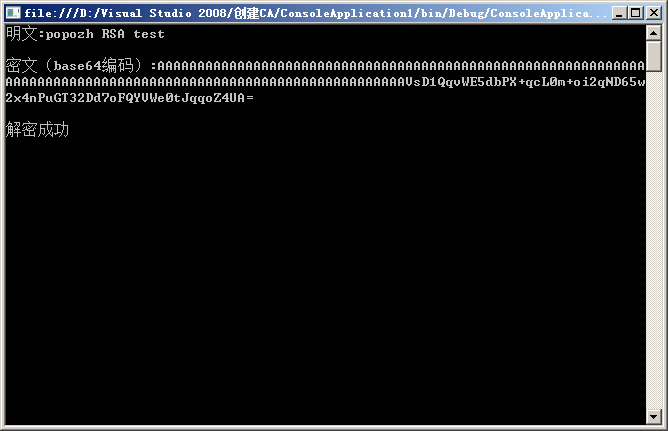
BC的API源代码中,以上的代码测试思路来自:csharp/crypto/test/src/crypto/test/RsaTest.cs,可以定位到该CS文件参考官方提供的测试和代码
下篇思路:生成自签的CA根证书、生成用户的证书
密钥对的保存:http://blog.csdn.net/popozhu/archive/2010/08/10/5802656.aspx
用Bouncy Castle的C#版API产生公钥和私钥的更多相关文章
- 在C#中保存Bouncy Castle生成的密钥对
在用Bouncy Castle的C#版API产生公钥和私钥 中产生了一对密钥对,可以用bouncy caslte提供的API进行保存 公钥方面的3个类,具体代码根据命名空间自行查看其源代码: Org. ...
- Bouncy Castle Crypto API c# port
Bouncy Castle 是一种用于 Java 平台的开放源码的轻量级密码术包.它支持大量的密码术算法,并提供 JCE 1.2.1 的实现.现在有了C#的版本.下面是网站上的介绍 This port ...
- Arcgis API For IOS扩展AGSDynamicLayer新旧版API对比
AGSDynamicLayer(ForSubclassEyesOnly) Category Reference Description This category organizes the meth ...
- 加密 bouncy castle
1.去官方站点下载Bouncy Castle的JCE Provider包 bcprov-ext-jdk15-145.jar 2.把jar文件复制到 $JAVA_HOME$\jre\lib\ext 目录 ...
- bouncy castle的配置
Bouncy Castle 是一种用于 Java 平台的开放源码的轻量级密码术包.它支持大量的密码术算法,并提供 JCE 1.2.1 的实现.因为 Bouncy Castle 被设计成轻量级的,所以从 ...
- 高德地图车机版API演示程序
高德地图车机版API演示程序 做车载的应该和这个程序打交道打的比较多吧,这里是我今天写的一个实现了他的API的一个演示程序 首先我们来看下他的官网. http://lbs.amap.com/api/a ...
- 基于.Net平台C#的微信网页版API
git上有很多类似的项目,但大多都是python和js的,为了便于.Net windows平台的使用,我重构了一个.Net版本的,已整理开源 https://github.com/leestar54/ ...
- 【Java密码学】使用Bouncy Castle生成数字签名、数字信封
Bouncy Castle(轻量级密码术包)是一种用于 Java 平台的开放源码的轻量级密码术包,它支持大量的密码术算法,并提供 JCE 1.2.1 的实现.最近项目上正好用到了Bouncy Cast ...
- 将html版API文档转换成chm格式的API文档
文章完全转载自: https://blog.csdn.net/u012557538/article/details/42089277 将html版API文档转换成chm格式的API文档并不是一件难事, ...
随机推荐
- CentOS下安装keepalived 进行服务器热备
一.准备: 1.1 安装依赖软件 如果系统为基本文本安装,需要安装一下软件 yum -y install ipvsadm yum -y install kernel kernel-devel reb ...
- c 深度剖析 6
函数的编码风格 1.注释 2,空行 3,缩进 4,参数长度,代码长度,语句长度要合适. 5,少用全局变量 6,指针仅作输入参数时,可用const 设置其为只读属性,避免其在函数中被修改. 7,函数默认 ...
- 关于HTML的Element
今天搞HTML的时候,发现了一些操作element的方法.先引用一篇. 1.document.getElementById(id); 2.document.getElementByTagName(t ...
- html部分---样式属性;
<!--大小--> width:宽度 height:高度 <!--背景与前景--> "background-color:#0F0; 背景颜色 background-i ...
- HDU-5536 Chip Factory (字典树)
题目大意:给n个数,编号为1~n,取三个编号不同的数,使表达式(a+b)^c的值最大. 题目分析:将这n个数按二进制位建立一棵trie.枚举i.j的和,查询亦或最大值,但在查询之前要把i.j在trie ...
- (转)A Beginner's Guide To Understanding Convolutional Neural Networks Part 2
Adit Deshpande CS Undergrad at UCLA ('19) Blog About A Beginner's Guide To Understanding Convolution ...
- JSBinding + SharpKit / 实战:转换 Survival Shooter
从 asset store 下载 Survival Shooter (商店里有2个版本,一种是给Unity5用的,一个是给Unity4.6用的,我们这个实验用的是后者,版本是2.2.如果) 1 删除多 ...
- C#绘图双缓冲
C#绘图双缓冲 C#双缓冲解释: 简单说就是当我们在进行画图操作时,系统并不是直接把内容呈现到屏幕上,而是先在内存中保存,然后一次性把结果输出来,如果没用双缓冲的话,你会发现在画图过程中屏幕会闪的很厉 ...
- phpstorm编辑器智能提示框架代码
按照上面的步骤就可以智能提示代码了!
- audition输出参数设置