
.Net MVC 网站中配置文件的读写
网站中有很多需要设置的内容,像网站信息,注册设置,上传设置等。如果保存在数据库中需要单独建张表,表中只有一条记录,这样会让数据库很臃肿,而且频繁存取数据库的效率也是个问题。而保存在config文件里是个不错选择,而且带有缓存功能!
我们可以在web.config的配置节写入配置。
<configuration>

  <configSections>

    <section name="entityFramework" type="System.Data.Entity.Internal.ConfigFile.EntityFrameworkSection, EntityFramework, Version=6.0.0.0, Culture=neutral, PublicKeyToken=b77a5c561934e089" requirePermission="false" />

      <!--这里可以定义配置节 -->

  <!-- For more information on Entity Framework configuration, visit http://go.microsoft.com/fwlink/?LinkID=237468 -->

  </configSections>
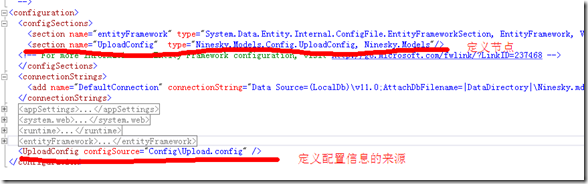
但是把大量的配置都写入这里也会造成web.config的臃肿,可以采用把配置节定义在这里,把具体配置信息保存在其他文件中。
以上传配置信息为例,看一下理想的结构
Config\Upload.config的内容
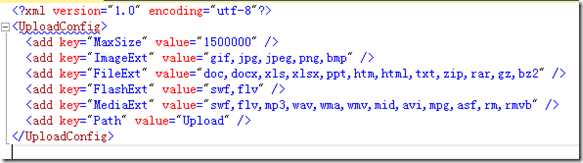
1、配置的元素。采用<add />的形式,是一个键和值得表示形式。<add key="MaxSize" value="1500000" />。
2、元素的集合,里面定义一系列的元素。<UploadConfig>……</UploadConfig>
3、自定义节,表示自定义的一个节点。<section name="UploadConfig" type="Ninesky.Models.Config.UploadConfig, Ninesky.Models"/>
name:节点名,type:处理节点的类行,逗号前是类名,逗号后是缩在程序集。
我们要创建这个类来管理配置
一、创建键,值元素类。
里面只有两个读写属性key和value,内容非常简单
using System.Configuration;

namespace Ninesky.Models.Config

{

    /// <summary>

    /// 键值元素类

    /// <remarks>

    /// 创建:2014.03.09

    /// </remarks>

    /// </summary>

    public class KeyValueElement:ConfigurationElement

    {

        /// <summary>

        /// 键

        /// </summary>

        [ConfigurationProperty("key",IsRequired=true)]

        public string Key {

            get { return this["key"].ToString(); }

            set { this["key"] = value; }

        }

        /// <summary>

        /// 值

        /// </summary>

        [ConfigurationProperty("value")]

        public string Value

        {

            get { return this["value"].ToString(); }

            set { this["value"] = value; }

        }

    }

}
二、创建元素集合类。内容很简单都进行了注释
using System;

using System.Configuration;

namespace Ninesky.Models.Config

{

    /// <summary>

    /// 元素集合类

    /// <remarks>

    /// 创建:2014.03.09

    /// </remarks>

    /// </summary>

    [ConfigurationCollection(typeof(KeyValueElement))]

    public class KeyValueElementCollection:ConfigurationElementCollection

    {

        //忽略大小写

        public KeyValueElementCollection() : base(StringComparer.OrdinalIgnoreCase) { }

        /// <summary>

        /// 集合中指定键的元素

        /// </summary>

        /// <param name="name"></param>

        /// <returns></returns>

        new public KeyValueElement this[string name]

        {

            get { return (KeyValueElement)base.BaseGet(name); }

            set

            {

                if (base.Properties.Contains(name)) base[name] = value;

                else base.BaseAdd(value);

            }

        }

        /// <summary>

        /// 创建新元素.

        /// 必须重写

        /// </summary>

        /// <returns></returns>

        protected override ConfigurationElement CreateNewElement()

        {

            return new KeyValueElement();

        }

        /// <summary>

        /// 获取元素的键

        /// </summary>

        /// <param name="element"></param>

        /// <returns></returns>

        protected override object GetElementKey(ConfigurationElement element)

        {

            return ((KeyValueElement)element).Key;

        }

    }

}
三、配置节类。
类中定义私有属性KeyValues。进行读写配置节集合,然后定义一系列的需要的配置属性,操作就是对KeyValues的元素读写。
using System.Configuration;

namespace Ninesky.Models.Config

{

    /// <summary>

    /// 上传设置配置节

    /// <remarks>

    /// 创建:2014.03.09

    /// </remarks>

    /// </summary>

    public class UploadConfig:ConfigurationSection

    {

        private static ConfigurationProperty _property = new ConfigurationProperty(string.Empty, typeof(KeyValueElementCollection), null, ConfigurationPropertyOptions.IsDefaultCollection);

        /// <summary>

        /// 配置列表

        /// </summary>

        [ConfigurationProperty("", Options = ConfigurationPropertyOptions.IsDefaultCollection)]

        private KeyValueElementCollection KeyValues

        {

            get { return (KeyValueElementCollection)base[_property]; }

            set { base[_property] = value; }

        }

        /// <summary>

        /// 最大大小

        /// </summary>

        public int MaxSize

        {

            get

            {

                int _value =;

                if (KeyValues["MaxSize"] != null) int.TryParse(KeyValues["MaxSize"].Value, out _value);

                return _value;

            }

            set

            {

                if (KeyValues["MaxSize"] == null) KeyValues["MaxSize"] = new KeyValueElement() { Key = "MaxSize", Value = value.ToString() };

                else KeyValues["MaxSize"].Value = value.ToString();

            }

        }

        /// <summary>

        /// 上传目录

        /// 为应用程序目录起的文件夹名,前面不带~/

        /// </summary>

        public string Path

        {

            get

            {

                if (KeyValues["Path"] == null) return "Upload";

                return KeyValues["Path"].Value;

            }

            set

            {

                if (KeyValues["Path"] == null) KeyValues["Path"] = new KeyValueElement() { Key = "Path", Value = value };

                else KeyValues["Path"].Value = value;

            }

        }

        /// <summary>

        /// 允许上传的图片类型文件扩展,多个用“,”隔开

        /// </summary>

        public string ImageExt

        {

            get

            {

                if (KeyValues["ImageExt"] == null) return string.Empty;

                return KeyValues["ImageExt"].Value;

            }

            set

            {

                if (KeyValues["ImageExt"] == null) KeyValues["ImageExt"] = new KeyValueElement() { Key = "ImageExt", Value = value };

                else KeyValues["ImageExt"].Value = value;

            }

        }

        /// <summary>

        /// 允许上传的Flash类型文件扩展,多个用“,”隔开

        /// </summary>

        public string FlashExt

        {

            get

            {

                if (KeyValues["FlashExt"] == null) return string.Empty;

                return KeyValues["FlashExt"].Value;

            }

            set

            {

                if (KeyValues["FlashExt"] == null) KeyValues["FlashExt"] = new KeyValueElement() { Key = "FlashExt", Value = value };

                else KeyValues["FlashExt"].Value = value;

            }

        }

        /// <summary>

        /// 允许上传的媒体类型文件扩展,多个用“,”隔开

        /// </summary>

        public string MediaExt

        {

            get

            {

                if (KeyValues["MediaExt"] == null) return string.Empty;

                return KeyValues["MediaExt"].Value;

            }

            set

            {

                if (KeyValues["MediaExt"] == null) KeyValues["MediaExt"] = new KeyValueElement() { Key = "MediaExt", Value = value };

                else KeyValues["MediaExt"].Value = value;

            }

        }

        /// <summary>

        /// 允许上传的文件类型文件扩展,多个用“,”隔开

        /// </summary>

        public string FileExt

        {

            get

            {

                if (KeyValues["FileExt"] == null) return string.Empty;

                return KeyValues["FileExt"].Value;

            }

            set

            {

                if (KeyValues["FileExt"] == null) KeyValues["FileExt"] = new KeyValueElement() { Key = "FileExt", Value = value };

                else KeyValues["FileExt"].Value = value;

            }

        }

    }

}
四、读取配置。
也是最关系的,配置信息怎么读出来。在上面类写好后读取非常容易了,只需用WebConfigurationManager.OpenWebConfiguration("~"). GetSection()获取配置节的实例,局可以使用属性值了
var _uploadConfig = System.Web.Configuration.WebConfigurationManager.OpenWebConfiguration("~").GetSection("UploadConfig") as Ninesky.Models.Config.UploadConfig;

            //文件最大限制

            int _maxSize = _uploadConfig.MaxSize;

            //文件路径

            string _fileParth =  _uploadConfig.Path ;

            string _dirName;

            //允许上传的类型

            Hashtable extTable = new Hashtable();

            extTable.Add("image", _uploadConfig.ImageExt);

            extTable.Add("flash", _uploadConfig.FileExt);

            extTable.Add("media", _uploadConfig.MediaExt);

            extTable.Add("file", _uploadConfig.FileExt);
五、写入配置
跟读取类似,把属性值设置后save()一下,内容就会保存到Config\Upload.config中。
代码如下:
var _uploadConfig = System.Web.Configuration.WebConfigurationManager.OpenWebConfiguration("~").GetSection("UploadConfig") as Ninesky.Models.Config.UploadConfig;

            //文件最大限制

            int _maxSize = _uploadConfig.MaxSize;

            _uploadConfig.FileExt = "doc,docx,xls,xlsx,ppt,htm,html,txt,zip,rar,gz,bz2";

            _uploadConfig.FlashExt = "swf,flv";

            _uploadConfig.ImageExt = "gif,jpg,jpeg,png,bmp";

            _uploadConfig.MediaExt = "swf,flv,mp3,wav,wma,wmv,mid,avi,mpg,asf,rm,rmvb";

            _uploadConfig.Path = "Upload";

            _uploadConfig.CurrentConfiguration.Save();
.Net MVC 网站中配置文件的读写的更多相关文章
- 针对Linux ASP.NET MVC网站中 httpHandlers配置无效的解决方案
近期有Linux ASP.NET用户反映,在MVC网站的Web.config中添加 httpHandlers 配置用于处理自定义类型,但是在运行中并没有产生预期的效果,服务器返回了404(找不到网页) ...
- 关于linux asp.net MVC网站中 httpHandlers配置无效的处理方法
近期有Jexus用户反映,在Linux ASP.NET MVC网站的Web.config中添加 httpHandlers 配置用于处理自定义类型,但是在运行中并没有产生预期的效果,服务器返回了404( ...
- 网站的配置文件XML读写
网站的配置信息一般都写入到XML中,以下是简单的对xml的读写操作,仅供参考. 读操作: XmlDocument xmlDoc = new XmlDocument(); XmlReaderSettin ...
- [译]MVC网站教程(四):MVC4网站中集成jqGrid表格插件(系列完结)
目录 1. 介绍 2. 软件环境 3. 在运行示例代码之前(源代码 + 示例登陆帐号) 4. jqGrid和AJAX 5. GridSettings 6. ...
- [译]MVC网站教程(三):动态布局和站点管理
目录 1. 介绍 2. 软件环境 3. 在运行示例代码之前(源代码 + 示例登陆帐号) 4. 自定义操作结果和控制器扩展 1) OpenFileResult 2) ImageR ...
- [译]MVC网站教程(二):异常管理
介绍 “MVC网站教程”系列的目的是教你如何使用 ASP.NET MVC 创建一个基本的.可扩展的网站. 1) MVC网站教程(一):多语言网站框架 2) MVC网站教程(二):异常管理 3) ...
- MVC设计模式在网站中的应用
MVC设计模式在网站中的应用 以淘宝的购物车为例 一.结合六个基本质量属性 可修改性 采用MVC设计模式的时候,可以将视图.模型.控制器分析,将用户动作.数据表示.应用数据分离开来,如果用户需要以不同 ...
- [译]MVC网站教程(一):多语言网站框架
本文简介 本博文介绍了 Visual Studio 工具生成的 ASP.NET MVC3 站点的基本框架:怎样实现网站的语言的国际化与本地化功能,从零开始实现用户身份认证机制,从零开始实现用户注册机制 ...
- 使用jenkins配置.net mvc网站进行持续集成二
上一篇使用jenkins配置.net mvc网站进行持续集成一只是简单介绍了jenkins构建站点到本地服务器,这一篇,就来讲解如何部署站点到指定的服务器上面. 1.IIS远程发布配置 1.在服务器管 ...
随机推荐
- Tomcat一个BUG造成CLOSE_WAIT
之前应该提过,我们线上架构整体重新架设了,应用层面使用的是Spring Boot,前段日子因为一些第三方的原因,略有些匆忙的提前开始线上的内测了.然后运维发现了个问题,服务器的HTTPS端口有大量的C ...
- 配置android sdk 环境
1:下载adnroid sdk安装包 官方下载地址无法打开,没有vpn,使用下面这个地址下载,地址:http://www.android-studio.org/
- Shell特殊变量
$ 表示当前Shell进程的ID,即pid $echo $$ 运行结果 特殊变量列表 变量 含义 $0 当前脚本的文件名 $n 传递给脚本或函数的参数.n 是一个数字,表示第几个参数.例如,第一个参数 ...
- 从0开始搭建SQL Server AlwaysOn 第一篇(配置域控)
从0开始搭建SQL Server AlwaysOn 第一篇(配置域控) 第一篇http://www.cnblogs.com/lyhabc/p/4678330.html第二篇http://www.cnb ...
- H5单页面手势滑屏切换原理
H5单页面手势滑屏切换是采用HTML5 触摸事件(Touch) 和 CSS3动画(Transform,Transition)来实现的,效果图如下所示,本文简单说一下其实现原理和主要思路. 1.实现原理 ...
- 你知道C#中的Lambda表达式的演化过程吗?
那得从很久很久以前说起了,记得那个时候... 懵懂的记得从前有个叫委托的东西是那么的高深难懂. 委托的使用 例一: 什么是委托? 个人理解:用来传递方法的类型.(用来传递数字的类型有int.float ...
- 多线程的通信和同步(Java并发编程的艺术--笔记)
1. 线程间的通信机制 线程之间通信机制有两种: 共享内存.消息传递. 2. Java并发 Java的并发采用的是共享内存模型,Java线程之间的通信总是隐式执行,通信的过程对于程序员来说是完全透 ...
- css3中perspective
perspective 属性定义 3D 元素距视图的距离,以像素计.该属性允许改变 3D 元素查看 3D 元素的视图.当为元素定义 perspective 属性时,其子元素会获得透视效果,而不是元素本 ...
- 深入理解MySql子查询IN的执行和优化
IN为什么慢? 在应用程序中使用子查询后,SQL语句的查询性能变得非常糟糕.例如: SELECT driver_id FROM driver where driver_id in (SELECT dr ...
- 读python源码--对象模型
学python的人都知道,python中一切皆是对象,如class生成的对象是对象,class本身也是对象,int是对象,str是对象,dict是对象....所以,我很好奇,python是怎样实现这些 ...