
tcpdump后台不间断抓包
版本1的抓包命令
这两天排查一个小问题,需要在服务器上使用tcpdump24小时不间断抓包,这里简单记录下。
先看下tcpdump的语法:
tcpdump [ -AbdDefhHIJKlLnNOpqStuUvxX# ] [ -B buffer_size ]

               [ -c count ]

               [ -C file_size ] [ -G rotate_seconds ] [ -F file ]

               [ -i interface ] [ -j tstamp_type ] [ -m module ] [ -M secret ]

               [ --number ] [ -Q|-P in|out|inout ]

               [ -r file ] [ -V file ] [ -s snaplen ] [ -T type ] [ -w file ]

               [ -W filecount ]

               [ -E spi@ipaddr algo:secret,...  ]

               [ -y datalinktype ] [ -z postrotate-command ] [ -Z user ]

               [ --time-stamp-precision=tstamp_precision ]

               [ --immediate-mode ] [ --version ]

               [ expression ]
一开始使用的命令基本长下面这样:
nohup tcpdump -i ens192 tcp port 5432 -C 1 -w /root/pg5432.pcap &
这个语句的前后分别是nohup 和 &, 这个是为了断开ssh后也能在后台运行,剩下部分才是主体:
tcpdump -i ens192 tcp port 5432 -C 1 -w /root/pg5432.pcap
-i ens192,指定网卡
tcp port 5432,指定捕获表达式
-C 1,表示当捕获文件的大小超过1M时,就新打开一个文件,我昨天是为了测试,就弄的1M。
-C file_size
Before writing a raw packet to a savefile, check whether the file is currently larger
than file_size and, if so, close the current savefile and open a new one. Savefiles after the first savefile will have the name specified with the -w flag, with a number after it, starting at 1 and continuing upward. The units of file_size are millions of bytes (1,000,000 bytes, not1,048,576 bytes).-w /root/pg5432.pcap,将抓的包存到该路径指定的文件。
这个选项有一点,就是捕获的内容会被缓存,不会马上写入文件,除非指定-U选项。
This output will be buffered if written to a file or pipe, so a program reading from the file or pipe may not see packets for an arbitrary amount of time after they are received.
Use the -U flag to cause packets to be written as soon as they are received.
结果执行这个语句,报错:
tcpdump: /root/pg5432.pcap: Permission denied
我都有点懵,我是尊贵的root,还能没权限吗?
后面再想,是不是变成用tcpdump用户执行了,检查了下这个用户的权限,看着没问题,后面还是在网上找到了答案:
https://serverfault.com/questions/478636/tcpdump-out-pcap-permission-denied
意思就是说,加了-C选项后,会放弃自己root的身份,这段英文有点拗口,自己看吧:
Note that when used with -Z option (enabled by default), privileges are dropped before opening first savefile
不过吧,这句提示,在centos 7上安装的tcpdump版本中,甚至没出现,看来文档还是有点问题。
解决的办法,就是加上-Z选项,我这边就是-Z root。
-Z user
--relinquish-privileges=user
If tcpdump is running as root, after opening the capture device or input savefile, but before opening any savefiles for output,change the user ID to user and the group ID to the primary group of user.This behavior can also be enabled by default at compile time.
版本二的抓包命令
nohup tcpdump -i ens192 tcp port 5432 -C 1 -Z root -w /root/pg5432.pcap &
这个命令就可以用了。
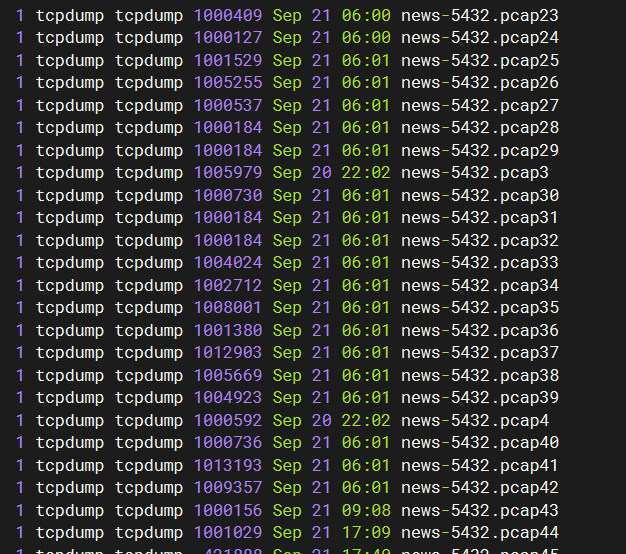
抓包效果如下:
扩展选项
当然,可以看到抓到的包很多,如果流量大,可能担心磁盘会炸,此时,可以再加上 -W 选项来限制最多生成多少个文件,如-W 100,最多生成100个,超过100后,就会覆盖最早的文件。
-W
Used in conjunction with the -C option, this will limit the number of files created to the specified number, and begin over‐writing files from the beginning, thus creating a 'rotating' buffer. In addition, it will name the files with enough leading 0s to support the maximum number of files, allowing them to sort correctly.Used in conjunction with the -G option, this will limit the number of rotated dump files that get created, exiting with status 0 when reaching the limit. If used with -C as well, the behavior will result in cyclical files per timeslice.
除了达到一定大小就新建文件,也可以每隔n秒新建文件:
-G rotate_seconds
If specified, rotates the dump file specified with the -w option every rotate_seconds seconds. Savefiles will have the namespecified by -w which should include a time format as defined by strftime(3). If no time format is specified, each new file
will overwrite the previous.If used in conjunction with the -C option, filenames will take the form of `file'.
在麒麟操作系统如何安装tcpdump
银河麒麟V10
我这次查问题是要在两端同时抓包,一端是centos,另一端结果发现是信创操作系统,麒麟V10。
首先说下,怎么辨别是中标麒麟,还是银河麒麟。
[root@xc-website-db-dev ~]# cat /etc/os-release

NAME="Kylin Linux Advanced Server"

VERSION="V10 (Tercel)"

ID="kylin"

VERSION_ID="V10"

PRETTY_NAME="Kylin Linux Advanced Server V10 (Tercel)"

ANSI_COLOR="0;31"
如果是V10,就是银河麒麟;如果是V7,是中标麒麟。
参考:https://www.cnblogs.com/shuiche/p/16334092.html
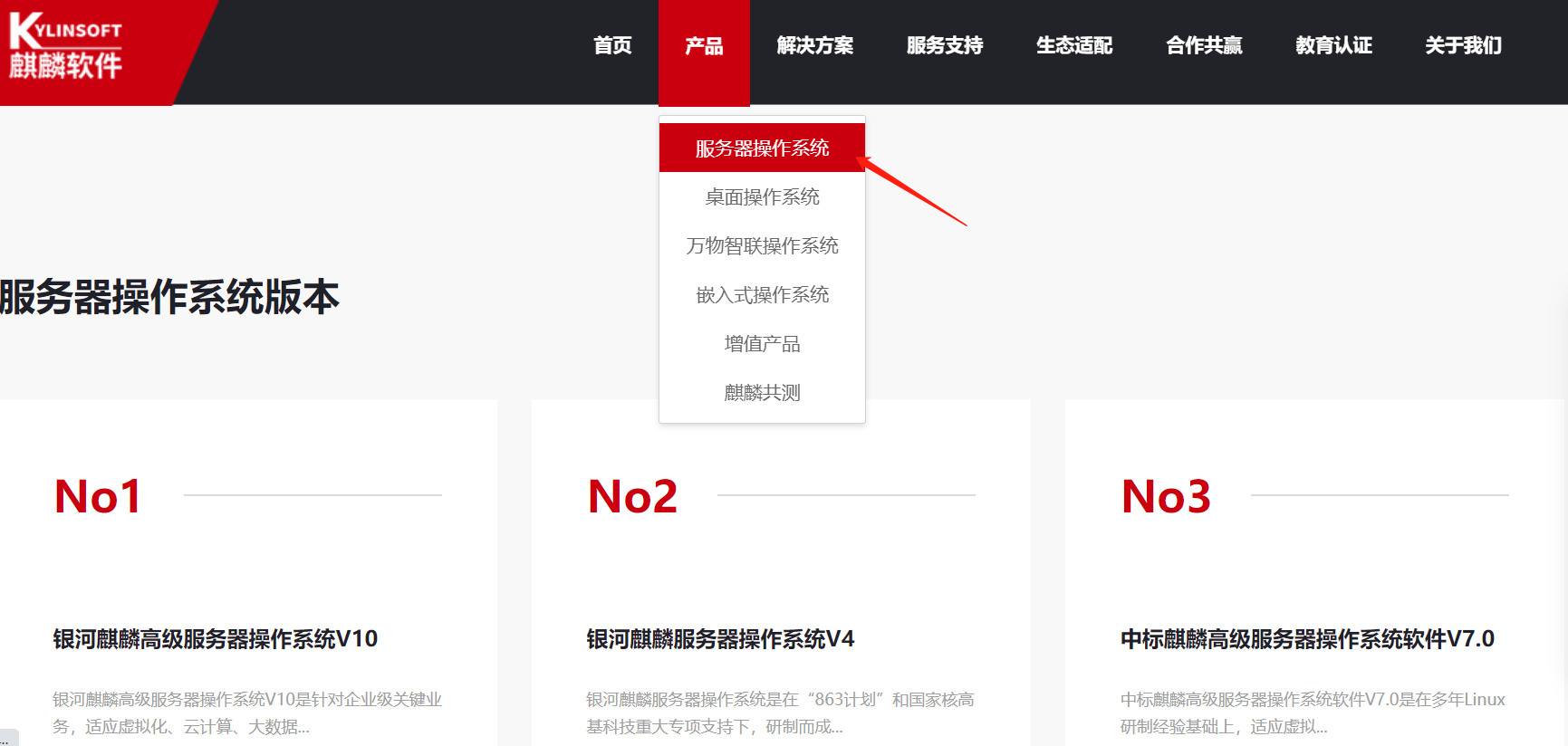
我这边也看了下麒麟的官网,服务器端,主要就是这几个版本:
官方文档在这里:
https://www.kylinos.cn/support/document/60.html
银河麒麟高级服务器操作系统 V10系统管理员手册V3.0-20221024.pdf
配置yum源
我看了下上面的文档,已经使用dnf源了,但我们这个系统,不知道谁装的,也还是搞了yum。
但是yum是个本地源,不知道为啥还用不了,配外部yum源吧,内网机器还不能上外网,另外,麒麟的官方的yum源也不知道在哪里,服了,另外,我怀疑是不是必须得用他们的光盘来搞本地源啊。。
我在这台机器上发现个备份的麒麟repo,就记录在这里吧:
###Kylin Linux Advanced Server 10 - os repo###

[ks10-adv-os]

name = Kylin Linux Advanced Server 10 - Os

baseurl = http://update.cs2c.com.cn:8080/NS/V10/V10SP1.1/os/adv/lic/base/$basearch/

gpgcheck = 1

gpgkey=file:///etc/pki/rpm-gpg/RPM-GPG-KEY-kylin

enabled = 1

[ks10-adv-updates]

name = Kylin Linux Advanced Server 10 - Updates

baseurl = http://update.cs2c.com.cn:8080/NS/V10/V10SP1.1/os/adv/lic/updates/$basearch/

gpgcheck = 1

gpgkey=file:///etc/pki/rpm-gpg/RPM-GPG-KEY-kylin

enabled = 1

[ks10-adv-addons]

name = Kylin Linux Advanced Server 10 - Addons

baseurl = http://update.cs2c.com.cn:8080/NS/V10/V10SP1.1/os/adv/lic/addons/$basearch/

gpgcheck = 1

gpgkey=file:///etc/pki/rpm-gpg/RPM-GPG-KEY-kylin

enabled = 0
我想装个tcpdump也很不容易。
这块大家自己百度搜一下吧,我后面是直接rpm安装的:(仅针对x86架构)
https://update.cs2c.com.cn/KY/V10/8U2/os/adv/lic/BaseOS/x86_64/Packages/
里面有tcpdump-4.9.2-6.el8.x86_64.rpm,下载下来rpm -ivh 安装即可。
参考文件
https://www.cnblogs.com/cnhk19/p/16273102.html
https://serverfault.com/questions/478636/tcpdump-out-pcap-permission-denied
https://blog.csdn.net/Xeon_CC/article/details/132142880 (给银河麒麟v10添加yum源)
tcpdump后台不间断抓包的更多相关文章
- [na]tcpdump非常实用的抓包实例
基本语法篇 常用应用: 过滤物理口 过滤某个port/ip/mac 过滤协议 显示ip/mac/port不解析等 过滤mac tcpdump -i eth0 ether host 24:DF:6A:F ...
- tcpdump安装配置及抓包分析
http://blog.csdn.net/e421083458/article/details/23963189 cpdump安装配置及抓包分析 预装软件:[plain] view plain cop ...
- 【跟唐老师学习云网络】 - 第7篇 Tcpdump大杀器抓包
[摘要] 前面章节的网络协议栈相关的信息建议大家多学习一遍,因为这些都是最基础的东西,想玩好云网络必备基本功.. 一.上帝视角 之前提到过定位问题可以开启上帝视角,那么如何开启就要依靠tcpdump这 ...
- Tcpdump非常实用的抓包12实例
1.过滤主机---------------------------------------------------------------- - 抓取所有经过 eth1,目的或源地址是 192.168 ...
- tcpdump非常实用的抓包实例
详细的文档见tcpdump高级过滤技巧 基本语法 ========过滤主机--------- 抓取所有经过 eth1,目的或源地址是 192.168.1.1 的网络数据# tcpdump -i eth ...
- 如何利用tcpdump对mysql进行抓包操作
命令如下: tcpdump -s -l -w - dst -i eno16777736 |strings 其中-i指定监听的网络接口,在RHEL 7下,网络接口名不再是之前的eth0,而是 eno16 ...
- 【转】详解使用tcpdump、wireshark对Android应用程序进行抓包并分析
原文网址:http://blog.csdn.net/gebitan505/article/details/19044857 本文主要介绍如何使用tcpdump和wireshark对Android应用程 ...
- Wireshark和TcpDump抓包分析心得
Wireshark和 TcpDump抓包分析心得 1. Wireshark与tcpdump介绍 Wireshark是一个网络协议检测工具,支持Windows平台和Unix平台,我一般只在Window ...
- Android通过tcpdump抓包(wifi, 2g, 3g都可以)
http://blog.csdn.net/deng529828/article/details/20646197 1. 手机要有root权限 2. 下载tcpdump http://www.str ...
- Android 联网监控抓包工具的制作(tcpdump的使用)
最近做一个Android联网抓包的工具 自己在网上搜索了好久 发现还是没有头绪 于是考虑在linux层上下功夫 于是采用linux的tcpdump来实现了抓包的功能 用简单的话来定义tcpdump,就 ...
随机推荐
- K8S | 核心原理分析
目录 一.背景 二.持续集成 三.K8S架构 1.核心组件 2.分层结构 3.核心能力 3.1 发现与负载 3.2 调度 3.3 自动伸缩 四.应用案例 1.服务部署 2.交互流程 五.参考源码 整体 ...
- Win10安装cuda11.0+cudnn8.0(这是配套的)
首先你要知道你的电脑显卡能支持的cuda最大版本: 如下下图所示,支持最大版本为cuda11.0.228版本! 一.下载 Win10 64 位 下载cudnn8.0 链接:https://pan.ba ...
- Python 九九乘法表的多种实现方式
简介 九九乘法表是初学者学习编程的必要练手题目之一,因此各种语言都有对应的实现方式,而 Python 也不例外.在 Python 中,我们可以使用多种方式来生成一个简单的九九乘法表. 本文共介绍了七种 ...
- 【.NET深呼吸】用代码写WPF控件模板
这一次咱们来探究一下怎么用纯代码写 WPF 模板.模板有个共同基类 FrameworkTemplate,数据模板.控件模板等是从此类派生的,因此,该类已定义了一些通用成员. 用代码构建模板,重要的成员 ...
- C++容器(vector、deque、list、map)
(1) vector:将元素置于一个动态数组中,可以随机存储元素(也就是用索引直接存取). 数组尾部添加或删除元素非常迅速.但在中部或头部就比较费时. *代码演示:* 取: at在下标越界时会抛出异常 ...
- 文本识别分类系统python,基于深度学习的CNN卷积神经网络算法
一.介绍 文本分类系统,使用Python作为主要开发语言,通过TensorFlow搭建CNN卷积神经网络对十余种不同种类的文本数据集进行训练,最后得到一个h5格式的本地模型文件,然后采用Django开 ...
- .Net 472&6.0 Razor编译时的小差异
前言 几个月前在进行着.Net 472到6.0的升级,复用原有代码,在对Razor进行迁移中,发现原运行正常的代码,却存在报错,深入研究发现是Core下对Razor编译有一些变动. 问题复现 472 ...
- 1.3 Metasploit 生成SSL加密载荷
在本节中,我们将介绍如何通过使用Metasploit生成加密载荷,以隐藏网络特征.前一章节我们已经通过Metasploit生成了一段明文的ShellCode,但明文的网络传输存在安全隐患,因此本节将介 ...
- 国产化之x64平台安装银河麒麟操作系统
背景 某个项目需要实现基础软件全部国产化,其中操作系统指定银河麒麟v4,CPU使用飞腾处理器.飞腾处理器是ARMv8架构的,在之前的文章中介绍了使用QEMU模拟ARMv8架构安装银河麒麟操作系统的方式 ...
- 二分查找非递归Algorithm(java)
二分查找的适用条件 二分查找只适用于有序的数列中进行查找(比如数字和字母等),将数列排序后再进行查找 二分查找的运行时间为对数时间O(LONG2 N) 二分查找非递归的实现 /** * @param ...