
通用权限系统-Spring-Boot-Starter
Spring-Boot-Starter
自定义Starter
案例一:读取application.yml中的参数
1、创建
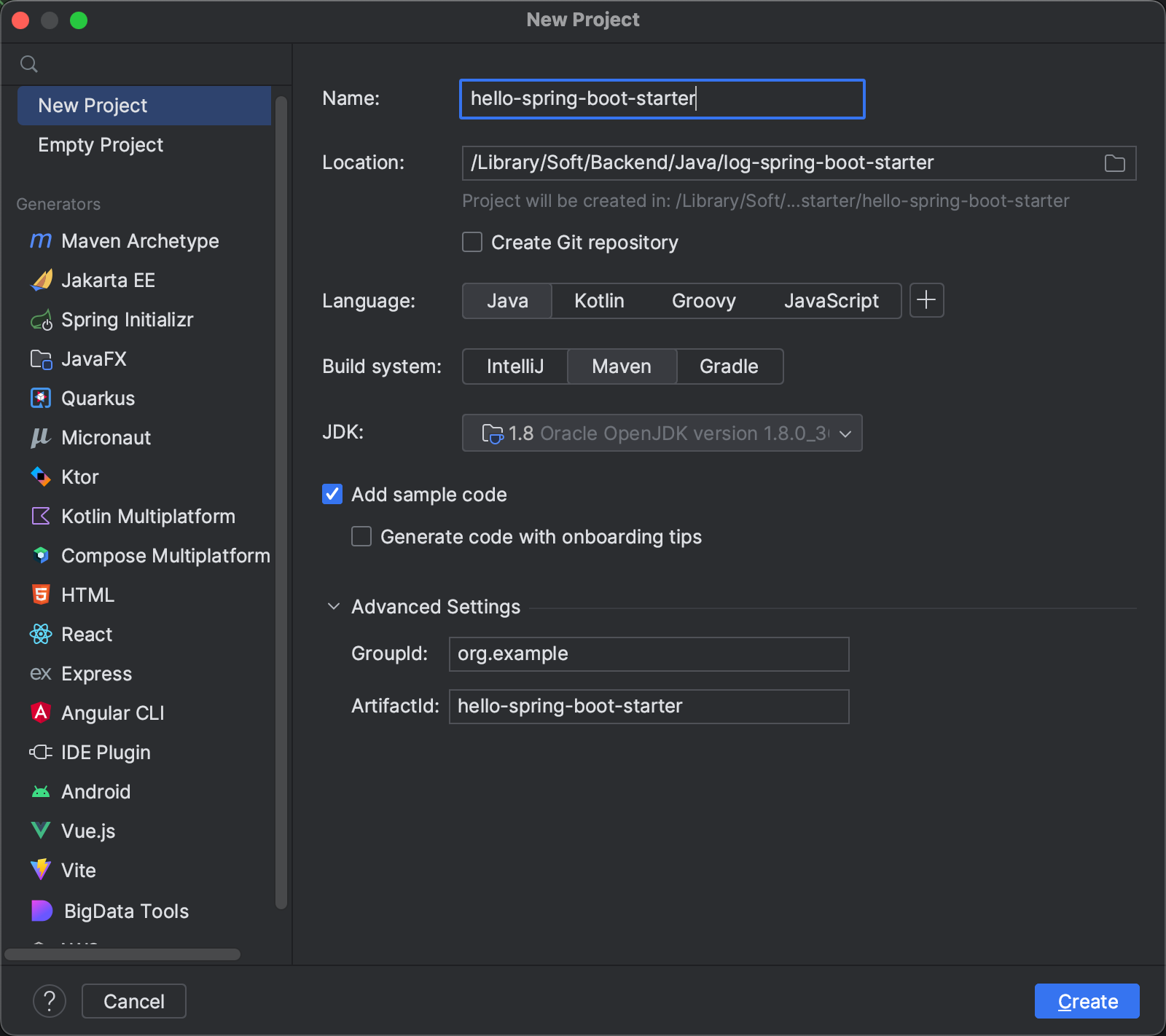
1、创建maven工程hello-spring-boot-starter
2、pom中添加依赖
<?xml version="1.0" encoding="UTF-8"?>

<project xmlns="http://maven.apache.org/POM/4.0.0"

         xmlns:xsi="http://www.w3.org/2001/XMLSchema-instance"

         xsi:schemaLocation="http://maven.apache.org/POM/4.0.0 http://maven.apache.org/xsd/maven-4.0.0.xsd">

    <modelVersion>4.0.0</modelVersion>

    <groupId>org.example</groupId>

    <artifactId>hello-spring-boot-starter</artifactId>

    <version>1.0-SNAPSHOT</version>

    <properties>

        <maven.compiler.source>8</maven.compiler.source>

        <maven.compiler.target>8</maven.compiler.target>

        <project.build.sourceEncoding>UTF-8</project.build.sourceEncoding>

    </properties>

    <parent>

        <groupId>org.springframework.boot</groupId>

        <artifactId>spring-boot-starter-parent</artifactId>

        <version>2.2.2.RELEASE</version>

        <relativePath/>

    </parent>

    <dependencies>

        <dependency>

            <groupId>org.springframework.boot</groupId>

            <artifactId>spring-boot-starter</artifactId>

        </dependency>

        <dependency>

            <groupId>org.springframework.boot</groupId>

            <artifactId>spring-boot-autoconfigure</artifactId>

        </dependency>

    </dependencies>

</project>
3、创建HelloProperties
配置属性类,用于封装配置文件中配置的参数信息
package org.example.config;

import org.springframework.boot.context.properties.ConfigurationProperties;

/**

 * TODO 配置属性类,用于封装配置文件中配置的参数信息

 *

 * @author ss_419

 * @version 1.0

 * @date 2023/7/8 13:55

 */

@ConfigurationProperties(prefix = "hello")

public class HelloProperties {

    private String name;

    private String address;

    public String getName() {

        return name;

    }

    public void setName(String name) {

        this.name = name;

    }

    public String getAddress() {

        return address;

    }

    public void setAddress(String address) {

        this.address = address;

    }

    @Override

    public String toString() {

        return "HelloProperties{" +

                "name='" + name + '\'' +

                ", address='" + address + '\'' +

                '}';

    }

}
4、创建HelloService
这个类用于对读取到的参数进行一些业务上的操作
package org.example.service;

/**

 * TODO

 *

 * @author ss_419

 * @version 1.0

 * @date 2023/7/8 14:03

 */

public class HelloService {

    private String name;

    private String address;

    public HelloService(String name, String address) {

        this.name = name;

        this.address = address;

    }

    public String sayHello(){

        return "你好!我的名字叫做"+name+",地址是" + address;

    }

}
5、创建HelloServiceAutoConfiguration(用于自动配置HelloService对象)
package org.example.config;

import org.example.service.HelloService;

import org.springframework.beans.factory.annotation.Autowired;

import org.springframework.boot.autoconfigure.condition.ConditionalOnMissingBean;

import org.springframework.boot.context.properties.EnableConfigurationProperties;

import org.springframework.context.annotation.Bean;

import org.springframework.context.annotation.Configuration;

/**

 * TODO 自动配置类

 * 通过@Configuration + @Bean 实现自动创建对象

 *

 * @author ss_419

 * @version 1.0

 * @date 2023/7/8 14:06

 */

@Configuration

// 一定要加上这个注解,否则Spring找不到这个配置类

@EnableConfigurationProperties(value = HelloProperties.class)

public class HelloServiceAutoConfiguration {

    private HelloProperties helloProperties;

    // 通过构造方法注入配置属性对象HelloProperties

    public HelloServiceAutoConfiguration(HelloProperties helloProperties) {

        this.helloProperties = helloProperties;

    }

    // 实例化HelloService并载入Spring IOC 容器

    @Bean

    @ConditionalOnMissingBean// Spring中没有这个实例的时候再去创建

    public HelloService helloService(){

        return new HelloService(helloProperties.getName(), helloProperties.getAddress());

    }

}
6、在resources目录下创建META-INF/spring.factories
org.springframework.boot.autoconfigure.EnableAutoConfiguration=\

org.example.config.HelloServiceAutoConfiguration
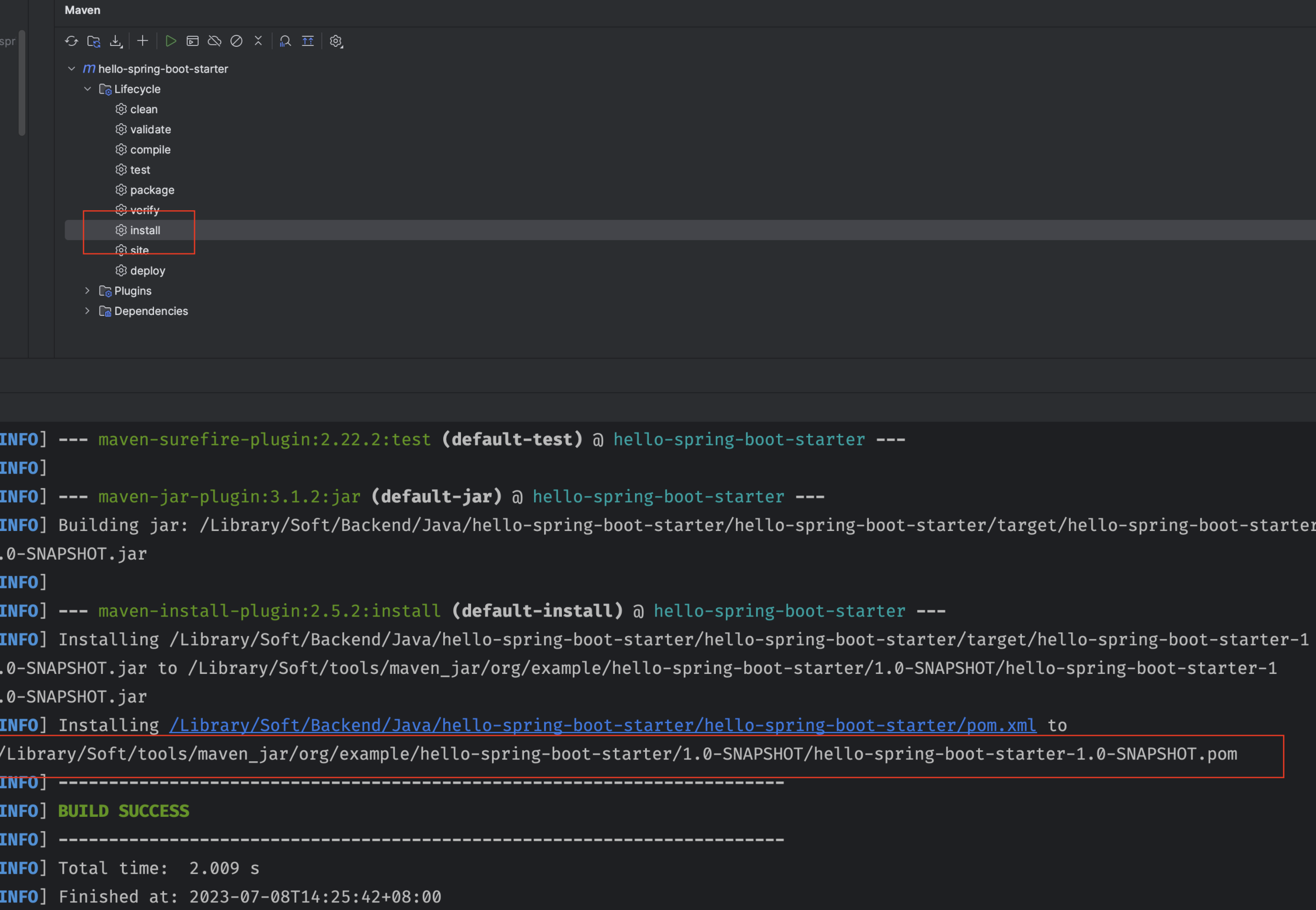
7、将工程打包到maven仓库中
2、使用
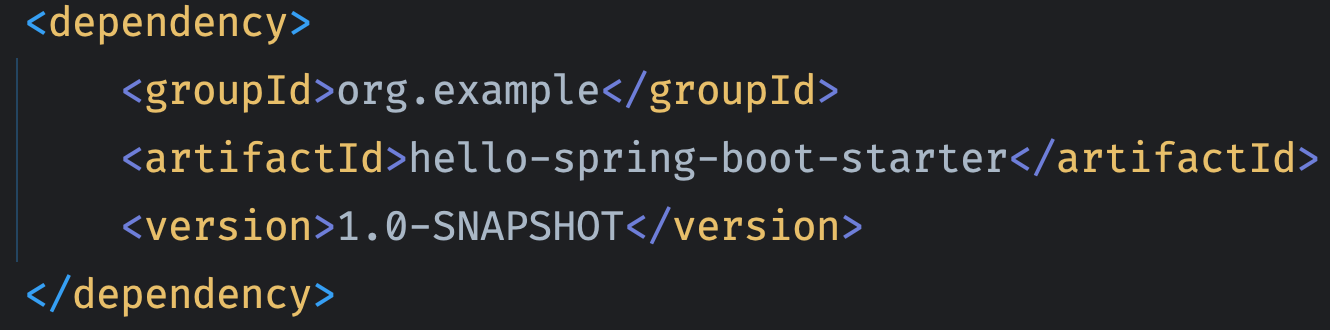
1、创建项目,导入自定义starter
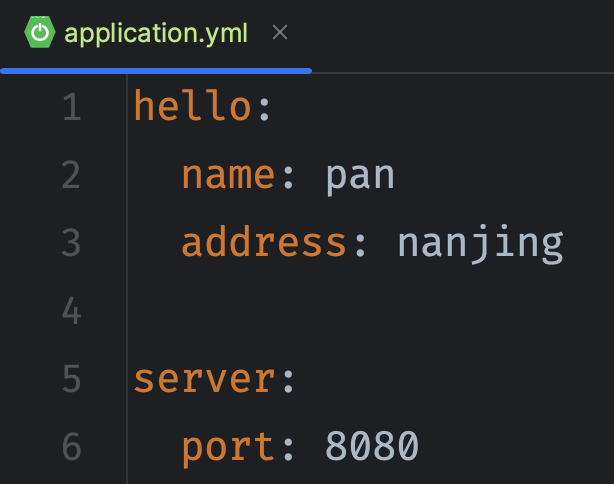
2、创建application.yml配置文件
3、创建启动类
package org.example;

import org.springframework.boot.SpringApplication;

import org.springframework.boot.autoconfigure.SpringBootApplication;

/**

 * TODO

 *

 * @author ss_419

 * @version 1.0

 * @date 2023/7/8 14:39

 */

@SpringBootApplication

public class HelloApplication {

    public static void main(String[] args) {

        SpringApplication.run(HelloApplication.class,args);

    }

}
4、创建测试Controller
package org.example.controller;

import org.example.annotaion.MyLog;

import org.example.service.HelloService;

import org.springframework.beans.factory.annotation.Autowired;

import org.springframework.web.bind.annotation.GetMapping;

import org.springframework.web.bind.annotation.RequestMapping;

import org.springframework.web.bind.annotation.RestController;

/**

 * TODO

 *

 * @author ss_419

 * @version 1.0

 * @date 2023/7/8 14:36

 */

@RestController

@RequestMapping("/hello")

public class HelloController {

    @Autowired

    private HelloService helloService;

    @GetMapping("/sayHello")

    public String sayHello() {

     return helloService.sayHello();

    }

}
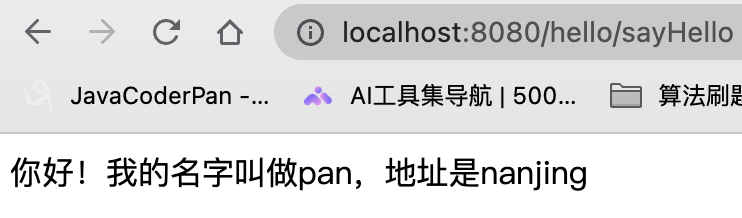
5、测试
案例二:通过自动配置来创建一个拦截器对象,通过此拦截器对象来实现记录日志功能
1、创建
1、创建maven项目并且引入依赖
<?xml version="1.0" encoding="UTF-8"?>

<project xmlns="http://maven.apache.org/POM/4.0.0"

         xmlns:xsi="http://www.w3.org/2001/XMLSchema-instance"

         xsi:schemaLocation="http://maven.apache.org/POM/4.0.0 http://maven.apache.org/xsd/maven-4.0.0.xsd">

    <modelVersion>4.0.0</modelVersion>

    <parent>

        <groupId>org.springframework.boot</groupId>

        <artifactId>spring-boot-starter-parent</artifactId>

        <version>2.2.2.RELEASE</version>

        <relativePath/>

    </parent>

    <groupId>org.example</groupId>

    <artifactId>log-spring-boot-starter</artifactId>

    <version>1.0-SNAPSHOT</version>

    <properties>

        <maven.compiler.source>8</maven.compiler.source>

        <maven.compiler.target>8</maven.compiler.target>

        <project.build.sourceEncoding>UTF-8</project.build.sourceEncoding>

    </properties>

    <dependencies>

        <dependency>

            <groupId>org.springframework.boot</groupId>

            <artifactId>spring-boot-starter</artifactId>

        </dependency>

        <dependency>

            <groupId>org.springframework.boot</groupId>

            <artifactId>spring-boot-autoconfigure</artifactId>

        </dependency>

        <dependency>

            <groupId>org.springframework.boot</groupId>

            <artifactId>spring-boot-starter-web</artifactId>

        </dependency>

    </dependencies>

</project>
2、创建MyLog注解
package org.example.annotaion;

import java.lang.annotation.ElementType;

import java.lang.annotation.Retention;

import java.lang.annotation.RetentionPolicy;

import java.lang.annotation.Target;

@Target(ElementType.METHOD)

@Retention(RetentionPolicy.RUNTIME)

public @interface MyLog {

    /**

     * 方法描述

     * @return

     */

    String desc() default "";

}
3、创建日志拦截器
package org.example.interceptor;

import org.example.annotaion.MyLog;

import org.springframework.web.method.HandlerMethod;

import org.springframework.web.servlet.ModelAndView;

import org.springframework.web.servlet.handler.HandlerInterceptorAdapter;

import javax.servlet.http.HttpServletRequest;

import javax.servlet.http.HttpServletResponse;

import java.lang.reflect.Method;

/**

 * TODO 自定义日志拦截器

 *

 * @author ss_419

 * @version 1.0

 * @date 2023/7/8 17:43

 */

public class MyLogInterceptor extends HandlerInterceptorAdapter {

    private static final ThreadLocal<Long> startTimeThreadLocal = new ThreadLocal<>();// 记录时间毫秒值

    /**

     * 执行之前

     * @param request

     * @param response

     * @param handler

     * @return

     * @throws Exception

     */

    @Override

    public boolean preHandle(HttpServletRequest request, HttpServletResponse response, Object handler) throws Exception {

        // 进行转换

        HandlerMethod handlerMethod = (HandlerMethod) handler;

        Method method = handlerMethod.getMethod();

        // 获取方法上的注解MyLog

        MyLog annotation = method.getAnnotation(MyLog.class);

        if(annotation != null){

            // 说明当前拦截到的方法上加入了MyLog注解

            long currentTimeMillis = System.currentTimeMillis();

            startTimeThreadLocal.set(currentTimeMillis);

        }

        return true;

    }

    /**

     * 执行之后

     * @param request

     * @param response

     * @param handler

     * @param modelAndView

     * @throws Exception

     */

    @Override

    public void postHandle(HttpServletRequest request, HttpServletResponse response, Object handler, ModelAndView modelAndView) throws Exception {

        HandlerMethod handlerMethod = (HandlerMethod) handler;

        Method method = handlerMethod.getMethod();

        // 获取方法上的注解MyLog

        MyLog annotation = method.getAnnotation(MyLog.class);

        if(annotation != null){

            // 说明当前拦截到的方法上加入了MyLog注解

            Long startTime = startTimeThreadLocal.get();

            long endTime = System.currentTimeMillis();

            long optTime =  endTime - startTime;

            String requestUri = request.getRequestURI();

            String methodName = method.getDeclaringClass().getName() + "."+

                                method.getName()+"()";

            String methodDesc = annotation.desc();

            System.out.println("请求uri:"+requestUri);

            System.out.println("请求方法名:"+methodName);

            System.out.println("方法描述:"+methodDesc);

            System.out.println("方法执行时间:"+optTime+"ms");

        }

        super.postHandle(request, response, handler, modelAndView);

    }

}
4、创建自动装配对象
package org.example.config;

import org.example.interceptor.MyLogInterceptor;

import org.springframework.context.annotation.Configuration;

import org.springframework.web.servlet.config.annotation.InterceptorRegistry;

import org.springframework.web.servlet.config.annotation.WebMvcConfigurer;

/**

 * TODO

 *

 * @author ss_419

 * @version 1.0

 * @date 2023/7/8 18:08

 */

@Configuration

public class MyLogAutoConfiguration implements WebMvcConfigurer {

    /**

     * 注册自定义日志拦截器

     * @param registry

     */

    @Override

    public void addInterceptors(InterceptorRegistry registry) {

        registry.addInterceptor(new MyLogInterceptor());

    }

}
5、在resources下创建META-INF,在该文件夹下创建spring.factories
该配置文件用于扫描自动装配类
org.springframework.boot.autoconfigure.EnableAutoConfiguration=\

org.example.config.MyLogAutoConfiguration
2、使用
1、创建一个web项目,并且引入依赖,pom.xml如下:
<?xml version="1.0" encoding="UTF-8"?>

<project xmlns="http://maven.apache.org/POM/4.0.0"

         xmlns:xsi="http://www.w3.org/2001/XMLSchema-instance"

         xsi:schemaLocation="http://maven.apache.org/POM/4.0.0 http://maven.apache.org/xsd/maven-4.0.0.xsd">

    <modelVersion>4.0.0</modelVersion>

    <groupId>org.example</groupId>

    <artifactId>use-my-spring-boot-starter-demo</artifactId>

    <version>1.0-SNAPSHOT</version>

    <parent>

        <groupId>org.springframework.boot</groupId>

        <artifactId>spring-boot-starter-parent</artifactId>

        <version>2.2.2.RELEASE</version>

        <relativePath/>

    </parent>

    <properties>

        <maven.compiler.source>8</maven.compiler.source>

        <maven.compiler.target>8</maven.compiler.target>

        <project.build.sourceEncoding>UTF-8</project.build.sourceEncoding>

    </properties>

    <dependencies>

        <dependency>

            <groupId>org.example</groupId>

            <artifactId>log-spring-boot-starter</artifactId>

            <version>1.0-SNAPSHOT</version>

        </dependency>

        <dependency>

            <groupId>org.springframework.boot</groupId>

            <artifactId>spring-boot-starter-web</artifactId>

        </dependency>

        <dependency>

            <groupId>org.example</groupId>

            <artifactId>hello-spring-boot-starter</artifactId>

            <version>1.0-SNAPSHOT</version>

        </dependency>

    </dependencies>

</project>
2、创建测试Controller
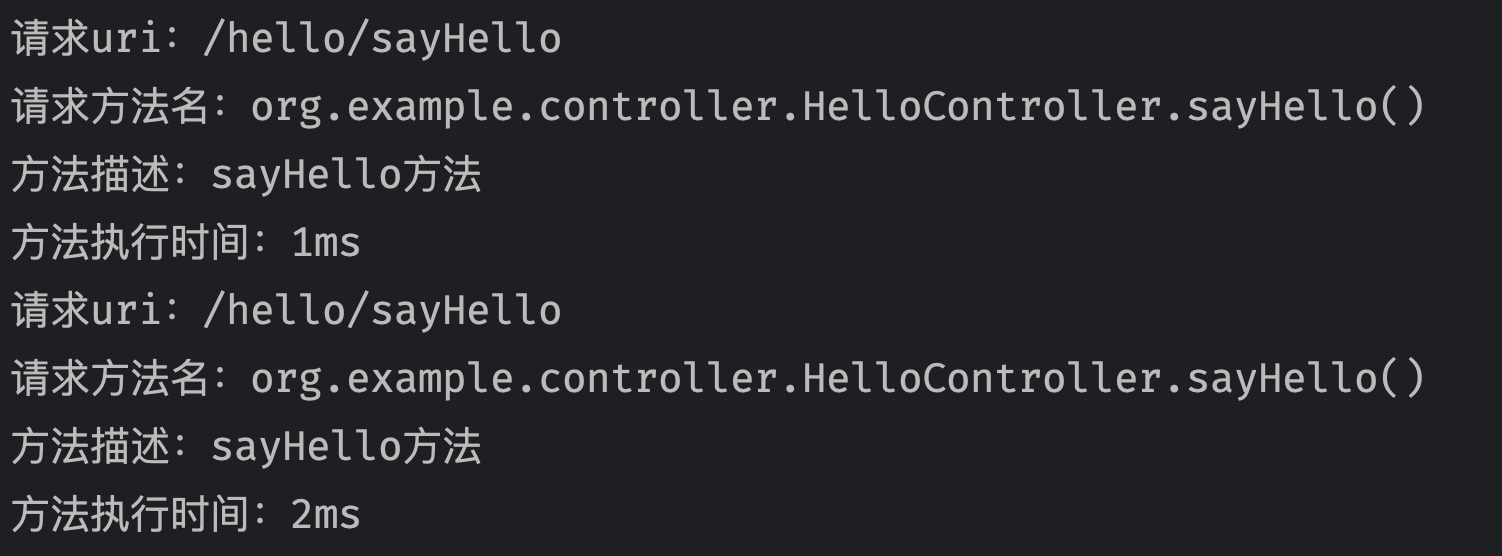
在测试的方法上添加上自定义的MyLog注解,当该方法执行的时候就会在控制台输出对应信息
package org.example.controller;

import org.example.annotaion.MyLog;

import org.example.service.HelloService;

import org.springframework.beans.factory.annotation.Autowired;

import org.springframework.web.bind.annotation.GetMapping;

import org.springframework.web.bind.annotation.RequestMapping;

import org.springframework.web.bind.annotation.RestController;

/**

 * TODO

 *

 * @author ss_419

 * @version 1.0

 * @date 2023/7/8 14:36

 */

@RestController

@RequestMapping("/hello")

public class HelloController {

    @Autowired

    private HelloService helloService;

    @GetMapping("/sayHello")

    @MyLog(desc = "sayHello方法")

    public String sayHello() {

     return helloService.sayHello();

    }

}
3、测试
到这里,对于自定义starter的案例就结束了。
通用权限系统-Spring-Boot-Starter的更多相关文章
- spring -boot s-tarter 详解
Starter POMs是可以包含到应用中的一个方便的依赖关系描述符集合.你可以获取所有Spring及相关技术的一站式服务,而不需要翻阅示例代码,拷贝粘贴大量的依赖描述符.例如,如果你想使用Sprin ...
- SpringBoot 之Spring Boot Starter依赖包及作用
Spring Boot 之Spring Boot Starter依赖包及作用 spring-boot-starter 这是Spring Boot的核心启动器,包含了自动配置.日志和YAML. spri ...
- Spring Boot Starter列表
转自:http://blog.sina.com.cn/s/blog_798f713f0102wiy5.html Spring Boot Starter 基本的一共有43种,具体如下: 1)spring ...
- 创建自己的Spring Boot Starter
抽取通用模块作为项目的一个spring boot starter.可参照mybatis的写法. IDEA创建Empty Project并添加如下2个module,一个基本maven模块,另一个引入sp ...
- 手把手教你手写一个最简单的 Spring Boot Starter
欢迎关注微信公众号:「Java之言」技术文章持续更新,请持续关注...... 第一时间学习最新技术文章 领取最新技术学习资料视频 最新互联网资讯和面试经验 何为 Starter ? 想必大家都使用过 ...
- Spring Boot Starter 和 ABP Module
Spring Boot 和 ABP 都是模块化的系统,分别是Java 和.NET 可以对比的框架.模块系统是就像乐高玩具一样,一块一块零散积木堆积起一个精彩的世界.每种积木的形状各不相同,功能各不相同 ...
- 三分钟实战手写Spring Boot Starter
1 背景 在平时的开发中,开发的同学会把一些通用的方法,写成一个工具类,例如日期转换的,JSON转换的等等,方便业务后续调用,使代码更容易维护. 如果一些更常用的方法,例如鉴权的,加解密的等等,几乎每 ...
- Spring Boot Starter 介绍
http://www.baeldung.com/spring-boot-starters 作者:baeldung 译者:http://oopsguy.com 1.概述 依赖管理是任何复杂项目的关键部分 ...
- Spring Boot (一): Spring Boot starter自定义
前些日子在公司接触了spring boot和spring cloud,有感于其大大简化了spring的配置过程,十分方便使用者快速构建项目,而且拥有丰富的starter供开发者使用.但是由于其自动化配 ...
- Spring boot starter pom的依赖关系说明
Spring Boot 通过starter依赖为项目的依赖管理提供帮助.starter依赖起始就是特殊的maven依赖,利用了传递依赖解析,把常用库聚合在一起,组成了几个为特定功能而定制的依赖. sp ...
随机推荐
- 四月十五号java基础知识
1.今天下午做了一个题感受很深,自己做题没有思路或者有点思路死磕也没有搞清楚,看起来很简单的问题,在我手里很难 做咯许久还是室友帮忙解决的,后面重新打一遍还是出问题,找他解决的,问了问他我自己的问题, ...
- C# System.lnvalidOperationException:"A second operation started on this context before a previousoperation completed. This is usually caused by different threads using the same instance ofDbContext...
与上一篇问题一样,只是错误不一样,DbContext 不支持并发请求,每个数据库操作都使用await就可以了
- 【Vue项目】尚品汇(三)Home模块+Floor模块+Swiper轮播图
写在前面 今天是7.23,这一篇内容主要完成了Home模块和部分Search模块的开发,主要是使用了swiper轮播图插件获取vuex仓库数据展示组件以及其他信息. 1 Search模块 1.1 Se ...
- PRINCE2核心知识点整理
前言 PRINCE2,即 PRoject IN Controlled Environment(受控环境中的项目)是一种结构化的项目管理方法论,由英国政府内阁商务部(OGC)推出,是英国项目管理标准. ...
- Python-faker的简单使用
前言: faker是一个开源的python库,安装完成后只需要调用Faker库,就可以帮助我们创建需要的数据. 一.安装 1.执行如下命令安装 pip3 install faker 2.进入File ...
- 2023-01-07:hyper/docker-registry-web是registry的web界面工具之一。请问部署在k3s中,yaml如何写?
2023-01-07:hyper/docker-registry-web是registry的web界面工具之一.请问部署在k3s中,yaml如何写? 答案2023-01-07: yaml如下: api ...
- 2022-09-16:以下go语言代码输出什么?A:101;B:100;C:1;D:2。 package main import ( “fmt“ ) type MS struct {
2022-09-16:以下go语言代码输出什么?A:101:B:100:C:1:D:2. package main import ( "fmt" ) type MS struct ...
- golang基础面试题,不完整
启动流程 Q.go的init函数是什么时候执行的? Q.多个init函数执行顺序能保证吗? Q.go init 的执行顺序,注意是不按导入规则的(这里是编译时按文件名的顺序执行的) Q.init函数能 ...
- IBM小型机 - 登录Web控制台
前言: IBM 小型机没有VGA或者HDMI接口,只能通过web或者串口的方式,配置和查看设备的硬件信息: 我们可以通过两种方式获取小型机的IP,并通过浏览器访问. 操作步骤: 1.服务器接通电源,直 ...
- wmi搜集一台计算机的硬件信息
作用: Python搜集一台计算机的硬件信息,借助模块:wmi,这个模块只支持window操作系统. 安装: pip install wmi 导入: import wmi 实例 c = wmi.WMI ...