
NodeJS连接mysql,报错ER_NOT_SUPPORTED_AUTH_MODE: Client does not support authentication protocol requested by server; consider upgrading MySQL client
我是mysql8.0以上的版本,在用NodeJS连接服务器中mysql数据库时开始报错

这表示服务器启动起来,但是数据库中密码协议出错,我从网上查到的结果告诉我,是mysql8.0支持了一个新的密码协议,但是NodeJS目前还没有支持导致的。
下面是我避坑后的解决方案,可能不适用于所有人
1. 登陆服务器中mysql
以管理员身份打开命令行,输入
mysql -u administrator -p
如果提示mysql不是可执行文件,可以在命令行中cd,直到mysql 中的bin目录,或者把mysql加入环境变量
注意:上面的root是你要修改的用户名,可能不是administrator,我的就是administrator
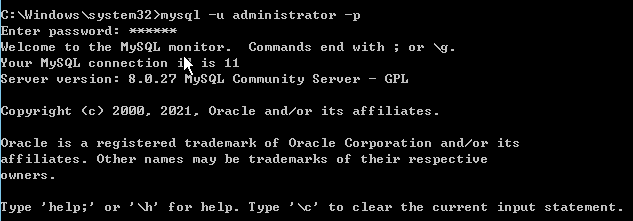
2. 输入密码
然后输入密码,进入mysql
3. 选择数据库
所以,首先我们需要选择数据库,在命令行中输入
use mysql
注意:这里就是mysql,不是别的名称,除非你修改了数据库中存储用户名密码的表的名称,但是这种几率很小,你动不到那里

如果选错数据库的话,会在后续密码置空操作中提示下述错误

4. 密码置空
如果原密码不置空,直接修改密码的话,会报错

密码置空操作,输入
update user set authentication_string='' where user='administrator';
其中上述administrator仍然为你需要修改密码协议的用户名

5. 刷新
此步骤很重要
flush privileges;

6. 修改密码及协议
我在这一步卡了好久
我修改密码协议,出现图中错误

查了很多资料,我明白了
打开数据库,mysql库,user表,可以看到
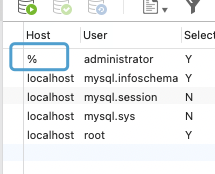
在我要修改的用户名前的host中是‘%’,而不是‘localhost’,所以我需要将命令中的 localhost 改为 %
alter user 'administrator'@'%' identified with mysql_native_password by '123456';
上述administrator为你需要修改密码的用户名,123456中为你的密码

至此,即完成全部步骤
mysql忘记密码修改等,网上很多教程好像不适用于mysql8.0,有时间把这部分写一下。
NodeJS连接mysql,报错ER_NOT_SUPPORTED_AUTH_MODE: Client does not support authentication protocol requested by server; consider upgrading MySQL client的更多相关文章
- egg 连接 mysql 的 docker 容器,报错:Client does not support authentication protocol requested by server; consider upgrading MySQL client
egg 连接 mysql 的 docker 容器,报错:Client does not support authentication protocol requested by server; con ...
- 图文并茂解决Client does not support authentication protocol requested by server; consider upgrading MySQL
今天服务器部署node.js+mysql,调用接口报错ER_NOT_SUPPORTED_AUTH_MODE: Client does not support authentication protoc ...
- Client does not support authentication protocol requested by server; consider upgrading MySQL client
出现错误 Client does not support authentication protocol requested by server; consider upgrading MySQL c ...
- UnhandledPromiseRejectionWarning: SequelizeConnectionError: Client does not support authentication protocol requested by server; consider upgrading MySQL client
UnhandledPromiseRejectionWarning: SequelizeConnectionError: Client does not support authentication p ...
- node mysql问题:Client does not support authentication protocol requested by server; consider upgrading MySQL client!
node后台 mysql处理模块(版本:2.16.0) 执行connect方法时报错: Client does not support authentication protocol requeste ...
- MySQL安装教程及Navicat连接MySQL报错:1251-Client does not support authentication protocol requested by server
MySQL安装可参考: MySql 8.0.18安装 此参考文章后面涉及到的密码修改,对本标题碰到的错误同样适用. 本文先讲如何安装,在讲碰到的1251问题.要直接看解决方案的朋友可以直接通过目录链接 ...
- vscode Error: ER_NOT_SUPPORTED_AUTH_MODE: Client does not support authentication protocol requested by server; consider upgrading MySQL client
vscode 连接 mysql 时出现这个错误 alter user 'root'@'localhost' identified with mysql_native_password by 'pass ...
- Mysql8 连接提示 Client does not support authentication protocol requested by server; consider upgrading MySQL client 解决方法
USE mysql;ALTER USER 'root'@'localhost' IDENTIFIED WITH mysql_native_password BY 'password';FLUSH PR ...
- docker安装mysql容器后,是用navicat连接报client does not support authentication protocol requested by server consider upgrading mysql client
#进入容器 docker exec -it mysql bash#进入mysqlmysql -u root -p#重置密码ALTER USER 'root'@'%' IDENTIFIED WITH m ...
- django.db.utils.OperationalError: (1251, 'Client does not support authentication protocol requested by server; consider upgrading MySQL client')
1.打开MySQL: cmd里 net start mysql mysql -hlocalhost -uroot -p回车 进入mysql数据库 2. 命令如下: 1.use mysql; 2.alt ...
随机推荐
- MIT6.s081/6.828 lectrue4:page tables 以及 Lab3 心得
不管是计算机组成还是操作系统,虚拟内存都是其中的重要内容,所以这一节我会结合 CSAPP 第九章:虚拟内存 来一起复习(顺便一说,CSAPP 这一节的 lab 是要求设计一个内存分配器,也是很有意思的 ...
- 《Linux基础》05. 定时任务调度 · 磁盘分区与挂载 · 网络配置
@ 目录 1:定时任务调度 1.1:crontab 1.2:at 2:磁盘分区与挂载 2.1:原理介绍 2.2:硬盘说明 2.3:磁盘目录情况查询 2.3.1:lsblk 2.3.2:df 2.3.3 ...
- Vue【原创】基于【日历组件Calendar】的【节假日管理】功能整合
基于日历组件(lilo-calendar)的节假日管理功能整合. 效果图: 完整代码: 1 <template> 2 <div class="root-calendar&q ...
- from my mac
hello
- 【matplotlib 实战】--平行坐标系
平行坐标系是一种统计图表,它包含多个垂直平行的坐标轴,每个轴表示一个字段,并用刻度标明范围.通过在每个轴上找到数据点的落点,并将它们连接起来形成折线,可以很容易地展示多维数据.随着数据增多,折线会堆叠 ...
- Kubeflow基础知识
kubeflow 基础知识 kubeflow 简介 kubeflow是谷歌开源的MLOps开源平台,其中包含的不同组件代表了机器学习生命周期的不同阶段. 下图是kubeflow组织ML工作流程: ku ...
- rte-rtc
活动内容 个人中心 立即报名 活动详情 RTE大会(原"RTC大会")创立于2015年,是亚太首个.迄今为止规模最大的实时互联网技术盛会,覆盖200+行业场景 ...
- FragmentStatePagerAdapter
public abstract class FragmentStatePagerAdapter extends PagerAdapter java.lang.Object ↳ android.s ...
- Spring扩展接口(2):BeanDefinitionRegistryPostProcessor
在此系列文章中,我总结了Spring几乎所有的扩展接口,以及各个扩展点的使用场景.并整理出一个bean在spring中从被加载到最终初始化的所有可扩展点的顺序调用图.这样,我们也可以看到bean是如何 ...
- WSL2 中访问 Windows 的代理的最简易方案
前言 学校的网卡不允许运行虚拟机,所以必须将 WSL 的流量变成主机的流量,但从百度查的方案都是设置 Windows 主机的 IP,都忽视了 Windows 的默认功能,即 mdns 或 Window ...