
CentOS 7 yum无法使用解决方法Could not retrieve mirrorlist http://mirrorlist.centos.org/?release=7&arch=
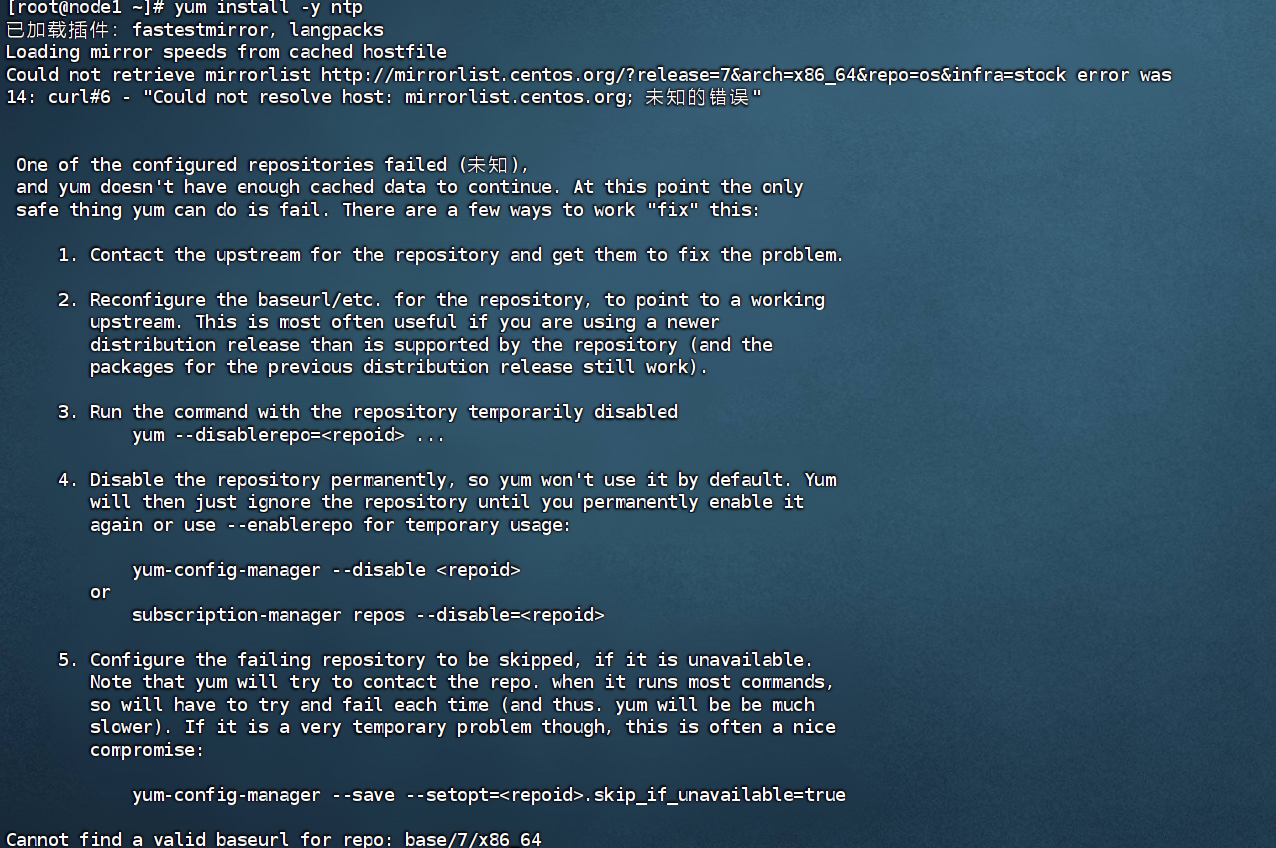
在centos7中使用yum命令时候报错:
Loading mirror speeds from cached hostfile

Could not retrieve mirrorlist http://mirrorlist.centos.org/?release=7&arch=x86_64&repo=os&infra=stock error was

14: curl#6 - "Could not resolve host: mirrorlist.centos.org; 未知的错误"
问题原因
出现这个错误是因为使用的 CentOS 7 仓库已经被归档,当前的镜像地址无法找到所需的文件。CentOS 7 的官方支持已经结束,部分仓库已被移至归档库。这导致了你的 yum 命令无法找到所需的元数据文件。CentOS 7 的官方仓库在 2024 年 6 月 30 日之后已经停止维护。因此,使用最新的 CentOS 7 官方仓库可能会遇到问题。
解决方法
进入/etc/yum.repos.d目录下找到 CentOS-Base.repo
进入目录:
cd /etc/yum.repos.d

之后依次执行:
cp  CentOS-Base.repo   CentOS-Base.repo.backup

vi CentOS-Base.repo
进入后改为:
# CentOS-Base.repo

#

# The mirror system uses the connecting IP address of the client and the

# update status of each mirror to pick mirrors that are updated to and

# geographically close to the client.  You should use this for CentOS updates

# unless you are manually picking other mirrors.

#

# If the mirrorlist= does not work for you, as a fall back you can try the

# remarked out baseurl= line instead.

#

#

[base]

name=CentOS-$releasever - Base

#mirrorlist=http://mirrorlist.centos.org/?release=$releasever&arch=$basearch&repo=os&infra=$infra

#baseurl=http://mirror.centos.org/centos/$releasever/os/$basearch/

#baseurl=http://vault.centos.org/7.9.2009/x86_64/os/

baseurl=http://vault.centos.org/7.9.2009/os/$basearch/

gpgcheck=1

gpgkey=file:///etc/pki/rpm-gpg/RPM-GPG-KEY-CentOS-7

#released updates

[updates]

name=CentOS-$releasever - Updates

#mirrorlist=http://mirrorlist.centos.org/?release=$releasever&arch=$basearch&repo=updates&infra=$infra

#baseurl=http://mirror.centos.org/centos/$releasever/updates/$basearch/

#baseurl=http://vault.centos.org/7.9.2009/x86_64/os/

baseurl=http://vault.centos.org/7.9.2009/updates/$basearch/

gpgcheck=1

gpgkey=file:///etc/pki/rpm-gpg/RPM-GPG-KEY-CentOS-7

#additional packages that may be useful

[extras]

name=CentOS-$releasever - Extras

#mirrorlist=http://mirrorlist.centos.org/?release=$releasever&arch=$basearch&repo=extras&infra=$infra

#$baseurl=http://mirror.centos.org/centos/$releasever/extras/$basearch/

#baseurl=http://vault.centos.org/7.9.2009/x86_64/os/

baseurl=http://vault.centos.org/7.9.2009/extras/$basearch/

gpgcheck=1

gpgkey=file:///etc/pki/rpm-gpg/RPM-GPG-KEY-CentOS-7

#additional packages that extend functionality of existing packages

[centosplus]

name=CentOS-$releasever - Plus

#mirrorlist=http://mirrorlist.centos.org/?release=$releasever&arch=$basearch&repo=centosplus&infra=$infra

#baseurl=http://mirror.centos.org/centos/$releasever/centosplus/$basearch/

#baseurl=http://vault.centos.org/7.9.2009/x86_64/os/

baseurl=http://vault.centos.org/7.9.2009/centosplus/$basearch/

gpgcheck=1

enabled=0

gpgkey=file:///etc/pki/rpm-gpg/RPM-GPG-KEY-CentOS-7
然后wq保存下,依次执行:
sudo yum clean all

sudo yum makecache
之后等待加载:

阿里云镜像源
以下两个命令都可以,执行完成后进入/etc/yum.repos.d
curl -o /etc/yum.repos.d/CentOS-Base.repo https://mirrors.aliyun.com/repo/Centos-7.repo
wget -O /etc/yum.repos.d/CentOS-Base.repo https://mirrors.aliyun.com/repo/Centos-7.repo
然后执行:
cat CentOS-Base.repo
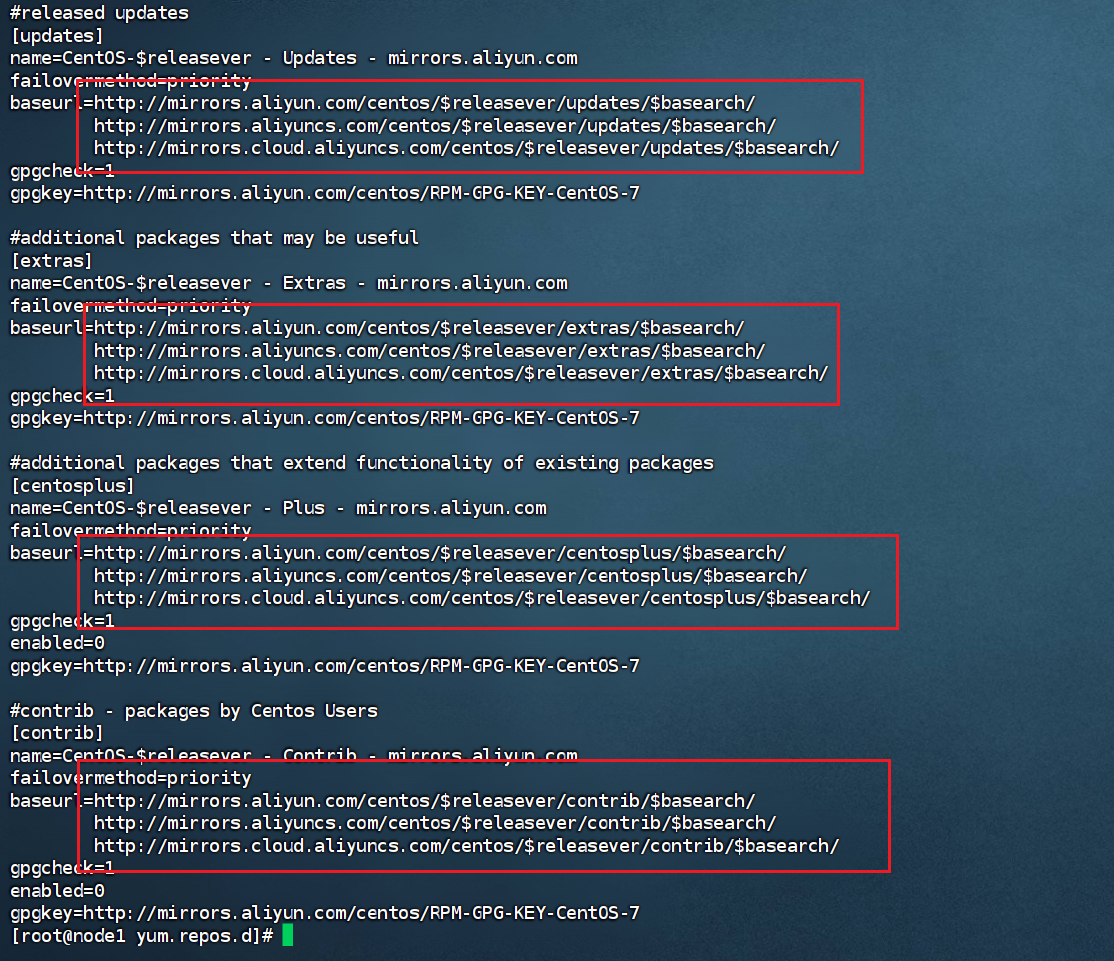
看着镜像是阿里云的即可。 建议在执行下
sudo yum clean all

sudo yum makecache
欢迎关注公众号:愚生浅末
CentOS 7 yum无法使用解决方法Could not retrieve mirrorlist http://mirrorlist.centos.org/?release=7&arch=的更多相关文章
- VMware虚拟机的CentOS无法上网的解决方法
前言:由于Linux下很多软件安装必须网络环境下进行,因此,对于如何在VMware下进行上网,我折腾了至少三天,今天上午,也即五一劳动节,终于搜到一遍技术文章,经过自己实践,VMware下Linux的 ...
- 树莓派(Raspberry Pi 3)安装centos7后yum无法使用解决办法
树莓派(Raspberry Pi 3)安装centos7后yum无法使用解决办法 人穷,闲鱼淘了个二手的树莓派3 英国版,无奈咱也不会用,很无奈~ 安装教程百度到的差不多都可以,找个格式正常的一步一步 ...
- 001. 使用ssh连接不上centos 6.5的解决方法及其解决中文乱码
1. 使用ssh连接不上centos 6.5的解决方法: 错误显示: Connecting to 192.168.1.106:22... Could not connect to '192.168.1 ...
- CentOS 大量的TIME_WAIT解决方法
CentOS 大量的TIME_WAIT解决方法 最近个人博客总是出现无法打开的现象,具体表现为,打开页面需要等待n长时间,登陆系统后发现系统存在大量TIME_WAIT状态的连接,google了一下解决 ...
- VMware workstation虚拟机配置文件不兼容无法使用解决方法
VMware workstation虚拟机配置文件不兼容无法使用解决方法打开VMware workstation虚拟机提示:配置文件"--.vmx"是由Vmware产品创建,但该产 ...
- centos在yum install报错:Another app is currently holding the yum lock解决方法
centos在yum install报错:Another app is currently holding the yum lock,这个问题可能是很多的新手经常遇到问题,之前也有人问我,包括本人在刚 ...
- yum出现“No module named yum”错误解决方法
安装了一个Python2.7,隔天发现yum无法使用,报错信息如下,应该是系统是使用的默认的python2.6的版本 解决办法修改yum文件#vi /usr/bin/yum将 #!/usr/bin/p ...
- centos 更换yum源 (解决下载慢的问题)
先看有没有安装wget wget -V 如果没有执行 yum -y install wget 进行安装 然后进行配置的备份 mv /etc/yum.repos.d/CentO ...
- Another app is currently holding the yum lock解决方法
用yum安装包有时候会提示 ``` Another app is currently holding the yum lock; waiting for it to exit... The oth ...
- mac os ssh远程链接centos提示证书错误解决方法
下面是错误提示 IT IS POSSIBLE THAT SOMEONE IS DOING SOMETHING NASTY! Someone could be eavesdropping on you ...
随机推荐
- GUI自动化测试策略
标签(空格分隔): GUI自动化策略 带你看看实际的大型全球化电商网站的 GUI 自动化测试如何开展.这场实战,我将从以下两个方面展开 试策略如何设计?这一点,我会根据亲身经历的实际项目,和你探讨 G ...
- 树莓派4B-GPIO控制步进电机
树莓派4B-GPIO控制步进电机 硬件需求: 步进电机 树莓派 杜邦线 L298N驱动模块 选择步进电机 首先需要确认步进电机,因为步进电机可分为单极性和双极步进电动机两种,这两种电机的驱动方式是不同 ...
- JavaScript -- 变量 --手稿
- Luogu P5745 区间最大和
原题链接:Luogu P5745 区间最大和 初看这道题,
- 新一代的团队协作平台-Teamlinker
Teamlinker是一个集成了不同功能和模块的团队协作平台.你可以联系你的团队成员,分配你的任务,开始一个会议,安排各项事务,管理你的文件等.并且支持线下免费部署,功能和线上版本一致. 主页 对于很 ...
- 全网最适合入门的面向对象编程教程:09 类和对象的Python实现-类之间的关系,你知道多少?
全网最适合入门的面向对象编程教程:09 类和对象的 Python 实现-类之间的关系,你知道多少? 摘要: 本文主要对类之间的关系进行了基本介绍,包括继承.组合.依赖关系,并辅以现实中的例子加以讲解, ...
- Top monitor[2.1.11] 开源
说明 本项目将转为开源项目. \(\text{GitHub}\) 仓库下载链接 \(|\) 项目初始化下载 \(|\) 项目编辑文件下载. 项目说明 声明:此项目由 \(\text{So_noSlac ...
- JavaScript一天一个算法题~持续更新中。。。。。
1,数组去重 i.暴力去重 思路:建一个空数组,通过判断原数组的元素是否在空数组内,如果在,不放入,不在,放入空数组. function clearCommnetArray(array){ let a ...
- C# 通过反射(Reflection)调用不同名泛型方法
概述 由于工作需要,需要通过数据类型和方法名控制方法走向 用到的数据类型有8种(string,Int16,Int32,Int64,Boolean,Byte,Single,Double) 读取的方法(参 ...
- RedisTemplate使用rightPushAll时的注意事项
问题:第一次使用时rightPushAll,我以为这个方法就是直接把我们集合中的数据全部添加到redis的list里面,但是如果直接使用ArrayList类型添加,发现事情并不是我们想的这样,他并没有 ...