
CentOS 7 yum无法使用解决方法Could not retrieve mirrorlist http://mirrorlist.centos.org/?release=7&arch=
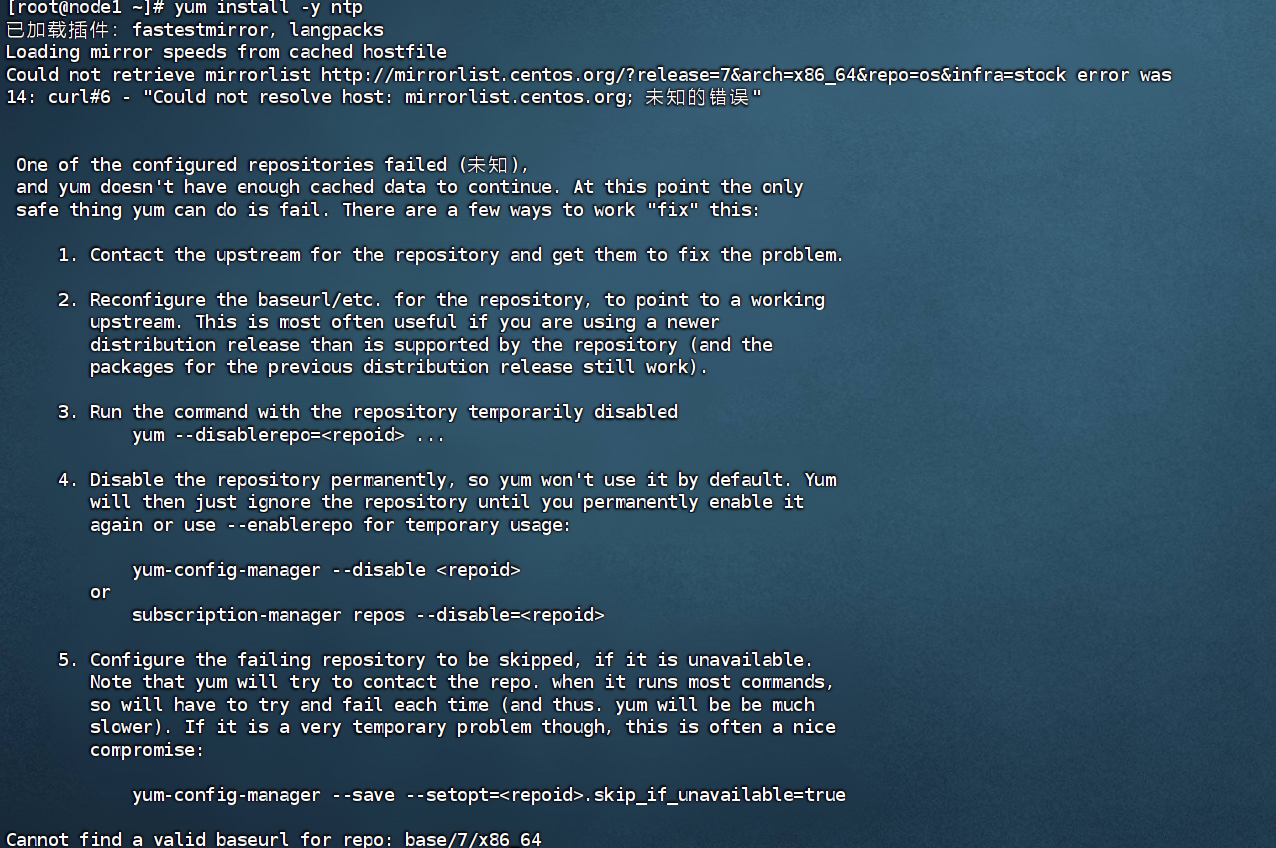
在centos7中使用yum命令时候报错:
Loading mirror speeds from cached hostfile

Could not retrieve mirrorlist http://mirrorlist.centos.org/?release=7&arch=x86_64&repo=os&infra=stock error was

14: curl#6 - "Could not resolve host: mirrorlist.centos.org; 未知的错误"
问题原因
出现这个错误是因为使用的 CentOS 7 仓库已经被归档,当前的镜像地址无法找到所需的文件。CentOS 7 的官方支持已经结束,部分仓库已被移至归档库。这导致了你的 yum 命令无法找到所需的元数据文件。CentOS 7 的官方仓库在 2024 年 6 月 30 日之后已经停止维护。因此,使用最新的 CentOS 7 官方仓库可能会遇到问题。
解决方法
进入/etc/yum.repos.d目录下找到 CentOS-Base.repo
进入目录:
cd /etc/yum.repos.d

之后依次执行:
cp  CentOS-Base.repo   CentOS-Base.repo.backup

vi CentOS-Base.repo
进入后改为:
# CentOS-Base.repo

#

# The mirror system uses the connecting IP address of the client and the

# update status of each mirror to pick mirrors that are updated to and

# geographically close to the client.  You should use this for CentOS updates

# unless you are manually picking other mirrors.

#

# If the mirrorlist= does not work for you, as a fall back you can try the

# remarked out baseurl= line instead.

#

#

[base]

name=CentOS-$releasever - Base

#mirrorlist=http://mirrorlist.centos.org/?release=$releasever&arch=$basearch&repo=os&infra=$infra

#baseurl=http://mirror.centos.org/centos/$releasever/os/$basearch/

#baseurl=http://vault.centos.org/7.9.2009/x86_64/os/

baseurl=http://vault.centos.org/7.9.2009/os/$basearch/

gpgcheck=1

gpgkey=file:///etc/pki/rpm-gpg/RPM-GPG-KEY-CentOS-7

#released updates

[updates]

name=CentOS-$releasever - Updates

#mirrorlist=http://mirrorlist.centos.org/?release=$releasever&arch=$basearch&repo=updates&infra=$infra

#baseurl=http://mirror.centos.org/centos/$releasever/updates/$basearch/

#baseurl=http://vault.centos.org/7.9.2009/x86_64/os/

baseurl=http://vault.centos.org/7.9.2009/updates/$basearch/

gpgcheck=1

gpgkey=file:///etc/pki/rpm-gpg/RPM-GPG-KEY-CentOS-7

#additional packages that may be useful

[extras]

name=CentOS-$releasever - Extras

#mirrorlist=http://mirrorlist.centos.org/?release=$releasever&arch=$basearch&repo=extras&infra=$infra

#$baseurl=http://mirror.centos.org/centos/$releasever/extras/$basearch/

#baseurl=http://vault.centos.org/7.9.2009/x86_64/os/

baseurl=http://vault.centos.org/7.9.2009/extras/$basearch/

gpgcheck=1

gpgkey=file:///etc/pki/rpm-gpg/RPM-GPG-KEY-CentOS-7

#additional packages that extend functionality of existing packages

[centosplus]

name=CentOS-$releasever - Plus

#mirrorlist=http://mirrorlist.centos.org/?release=$releasever&arch=$basearch&repo=centosplus&infra=$infra

#baseurl=http://mirror.centos.org/centos/$releasever/centosplus/$basearch/

#baseurl=http://vault.centos.org/7.9.2009/x86_64/os/

baseurl=http://vault.centos.org/7.9.2009/centosplus/$basearch/

gpgcheck=1

enabled=0

gpgkey=file:///etc/pki/rpm-gpg/RPM-GPG-KEY-CentOS-7
然后wq保存下,依次执行:
sudo yum clean all

sudo yum makecache
之后等待加载:

阿里云镜像源
以下两个命令都可以,执行完成后进入/etc/yum.repos.d
curl -o /etc/yum.repos.d/CentOS-Base.repo https://mirrors.aliyun.com/repo/Centos-7.repo
wget -O /etc/yum.repos.d/CentOS-Base.repo https://mirrors.aliyun.com/repo/Centos-7.repo
然后执行:
cat CentOS-Base.repo
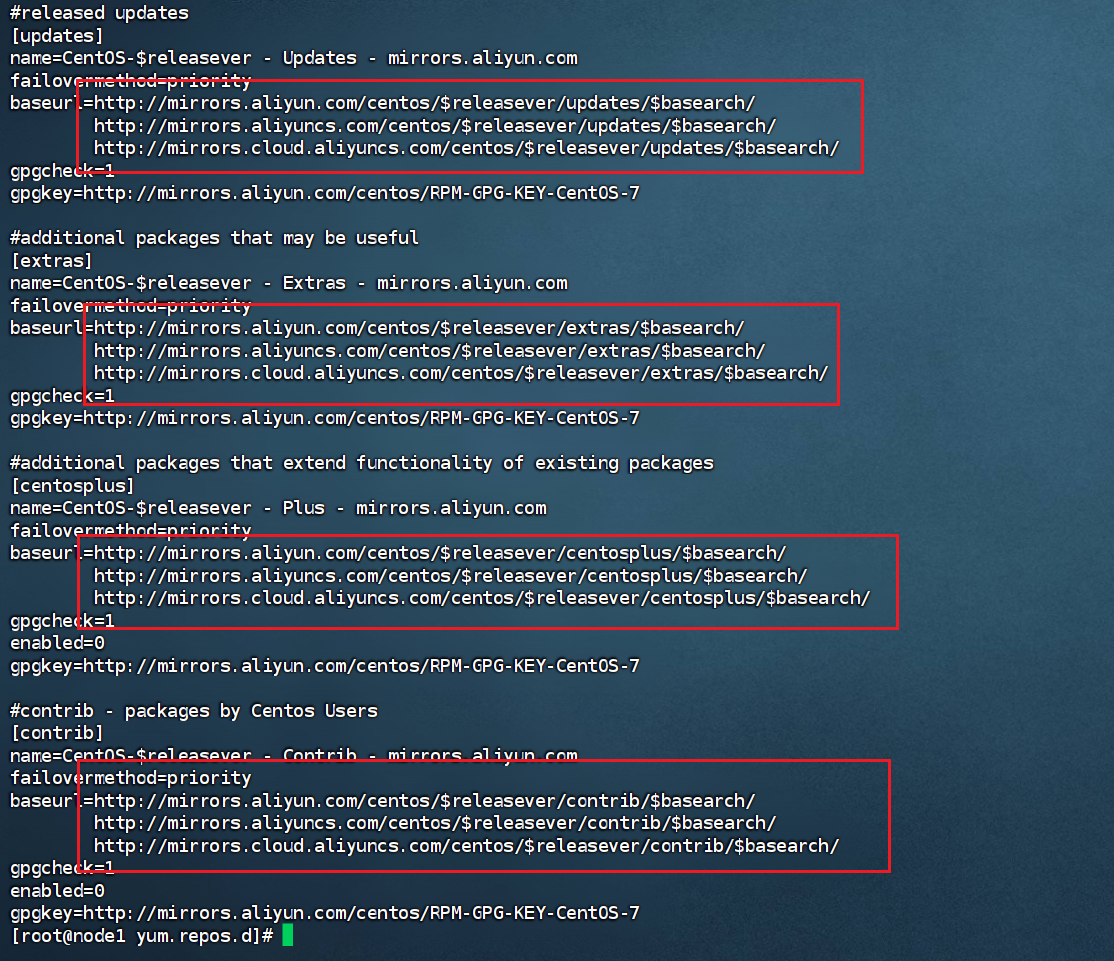
看着镜像是阿里云的即可。 建议在执行下
sudo yum clean all

sudo yum makecache
欢迎关注公众号:愚生浅末
CentOS 7 yum无法使用解决方法Could not retrieve mirrorlist http://mirrorlist.centos.org/?release=7&arch=的更多相关文章
- VMware虚拟机的CentOS无法上网的解决方法
前言:由于Linux下很多软件安装必须网络环境下进行,因此,对于如何在VMware下进行上网,我折腾了至少三天,今天上午,也即五一劳动节,终于搜到一遍技术文章,经过自己实践,VMware下Linux的 ...
- 树莓派(Raspberry Pi 3)安装centos7后yum无法使用解决办法
树莓派(Raspberry Pi 3)安装centos7后yum无法使用解决办法 人穷,闲鱼淘了个二手的树莓派3 英国版,无奈咱也不会用,很无奈~ 安装教程百度到的差不多都可以,找个格式正常的一步一步 ...
- 001. 使用ssh连接不上centos 6.5的解决方法及其解决中文乱码
1. 使用ssh连接不上centos 6.5的解决方法: 错误显示: Connecting to 192.168.1.106:22... Could not connect to '192.168.1 ...
- CentOS 大量的TIME_WAIT解决方法
CentOS 大量的TIME_WAIT解决方法 最近个人博客总是出现无法打开的现象,具体表现为,打开页面需要等待n长时间,登陆系统后发现系统存在大量TIME_WAIT状态的连接,google了一下解决 ...
- VMware workstation虚拟机配置文件不兼容无法使用解决方法
VMware workstation虚拟机配置文件不兼容无法使用解决方法打开VMware workstation虚拟机提示:配置文件"--.vmx"是由Vmware产品创建,但该产 ...
- centos在yum install报错:Another app is currently holding the yum lock解决方法
centos在yum install报错:Another app is currently holding the yum lock,这个问题可能是很多的新手经常遇到问题,之前也有人问我,包括本人在刚 ...
- yum出现“No module named yum”错误解决方法
安装了一个Python2.7,隔天发现yum无法使用,报错信息如下,应该是系统是使用的默认的python2.6的版本 解决办法修改yum文件#vi /usr/bin/yum将 #!/usr/bin/p ...
- centos 更换yum源 (解决下载慢的问题)
先看有没有安装wget wget -V 如果没有执行 yum -y install wget 进行安装 然后进行配置的备份 mv /etc/yum.repos.d/CentO ...
- Another app is currently holding the yum lock解决方法
用yum安装包有时候会提示 ``` Another app is currently holding the yum lock; waiting for it to exit... The oth ...
- mac os ssh远程链接centos提示证书错误解决方法
下面是错误提示 IT IS POSSIBLE THAT SOMEONE IS DOING SOMETHING NASTY! Someone could be eavesdropping on you ...
随机推荐
- JS中this的几种指向
这些this的指向,是当我们调用函数的时候确定的.调用方式的不同决定了this的指向不同一般指向我们的调用者.普通函数调用 window.定时器函数 wind ...
- Redis巡检检查 redis-check-aof
一.AOF1.AOF 是什么以日志的形式来记录每个写操作,将Redis执行过的所有写指令记录下来(读操作不记录),只许追加文件但不可以改写文件,Redis启动之初会读取该文件重新构建数据,换言之,R ...
- oeasy教您玩转vim - 32 - # 函数跳转
程序移动 回忆上节课内容 上次内容很简单,主要针对文本类素材 移动段落 {向前 }向后 移动句子 (向前 )向后 如果我想程序中快速移动 怎么办? #首先下载文本找到tomsawyer.txt g ...
- Flink 架构学习总结
Flink是一个分布式系统,要求有效地分配和管理计算资源以执行流式应用程序.它集成了所有常见的集群资源管理器,如Hadoop YARN和Kubernetes,但也可以设置为作为standalone甚至 ...
- Kubernetes 部署Dashboard UI
实践环境 CentOS-7-x86_64-DVD-1810 Docker 19.03.9 Kubernetes version: v1.20.5 发布Dashboard 可以通过运行以下命令部署Das ...
- 免费使用TasteWP一键搭建线上临时WordPress网站
虽然用宝塔面板或者1Panel面板可以非常快速的搭建一个WordPress网站,但是有时候只想测试下我设计的页面或者开发的主题和插件,又得买服务器,绑定域名,安装程序,搭建起来也过于浪费时间了:再或者 ...
- 基于Hive的大数据分析系统
1.概述 在构建大数据分析系统的过程中,我们面对着海量.多源的数据挑战,如何有效地解决这些零散数据的分析问题一直是大数据领域研究的核心关注点.大数据分析处理平台作为应对这一挑战的利器,致力于整合当前主 ...
- [银河麒麟] Samba的安装与配置
什么是Samba以及它是干嘛的 Samba,是种用来让UNIX系列的操作系统与微软Windows操作系统的SMB/CIFS(Server Message Block/Common Internet F ...
- 【ElasticSearch】04 Spring-Data-ElasticSearch
官方网站: https://spring.io/projects/spring-data-elasticsearch 对应 Elasticsearch7.6.2,Spring boot2.3.x 一般 ...
- 【Uni-App】UniApp转微信小程序发布应用
参考地址: https://www.jianshu.com/p/a77b73f329e4 第一步,把原始Uni-App项目,转成微信小程序项目 点[发行]-- [小程序-微信(仅适用uni-app)] ...