
elementPlus配合vue-router搭建后台系统菜单模块
设置menuType来区分菜单类型
  /**

   * @params menuType

   * -1 一般为首页 / -> /home 只显示第一个子项

   * -2 为无子菜单的菜单项 /config -> /config/person 无上下级,使用一级title

   * -3 正常菜单 /system -> /system/1 | /system/2 有上下级

   */
先看看页面效果吧
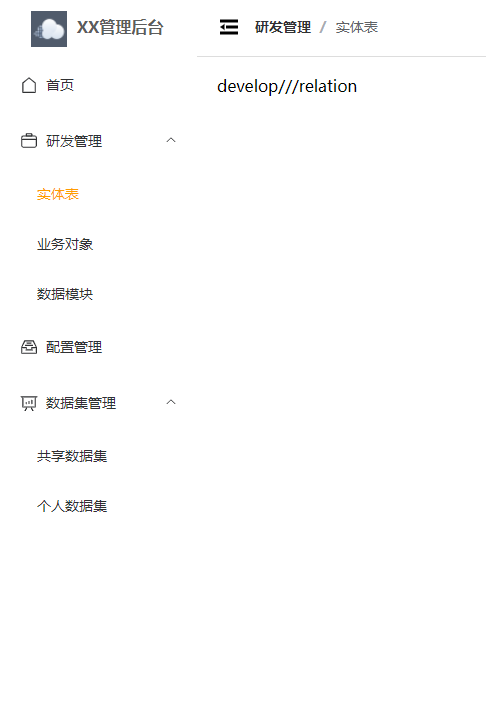
- type=1
  export default [

    {

  	path: '/',

  	component: Layout,

  	redirect: '/home',

  	meta: { icon: 'House', menuType: 1 },

  	children: [

  	  {

  		path: 'home',

  		component: () => import('@/views/home/index.vue'),

  		meta: { title: '首页' }

  	  },

  	  {

  		path: '401',

  		component: () => import('@/views/home/401.vue'),

  		meta: { title: '401', hideMenu: true }

  	  },

  	  {

  		path: '404',

  		component: () => import('@/views/home/404.vue'),

  		meta: { title: '404', hideMenu: true }

  	  }

  	]

    },

    {

  	path: '/:pathMatch(.*)*',

  	redirect: '/404',

  	meta: { hideMenu: true }

    }

  ]
- type=2
  export default [

    {

  	path: '/configuration',

  	component: Layout,

  	meta: { title: '配置管理', icon: 'MessageBox', menuType: 2 },

  	redirect: '/configuration/form',

  	children: [

  	  {

  		path: 'form',

  		component: () => import('@/views/configuration/form/index.vue'),

  		meta: { title: '表单可视化', cache: false }

  	  }

  	]

    }

  ]
- type=3
  export default [

    {

  	path: '/dataset',

  	component: Layout,

  	meta: { title: '数据集管理', icon: 'DataAnalysis', menuType: 3 },

  	redirect: '/dataset/multi',

  	children: [

  	  {

  		path: 'multi',

  		component: () => import('@/views/dataset/multi/index.vue'),

  		meta: { title: '共享数据集', cache: true }

  	  },

  	  {

  		path: 'person',

  		component: () => import('@/views/dataset/person/index.vue'),

  		meta: { title: '个人数据集', cache: true }

  	  }

  	]

    }

  ]
区别看得出来吧,看得出来吧,出来吧,吧!
最主要看看menu逻辑
menu:
  <template>

    <el-scrollbar>

  	<el-menu

  	  :default-active="activePath"

  	  :collapse="!!collapseMenu"

  	  :collapse-transition="false"

  	>

  	  <menu-item

  		v-for="(menu, key) in allRoutes"

  		:key="key"

  		:menu="menu"

  		:path="menu.path"

  	  />

  	</el-menu>

    </el-scrollbar>

  </template>

  <script lang="ts" setup>

  import { computed } from 'vue'

  import { useRouter, useRoute } from 'vue-router'

  import MenuItem from './MenuItem.vue'

  import { storeToRefs } from 'pinia'

  import { SystemStore } from '@/store'

  const systemStore = SystemStore()

  const { collapseMenu } = storeToRefs(systemStore)

  const route = useRoute()

  const router = useRouter()

  const allRoutes = router.options.routes

  const activePath = computed(() => {

    return route.path

  })

  </script>

  <style lang="scss" scoped>

  .el-menu {

    border: none;

  }

  </style>
menuItem:
  <template>

    <template v-if="!props.menu.meta?.hideMenu">

  	<el-sub-menu v-if="props.menu.meta?.menuType === 3" :index="menuPath">

  	  <template #title>

  		<el-icon>

  		  <component :is="props.menu.meta?.icon"></component>

  		</el-icon>

  		<span>{{ props.menu.meta?.title }}</span>

  	  </template>

  	  <template v-for="children in props.menu.children" :key="children.path">

  		<menu-item

  		  v-if="!children.meta?.hideMenu"

  		  :menu="children"

  		  :path="`${menuPath}/${children.path}`"

  		/>

  	  </template>

  	</el-sub-menu>

  	<router-link v-else :to="menuPath">

  	  <el-menu-item :index="menuPath">

  		<el-icon v-if="props.menu.meta?.icon">

  		  <component :is="props.menu.meta.icon"></component>

  		</el-icon>

  		<template #title>

  		  <span>{{

  			props.menu.meta?.menuType === 1

  			  ? props.menu.children[0].meta?.title

  			  : props.menu.meta?.title

  		  }}</span>

  		</template>

  	  </el-menu-item>

  	</router-link>

    </template>

  </template>

  <script lang="ts" setup>

  import { computed, PropType } from 'vue'

  import { RouteRecordRaw } from 'vue-router'

  const props = defineProps({

    menu: {

  	type: Object as PropType<RouteRecordRaw>,

  	required: true

    },

    path: {

  	type: String,

  	default: ''

    }

  })

  const menuPath = computed(() => {

    if ([1, 2].includes(props.menu.meta?.menuType as number)) {

  	return (

  	  (props.path === '/' ? props.path : props.path + '/') +

  	  props.menu.children![0].path

  	)

    }

    return props.path

  })

  </script>
通过路由meta里面设置hideMenu属性来控制是否在菜单栏展示
menuType
- 为1时(首页),取第一个children的信息
- 为2时取主菜单信息,不展示子菜单
- 为3时全部展示父子菜单
然后就是获取path和取title的逻辑,看看代码就能懂
elementPlus配合vue-router搭建后台系统菜单模块的更多相关文章
- 保姆级别的vue + ElementUI 搭建后台管理系统教程
vue + ElementUI 搭建后台管理系统记录 本文档记录了该系统从零配置的完整过程 项目源码请访问:https://gitee.com/szxio/vue2Admin,如果感觉对你有帮助,请点 ...
- 基于vue模块化开发后台系统——构建项目
文章目录如下:项目效果预览地址项目开源代码基于vue模块化开发后台系统--准备工作基于vue模块化开发后台系统--构建项目基于vue模块化开发后台系统--权限控制 前言 在熟悉上一篇说到准备工具之后, ...
- react 高效高质量搭建后台系统 系列 —— 登录
其他章节请看: react 高效高质量搭建后台系统 系列 登录 本篇将完成登录模块.效果和 spug 相同: 需求如下: 登录页的绘制 支持普通登录和LDAP登录 登录成功后跳转到主页,没有登录的情况 ...
- react 高效高质量搭建后台系统 系列 —— 系统布局
其他章节请看: react 高效高质量搭建后台系统 系列 系统布局 前面我们用脚手架搭建了项目,并实现了登录模块,登录模块所依赖的请求数据和antd(ui框架和样式)也已完成. 本篇将完成系统布局.比 ...
- react 高效高质量搭建后台系统 系列 —— 表格的封装
其他章节请看: react 高效高质量搭建后台系统 系列 表格 有一种页面在后台系统中比较常见:页面分上下两部分,上部分是 input.select.时间等查询项,下部分是查询项对应的表格数据.包含增 ...
- react 高效高质量搭建后台系统 系列 —— 前端权限
其他章节请看: react 高效高质量搭建后台系统 系列 权限 本系列已近尾声,权限是后台系统必不可少的一部分,本篇首先分析spug项目中权限的实现,最后在将权限加入到我们的项目中来. spug 中权 ...
- 基于vue模块化开发后台系统——准备工作
文章目录如下:项目效果预览地址项目开源代码基于vue模块化开发后台系统--准备工作基于vue模块化开发后台系统--构建项目基于vue模块化开发后台系统--权限控制 前言 本文章是以学习为主,练习一下v ...
- react 高效高质量搭建后台系统 系列 —— 脚手架搭建
其他章节请看: react 高效高质量搭建后台系统 系列 脚手架搭建 本篇主要创建新项目 myspug,以及准备好环境(例如:安装 spug 中用到的包.本地开发和部署.自定义配置 react-app ...
- react 高效高质量搭建后台系统 系列 —— 请求数据
其他章节请看: react 高效高质量搭建后台系统 系列 请求数据 后续要做登录模块(主页),需要先和后端约定JSON数据格式,将 axios 进行封装,实现本地的数据模拟 mockjs. Tip:s ...
- react 高效高质量搭建后台系统 系列 —— antd和样式
其他章节请看: react 高效高质量搭建后台系统 系列 antd 后续要做登录模块(主页),不仅要解决请求数据的问题,还需要完成 antd 配置以及样式的准备. antd 多种主题风格 详情请看 这 ...
随机推荐
- 人工智能创新挑战赛:海洋气象预测Baseline[4]完整版(TensorFlow、torch版本)含数据转化、模型构建、MLP、TCNN+RNN、LSTM模型训练以及预测
人工智能创新挑战赛:海洋气象预测Baseline[4]完整版(TensorFlow.torch版本)含数据转化.模型构建.MLP.TCNN+RNN.LSTM模型训练以及预测 1.赛题简介 项目链接以及 ...
- iPhone 15 Pro Max的Type-C接口有多牛?实测USB3比USB2快11倍
苹果最新的iPhone 15系列和iPhone 15 Pro系列新机,尽管两者都是Type-C接口,但速度相差20倍. 据了解,iPhone 15 Pro/Max搭载的苹果A17 Pro芯片内含专门的 ...
- ubuntu之jupyter notebook配置
ubuntu之jupyter notebook配置 安装jupyter: 前提:安装pip pip install jupyter jupyter notebook 配置: 生成配置文件: jupyt ...
- Nginx+uwsgi+ssl配置https
Nginx+uwsgi+ssl配置https 使用原始django,太过于笨重和杂多nginx是一个轻量级的web服务器,在处理静态资源和高并发有优势uwsgi是一个基于python的高效率的协议,处 ...
- NC20545 [HEOI2012]采花
题目链接 题目 题目描述 萧芸斓是Z国的公主,平时的一大爱好是采花. 今天天气晴朗,阳光明媚,公主清晨便去了皇宫中新建的花园采花. 花园足够大,容纳了 \(n\) 朵花,花有 \(c\) 种颜色(用整 ...
- NC50505 二叉苹果树
题目链接 题目 题目描述 有一棵二叉苹果树,如果数字有分叉,一定是分两叉,即没有只有一个儿子的节点.这棵树共N个节点,标号1至N,树根编号一定为1. 我们用一根树枝两端连接的节点编号描述一根树枝的位置 ...
- 端口碰撞Port Knocking和单数据包授权SPA
端口碰撞技术 Port knocking 从网络安全的角度,服务器开启的端口越多就越不安全,因此系统安全加固服务中最常用的方式,就是先关闭无用端口,再对提供服务的端口做访问控制.而作为远程管理与维护的 ...
- 【OpenGL ES】渐变凸镜贴图
1 前言 正方形图片贴到圆形上 中将正方形图片上的纹理映射到圆形模型上,凸镜贴图 中介绍了将圆形图片上的纹理映射到凸镜模型上.如果将原图片逐渐变为凸镜效果,中间的变化过程又是什么样的? 图片的 ...
- 【OpenGL ES】凸镜贴图
1 前言 正方形图片贴到圆形上 中将正方形图片上的纹理映射到圆形模型上,同理,也可以将圆形上的纹理映射到凸镜的球形曲面上.如下图,最左边的竖条是原图片的截面(纹理坐标),最右边的竖条是变换后的顶点 ...
- SpringBoot+Shiro+LayUI权限管理系统项目-8.实现日志管理
1.说明 基于注解和AOP实现的日志管理.只讲解关键部分,详细看源码,文章下方捐赠或QQ联系捐赠获取. 2.功能展示 包括日志搜索.查看详情和批量删除. 3.业务模型 @Data @TableName ...