
elementPlus配合vue-router搭建后台系统菜单模块
设置menuType来区分菜单类型
  /**

   * @params menuType

   * -1 一般为首页 / -> /home 只显示第一个子项

   * -2 为无子菜单的菜单项 /config -> /config/person 无上下级,使用一级title

   * -3 正常菜单 /system -> /system/1 | /system/2 有上下级

   */
先看看页面效果吧
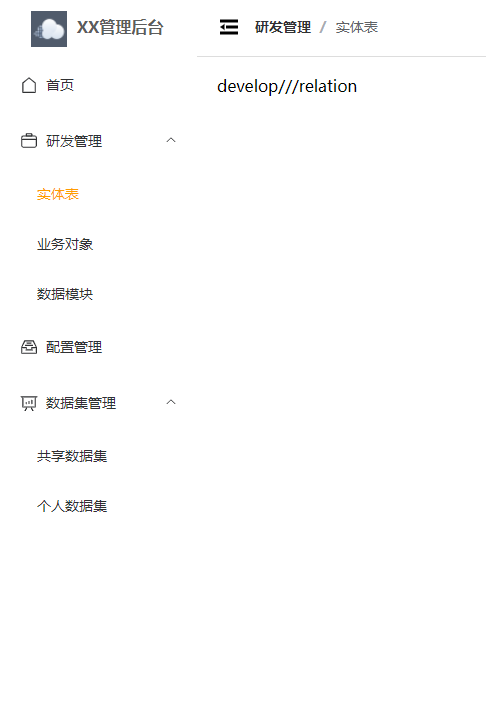
- type=1
  export default [

    {

  	path: '/',

  	component: Layout,

  	redirect: '/home',

  	meta: { icon: 'House', menuType: 1 },

  	children: [

  	  {

  		path: 'home',

  		component: () => import('@/views/home/index.vue'),

  		meta: { title: '首页' }

  	  },

  	  {

  		path: '401',

  		component: () => import('@/views/home/401.vue'),

  		meta: { title: '401', hideMenu: true }

  	  },

  	  {

  		path: '404',

  		component: () => import('@/views/home/404.vue'),

  		meta: { title: '404', hideMenu: true }

  	  }

  	]

    },

    {

  	path: '/:pathMatch(.*)*',

  	redirect: '/404',

  	meta: { hideMenu: true }

    }

  ]
- type=2
  export default [

    {

  	path: '/configuration',

  	component: Layout,

  	meta: { title: '配置管理', icon: 'MessageBox', menuType: 2 },

  	redirect: '/configuration/form',

  	children: [

  	  {

  		path: 'form',

  		component: () => import('@/views/configuration/form/index.vue'),

  		meta: { title: '表单可视化', cache: false }

  	  }

  	]

    }

  ]
- type=3
  export default [

    {

  	path: '/dataset',

  	component: Layout,

  	meta: { title: '数据集管理', icon: 'DataAnalysis', menuType: 3 },

  	redirect: '/dataset/multi',

  	children: [

  	  {

  		path: 'multi',

  		component: () => import('@/views/dataset/multi/index.vue'),

  		meta: { title: '共享数据集', cache: true }

  	  },

  	  {

  		path: 'person',

  		component: () => import('@/views/dataset/person/index.vue'),

  		meta: { title: '个人数据集', cache: true }

  	  }

  	]

    }

  ]
区别看得出来吧,看得出来吧,出来吧,吧!
最主要看看menu逻辑
menu:
  <template>

    <el-scrollbar>

  	<el-menu

  	  :default-active="activePath"

  	  :collapse="!!collapseMenu"

  	  :collapse-transition="false"

  	>

  	  <menu-item

  		v-for="(menu, key) in allRoutes"

  		:key="key"

  		:menu="menu"

  		:path="menu.path"

  	  />

  	</el-menu>

    </el-scrollbar>

  </template>

  <script lang="ts" setup>

  import { computed } from 'vue'

  import { useRouter, useRoute } from 'vue-router'

  import MenuItem from './MenuItem.vue'

  import { storeToRefs } from 'pinia'

  import { SystemStore } from '@/store'

  const systemStore = SystemStore()

  const { collapseMenu } = storeToRefs(systemStore)

  const route = useRoute()

  const router = useRouter()

  const allRoutes = router.options.routes

  const activePath = computed(() => {

    return route.path

  })

  </script>

  <style lang="scss" scoped>

  .el-menu {

    border: none;

  }

  </style>
menuItem:
  <template>

    <template v-if="!props.menu.meta?.hideMenu">

  	<el-sub-menu v-if="props.menu.meta?.menuType === 3" :index="menuPath">

  	  <template #title>

  		<el-icon>

  		  <component :is="props.menu.meta?.icon"></component>

  		</el-icon>

  		<span>{{ props.menu.meta?.title }}</span>

  	  </template>

  	  <template v-for="children in props.menu.children" :key="children.path">

  		<menu-item

  		  v-if="!children.meta?.hideMenu"

  		  :menu="children"

  		  :path="`${menuPath}/${children.path}`"

  		/>

  	  </template>

  	</el-sub-menu>

  	<router-link v-else :to="menuPath">

  	  <el-menu-item :index="menuPath">

  		<el-icon v-if="props.menu.meta?.icon">

  		  <component :is="props.menu.meta.icon"></component>

  		</el-icon>

  		<template #title>

  		  <span>{{

  			props.menu.meta?.menuType === 1

  			  ? props.menu.children[0].meta?.title

  			  : props.menu.meta?.title

  		  }}</span>

  		</template>

  	  </el-menu-item>

  	</router-link>

    </template>

  </template>

  <script lang="ts" setup>

  import { computed, PropType } from 'vue'

  import { RouteRecordRaw } from 'vue-router'

  const props = defineProps({

    menu: {

  	type: Object as PropType<RouteRecordRaw>,

  	required: true

    },

    path: {

  	type: String,

  	default: ''

    }

  })

  const menuPath = computed(() => {

    if ([1, 2].includes(props.menu.meta?.menuType as number)) {

  	return (

  	  (props.path === '/' ? props.path : props.path + '/') +

  	  props.menu.children![0].path

  	)

    }

    return props.path

  })

  </script>
通过路由meta里面设置hideMenu属性来控制是否在菜单栏展示
menuType
- 为1时(首页),取第一个children的信息
- 为2时取主菜单信息,不展示子菜单
- 为3时全部展示父子菜单
然后就是获取path和取title的逻辑,看看代码就能懂
elementPlus配合vue-router搭建后台系统菜单模块的更多相关文章
- 保姆级别的vue + ElementUI 搭建后台管理系统教程
vue + ElementUI 搭建后台管理系统记录 本文档记录了该系统从零配置的完整过程 项目源码请访问:https://gitee.com/szxio/vue2Admin,如果感觉对你有帮助,请点 ...
- 基于vue模块化开发后台系统——构建项目
文章目录如下:项目效果预览地址项目开源代码基于vue模块化开发后台系统--准备工作基于vue模块化开发后台系统--构建项目基于vue模块化开发后台系统--权限控制 前言 在熟悉上一篇说到准备工具之后, ...
- react 高效高质量搭建后台系统 系列 —— 登录
其他章节请看: react 高效高质量搭建后台系统 系列 登录 本篇将完成登录模块.效果和 spug 相同: 需求如下: 登录页的绘制 支持普通登录和LDAP登录 登录成功后跳转到主页,没有登录的情况 ...
- react 高效高质量搭建后台系统 系列 —— 系统布局
其他章节请看: react 高效高质量搭建后台系统 系列 系统布局 前面我们用脚手架搭建了项目,并实现了登录模块,登录模块所依赖的请求数据和antd(ui框架和样式)也已完成. 本篇将完成系统布局.比 ...
- react 高效高质量搭建后台系统 系列 —— 表格的封装
其他章节请看: react 高效高质量搭建后台系统 系列 表格 有一种页面在后台系统中比较常见:页面分上下两部分,上部分是 input.select.时间等查询项,下部分是查询项对应的表格数据.包含增 ...
- react 高效高质量搭建后台系统 系列 —— 前端权限
其他章节请看: react 高效高质量搭建后台系统 系列 权限 本系列已近尾声,权限是后台系统必不可少的一部分,本篇首先分析spug项目中权限的实现,最后在将权限加入到我们的项目中来. spug 中权 ...
- 基于vue模块化开发后台系统——准备工作
文章目录如下:项目效果预览地址项目开源代码基于vue模块化开发后台系统--准备工作基于vue模块化开发后台系统--构建项目基于vue模块化开发后台系统--权限控制 前言 本文章是以学习为主,练习一下v ...
- react 高效高质量搭建后台系统 系列 —— 脚手架搭建
其他章节请看: react 高效高质量搭建后台系统 系列 脚手架搭建 本篇主要创建新项目 myspug,以及准备好环境(例如:安装 spug 中用到的包.本地开发和部署.自定义配置 react-app ...
- react 高效高质量搭建后台系统 系列 —— 请求数据
其他章节请看: react 高效高质量搭建后台系统 系列 请求数据 后续要做登录模块(主页),需要先和后端约定JSON数据格式,将 axios 进行封装,实现本地的数据模拟 mockjs. Tip:s ...
- react 高效高质量搭建后台系统 系列 —— antd和样式
其他章节请看: react 高效高质量搭建后台系统 系列 antd 后续要做登录模块(主页),不仅要解决请求数据的问题,还需要完成 antd 配置以及样式的准备. antd 多种主题风格 详情请看 这 ...
随机推荐
- VS2013未能正确加载microsoft.visualstudio.editor.implementation.editorpackage
在用VS2013做项目,但是特别不顺利,这不,VS2013突然罢工了,连解决方案都打不开了,会出现如下的错误: 试了网上的各种解决方案,总算找到一个适合自己的,具体方法如下: 1.打开VS2013的& ...
- paddle DeBug 三步定位PARL飞桨报错原因,快速解决程序问题
相关文章: [一]-环境配置+python入门教学 [二]-Parl基础命令 [三]-Notebook.&pdb.ipdb 调试 [四]-强化学习入门简介 [五]-Sarsa&Qlea ...
- CE修改器入门:代码替换功能
某些游戏重新开始时,数据会存储在与上次不同的地方, 甚至游戏的过程中数据的存储位置也会变动.在这种情况下,你还是可以简单几步搞定它.这次我将尽量阐述如何运用"代码替换"功能,第五关 ...
- 移动端跨平台动效工具Lottie, PAG的使用
动效工具Lottie Lottie 是 Airbnb 开源的一套跨平台的完整的动画效果解决方案,设计师可以使用 Adobe After Effects 设计出漂亮的动画之后,使用 Lottic 提 ...
- 群联预告满血PCIe 5.0 SSD主控:飙上14.7GB/s
群联电子将在CES 2024上展示两款新的PCIe 5.0 SSD主控方案,一个定位旗舰,一个面向主流. PCIe 5.0 SSD诞生已经差不多一年了,但是受限于群联E26主控的先天不足,以及闪存技术 ...
- docker 安装的jenkins如何执行宿主机的shell启动jar包
最近在用docker做自动化部署的时候遇到一个问题,就是用docker装的jenkins可以通过映射执行宿主机脚本.但是,却无法通过shell脚本启动宿主机jar包.经排查最终用以下方案完美解决. 一 ...
- 【可观测性系列】 OpenTelemetry Collector的部署模式分析
作者简介:大家好,我是蓝胖子 ️博客首页:主页蓝胖子的编程梦 ️热门专题:我的服务监控实践 ,500行代码手写Docker **每日一句:白日莫闲过,青春不再来 大家好,我是蓝胖子,在前面我介绍了下O ...
- CF1903
A 若 \(k>1\),冒泡排序:否则判断是否已经有序. B 初始令 \(a_i=2^{30}-1\),然后对于每个限制,让 \(a_i\leftarrow a_i\&M_{i,j},\ ...
- Executors.newFixedThreadPool(int nThreads)存在的缺陷
一般来讲是不推荐直接使用JAVA提供的Executors类来初始化线程池,如果有需要可以自行通过ThreadPoolExecutor来封装进行初始化. 可以用newFixedThreadPool(in ...
- NC16513 无关(relationship)
题目链接 题目 题目描述 若一个集合A内所有的元素都不是正整数N的因数,则称N与集合A无关. 给出一个含有k个元素的集合A={a1,a2,a3,...,ak},求区间[L,R]内与A无关的正整数的个数 ...