
HTML+CSS设计一个朴实无华的登录页
说明
之前一直偏重于后端技术研究,最近设计网站感觉前端太菜,遂集中看了下CSS的内容。后续我会发表一些前端实战的一些例子,给自己记录的同时希望也能分享给大家。
实现效果
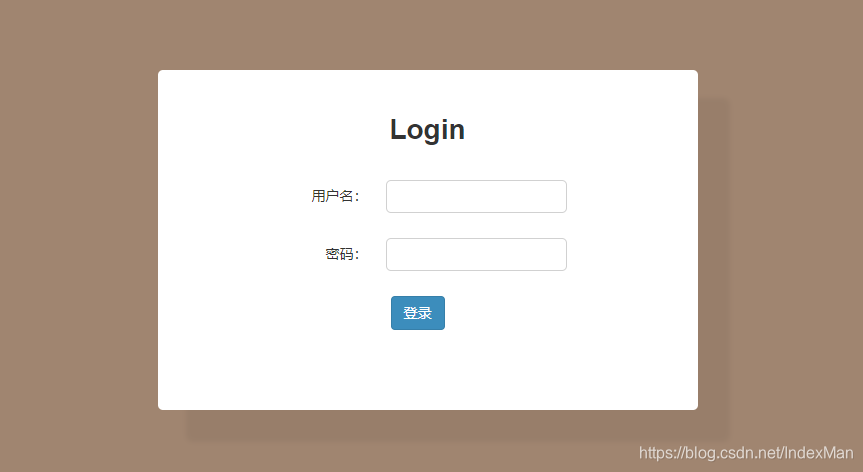
主要知识点
- DIV屏幕垂直居中(自动管理宽度和高度)
- input标签修饰(padding和focus样式)
- DIV边框阴影和圆角效果(利用:box-shadow)
- 如何让label标签垂直右对齐(inline-block)
- 如何调整line-height使得块级元素不会乱动
源码
<!DOCTYPE html>

<html lang="en">

  <head>

    <meta charset="UTF-8" />

    <meta name="viewport" content="width=device-width, initial-scale=1.0" />

    <title>登录</title>

    <style type="text/css">

      body,

      html {

        width: 100%;

        height: 100%;

        font: 14px/1.5 "SF Pro SC", "HanHei SC", "SF Pro Text", "Myriad Set Pro",

          "SF Pro Icons", "PingFang SC", "Helvetica Neue", "Helvetica", "Arial",

          sans-serif;

        background-color: #a08570;

        color: #333;

      }

      .login-body {

        width: 500px;

        margin: auto;

        background-color: #fff;

        padding: 20px;

        text-align: center;

        position: absolute;

        top: 0;

        left: 0;

        bottom: 0;

        right: 0;

        height: 300px;

        box-shadow: rgba(0, 0, 0, 0.05) 30px 30px 5px 2px;

        background: rgb(255, 255, 255);

        border-radius: 5px;

      }

      .form-item {

        padding: 10px 20px 10px 0;

        display: block;

        margin: 5px 0;

      }

      .form-item label {

        display: inline-block;

        text-align: right;

        width: 100px;

        line-height: 1.8em;

      }

      .form-item input {

        padding: 5px;

        line-height: 1.6em;

        margin-left: 15px;

        border-radius: 5px;

        border: 1px solid rgb(209, 209, 209);

      }

      input[type="text"]:focus {

        outline: 1px solid #84bc3c;

      }

      .btn {

        display: inline-block;

        margin-bottom: 0;

        font-weight: 400;

        text-align: center;

        white-space: nowrap;

        vertical-align: middle;

        cursor: pointer;

        background-image: none;

        border: 1px solid transparent;

        padding: 6px 12px;

        font-size: 14px;

        line-height: 1.42857143;

        border-radius: 4px;

      }

      .btn-primary {

        background-color: #3c8dbc;

        border-color: #367fa9;

        color: #fff;

      }

    </style>

  </head>

  <body>

    <div class="login-body">

      <form action="#">

        <div class="title">

          <h1>Login</h1>

        </div>

        <div class="form-item">

          <label for="username">用户名:</label>

          <input type="text" id="username" name="username" />

        </div>

        <div class="form-item">

          <label for="password">密码:</label>

          <input type="text" id="password" name="password" />

        </div>

        <div class="form-item">

          <button type="submit" id="submit" class="btn btn-primary">

            登录

          </button>

        </div>

      </form>

    </div>

  </body>

</html>
HTML+CSS设计一个朴实无华的登录页的更多相关文章
- CSS设计一个三列布局的页面
探讨这种布局是因为最近对话框组件以及信息系统B/S界面布局的需要.无论是什么,我们在写CSS之前首先引入reset.css,我使用的是淘宝的reset. 01 /* 02 KISSY CSS Rese ...
- 利用HTML和CSS设计一个静态的“小米商城官网首页”
一.小项目说明 这是个例行的小项目练习,主要利用html和css的基础知识,复刻一个缩减版的小米商城网页.包括[导航栏].[头部logo区,快捷键.搜索框].[网页主体].[网页尾部]几个部分.目前只 ...
- No.7 - 使用 animate.css 实现一个优雅的登录框
<!DOCTYPE html> <html> <head> <meta http-equiv="content-type" content ...
- spring security之 默认登录页源码跟踪
spring security之 默认登录页源码跟踪 2021年的最后2个月,立个flag,要把Spring Security和Spring Security OAuth2的应用及主流程源码研究透 ...
- winform设计一个登录界面和修改密码的界面-自动切换窗体(问题[已解] 望一起讨论)(技术改变世界-cnblog)
http://www.cnblogs.com/IAmBetter/archive/2012/01/14/2322156.html winform设计一个登录界面和修改密码的界面-自动切换窗体(问题[已 ...
- 少量代码设计一个登录界面(二) – .NET CORE(C#) WPF开发
微信公众号:Dotnet9,网站:Dotnet9,问题或建议:请网站留言, 如果对您有所帮助:欢迎赞赏. 阅读导航 本文背景 代码实现 本文参考 源码 1. 本文背景 同上篇文章<少量代码设计一 ...
- 少量代码设计一个登录界面 - .NET CORE(C#) WPF开发
微信公众号:Dotnet9,网站:Dotnet9,问题或建议:请网站留言, 如果对您有所帮助:欢迎赞赏. 少量代码设计一个登录界面 - .NET CORE(C#) WPF开发 阅读导航 本文背景 代码 ...
- vue 根据接口返回的状态码判断用户登录状态并跳转登录页,登录后回到上一个页面(http拦截器)
背景:后台接口返回code==501表示用户是未登录状态,需要登录才可访问: 通过http拦截做路由跳转 第一步:src目录下新建http.js文件,内容如下: import Axios from ' ...
- webview之如何设计一个优雅健壮的Android WebView?(下)(转)
转载:https://iluhcm.com/2018/02/27/design-an-elegant-and-powerful-android-webview-part-two/ (这篇文章写得有点晚 ...
- webview之如何设计一个优雅健壮的Android WebView?(上)(转)
转接:https://iluhcm.com/2017/12/10/design-an-elegant-and-powerful-android-webview-part-one/ 前言 Android ...
随机推荐
- electron打包,使用electron-packager
构建项目可以使用electron-forge构建,但是这个东西打包比较坑,mac运行报错,win下会有缓存机制,也就是热更新无效 所以选择使用electron-packager打包 sudo npm ...
- idb单副本时-TiKV节点损坏后有损数据恢复的方法
Tidb单副本时-TiKV节点损坏后有损数据恢复的方法 背景 UAT环境下,为了减少存储. 搭建了一套单副本的TiDB集群 但是随着数据量的增多, UAT上面的数据可以丢失,但是表结构等信息是无法接受 ...
- [转帖]ssh时不输入YES
vim /etc/ssh/ssh_config 60行新添加 StrictHostKeyChecking no
- [转帖]redis操作 + StrictRedis使用
https://www.cnblogs.com/szhangli/p/9979600.html Redis string类型 字符串类型是 Redis 中最为基础的数据存储类型. 它在 Redis 中 ...
- [转帖]手把手教你在QEMU上运行RISC-V Linux
https://kernel.0voice.com/forum.php?mod=viewthread&tid=3080 嵌入式Linux内核 发布于 2023-3-15 14:44:37 ...
- awk中的NR,FNR ,NF,$NF,RS,ORS,FS,OFS
awk中的NR,FNR ,NF,$NF,RS,ORS,FS,OFS https://www.cnblogs.com/zhangqingsh/archive/2013/04/24/3040801.htm ...
- grafana与K8S的下载地址
https://grafana.com/grafana/download/9.1.6 https://dl.k8s.io/v1.15.1/kubernetes-node-linux-amd64.tar ...
- kubeadm 搭建 k8s 时用到的常用命令汇总
简单记录一下 kubeadm config images list 修改镜像名称 docker tag registry.cn-hangzhou.aliyuncs.com/google_contain ...
- echarts柱状图圆角实现
series: [{ name: '销量', type: 'bar', barWidth : 30,//柱图宽度 data: [5, 20, 36, 10, 10, 20], itemStyle: { ...
- 同步存储读取vuex中store中的值
main.js import store from "./store"; Vue.prototype.$store = store; 在 store中的index.js中 impo ...