
如何在wcf中用net tcp协议进行通讯
快速阅读
如何在wcf中用net tcp协议进行通讯,一个打开Wcf的公共类。比较好好,可以记下来。 配置文件中注意配置 Service,binding,behaviors. Service中配置endpoint 指明abc ,binding中配置tcp通讯的要关参数,behaivor中配置http请求的 地址
1.建立服务服务端
还是用上次的代码,提供一个user类,实现一个方法
[ServiceContract]

    public interface IUser

    {

        [OperationContract]

        string GetUserInfo();

    }

[ServiceContract]

    public interface IUser

    {

        [OperationContract]

        string GetUserInfo();

    }
2.ServiceHostManager公有类
通过公有类可以减少代码编写量,可以保存下来,以后用的时候 直接拿来用
public interface IServiceHostmanager : IDisposable

    {

        void Start();

        void Stop();

    }

    public class ServiceHostManager<TService>:IServiceHostmanager

        where TService:class

    {

        private ServiceHost host;

        public void Dispose()

        {

            Stop();

        }

        public ServiceHostManager()

        {

            host=new ServiceHost(typeof(User));

            host.Opened+= (sender, e) =>

            {

                Console.WriteLine("wcf服务已经启动监听{0}",host.Description.Endpoints[0].Address);

            };

            host.Closed+= (sender, e) =>

            {

                Console.WriteLine("wcf服务已经启动关闭{0}", host.Description.Endpoints[0].Address);

            };

        }

        public void Start()

        {

            Console.WriteLine("正在启动wcf服务{0}",host.Description.Endpoints[0].Name);

            host.Open();

        }

        public void Stop()

        {

            if (host != null && host.State == CommunicationState.Opened)

            {

                Console.WriteLine("正在关闭wcf服务{0}", host.Description.Endpoints[0].Name);

                host.Close();

            }

        }

        public static Task StartNew(CancellationTokenSource conTokenSource)

        {

            var task = Task.Factory.StartNew(() =>

            {

                IServiceHostmanager shm = null;

                try

                {

                    shm = new ServiceHostManager<TService>();

                    shm.Start();

                    while (true)

                    {

                        if (conTokenSource.IsCancellationRequested && shm != null)

                        {

                            shm.Stop();

                            break;

                        }

                    }

                }

                catch (Exception ex)

                {

                    Console.WriteLine(ex.Message);

                    if (shm != null) shm.Stop();

                }

            },conTokenSource.Token);

            return task;

        }

    }
3.配置的相关参数
配置文件中注意配置 Service,binding,behaviors. Service中配置endpoint 指明abc ,binding中配置tcp通讯的要关参数,behaivor中配置http请求的 地址
<?xml version="1.0" encoding="utf-8" ?>

<configuration>

  <system.serviceModel>

    <services>

      <service name="hcbServiceB.User"  behaviorConfiguration="userBehavior">

        <endpoint address="net.tcp://localhost:12345/User" binding="netTcpBinding" contract="hcbServiceB.IUser">

          <identity>

            <dns value="localhost"/>

          </identity>

        </endpoint>

      </service>

    </services>

    <bindings>

      <netTcpBinding>

        <binding name="netTcpBindingConfig" closeTimeout="00:30:00" openTimeout="00:30:00" receiveTimeout="00:30:00" sendTimeout="00:30:00" transactionFlow="false" transferMode="Buffered" transactionProtocol="OleTransactions" hostNameComparisonMode="StrongWildcard" listenBacklog="100" maxBufferPoolSize="2147483647" maxBufferSize="2147483647" maxConnections="100" maxReceivedMessageSize="2147483647">

          <readerQuotas maxDepth="64" maxStringContentLength="2147483647" maxArrayLength="2147483647 " maxBytesPerRead="4096" maxNameTableCharCount="16384" />

          <reliableSession ordered="true" inactivityTimeout="00:30:00" enabled="false" />

          <security mode="Transport">

            <transport clientCredentialType="Windows" protectionLevel="EncryptAndSign" />

          </security>

        </binding>

      </netTcpBinding>

    </bindings>

    <behaviors>

      <serviceBehaviors>

        <behavior name="userBehavior">

          <serviceMetadata httpGetEnabled="True" httpGetUrl="http://localhost:8081/User" />

          <serviceDebug includeExceptionDetailInFaults="True" />

          <serviceThrottling maxConcurrentCalls="1000" maxConcurrentInstances="1000" maxConcurrentSessions="1000" />

        </behavior>

      </serviceBehaviors>

    </behaviors>

  </system.serviceModel>

</configuration>
4.启动服务
控制台中启动服务
 static void Main(string[] args)

 {

     Console.WriteLine("初始化...");

     Console.WriteLine("服务运行期间,请不要关闭窗口。");

     Console.Title = "wcf net tcp测试 ";

     var cancelTokenSouce = new CancellationTokenSource();

     ServiceHostManager<User>.StartNew(cancelTokenSouce);

     while (true)

     {

         if (Console.ReadKey().Key == ConsoleKey.Escape)

         {

             Console.WriteLine();

             cancelTokenSouce.Cancel();

             break;

         }

     }

 }
5wcftesttoos软件测试
软件路径位于,可以根据自己安装vs的目录去找。

D:\Program Files (x86)\Microsoft Visual Studio\2017\Professional\Common7\IDE
测试
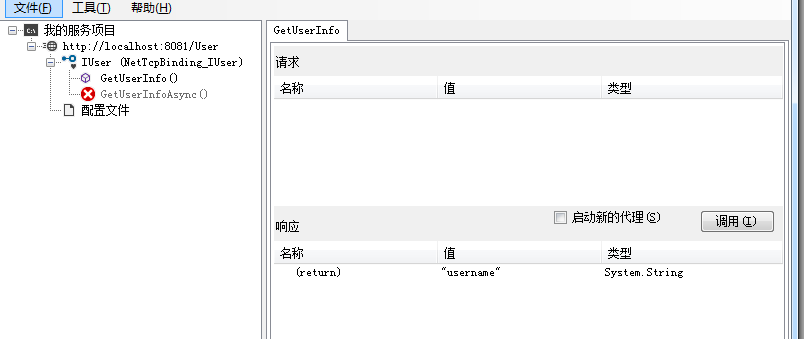
参考:
WCF绑定netTcpBinding寄宿到控制台应用程序:https://www.cnblogs.com/felixnet/p/7397139.html
友情提示
我对我的文章负责,发现好多网上的文章 没有实践,都发出来的,让人走很多弯路,如果你在我的文章中遇到无法实现,或者无法走通的问题。可以直接在公众号《爱码农爱生活 》留言。必定会再次复查原因。让每一篇 文章的流程都能顺利实现。

如何在wcf中用net tcp协议进行通讯的更多相关文章
- WCF 采用net.tcp协议
WCF 采用net.tcp协议实践 概述 与Socket相比,WCF真是爽得不得了,其基本指导思想为SOA——面向服务. 其基本配置在于ABC(Address,Binding,Contract), ...
- WCF 采用net.tcp协议实践
概述 与Socket相比,WCF真是爽得不得了,其基本指导思想为SOA——面向服务. 其基本配置在于ABC(Address,Binding,Contract),通常,只要这三个因素配置对了,那么,基本 ...
- WCF 采用net.tcp协议实践(转)
概述 与Socket相比,WCF真是爽得不得了,其基本指导思想为SOA——面向服务. 其基本配置在于ABC(Address,Binding,Contract),通常,只要这三个因素配置对了,那么,基本 ...
- 如何在WCF中用TcpTrace工具查看发送和接收的SOAP消息
WCF对消息加密(只对消息加密,不考虑Authorize)其实很简单,只要在server和client端的binding加入security mode为Message(还有Transport, Tra ...
- 基于TCP协议的网络通讯流程
不多说了,先上个图: 从上面的图中可以看出来,基于TCP协议进行通讯可以大致分成以下几个阶段: 1. 首先是在服务器端, TCP Sever调用socket(), bind(), listen()完成 ...
- WCF:如何将net.tcp协议寄宿到IIS
1 部署IIS 1.1 安装WAS IIS原本是不支持非HTTP协议的服务,为了让IIS支持net.tcp,必须先安装WAS(Windows Process Activation Service),即 ...
- [转]WCF:如何将net.tcp协议寄宿到IIS
本文转自:http://www.cnblogs.com/Gyoung/archive/2012/12/11/2812555.html 1 部署IIS 1.1 安装WAS IIS原本是不支持非HTTP协 ...
- WCF开发中将net.tcp协议寄宿到IIS的方法
1 部署IIS 1.1 安装WAS IIS原本是不支持非HTTP协议的服务,为了让IIS支持net.tcp,必须先安装WAS(Windows Process Activation Service),即 ...
- WCF入门教程(四)通过Host代码方式来承载服务 一个WCF使用TCP协议进行通协的例子 jquery ajax调用WCF,采用System.ServiceModel.WebHttpBinding System.ServiceModel.WSHttpBinding协议 学习WCF笔记之二 无废话WCF入门教程一[什么是WCF]
WCF入门教程(四)通过Host代码方式来承载服务 Posted on 2014-05-15 13:03 停留的风 阅读(7681) 评论(0) 编辑 收藏 WCF入门教程(四)通过Host代码方式来 ...
随机推荐
- JS中BOM和DOM常用的事件
总结:window对象 ● window.innerHeight - 浏览器窗口的内部高度 ● window.innerWidth - 浏览器窗口的内部宽度 ● window.open() - 打开新 ...
- MySQL比较时间(datetime)大小
获取时间返回的秒数:strtotime('2019-05-10 00:00:00') 遇到一个业务功能需要将当前时间与数据库中的会议开始.结束时间进行比较,记录一下,方便下次用. 用unix_time ...
- object-c 连接mysql
1. 通读 'mysql的使用' 2. 在Target->build setting 修改配置 User Header Search Paths 加入 /usr/local/mysql/incl ...
- 虹软人脸识别SDK在网络摄像头中的实际应用
目前在人脸识别领域中,网络摄像头的使用很普遍,但接入网络摄像头和人脸识别SDK有一定门槛,在此篇中介绍过虹软人脸识别SDK的接入流程,本文着重介绍网络摄像头获取视频流并处理的流程(红色框内),以下内容 ...
- WampServer详解
php能做什么,它是运行在服务器端的,web网站大部分数据都是存储在服务器上的,PHP就是用来处理这些存储在服务器的数据.跨平台,服务器可以是多种平台上的服务器,脚本语言,免费. wampserver ...
- golang读写文件的几种方式
golang中处理文件有很多种方式,下面我们来看看. (1)使用os模块 先来看看如何查看文件属性 package main import ( "fmt" "os&quo ...
- WebService知识点
Web Services简介: 什么是Web Services? Web Services 是应用程序组件 Web Services 使用开放协议进行通信 Web Services 是独立的(self ...
- 在线研讨会预热 | 基于ASPICE&CNAS的单元测试介绍
随着新能源车.智能驾驶技术的快速发展,软件本身复杂度越来越高,应用场景也是复杂多样,如何保证软件质量对我们来说是一个严峻的挑战.软件测试作为软件质量保证的重要手段,被各大整车厂和供应商 ...
- Not so Mobile UVA - 839(二叉树的先序遍历)
#include<iostream> using namespace std; int solve(int &W) /*这里一定要用引用,为了赋给它值*/ { int wl, dl ...
- python操作excel(xlwt写,xlrd读)基本方法
python操作excle在测试工作中还是很有用的,比如读取测试数据,回写测试结果到excel. 1.安装 pip install xlwt pip install xlrd 2.写excel # 导 ...