
Springboot Actuator之九:actuator jmx endpoint
1、配置
endpoints.jmx.domain: myapp

endpoints.jmx.uniqueNames: true

endpoints.auditevents.enabled: true
2、结果:

自定义Bean,通过JMX暴露
package com.dxz.actuator;

import org.springframework.jmx.export.annotation.ManagedAttribute;

import org.springframework.jmx.export.annotation.ManagedOperation;

import org.springframework.jmx.export.annotation.ManagedResource;

import org.springframework.stereotype.Component;

@Component

@ManagedResource(objectName = "com.dxz.jmx:type=SimpleBean", description = "这里是描述")

public class SimpleBean {

    private long id;

    private String name;

    private int age;

    /**

     * 暴露属性

     */

    @ManagedAttribute(description = "这是属性id")

    public long getId() {

        return id;

    }

    public void setId(long id) {

        this.id = id;

    }

    /**

     * 暴露属性

     */

    @ManagedAttribute(description = "这是属性name")

    public String getName() {

        return name;

    }

    public void setName(String name) {

        this.name = name;

    }

    /**

     * 暴露属性

     */

    @ManagedAttribute(description = "这是属性age")

    public int getAge() {

        return age;

    }

    public void setAge(int age) {

        this.age = age;

    }

    /**

     * 暴露方法

     */

    @ManagedOperation(description = "这里是操作")

    public String display() {

        return this.toString();

    }

    @Override

    public String toString() {

        return "SimpleBean{" + "id=" + id + ", name='" + name + '\'' + ", age=" + age + '}';

    }

}
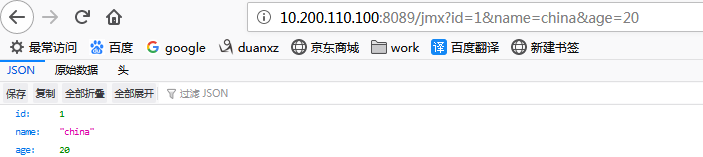
下面的controller为了测试,改变数据,
package com.dxz.actuator;

import org.springframework.beans.factory.annotation.Autowired;

import org.springframework.web.bind.annotation.GetMapping;

import org.springframework.web.bind.annotation.RequestParam;

import org.springframework.web.bind.annotation.RestController;

@RestController

public class JmxController {

    @Autowired

    private SimpleBean simpleBean;

    @GetMapping("/jmx")

    public SimpleBean simpleBean(@RequestParam(required = false) Long id, @RequestParam(required = false) String name,

            @RequestParam(required = false) Integer age) {

        if (id != null) {

            simpleBean.setId(id);

        }

        if (name != null) {

            simpleBean.setName(name);

        }

        if (age != null) {

            simpleBean.setAge(age);

        }

        return simpleBean;

    }

}
结果:

Springboot Actuator之九:actuator jmx endpoint的更多相关文章
- Springboot Actuator之八:actuator的执行原理
本文接着<Springboot Actuator之七:actuator 中原生endpoint源码解析1>,前面主要分析了原生endpoint的作用. 现在着重了解actuator的执行原 ...
- SpringBoot系列(九)单,多文件上传的正确姿势
SpringBoot系列(九)分分钟解决文件上传 往期推荐 SpringBoot系列(一)idea新建Springboot项目 SpringBoot系列(二)入门知识 springBoot系列(三)配 ...
- Springboot Actuator之七:actuator 中原生endpoint源码解析1
看actuator项目的包结构,如下: 本文中的介绍Endpoints. Endpoints(端点)介绍 Endpoints 是 Actuator 的核心部分,它用来监视应用程序及交互,spring- ...
- Springboot监控之一:SpringBoot四大神器之Actuator之3-springBoot的监控和管理--指标说明
Spring Boot包含很多其他的特性,它们可以帮你监控和管理发布到生产环境的应用.你可以选择使用HTTP端点,JMX或远程shell(SSH或Telnet)来管理和监控应用.审计(Auditing ...
- Spring Boot]SpringBoot四大神器之Actuator
论文转载自博客: https://blog.csdn.net/Dreamhai/article/details/81077903 https://bigjar.github.io/2018/08/19 ...
- SpringBoot四大神器之Actuator
介绍 Spring Boot有四大神器,分别是auto-configuration.starters.cli.actuator,本文主要讲actuator.actuator是spring boot提供 ...
- Springboot监控之一:SpringBoot四大神器之Actuator
介绍 Spring Boot有四大神器,分别是auto-configuration.starters.cli.actuator,本文主要讲actuator.actuator是spring boot提供 ...
- SpringBoot整合Swagger和Actuator
前言 本篇文章主要介绍的是SpringBoot整合Swagger(API文档生成框架)和SpringBoot整合Actuator(项目监控)使用教程. SpringBoot整合Swagger 说明:如 ...
- SpringBoot要点之使用Actuator监控
Actuator是Springboot提供的用来对应用系统进行自省和监控的功能模块,借助于Actuator开发者可以很方便地对应用系统某些监控指标进行查看.统计等. 在pom文件中加入spring-b ...
随机推荐
- Extjs 树菜单的自动展开数据的请求
今天在做extjs开发的时候,在树菜单上遇到了一个坑,也许是我刚接触extjs 不熟的缘故 问题描述:后台设置的树自动展开,但是在前端总是只显示一条数据,但是数据确实都请求到了. 经过几个小时不屑的努 ...
- Java 8 Time Api 使用指南-珍藏限量版
前面写过了Stream和Lambda,最近正想写Java 8的Time Api,小胖哥这个文章写得很好,就偷懒转载了. 1.概述 Java 8为Date和Time引入了新的API,以解决旧java.u ...
- 学点经济学:M0、M1、M2、M3,傻傻分不清?(转载)
来源:http://t.10jqka.com.cn/pid_97006727.shtml 学点经济学:M0.M1.M2.M3,傻傻分不清? 25,508人浏览 2018-08-03 11:06 常听人 ...
- Linux下BLAST+的本地化(BLAST 2.2.29+)
链接:http://blog.sciencenet.cn/home.php?mod=space&uid=830496&do=blog&quickforward=1&id ...
- 第一部分day5 文件操作
#-----文件操作----- 文件操作模式 1."r" 读 2."w" 清空写入 3."a" 追加 4."r+" 读写 ...
- HTTP协议那些事儿
HTTP协议简介 超文本传输协议(英文:HyperText Transfer Protocol,缩写:HTTP)是一种用于分布式.协作式和超媒体信息系统的应用层协议.HTTP是万维网的数据通信的基础. ...
- Java精通并发-Condition详解及相比于传统线程并发模式的改进
在上一次https://www.cnblogs.com/webor2006/p/11792954.html对于Lock的具体实现类ReentrantLock用了一个示例对它进行了一个简单的了解,而它其 ...
- LayUI的基本使用 - Tab选项卡切换显示对应数据
要求:实现tab选项卡改变的同时展示数据也跟着改变 实现条件: 1. 选项卡 [官网 – 文档/示例 – 页面元素 – 选项卡] 2.数据表格 [官网 – 文档/示例 – 内置模块 – 数据表格] 3 ...
- 搭建代理服务器时的笔记,request使用笔记
request 请求笔记: 1.opation中使用form字段传参 对应 content-type': 'application/x-www-form-urlencoded',如果想要content ...
- MySQL基于 amoeba.xml的读写分离
1.准备两台服务器 centos7 192.168.52.35 192.168.52.36 2.关闭防火墙 [root@localhost ~]# systemctl stop firewalld ...