
XGBoost对波士顿房价进行预测
import numpy as np

import matplotlib as mpl

mpl.rcParams["font.sans-serif"] = ["SimHei"]

import matplotlib.pyplot as plt

import pandas as pd

from sklearn.model_selection  import train_test_split

from sklearn.metrics import mean_squared_error

import xgboost as xgb
def notEmpty(s):

    return s != ''
names = ['CRIM','ZN', 'INDUS','CHAS','NOX','RM','AGE','DIS','RAD','TAX','PTRATIO','B','LSTAT']

path = "datas/boston_housing.data"

## 由于数据文件格式不统一,所以读取的时候,先按照一行一个字段属性读取数据,然后再按照每行数据进行处理

fd = pd.read_csv(path, header=None)

data = np.empty((len(fd), 14))

for i, d in enumerate(fd.values):

    d = map(float, filter(notEmpty, d[0].split(' ')))

    data[i] = list(d)

x, y = np.split(data, (13,), axis=1)

y = y.ravel()

print ("样本数据量:%d, 特征个数:%d" % x.shape)

print ("target样本数据量:%d" % y.shape[0])
样本数据量:506, 特征个数:13

target样本数据量:506
# 查看数据信息

X_DF = pd.DataFrame(x)

X_DF.info()

X_DF.describe().T

X_DF.head()
<class 'pandas.core.frame.DataFrame'>

RangeIndex: 506 entries, 0 to 505

Data columns (total 13 columns):

0     506 non-null float64

1     506 non-null float64

2     506 non-null float64

3     506 non-null float64

4     506 non-null float64

5     506 non-null float64

6     506 non-null float64

7     506 non-null float64

8     506 non-null float64

9     506 non-null float64

10    506 non-null float64

11    506 non-null float64

12    506 non-null float64

dtypes: float64(13)

memory usage: 51.5 KB

#数据的分割,

x_train, x_test, y_train, y_test = train_test_split(x, y, train_size=0.8, random_state=14)

print ("训练数据集样本数目:%d, 测试数据集样本数目:%d" % (x_train.shape[0], x_test.shape[0]))
训练数据集样本数目:404, 测试数据集样本数目:102
# XGBoost将数据转换为XGBoost可用的数据类型

dtrain = xgb.DMatrix(x_train, label=y_train)

dtest = xgb.DMatrix(x_test)
# XGBoost模型构建

# 1. 参数构建

params = {'max_depth':2, 'eta':1, 'silent':1, 'objective':'reg:linear'}

num_round = 2

# 2. 模型训练

bst = xgb.train(params, dtrain, num_round)

# 3. 模型保存

bst.save_model('xgb.model')
# XGBoost模型预测

y_pred = bst.predict(dtest)

print(mean_squared_error(y_test, y_pred))
24.869737956719252
# 4. 加载模型

bst2 = xgb.Booster()

bst2.load_model('xgb.model')

# 5 使用加载模型预测

y_pred2 = bst2.predict(dtest)

print(mean_squared_error(y_test, y_pred2))
24.869737956719252
# 画图

## 7. 画图

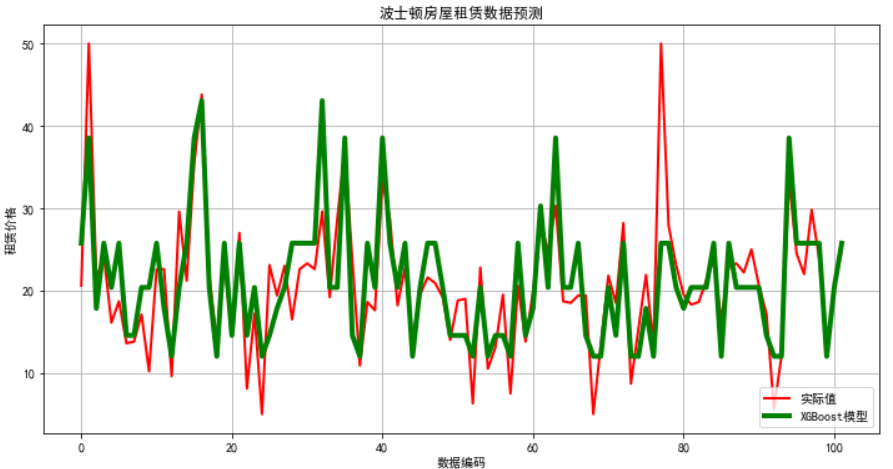
plt.figure(figsize=(12,6), facecolor='w')

ln_x_test = range(len(x_test))

plt.plot(ln_x_test, y_test, 'r-', lw=2, label=u'实际值')

plt.plot(ln_x_test, y_pred, 'g-', lw=4, label=u'XGBoost模型')

plt.xlabel(u'数据编码')

plt.ylabel(u'租赁价格')

plt.legend(loc = 'lower right')

plt.grid(True)

plt.title(u'波士顿房屋租赁数据预测')

plt.show()
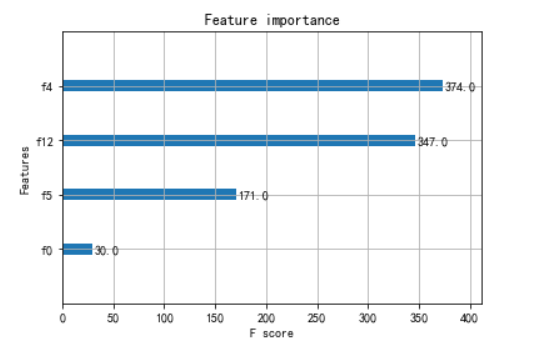
from xgboost import plot_importance

from matplotlib import pyplot

# 找出最重要的特征

plot_importance(bst,importance_type = 'cover')

pyplot.show()
XGBoost对波士顿房价进行预测的更多相关文章
- 波士顿房价预测 - 最简单入门机器学习 - Jupyter
机器学习入门项目分享 - 波士顿房价预测 该分享源于Udacity机器学习进阶中的一个mini作业项目,用于入门非常合适,刨除了繁琐的部分,保留了最关键.基本的步骤,能够对机器学习基本流程有一个最清晰 ...
- Tensorflow之多元线性回归问题(以波士顿房价预测为例)
一.根据波士顿房价信息进行预测,多元线性回归+特征数据归一化 #读取数据 %matplotlib notebook import tensorflow as tf import matplotlib. ...
- 机器学习实战二:波士顿房价预测 Boston Housing
波士顿房价预测 Boston housing 这是一个波士顿房价预测的一个实战,上一次的Titantic是生存预测,其实本质上是一个分类问题,就是根据数据分为1或为0,这次的波士顿房价预测更像是预测一 ...
- AdaBoost 算法-分析波士顿房价数据集
公号:码农充电站pro 主页:https://codeshellme.github.io 在机器学习算法中,有一种算法叫做集成算法,AdaBoost 算法是集成算法的一种.我们先来看下什么是集成算法. ...
- 《用Python玩转数据》项目—线性回归分析入门之波士顿房价预测(二)
接上一部分,此篇将用tensorflow建立神经网络,对波士顿房价数据进行简单建模预测. 二.使用tensorflow拟合boston房价datasets 1.数据处理依然利用sklearn来分训练集 ...
- 机器学习之路:python 集成回归模型 随机森林回归RandomForestRegressor 极端随机森林回归ExtraTreesRegressor GradientBoostingRegressor回归 预测波士顿房价
python3 学习机器学习api 使用了三种集成回归模型 git: https://github.com/linyi0604/MachineLearning 代码: from sklearn.dat ...
- 机器学习之路: python 回归树 DecisionTreeRegressor 预测波士顿房价
python3 学习api的使用 git: https://github.com/linyi0604/MachineLearning 代码: from sklearn.datasets import ...
- 机器学习之路:python k近邻回归 预测波士顿房价
python3 学习机器学习api 使用两种k近邻回归模型 分别是 平均k近邻回归 和 距离加权k近邻回归 进行预测 git: https://github.com/linyi0604/Machine ...
- 机器学习之路: python 线性回归LinearRegression, 随机参数回归SGDRegressor 预测波士顿房价
python3学习使用api 线性回归,和 随机参数回归 git: https://github.com/linyi0604/MachineLearning from sklearn.datasets ...
随机推荐
- 封装原生promise函数
阿里面试题: 手动封装promise函数 <!DOCTYPE html> <html lang="en"> <head> <meta ch ...
- 【批处理】set命令
原文地址:https://www.cnblogs.com/Braveliu/p/5081084.html [1]set命令简介 set,设置. [2]set命令使用 1. 打印系统环境变量.set命令 ...
- PDE工具箱的简单使用
转载自Here matlab的PDE工具箱的简单使用 问题选择 边界条件选择 菜单按钮和简单使用 命令行输入pdetool,打开GUI编辑界面如下: 注意到工具栏上,就是我们要用到的,从左到右依次使用 ...
- 【后缀数组】【LuoguP4051】 [JSOI2007]字符加密
题目链接 题目描述 喜欢钻研问题的JS 同学,最近又迷上了对加密方法的思考.一天,他突然想出了一种他认为是终极的加密办法:把需要加密的信息排成一圈,显然,它们有很多种不同的读法. 例如'JSOI07' ...
- 从海量数据中寻找出topK的最优算法代码
package findMinNumIncludedTopN;/** * 小顶堆 * @author TongXueQiang * @date 2016/03/09 * @since JDK 1.8 ...
- thread 线程分析工具
(1) https://fastthread.io/ 将线程 jstack pid 出来之后,压缩一下成为zip 然后 上传上去
- protobuf使用
一.protobuf环境搭建 Github 地址: https://github.com/protocolbuffers/protobuf 然后进入下载页 https://github.com/pro ...
- 解决vs2010按ctrl+f5,调试窗口一闪而过的方法
vs2010调试按F5与按Ctrl+F5有什么区别 Ctrl F5测试运行后不自动推出控制台,直接按F5会自动退出去 解决vs2010按ctrl+f5,调试窗口一闪而过的方法 http://hi.ba ...
- linux学习(1):linux命令大全
Linux命令 目录 1 文件管理... 5 1.1 basename. 5 1.2 cat 5 1.3 cd. 5 1.4 ...
- python 上下文管理器contextlib.ContextManager
1 模块简介 在数年前,Python 2.5 加入了一个非常特殊的关键字,就是with.with语句允许开发者创建上下文管理器.什么是上下文管理器?上下文管理器就是允许你可以自动地开始和结束一些事情. ...