
The Instruction Set In Cortex-M3
The Cortex-M3 supports the Thumb-2 instruction set. This is one of the most important features of the Cortex-M3 processor because it allows 32-bit instructions and 16-bit instructions to be used together for high code density and high efficiency. It is flexible and powerful yet easy to use.
In previous ARM processors, the central processing unit (CPU) had two operation states: a 32-bit ARM state and a 16-bit Thumb state. In the ARM state, the instructions are 32 bits and can execute all supported instructions with very high performance. In the Thumb state, the instructions are 16 bits, so there is a much higher instruction code density, but the Thumb state does not have all the functionality of ARM instructions and may require more instructions to complete certain types of operations.
To get the best of both worlds, many applications have mixed ARM and Thumb codes. However, the mixed-code arrangement does not always work best. There is overhead (in terms of both execution time and instruction space, see Figure 2.7) to switch between the states, and ARM and Thumb codes might need to be compiled separately in different files. This increases the complexity of software develop- ment and reduces maximum efficiency of the CPU core.
With the introduction of the Thumb-2 instruction set, it is now possible to handle all process- ing requirements in one operation state. There is no need to switch between the two. In fact, the Cortex-M3 does not support the ARM code. Even interrupts are now handled with the Thumb state. (Previously, the ARM core entered interrupt handlers in the ARM state.) Since there is no need to switch between states, the Cortex-M3 processor has a number of advantages over traditional ARM processors, such as:
No state switching overhead, saving both execution time and instruction space
No need to separate ARM code and Thumb code source files, making software development and
maintenance easier
It’s easier to get the best efficiency and performance, in turn making it easier to write software, because there is no need to worry about switching code between ARM and Thumb to try to get the best density/performance
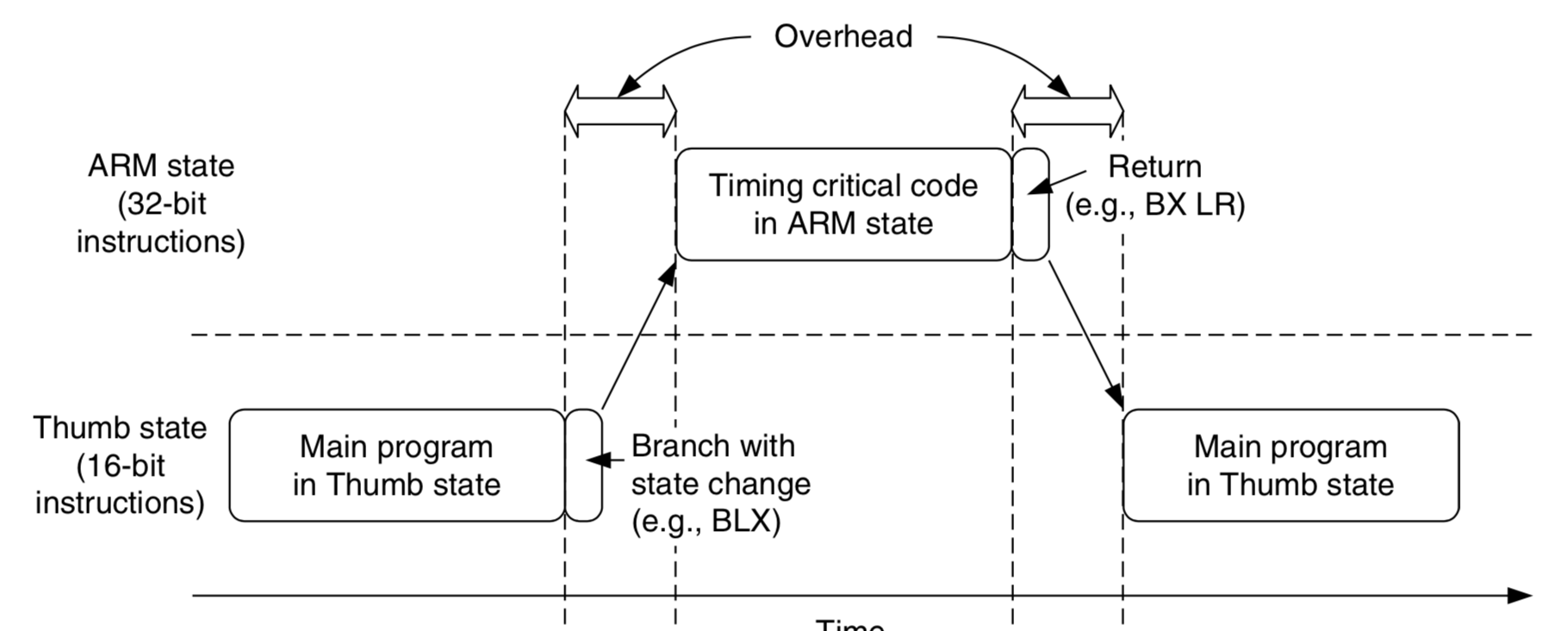
|
|
Switching between ARM Code and Thumb Code in Traditional ARM Processors Such as the ARM7. The Cortex-M3 processor has a number of interesting and powerful instructions. Here are a few examples:
Since the Cortex-M3 processor supports the Thumb-2 instruction set only, existing program code for ARM needs to be ported to the new architecture. Most C applications simply need to be recompiled using new compilers that support the Cortex-M3. Some assembler codes need modification and porting to use the new architecture and the new unified assembler framework. Note that not all the instructions in the Thumb-2 instruction set are implemented on the Cortex-M3. The ARMv7-M Architecture Application Level Reference Manual [Ref. 2] only requires a subset of the Thumb-2 instructions to be implemented. For example, coprocessor instructions are not supported on the Cortex-M3 (external data processing engines can be added), and Single Instruction–Multiple Data (SIMD) is not implemented on the Cortex-M3. In addition, a few Thumb instructions are not supported, such as Branch with Link and Exchange (BLX) with immediate (used to switch processor state from Thumb to ARM), a couple of change process state (CPS) instructions, and the SETEND (Set Endian) instructions, which were introduced in architecture v6. For a complete list of supported instructions, refer to Appendix A. 摘抄自:《The definitive guide to the ARM Cortex-M3》Second Edition. |
The Instruction Set In Cortex-M3的更多相关文章
- ARM Cortex M3(V7-M架构)硬件启动程序 一
Cortex-m3启动代码分析笔记 启动代码文件名是STM32F10X.S,它的作用先总结下,然后再分析. 启动代码作用一般是: 1)堆和栈的初始化: 2)中断向量表定义: 3)地址重映射及中断向量表 ...
- ARM Cortex M3系列GPIO口介绍(工作方式探讨)
一.Cortex M3的GPIO口特性 在介绍GPIO口功能前,有必要先说明一下M3的结构框图,这样能够更好理解总线结构和GPIO所处的位置. Cortex M3结构框图 从图中可以看出 ...
- ARM 架构、ARM7、ARM9、STM32、Cortex M3 M4 、51、AVR 之间有什么区别和联系?(转载自知乎)
ARM架构: 由英国ARM公司设计的一系列32位的RISC微处理器架构总称,现有ARMv1~ARMv8种类. ARM7: 一类采用ARMv3或ARMv4架构的,使用冯诺依曼结构的内核. ...
- STM32学习之路入门篇之指令集及cortex——m3的存储系统
STM32学习之路入门篇之指令集及cortex——m3的存储系统 一.汇编语言基础 一).汇编语言:基本语法 1.汇编指令最典型的书写模式: 标号 操作码 操作数1, 操作数2,... ...
- Implementation of Serial Wire JTAG flash programming in ARM Cortex M3 Processors
Implementation of Serial Wire JTAG flash programming in ARM Cortex M3 Processors The goal of the pro ...
- 【ARM-Linux开发】ARM7 ARM9 ARM Cortex M3 M4 有什么区别
ARM7 ARM9 ARM Cortex M3 M4 区别 arm7 arm9 可以类比386和奔腾, 不同代,arm9相比arm7指令集和性能都有所增强,arm7和arm9都有带mmu和无mmu的版 ...
- 【freertos】002-posix模拟器设计与cortex m3异常处理
目录 前言 posix 标准接口层设计 模拟器的系统心跳 模拟器的task底层实质 模拟器的任务切换原理 cortex M3/M4异常处理 双堆栈指针 双操作模式 栈帧 EXC_RETURN 前言 如 ...
- CORTEX -M3 : Registers in depth
http://www.zembedded.com/cortex-m3-registers-in-depth/ Thanks for the overwhelm response you show in ...
- ARM Cortex M3(V7-M架构)硬件启动程序 二
解析 STM32 的启动过程 解析STM32的启动过程 当前的嵌入式应用程序开发过程里,并且C语言成为了绝大部分场合的最佳选择.如此一来main函数似乎成为了理所当然的起点——因为C程序往往从main ...
- stm32和cortex M3学习内核简单总结
1.stm32综述 2.寄存器组 3.操作模式和特权级别 4.存储器映射 5.中断和异常 6.其他 Stm32综述 这可以说是我第一款认真学习的单片机了,学完这个就要开启我通往arm9的大门了,接下来 ...
随机推荐
- vs查找替换功能打不开!
其实解决办法很简单啊 vs--窗口--重置窗口布局
- Operation之结合操作符
startWith 该方法会在Observable序列开始之前插入一些事件元素. 即发生事件消息之前, 会发出这些预先插入的事件消息 Observable.of("2", &quo ...
- Spark Streaming反压机制
反压(Back Pressure)机制主要用来解决流处理系统中,处理速度比摄入速度慢的情况.是控制流处理中批次流量过载的有效手段. 1 反压机制原理 Spark Streaming中的反压机制是Spa ...
- 退出Vim编辑器
:q ,退出(:quit的缩写) :q!,退出且不保存(:quit!的缩写) :wq,保存并退出 :wq!,保存并退出即使文件没有写入权限(强制保存退出) :x,保存并退出(类似:wq,但是只有在有更 ...
- go 调度机制简介
goroutine是go中最重要的功能之一,正是因为有了goroutine这样强大的工具,go在并发方面表现的特别优秀. 那么goroutine和普通的线程和协程有什么区别呢?首先,我们需要明白线程和 ...
- 深入Nginx之《常用参数配置技巧》
常见参配置实战技巧 下面会讲解实战中应该怎么配置更为合理. 1.user 默认是nobody,如果使用nobody,Nginx在运行过程中会出现很多操作没有权限,比如写硬盘.一般都是用低于root级别 ...
- MySQL Community Server 8.0.16
1 首先 我们需要先下载一个 Mysql 点击这个网址进入 Mysql 的官网的下载地址: https://dev.mysql.com/downloads/mysql/ 首先 根据你的电脑的操作系统选 ...
- idea 添加自定义的todo标签
背景:idea添加自定义的todo标签可以提高开发效率,搞之 在idea定义个人风格的todo IDEA自定义TODO注释 主要分为如下两步 自定义todo标签 settings>Editor& ...
- python的帮助信息的写法
# coding = utf-8from optparse import OptionParserfrom optparse import OptionGroup usage = 'Usage: %p ...
- SpringBoot中使用Thymeleaf模板
1.引入pom依赖 <dependency> <groupId>org.springframework.boot</groupId> <artifactId& ...