
Android仿微信QQ等实现锁屏消息提醒
demo代码如下:
import android.content.Intent;

import android.os.Bundle;

import android.support.v7.app.AppCompatActivity;

import android.view.View;

import com.demo.lockscreenmsgdemo.MyService;

import com.demo.lockscreenmsgdemo.R;

/**

 * 仿qq,微信,支付宝锁屏消息

 * 使用步骤,点击这个按钮以后,按返回键退出APP,关闭手机屏幕,5s以后会受到锁屏消息,可以点击进入消息详情页面

 */

public class MainActivity extends AppCompatActivity {

    @Override

    protected void onCreate(Bundle savedInstanceState) {

        super.onCreate(savedInstanceState);

        setContentView(R.layout.activity_main);

        findViewById(R.id.start_service_btn).setOnClickListener(new View.OnClickListener() {

            @Override

            public void onClick(View view) {

                Intent intent = new Intent(MainActivity.this, MyService.class);

                startService(intent); //启动后台服务

            }

        });

    }

}
import android.app.KeyguardManager;

import android.app.WallpaperManager;

import android.content.Context;

import android.content.Intent;

import android.graphics.drawable.Drawable;

import android.os.Bundle;

import android.support.v7.app.AppCompatActivity;

import android.util.Log;

import android.view.View;

import android.view.Window;

import android.view.WindowManager;

import com.demo.lockscreenmsgdemo.R;

/**

 * 锁屏消息内容的activity

 */

public class MessageActivity extends AppCompatActivity {

    private Context mContext;

    @Override

    protected void onCreate(Bundle savedInstanceState) {

        super.onCreate(savedInstanceState);

        Log.i("tag", "onCreate:启动了消息内容的activity ");

        //四个标志位顾名思义,分别是锁屏状态下显示,解锁,保持屏幕长亮,打开屏幕。这样当Activity启动的时候,它会解锁并亮屏显示。

        Window win = getWindow();

        win.addFlags(WindowManager.LayoutParams.FLAG_SHOW_WHEN_LOCKED //锁屏状态下显示

                | WindowManager.LayoutParams.FLAG_DISMISS_KEYGUARD //解锁

                | WindowManager.LayoutParams.FLAG_KEEP_SCREEN_ON //保持屏幕长亮

                | WindowManager.LayoutParams.FLAG_TURN_SCREEN_ON); //打开屏幕

        //使用手机的背景

        Drawable wallPaper = WallpaperManager.getInstance(this).getDrawable();

        win.setBackgroundDrawable(wallPaper);

        setContentView(R.layout.activity_message);

        mContext = this;

        initView();

    }

    @Override

    protected void onNewIntent(Intent intent) {

        super.onNewIntent(intent);

        //获取电源管理器对象

//        PowerManager pm = (PowerManager) this.getSystemService(Context.POWER_SERVICE);

//        if (!pm.isScreenOn()) {

//            PowerManager.WakeLock wl = pm.newWakeLock(PowerManager.ACQUIRE_CAUSES_WAKEUP |

//                    PowerManager.SCREEN_BRIGHT_WAKE_LOCK, "bright");

//            wl.acquire();  //点亮屏幕

//            wl.release();  //任务结束后释放

//        }

    }

    private void initView() {

        findViewById(R.id.message_layout).setOnClickListener(new View.OnClickListener() {

            @Override

            public void onClick(View view) {

                //先解锁系统自带锁屏服务,放在锁屏界面里面

                KeyguardManager keyguardManager = (KeyguardManager) mContext.getSystemService(Context.KEYGUARD_SERVICE);

                keyguardManager.newKeyguardLock("").disableKeyguard(); //解锁

                //点击进入消息对应的页面

                mContext.startActivity(new Intent(mContext, DetailsActivity.class));

                finish();

            }

        });

        findViewById(R.id.close_iv).setOnClickListener(new View.OnClickListener() {

            @Override

            public void onClick(View view) {

                finish();

            }

        });

    }

}
import android.support.v7.app.AppCompatActivity;

import android.os.Bundle;

import com.demo.lockscreenmsgdemo.R;

public class DetailsActivity extends AppCompatActivity {

    @Override

    protected void onCreate(Bundle savedInstanceState) {

        super.onCreate(savedInstanceState);

        setContentView(R.layout.activity_details);

    }

}
import android.app.KeyguardManager;

import android.content.BroadcastReceiver;

import android.content.Context;

import android.content.Intent;

import android.os.Build;

import android.util.Log;

import com.demo.lockscreenmsgdemo.activity.MessageActivity;

/**

 * 监听锁屏消息的广播接收器

 */

public class LockScreenMsgReceiver extends BroadcastReceiver {

    private static final String TAG = "LockScreenMsgReceiver";

    @Override

    public void onReceive(Context context, Intent intent) {

        Log.i(TAG, "onReceive:收到了锁屏消息 ");

        String action = intent.getAction();

        if (action.equals("com.zx.lockscreenmsgdemo.LockScreenMsgReceiver")) {

            //管理锁屏的一个服务

            KeyguardManager km = (KeyguardManager) context.getSystemService(Context.KEYGUARD_SERVICE);

            String text = km.inKeyguardRestrictedInputMode() ? "锁屏了" : "屏幕亮着的";

            Log.i(TAG, "text: " + text);

            if (km.inKeyguardRestrictedInputMode()) {

                Log.i(TAG, "onReceive:锁屏了 ");

                //判断是否锁屏

                Intent alarmIntent = new Intent(context, MessageActivity.class);

                //在广播中启动Activity的context可能不是Activity对象,所以需要添加NEW_TASK的标志,否则启动时可能会报错。

                alarmIntent.addFlags(Intent.FLAG_ACTIVITY_NEW_TASK);

                if(Build.VERSION.SDK_INT >= 26){

                    alarmIntent.addFlags(Intent.FLAG_ACTIVITY_PREVIOUS_IS_TOP);

                }

                context.startActivity(alarmIntent); //启动显示锁屏消息的activity

            }

        }

    }

}
import android.app.Service;

import android.content.ComponentName;

import android.content.Intent;

import android.os.IBinder;

import android.util.Log;

/**

 * 模拟推送,在退出APP后的一段时间发送消息

 */

public class MyService extends Service {

    private static final String TAG = "MyService";

    public MyService() {

    }

    @Override

    public IBinder onBind(Intent intent) {

        Log.i(TAG, "onBind: ");

        throw new UnsupportedOperationException("Not yet implemented");

    }

    @Override

    public void onCreate() {

        Log.i(TAG, "onCreate: ");

        super.onCreate();

    }

    @Override

    public int onStartCommand(Intent intent, int flags, int startId) {

        Log.i(TAG, "onStartCommand: ");

        sendMessage();

        return START_STICKY;

    }

    @Override

    public void onDestroy() {

        Log.i(TAG, "onDestroy: ");

        super.onDestroy();

    }

    /**

     * 模仿推送,发消息

     */

    private void sendMessage() {

        System.out.println("sendMessage");

        new Thread(new Runnable() {

            @Override

            public void run() {

                try {

                    Thread.sleep(5000);

                } catch (InterruptedException e) {

                    e.printStackTrace();

                }

                Intent intent = new Intent();

                intent.setAction("com.demo.lockscreenmsgdemo.LockScreenMsgReceiver");

                //Android O版本对后台进程做了限制广播的发送,对隐式广播也做了限制;必须要指定接受广播类的包名和类名

                //解决Background execution not allowed-----8.0以上发送的隐式广播无法被收到问题

                intent.setComponent(new ComponentName("com.demo.lockscreenmsgdemo","com.demo.lockscreenmsgdemo.LockScreenMsgReceiver"));

                sendBroadcast(intent); //发送广播

            }

        }).start();

    }

}
页面布局:
activity_details.xml
<?xml version="1.0" encoding="utf-8"?>

<LinearLayout xmlns:android="http://schemas.android.com/apk/res/android"

xmlns:app="http://schemas.android.com/apk/res-auto"

xmlns:tools="http://schemas.android.com/tools"

android:layout_width="match_parent"

android:layout_height="match_parent"

android:gravity="center"

tools:context="com.demo.lockscreenmsgdemo.activity.DetailsActivity">

<TextView

    android:layout_width="wrap_content"

    android:layout_height="wrap_content"

    android:textSize="18sp"

    android:text="这是消息的详情"/>

</LinearLayout>
activity_main.xml
<?xml version="1.0" encoding="utf-8"?>

<RelativeLayout xmlns:android="http://schemas.android.com/apk/res/android"

    xmlns:app="http://schemas.android.com/apk/res-auto"

    xmlns:tools="http://schemas.android.com/tools"

    android:layout_width="match_parent"

    android:layout_height="match_parent"

    tools:context="com.demo.lockscreenmsgdemo.activity.MainActivity">

    <Button

        android:id="@+id/start_service_btn"

        android:layout_width="match_parent"

        android:layout_height="wrap_content"

        android:layout_centerInParent="true"

        android:text="开启消息服务" />

</RelativeLayout>
activity_message.xml
<?xml version="1.0" encoding="utf-8"?>

<LinearLayout xmlns:android="http://schemas.android.com/apk/res/android"

    android:layout_width="match_parent"

    android:layout_height="match_parent"

    android:gravity="center"

    android:layout_marginStart="15dp"

    android:layout_marginEnd="15dp"

    android:orientation="vertical">

    <RelativeLayout

        android:layout_width="match_parent"

        android:layout_height="50dp"

        android:background="#381515"

        android:orientation="horizontal">

        <ImageView

            android:id="@+id/icon_iv"

            android:layout_width="25dp"

            android:layout_height="25dp"

            android:layout_centerVertical="true"

            android:layout_marginStart="15dp"

            android:scaleType="centerCrop"

            android:src="@mipmap/qq" />

        <TextView

            android:layout_width="wrap_content"

            android:layout_height="wrap_content"

            android:layout_centerVertical="true"

            android:layout_marginStart="15dp"

            android:layout_toEndOf="@id/icon_iv"

            android:text="QQ"

            android:textColor="#fff" />

        <ImageView

            android:id="@+id/close_iv"

            android:layout_width="15dp"

            android:layout_height="15dp"

            android:layout_alignParentEnd="true"

            android:layout_centerVertical="true"

            android:layout_marginEnd="15dp"

            android:scaleType="centerCrop"

            android:src="@mipmap/close" />

    </RelativeLayout>

    <LinearLayout

        android:id="@+id/message_layout"

        android:layout_width="match_parent"

        android:layout_height="100dp"

        android:background="#1c3636"

        android:orientation="vertical"

        android:paddingLeft="15dp"

        android:paddingTop="25dp">

        <TextView

            android:layout_width="wrap_content"

            android:layout_height="wrap_content"

            android:text=".在吗?"

            android:textColor="#fff" />

        <TextView

            android:layout_width="wrap_content"

            android:layout_height="wrap_content"

            android:layout_marginTop="10dp"

            android:text=".今天有空吗!"

            android:textColor="#fff" />

    </LinearLayout>

</LinearLayout>
AndroidManifest.xml
<?xml version="1.0" encoding="utf-8"?>

<manifest xmlns:android="http://schemas.android.com/apk/res/android"

    package="com.demo.lockscreenmsgdemo">

    <!-- 解锁屏幕需要的权限 -->

    <uses-permission android:name="android.permission.DISABLE_KEYGUARD" />

    <!-- 申请电源锁需要的权限 -->

    <uses-permission android:name="android.permission.WAKE_LOCK" />

    <application

        android:allowBackup="true"

        android:icon="@mipmap/ic_launcher"

        android:label="@string/app_name"

        android:roundIcon="@mipmap/ic_launcher_round"

        android:supportsRtl="true"

        android:theme="@style/AppTheme">

        <activity android:name=".activity.MainActivity">

            <intent-filter>

                <action android:name="android.intent.action.MAIN" />

                <category android:name="android.intent.category.LAUNCHER" />

            </intent-filter>

        </activity>

        <activity

            android:name=".activity.MessageActivity"

            android:excludeFromRecents="true"

            android:launchMode="singleInstance"

            android:taskAffinity="" />

        <receiver

            android:name=".LockScreenMsgReceiver"

            android:enabled="true"

            android:exported="true">

            <intent-filter>

                <!-- 监听锁屏消息 -->

                <action android:name="com.demo.lockscreenmsgdemo.LockScreenMsgReceiver" />

            </intent-filter>

        </receiver>

        <service

            android:name=".MyService"

            android:enabled="true"

            android:exported="true" />

        <activity android:name=".activity.DetailsActivity"></activity>

    </application>

</manifest>
适用应用场景
- 适用应用场景:应用没有完全退出的情况下在后台运行时,如果用户已经关闭了手机屏幕,如果我们的APP收到推送消息,则打开手机屏幕,弹框显示消息的方式来提醒用户。
实现思路
- 在收到自己服务器的推送消息时,发送一条广播,在接收到指定广播之后在广播的onReceive()中判断当前屏幕是否处于关闭状态,如果处于关闭状态,则显示这个弹窗消息,反之,则不需要显示
说明:
KeyguardManager类,管理锁屏
在广播中启动Activity的context可能不是Activity对象,有可能是Service或者其他BroadcastReceiver,所以需要添加NEW_TASK的标志,否则启动时会报错。
- 能够在锁屏状态下显示消息就是因为窗体对象的这个添加标志位的这个方法起了作用。四个标志位的作用,分别是锁屏状态下显示,解锁,保持屏幕长亮,打开屏幕。这样当Activity启动的时候,它会解锁并亮屏显示。保持屏幕长亮这个标志位是可选的。
设置了背景为壁纸的背景,所以显示的是桌面的背景。如果背景设为默认的白色,则导致弹窗后面是一片白色,看起来很丑。如果背景设置为透明,则弹窗后面会显示出解锁后的界面(即使有锁屏密码,也是会显示解锁后的界面的),一样很影响视觉效果。
当显示完消息,点击消息内容的时候,需要先先解锁系统自带锁屏服务,才能进入我们对应的消息界面。
运行效果:
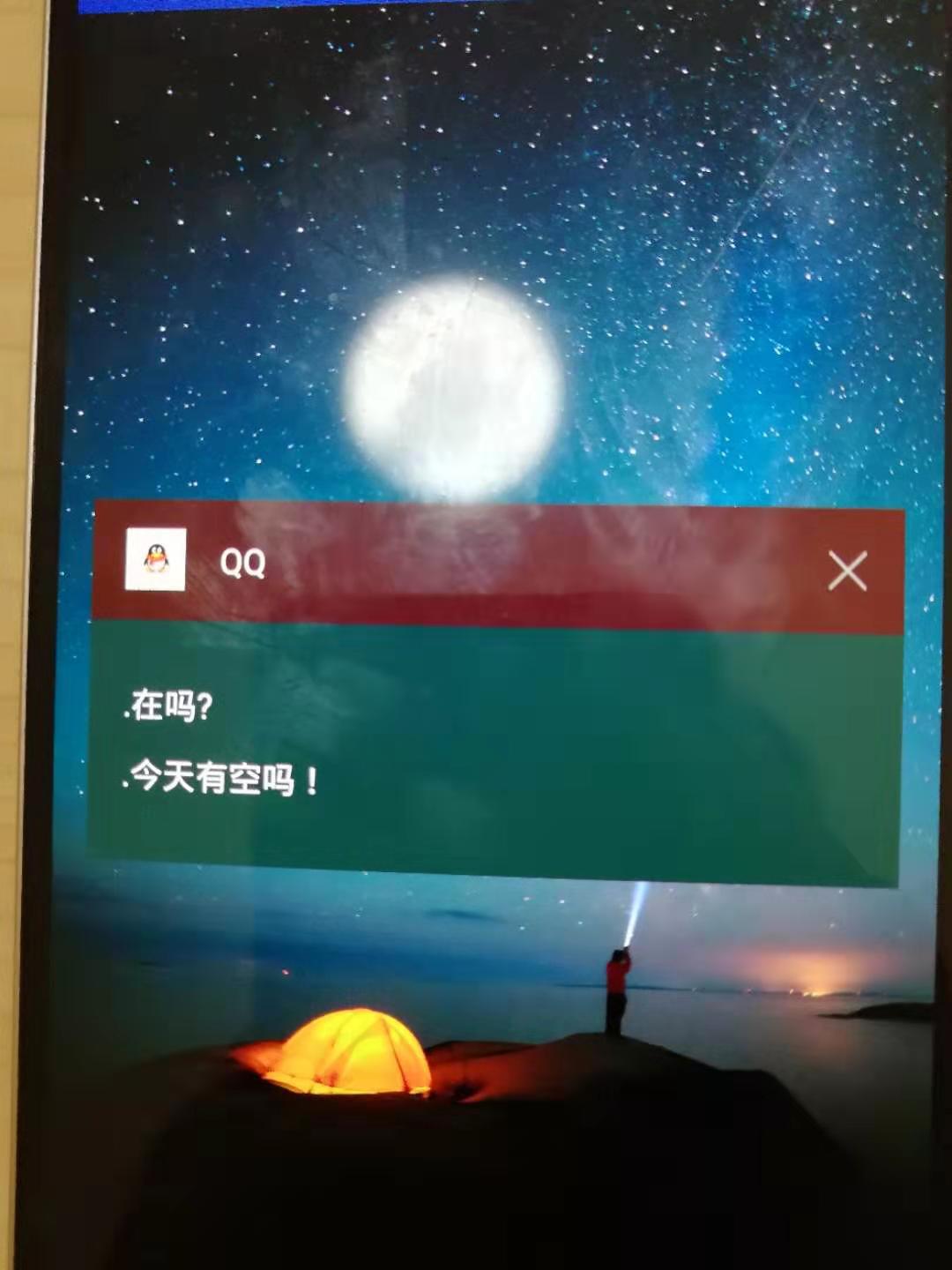
Android仿微信QQ等实现锁屏消息提醒的更多相关文章
- Android仿微信图片上传,可以选择多张图片,缩放预览,拍照上传等
仿照微信,朋友圈分享图片功能 .可以进行图片的多张选择,拍照添加图片,以及进行图片的预览,预览时可以进行缩放,并且可以删除选中状态的图片 .很不错的源码,大家有需要可以下载看看 . 微信 微信 微信 ...
- Vue3.0网页版聊天|Vue3.x+ElementPlus仿微信/QQ界面|vue3聊天实例
一.项目简介 基于vue3.x+vuex+vue-router+element-plus+v3layer+v3scroll等技术构建的仿微信web桌面端聊天实战项目Vue3-Webchat.基本上实现 ...
- Android 仿微信小视频录制
Android 仿微信小视频录制 WechatShortVideo和WechatShortVideo文章
- Android仿苹果版QQ下拉刷新实现(二) ——贝塞尔曲线开发"鼻涕"下拉粘连效果
前言 接着上一期Android仿苹果版QQ下拉刷新实现(一) ——打造简单平滑的通用下拉刷新控件 的博客开始,同样,在开始前我们先来看一下目标效果: 下面上一下本章需要实现的效果图: 大家看到这个效果 ...
- Android锁屏状态下弹出activity,如新版qq的锁屏消息提示
在接收消息广播的onReceive里,跳转到你要显示的界面.如: Intent intent = new Intent(arg0,MainActivity.class); intent.addFlag ...
- Android仿微信拍摄短视频
近期做项目需要添加上传短视频功能,功能设置为类似于微信,点击开始拍摄,设置最长拍摄时间,经过研究最终实现了这个功能,下面就和大家分享一下,希望对你有帮助. 1.视频录制自定义控件: /** * 视频播 ...
- Android 仿微信朋友圈添加图片
github地址(欢迎下载Demo) https://github.com/zhouxu88/WXCircleAddPic 老习惯,先上图,着急用的朋友,直接带走Demo,先拿来用吧,毕竟老板催的紧, ...
- [Android]仿新版QQ的tab下面拖拽标记为已读的效果
以下内容为原创,欢迎转载,转载请注明 来自天天博客:http://www.cnblogs.com/tiantianbyconan/p/4182929.html 可拖拽的红点,(仿新版QQ,tab下面拖 ...
- Android仿微信界面
效果图 原理介绍 1.先绘制一个颜色(例如:粉红) 2.设置Mode=DST_IN 3.绘制我们这个可爱的小机器人 回答我,显示什么,是不是显示交集,交集是什么?交集是我们的小机器人的非透明区域,也就 ...
随机推荐
- Android PKMS服务
它的作用? 关于PKMS的全称是啥应该咱们不陌生,PackageManagerService,和AMS一样是Android系统的核心服务,它主要负责系统中Package的管理,应用程序的安装.卸载.信 ...
- beta冲刺(3/7)
作业格式 课程名称:软件工程1916|W(福州大学) 作业要求:项目beta冲刺(团队) 团队名称: 那周余嘉熊掌将得队 作业目标:beta(3/7) 队员学号 队员姓名 博客地址 备注 221600 ...
- discuz x3.3标题的最少字数限制设置方法
Discuz帖子标题默认字数最多是80个字节,却没有最少的字节限制.最近看到很多站长想限制一下帖子标题最少字数,不管是利于seo,还是禁止灌水,都有必要.为此把设置方法发上来分享. 1.找到并打开st ...
- windows命令查看端口占用情况
打开cmd 查看端口占用情况:netstat -aon 查看PID对应的进程:tasklist /FI "PID eq 16948"
- 2019年12月份关于Android Studio 需要了解的知识总结
因为期末项目答辩的原因,我和我的小组成员一起写了个作品展示app 就是用AndroidStudio写的 具体功能呢还加上了云服务器,bmob,等等 我是不知道那个云服务器要怎么配置啊,也不会用,都是 ...
- js版本规范的表示:ES6 == ES 6 == ECMAScript 6 == ECMA-262 6
Ecma 国际大会宣布正式批准ECMA-262第 6 版,亦即 ECMAScript 2015(曾用名:ECMAScript 6.ES6)的语言规范. 关系 ECMA-262 == ECMAScrip ...
- 基本例程(4-1)手势识别C++ 和简单形状匹配
扩展库https://blog.csdn.net/Taily_Duan/article/details/52130135 opencv3.3+扩展库 /************************ ...
- moco搭建json api网站用于接口测试
java -jar moco-runner-1.0.0-standalone.jar http -p 12306 -c config/conf.json 配置文件 [ { "request& ...
- SQL注入学习
本次实验环境用的是Xampp,搭建的sqli-labs 配置环境: 下载路径https://github.com/Audi-1/sqli-labs,下载源代码,将解压好的文件夹放在xampp\htdo ...
- python Image open读取网络图片本地显示 爬虫必备
#!/usr/bin/python3 # -*- coding: utf-8 -*- import requests from PIL import Image from io import Byte ...