
pyspider 数据存入Mysql--Python3
一、不写入Mysql
以爬取哪儿网为例。
以下为脚本:
from pyspider.libs.base_handler import *

class Handler(BaseHandler):

    crawl_config = {

    }

    @every(minutes=24 * 60)

    def on_start(self):

        self.crawl('https://travel.qunar.com/travelbook/list.htm', callback=self.index_page, validate_cert=False)

    @config(age=100 * 24 * 60 * 60)

    def index_page(self, response):

        for each in response.doc('li > .tit > a').items():

            self.crawl(each.attr.href, callback=self.detail_page, validate_cert=False, fetch_type='js')

        next = response.doc('.next').attr.href

        self.crawl(next, callback=self.index_page)

    @config(priority=2)

    def detail_page(self, response):

        return {

            "url": response.url,

            "title": response.doc('#booktitle').text(),

            "date": response.doc('.when .data').text(),

            "day": response.doc('.howlong .data').text(),

            "who": response.doc('.who .data').text(),

            "text": response.doc('#b_panel_schedule').text(),

            "image": response.doc('.cover_img').text(),

        }
这个脚本里只是单纯的将结果打印在pyspider 的web ui中,并没有存到其它地方。
二、存入Mysql中
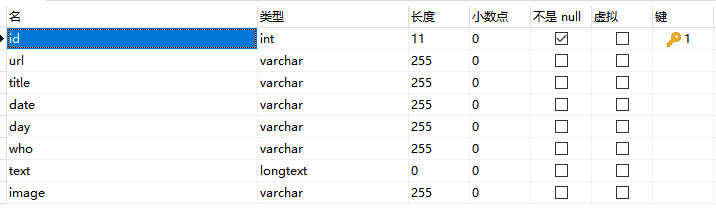
插入数据库的话,需要我们在调用它之前定义一个save_in_mysql函数。 并且需要将连接数据库等初始化放在__init__函数中。
注: pymysql.connect('localhost', '账号', '密码', '数据库', charset='utf8')
  # 连接数据库

    def __init__(self):

        self.db = pymysql.connect('localhost', 'root', 'root', 'qunar', charset='utf8')

    def save_in_mysql(self, url, title, date, day, who, text, image):

        try:

            cursor = self.db.cursor()

            sql = 'INSERT INTO qunar(url, title, date, day, who, text, image) \

            VALUES (%s, %s , %s, %s, %s, %s, %s)'   # 插入数据库的SQL语句

            print(sql)

            cursor.execute(sql, (url, title, date, day, who, text, image))

            print(cursor.lastrowid)

            self.db.commit()

        except Exception as e:

            print(e)

            self.db.rollback()
然后在detail_page中调用save_in_mysql函数:
@config(priority=2)

    def detail_page(self, response):

        url = response.url

        title = response.doc('title').text()

        date = response.doc('.when .data').text()

        day = response.doc('.howlong .data').text()

        who = response.doc('.who .data').text()

        text = response.doc('#b_panel_schedule').text()[0:100].replace('\"', '\'', 10)

        image = response.doc('.cover_img').attr.src

     # 插入数据库

        self.save_in_mysql(url, title, date, day, who, text, image)

        return {

            "url": response.url,

            "title": response.doc('title').text(),

            "date": response.doc('.when .data').text(),

            "day": response.doc('.howlong .data').text(),

            "who": response.doc('.who .data').text(),

            "text": response.doc('#b_panel_schedule').text(),

            "image": response.doc('.cover_img').attr.src

        }
三、完整代码、数据库建设及运行结果 (代码可直接跑)
#!/usr/bin/env python

# -*- encoding: utf-8 -*-

# Created on 2019-07-02 21:37:08

# Project: qunar

from pyspider.libs.base_handler import *

import pymysql

class Handler(BaseHandler):

    crawl_config = {

    }

    # 连接数据库

    def __init__(self):

        self.db = pymysql.connect('localhost', 'root', 'root', 'qunar', charset='utf8')

    def save_in_mysql(self, url, title, date, day, who, text, image):

        try:

            cursor = self.db.cursor()

            sql = 'INSERT INTO qunar(url, title, date, day, who, text, image) \

            VALUES (%s, %s , %s, %s, %s, %s, %s)'   # 插入数据库的SQL语句

            print(sql)

            cursor.execute(sql, (url, title, date, day, who, text, image))

            print(cursor.lastrowid)

            self.db.commit()

        except Exception as e:

            print(e)

            self.db.rollback()

    @every(minutes=24 * 60)

    def on_start(self):

        self.crawl('http://travel.qunar.com/travelbook/list.htm', callback=self.index_page)

    @config(age=10 * 24 * 60 * 60)

    def index_page(self, response):

        for each in response.doc('li > .tit > a').items():

            self.crawl(each.attr.href, callback=self.detail_page, fetch_type='js')

        next_url = response.doc('.next').attr.href

        self.crawl(next_url, callback=self.index_page)

    @config(priority=2)

    def detail_page(self, response):

        url = response.url

        title = response.doc('title').text()

        date = response.doc('.when .data').text()

        day = response.doc('.howlong .data').text()

        who = response.doc('.who .data').text()

        text = response.doc('#b_panel_schedule').text()[0:100].replace('\"', '\'', 10)

        image = response.doc('.cover_img').attr.src

     # 存入数据库

        self.save_in_mysql(url, title, date, day, who, text, image)

        return {

            "url": response.url,

            "title": response.doc('title').text(),

            "date": response.doc('.when .data').text(),

            "day": response.doc('.howlong .data').text(),

            "who": response.doc('.who .data').text(),

            "text": response.doc('#b_panel_schedule').text(),

            "image": response.doc('.cover_img').attr.src

        }
数据库建设:
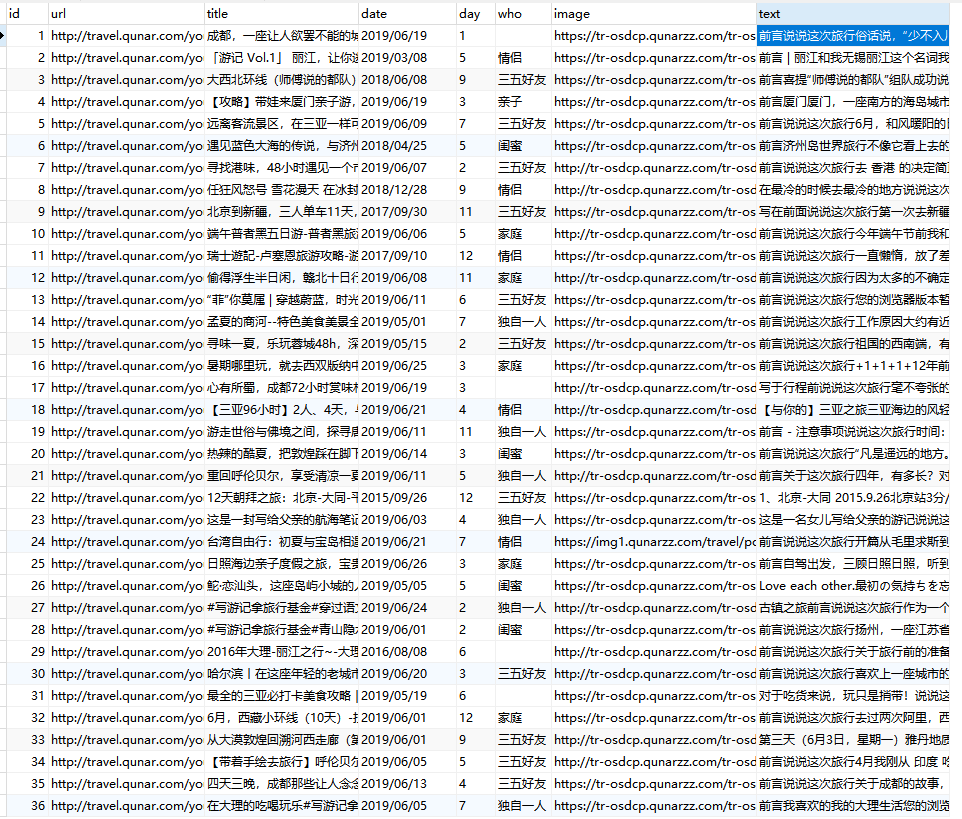
结果:
pyspider 数据存入Mysql--Python3的更多相关文章
- php+phpspreadsheet读取Excel数据存入mysql
先生成Excel模板,然后导入Excel数据到mysql,每条数据对应图片上传到阿里云 <?php /** * Created by PhpStorm. * User: Administrato ...
- Scrapy爬虫实例教程(二)---数据存入MySQL
书接上回 实例教程(一) 本文将详细描述使用scrapy爬去左岸读书所有文章并存入本地MySql数据库中,文中所有操作都是建立在scrapy已经配置完毕,并且系统中已经安装了Mysql数据库(有权限操 ...
- 关于mapreducer 读取hbase数据 存入mysql的实现过程
mapreducer编程模型是一种八股文的代码逻辑,就以用户行为分析求流存率的作为例子 1.map端来说:必须继承hadoop规定好的mapper类:在读取hbase数据时,已经有现成的接口 Tabl ...
- nodejs爬虫数据存入mysql
node爬虫主要用的是三个插件 request cheerio mysql 废话不多说直接上代码 const request=require("request") const ch ...
- web项目数据存入mysql数据库中文乱码问题
刚开始怀疑是项目中编码设置问题,发现在web.xml中已经有过设置:后来dubug显示数据在传输的过程中一切正常,怀疑是数据库编码问题,然后查看mysql编码: show variables like ...
- 【python 2.7】python读取json数据存入MySQL
同上一篇,只是适配 CentOS+ python 2.7 #python 2.7 # -*- coding:utf-8 -*- __author__ = 'BH8ANK' import json im ...
- 【python 3.6】python读取json数据存入MySQL(二)
在网上找到一个包含全国各省市经纬度的json文件,也可以通过上次的办法,解析json关键字,构造SQL语句,插入数据库. JSON文件格式如下: [ { "name": " ...
- 【python 3.6】python读取json数据存入MySQL(一)
整体思路: 1,读取json文件 2,将数据格式化为dict,取出key,创建数据库表头 3,取出dict的value,组装成sql语句,循环执行 4,执行SQL语句 #python 3.6 # -* ...
- 将数据存入mysql中
import pymysql import warnings # 忽略警告 warnings.filterwarnings("ignore") # 连接数据库 db = pymys ...
随机推荐
- discuz插件开发
首先请修改global里的配载文件$_config['plugindeveloper'] = 2; 然后应用中心,点击设计插件 模块选择管理中心即可在应用里面显示链接 开发资料参考:http://fa ...
- CSS Blur() 将高斯模糊应用于输出图片
一.Css Blur() blur() CSS 方法将高斯模糊应用于输出图片. 结果为 <filter-function>. blur(radius) radius模糊的半径,值为< ...
- MLflow系列3:MLflow项目
英文链接:https://mlflow.org/docs/latest/projects.html 本文链接:https://www.cnblogs.com/CheeseZH/p/11945432.h ...
- Quartus Prime 与 Modelsim 调试 及do文件使用
Quartus Prime 与 Modelsim 调试 及do文件使用 2019-06-28 11:12:50 RushBTaotao 阅读数 49更多 分类专栏: IntelFPGA-Softwar ...
- parquet 简介(转)
原文 Parquet 列式存储格式 面向分析型业务的列式存储格式 由 Twitter 和 Cloudera 合作开发,2015 年 5 月从 Apache 的孵化器里毕业成为 Apache 顶级项目 ...
- Golang指针与unsafe
前言 我们知道在golang中是存在指针这个概念的.对于指针很多人有点忌惮(可能是因为之前学习过C语言),因为它会导致很多异常的问题.但是很多人学习之后发现,golang中的指针很简单,没有C那么复杂 ...
- ["Visual Studio快捷键" ,"Vs","IDEA快捷键"]
描述说明 描述 说明 ↑ 方向键.上 ↓ 方向键.下 ← 方向键.左 → 方向键.右 快捷键大比拼 描述 Visual Studio 快捷键 IDEA快捷键 VisualStudio学名 IDEA学名 ...
- 工控随笔_C#连接PLC_之_C#入门_02_程序性结构和注释
前段时间看C#本质论,发现内容有点抽象,不适合入门,现在换了一本适合入门的书籍: C#图解教程. //引用命名空间,命名空间相当于一个容器,通过不同的容器来区分同名的内容 //System命名空间是. ...
- .net for TCP服务端 && 客户端
关键代码 详细代码请看示例代码 Service //创建套接字 IPEndPoint ipe = new IPEndPoint(IPAddress.Parse(ipaddress), port); / ...
- Gerrit - 初始配置
1 - 插件管理 1.1 下载并安装插件 以reviewers插件为例. 在GerritForge(https://gerrit-ci.gerritforge.com/),找到对应gerrit 版本的 ...