
java流与文件的操作 文件加密
课后作业
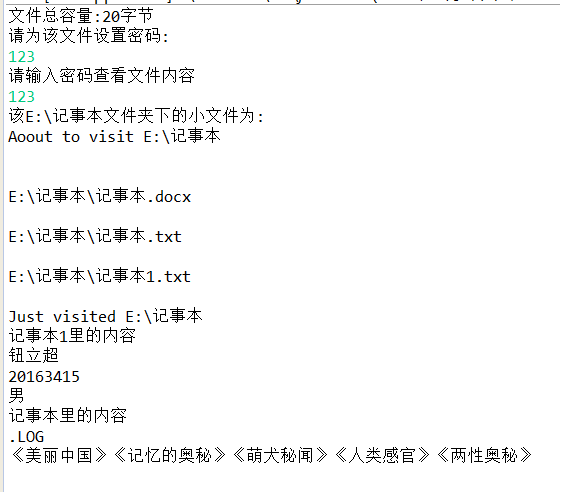
1,源代码
import java.io.*;
import java.nio.file.*;
import java.nio.file.attribute.BasicFileAttributes;
import java.util.Scanner;
public class File1 extends SimpleFileVisitor<Path> {
@Override
public FileVisitResult postVisitDirectory(Path dir, IOException exc)
throws IOException {
System.out.println();
System.out.println("Just visited "+dir);
return FileVisitResult.CONTINUE;
}
@Override
public FileVisitResult preVisitDirectory(Path dir, BasicFileAttributes attrs)
throws IOException {
System.out.println("Aoout to visit "+dir);
System.out.println();
return FileVisitResult.CONTINUE;
}
@Override
public FileVisitResult visitFile(Path file, BasicFileAttributes attrs)
throws IOException {
if(attrs.isRegularFile()){
System.out.println("");
}
System.out.println(file);
return FileVisitResult.CONTINUE;
}
@Override
public FileVisitResult visitFileFailed(Path file, IOException exc)
throws IOException {
System.err.println(exc.getMessage());
return FileVisitResult.CONTINUE;
}
public static void main(String[] args) throws IOException{
Scanner input=new Scanner(System.in);
String setSecret,secret;
File file=new File("E:\\记事本\\记事本1.txt");
System.out.println("文件总容量:"+file.length()+"字节");
System.out.println("请为该文件设置密码:");
setSecret=input.nextLine();
System.out.println("请输入密码查看文件内容");
do{
secret=input.nextLine();
if(secret.equals(setSecret)){
System.out.println("该E:\\记事本文件夹下的小文件为:");
Path fileDirPath=Paths.get("E:\\记事本");
File1 visit=new File1();
try {
Files.walkFileTree(fileDirPath, visit);
} catch (IOException e) {
e.printStackTrace();
}
InputStreamReader r1=new FileReader("E:\\记事本\\记事本1.txt");
FileReader r2=new FileReader("E:\\记事本\\记事本.txt");
BufferedReader br1=new BufferedReader(r1);
BufferedReader br2=new BufferedReader(r2);
String str;
System.out.println("记事本1里的内容");
while((str=br1.readLine())!=null){
System.out.println(str);
}
System.out.println("记事本里的内容");
while((str=br2.readLine())!=null){
System.out.println(str);
}
}
else
System.out.println("密码错误!请重新输入:");
}while(secret!=setSecret);
}
}
2,结果截图
动手动脑
1,
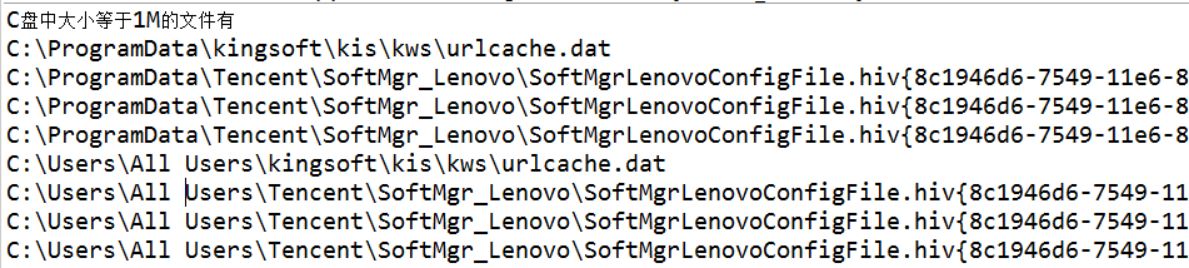
使用Files. walkFileTree()找出指定文件夹下所有大于指定大小(比如1M)的文件。
import java.io.IOException;
import java.nio.file.FileSystems;
import java.nio.file.FileVisitOption;
import java.nio.file.FileVisitResult;
import java.nio.file.FileVisitor;
import java.nio.file.Files;
import java.nio.file.Path;
import java.nio.file.PathMatcher;
import java.nio.file.Paths;
import java.nio.file.attribute.BasicFileAttributes;
import java.util.EnumSet;
public class Search implements FileVisitor {
private final PathMatcher matcher;
private final long accepted_size;
public Search(String glob,long accepted_size) {
matcher= FileSystems.getDefault().getPathMatcher("glob:" +glob);
this.accepted_size=accepted_size;
}
void search(Path file) throws IOException {
long size = (Long) Files.getAttribute(file, "basic:size");
if(size ==accepted_size) {
System.out.println(file);
}
}
@Override
public FileVisitResult postVisitDirectory(Object dir, IOException exc)throws IOException {
return FileVisitResult.CONTINUE;
}
@Override
public FileVisitResult preVisitDirectory(Object dir, BasicFileAttributes attrs)throws IOException {
return FileVisitResult.CONTINUE;
}
@Override
public FileVisitResult visitFile(Object file, BasicFileAttributes attrs)throws IOException {
search((Path) file);
return FileVisitResult.CONTINUE;
}
@Override
public FileVisitResult visitFileFailed(Object file, IOException exc)throws IOException {
return FileVisitResult.CONTINUE;
}
public static void main(String[] args) throws IOException{
String glob= "*.jpg";
long size = 1048576;//1M=1024k=1048576字节
Path fileTree = Paths.get("C:/");
Search walk=new Search(glob, size);
EnumSet opts=EnumSet.of(FileVisitOption.FOLLOW_LINKS);
System.out.println("C盘中大小等于1M的文件有");
Files.walkFileTree(fileTree, opts, Integer.MAX_VALUE, walk);
}
}
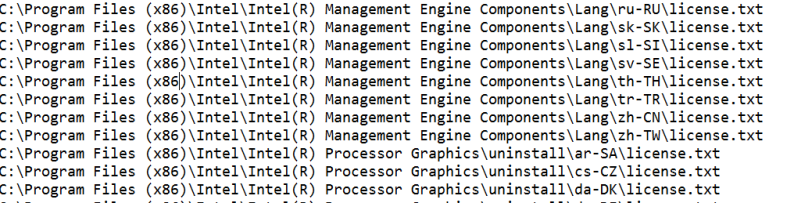
使用Files. walkFileTree()找出指定文件夹下所有扩展名为.txt和.java的文件。
import java.io.IOException;
import java.nio.file.FileSystems;
import java.nio.file.FileVisitResult;
import java.nio.file.Files;
import java.nio.file.Path;
import java.nio.file.PathMatcher;
import java.nio.file.Paths;
import java.nio.file.SimpleFileVisitor;
import java.nio.file.attribute.BasicFileAttributes;
public class FileGlobNIO {
public static void main(String args[]) throws IOException {
String glob = "glob:**/*.{java,txt}";
String path = "C:/";
match(glob, path);
}
public static void match(String glob, String location) throws IOException {
final PathMatcher pathMatcher = FileSystems.getDefault().getPathMatcher( glob);
Files.walkFileTree(Paths.get(location), new SimpleFileVisitor<Path>() {
@Override
public FileVisitResult visitFile(Path path,
BasicFileAttributes attrs) throws IOException {
if (pathMatcher.matches(path)) {
System.out.println(path);
}
return FileVisitResult.CONTINUE;
}
@Override
public FileVisitResult visitFileFailed(Path file, IOException exc)
throws IOException {
return FileVisitResult.CONTINUE;
}
});
}
}

使用Files. walkFileTree()找出指定文件夹下所有包容指定字符串的txt文件。
import java.io.IOException;
import java.io.*;
import java.nio.file.FileSystems;
import java.nio.file.FileVisitResult;
import java.nio.file.Files;
import java.nio.file.Path;
import java.nio.file.PathMatcher;
import java.nio.file.Paths;
import java.nio.file.SimpleFileVisitor;
import java.nio.file.attribute.BasicFileAttributes;
public class FileGlobNIO {
public static void main(String args[]) throws IOException {
String glob = "glob:**/*.txt";
String path = "C:/";
match(glob, path);
}
public static void match(String glob, String location) throws IOException {
final PathMatcher pathMatcher = FileSystems.getDefault().getPathMatcher( glob);
Files.walkFileTree(Paths.get(location), new SimpleFileVisitor<Path>() {
@Override
public FileVisitResult visitFile(Path path,
BasicFileAttributes attrs) throws IOException {
if (pathMatcher.matches(path)) {
BufferedReader reader =Files.newBufferedReader(path);//读取文件内的内容
String line=null;
while((line = reader.readLine()) !=null) {
if(line=="asdfghjkl")//若读取的内容等于“asdfghjkl"则输出文件名
{
System.out.println(path);
break;
}
}
}
return FileVisitResult.CONTINUE;
}
@Override
public FileVisitResult visitFileFailed(Path file, IOException exc)
throws IOException {
return FileVisitResult.CONTINUE;
}
});
}
}
2,实现监控文件夹功能
Path类实现了Watchable接口,因此我们能监控它的变化。
示例FileWatchDemo.java展示了如何监控一个文件夹中文件的新增、删除和改名。
请通过查询JDK文件和使用搜索引擎等方式,看懂此示例代码,并弄明白Watchable、WatchService等类型之间的关系,使用UML类图表示出这些类之间的关系。
1,java.nio.file.WatchService文件系统监视服务的接口类,它的具体实现由监视服务提供者负责加载。
2,ava.nio.file.Watchable 实现了 java.nio.file.Watchable 的对象才能注册监视服务 WatchService。java.nio.file.Path实现了 watchable 接口,后文使用 Path 对象注册监视服务。
3,java.nio.file.WatchKey 该类代表着 Watchable 对象和监视服务 WatchService 的注册关系。WatchKey 在 Watchable 对象向 WatchService 注册的时候被创建。它是 Watchable 和 WatchService 之间的关联类。
java流与文件的操作 文件加密的更多相关文章
- 007PHP文件处理—— 判断文件与操作文件fopen fread fclose is_executable is_readable is_writeable
<?php /** * 判断文件与操作文件fopen fread fclose * is_executable is_readable is_writeable */ //判断一个文件是不是一个 ...
- AIR文件操作:使用文件对象操作文件和目录 .
来源:http://blog.csdn.net/zdingxin/article/details/6635376 在AIR中可以方便的对本地文件操作,不过上次做了个项目,发现还是有不少不方便的地方,比 ...
- AIR使用文件对象操作文件和目录
文件对象是啥?文件对象(File对象)是在文件系统中指向文件或目录的指针.由于安全原因,只在AIR中可用. 文件对象能做啥? 获取特定目录,包括用户目录.用户文档目录.该应用程序启动的目录和程序目录 ...
- AIR文件操作(二):使用文件对象操作文件和目录
转载于:http://www.flashj.cn/wp/air-file-operation2.html 文件对象是啥?文件对象(File对象)是在文件系统中指向文件或目录的指针.由于安全原因,只在A ...
- PHP文件处理--操作文件
除了能够对文件内容进行读写,对文件本身相同也能够进行操作,如拷贝文件.又一次命名.查看改动日期等. PHP内置了大量的文件操作函数,经常使用的文件函数例如以下表: 函数原型 函数说明 举例 bool ...
- Java 流的概述及操作(转)
一.什么是流? 流就是字节序列的抽象概念,能被连续读取数据的数据源和能被连续写入数据的接收端就是流,流机制是Java及C++中的一个重要机制,通过流我们可以自由地控制文件.内存.IO设备等数据的流向. ...
- 【Python】 文件和操作文件方法
文件 ■ 基本的文件用法 f = open("path","mode") mode有a,w,r,b,+等.默认为r.模式与打开文件时的动作有关系,比如用w打开的 ...
- 2021-2-19:请问你知道 Java 如何高性能操作文件么?
一般高性能的涉及到存储框架,例如 RocketMQ,Kafka 这种消息队列,存储日志的时候,都是通过 Java File MMAP 实现的,那么什么是 Java File MMAP 呢? 什么是 J ...
- 用C#操作文件/文件夹(删除,复制,移动)
操作某一个文件/文件夹,需要一个文件的完整路径 一.使用File的静态方法进行文件操作 //使用file的静态方法进行复制 File.Copy(path, destpath); //使用File的静态 ...
随机推荐
- python3 将两个列表生成一个字典
需求: 存在两个list如下 list1 = ["one", "two", "three"] list2 = ["1", ...
- vuex中mutations与actions的区别
要执行vuex中的函数,有两种方法: 1.commit,例如this.$store.commit("GETMODULESELECTLIST"); //mutations中的方法 2 ...
- Python学习————字符串相关操作
s.capitalize()-------首字母大写s.upper()------全大写s.lower()------全小写s.swapcase()---大小写翻转s.title()------每个隔 ...
- 小学生都能学会的python(函数的进阶)
小学生都能学会的python(函数的进阶) 1. 动态传参 形参: 1. 位置参数 2. 默认值参数 3. 动态传参 *args 动态接收位置参数 **kwargs 动态接收关键字参数 def fun ...
- W10子系统UBantu命令安装Redis及其启动
W10子系统UBantu命令安装Redis及其启动 打开W10子系统UBantu 安装Redis $sudo apt-get install redis-server 启动Redis redis-se ...
- java应届生面试考点收集
回 到 顶 部 这些知识点来自于之前去百度实习.阿里.蘑菇街校园招聘的电话面试 未完待续 JavaSE 面向对象 封装.继承.多态(包括重载.重写) 常见区别 String.StringBuffer. ...
- 玩转oracle学习第六天
1.上节回想 2.PL/SQL的介绍 3.PL/SQL的基础 理解oracle的pl/sql概念 掌握PL/SQL编程技术(包含编写过程,函数,触发器.包... ) PL/SQL是什么? PL/ ...
- Android-Universal-Image-Loader学习笔记(3)--内存缓存
前面的两篇博客写了文件缓存.如今说说Android-Universal-Image-Loader的内存缓存.该内存缓存涉及到的类如图所看到的 这些类的继承关系例如以下图所看到的: 如同文件缓存一样,内 ...
- 数据结构与算法系列----最小生成树(Prim算法&Kruskal算法)
一:Prim算法 1.概览 普里姆算法(Prim算法).图论中的一种算法.可在加权连通图里搜索最小生成树.意即由此算法搜索到的边子集所构成的树中.不但包含了连通图里的全部顶点(英语:Ve ...
- unity3d 延迟运行脚本语句
在Unity3D中.有yield语句它负责延迟操作,yield return WaitForSeconds(3.0); //等待 3 秒 查看unity3d脚本手冊,使用方法须要在对应的格式. 以下代 ...