
Android实现对图片的缩放、剪切、旋转、存储
转载:http://www.cnblogs.com/jerehedu/p/4464870.html
一、问题描述:
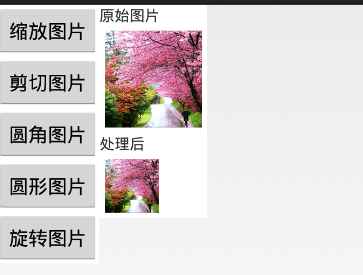
在开发中,当我们需要的有一张大图片同时还需要一些小图片时,我们只需要通过代码对此图片进行不同比例的缩放即可,这样大大节约资源,减小了安装包的尺寸 。除缩放外,我们还经常对图片进行其他操作如裁剪、旋转、存储等。
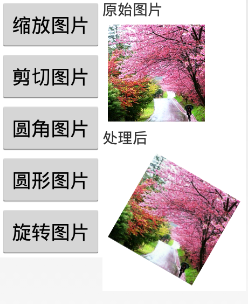
这样我们可以编写对于图片进行处理的通用组件,方便开发。下面就分享一下对图片进行处理的组件BitmapUtil,案例界面:

二、技术点描述:
1、通过BitmapFactory取得Bitmap
Bitmap bm=BitmapFactory.decodeStream(InputStream is );
2、Bimap的createBitmap()方法
Bitmap newbm = Bitmap.createBitmap( Bitmap s, int x, int y, int w, int h, Matrix m, boolean f);
该方法可实现位图的缩放、裁剪、旋转操作
参数说明:
Bitmap s:要处理的原始位图
int x ,y:起始位置坐标
int w:要截的图的宽度
int h:要截的图的宽度
Matrix m 矩阵,主要是用于平面的缩放、平移、旋转
boolean f:是否保证等比
返回值:返回处理后的Bitmap
三、BitmapUtil组件
可实现对图片进行按比例缩放、图片按比例裁剪、圆形图片处理等方法,实现功能如下:
1、readBitmapById()方法
/**

     * 通过资源id转化成Bitmap

     * @param context

     * @param resId

     * @return

     */

    public static Bitmap readBitmapById(Context context, int resId){

        BitmapFactory.Options opt = new BitmapFactory.Options();

        opt.inPreferredConfig = Bitmap.Config.RGB_565;

        opt.inPurgeable = true;

        opt.inInputShareable = true;

        InputStream is = context.getResources().openRawResource(resId);

        return BitmapFactory.decodeStream(is, null, opt);

    }
2、scaleImage()方法,实现按指定宽高缩放图片
/**

* 缩放图片

     * @param bm 要缩放图片

     * @param newWidth 宽度

     * @param newHeight 高度

     * @return处理后的图片

     */

    public static  Bitmap  scaleImage(Bitmap bm, int newWidth, int newHeight){

        if (bm == null){

            return null;

        }

        int width = bm.getWidth();

        int height = bm.getHeight();

        float scaleWidth = ((float) newWidth) / width;

        float scaleHeight = ((float) newHeight) / height;

        Matrix matrix = new Matrix();

        matrix.postScale(scaleWidth, scaleHeight);

        Bitmap newbm = Bitmap.createBitmap(bm, , , width, height, matrix,true);

        if (bm != null & !bm.isRecycled()){

            bm.recycle();//销毁原图片

            bm = null;

        }

        return newbm;

    }
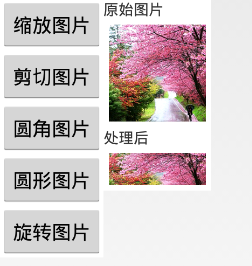
3、imageCrop()方法
/**

     * 按照一定的宽高比例裁剪图片

     * @param bitmap 要裁剪的图片

     * @param num1 长边的比例

     * @param num2 短边的比例

     * @param isRecycled是否回收原图片

     * @return 裁剪后的图片

     */

    public static Bitmap  imageCrop(Bitmap bitmap, int num1, int num2, boolean isRecycled){

        if (bitmap == null){

            return null;

        }

        int w = bitmap.getWidth(); // 得到图片的宽,高

        int h = bitmap.getHeight();

        int retX, retY;

        int nw, nh;

        if (w > h){

            if (h > w * num2 / num1){

                nw = w;

                nh = w * num2 / num1;

                retX = ;

                retY = (h - nh) / ;

            } else{

                nw = h * num1 / num2;

                nh = h;

                retX = (w - nw) / ;

                retY = ;

            }

        } else{

            if (w > h * num2 / num1){

                nh = h;

                nw = h * num2 / num1;

                retY = ;

                retX = (w - nw) / ;

            } else{

                nh = w * num1 / num2;

                nw = w;

                retY = (h - nh) / ;

                retX = ;}

        }

        Bitmap bmp = Bitmap.createBitmap(bitmap, retX, retY, nw, nh, null,false);

        if (isRecycled && bitmap != null && !bitmap.equals(bmp)&& !bitmap.isRecycled()){

            bitmap.recycle();//回收原图片

            bitmap = null;

        }

        return bmp;

    }
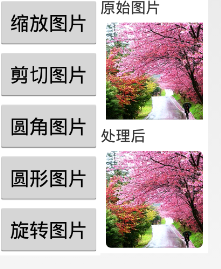
4、toRoundCorner()实现将图片转圆角
/**

     *图片转圆角

     * @param bitmap需要转的bitmap

     * @param pixels转圆角的弧度

     * @return 转圆角的bitmap

     */

    public static Bitmap toRoundCorner(Bitmap bitmap, int pixels)    {

        Bitmap output = Bitmap.createBitmap(bitmap.getWidth(),

                bitmap.getHeight(), Config.ARGB_8888);

        Canvas canvas = new Canvas(output);

        final int color = 0xff424242;

        final Paint paint = new Paint();

        final Rect rect = new Rect(, , bitmap.getWidth(), bitmap.getHeight());

        final RectF rectF = new RectF(rect);

        final float roundPx = pixels;

        paint.setAntiAlias(true);

        canvas.drawARGB(, , , );

        paint.setColor(color);

        canvas.drawRoundRect(rectF, roundPx, roundPx, paint);

        paint.setXfermode(new PorterDuffXfermode(Mode.SRC_IN));

        canvas.drawBitmap(bitmap, rect, rect, paint);

        if (bitmap != null && !bitmap.isRecycled())

        {

            bitmap.recycle();

        }

        return output;

    }
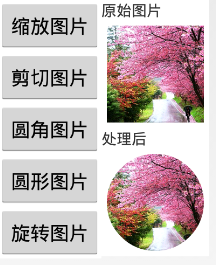
5、toRoundBitmap()方法将图像裁剪成圆形
public static Bitmap toRoundBitmap(Bitmap bitmap){

if (bitmap == null){

            return null;

        }

        int width = bitmap.getWidth();

        int height = bitmap.getHeight();

        float roundPx;

        float left, top, right, bottom, dst_left, dst_top, dst_right, dst_bottom;

        if (width <= height){

            roundPx = width / ;

            top = ;

            bottom = width;

            left = ;

            right = width;

            height = width;

            dst_left = ;

            dst_top = ;

            dst_right = width;

            dst_bottom = width;

        } else{

            roundPx = height / ;

            float clip = (width - height) / ;

            left = clip;

            right = width - clip;

            top = ;

            bottom = height;

            width = height;

            dst_left = ;

            dst_top = ;

            dst_right = height;

            dst_bottom = height;

        }

        Bitmap output = Bitmap.createBitmap(width, height, Config.ARGB_8888);

        Canvas canvas = new Canvas(output);

        final int color = 0xff424242;

        final Paint paint = new Paint();

        final Rect src = new Rect((int) left, (int) top, (int) right,

                (int) bottom);

        final Rect dst = new Rect((int) dst_left, (int) dst_top,

                (int) dst_right, (int) dst_bottom);

        final RectF rectF = new RectF(dst);

        paint.setAntiAlias(true);

        canvas.drawARGB(, , , );

        paint.setColor(color);

        canvas.drawRoundRect(rectF, roundPx, roundPx, paint);

        paint.setXfermode(new PorterDuffXfermode(Mode.SRC_IN));

        canvas.drawBitmap(bitmap, src, dst, paint);

        if (bitmap != null && !bitmap.isRecycled()){

            bitmap.recycle();

            bitmap = null;

        }

        return output;

    }
6、rotaingImageView()方法,实现旋转图片
/**

     * 旋转图片

     * @param angle 旋转角度

     * @param bitmap 要处理的Bitmap

     * @return 处理后的Bitmap

     */

    public static Bitmap rotaingImageView(int angle, Bitmap bitmap)

    {

        // 旋转图片 动作

        Matrix matrix = new Matrix();

        matrix.postRotate(angle);

        // 创建新的图片

        Bitmap resizedBitmap = Bitmap.createBitmap(bitmap, , ,

                bitmap.getWidth(), bitmap.getHeight(), matrix, true);

        if (resizedBitmap != bitmap && bitmap != null && !bitmap.isRecycled()){

            bitmap.recycle();

            bitmap = null;

        }

        return resizedBitmap;

        }
7、saveBmpToSd()实现将保存Bitmap到sdcard
public static boolean saveBmpToSd(String dir, Bitmap bm, String filename,

            int quantity, boolean recyle) {

        boolean ret = true;

        if (bm == null) {

            return false;}

        File dirPath = new File(dir);

        if (!exists(dir)) {

            dirPath.mkdirs();

        }

        if (!dir.endsWith(File.separator)) {

            dir += File.separator;

        }

        File file = new File(dir + filename);

        OutputStream outStream = null;

        try {

            file.createNewFile();

            outStream = new FileOutputStream(file);

            bm.compress(Bitmap.CompressFormat.JPEG, quantity, outStream);

        } catch (Exception e) {

            e.printStackTrace();

            ret = false;

        } finally {

            try {

                if (outStream != null) outStream.close();

            } catch (IOException e) {

                e.printStackTrace();

            }

            if (recyle && !bm.isRecycled()) {

                bm.recycle();

                bm = null;

            }

        }

        return ret;

    }

作者:杰瑞教育

出处:http://www.cnblogs.com/jerehedu/

本文版权归烟台杰瑞教育科技有限公司和博客园共有,欢迎转载,但未经作者同意必须保留此段声明,且在文章页面明显位置给出原文连接,否则保留追究法律责任的权利。
Android实现对图片的缩放、剪切、旋转、存储的更多相关文章
- Android动画及图片的缩放和旋转
Android动画有2种,一种是Tween Animation,另一种是Frame Animation,先说说Tween动画吧. Tween动画是对视图对象中的内容进行一系列简单的转换,比如位置的移动 ...
- Android 图片的缩放与旋转
本文实现Android中的图片的缩放效果 首先设计布局: <LinearLayout xmlns:android="http://schemas.android.com/apk/res ...
- js手写图片查看器(图片的缩放、旋转、拖拽)
在做一次代码编辑任务中,要查看图片器.在时间允许的条件下,放弃了已经封装好的图片jq插件,现在自己手写js实现图片的缩放.旋转.推拽功能! 具体代码如下: <!DOCTYPE html> ...
- java处理图片--图片的缩放,旋转和马赛克化
这是我自己结合网上的一些资料封装的java图片处理类,支持图片的缩放,旋转,马赛克化.(转载请注明出处:http://blog.csdn.net/u012116457) 不多说,上代码: packag ...
- js实现图片查看器(图片的缩放、旋转、拖拽)
一.关于图片查看器. 目前网络上能找到的图片查看器很多,谁便一搜就能出来.如:jquery.iviewer.js.Viewer.js这两个js文件,其中功能也足够满足大部分开发需求.但是单纯的就想实现 ...
- Android -- ImageView(控制图片的大小以及旋转的角度)
1.
- java SpringWeb 接收安卓android传来的图片集合及其他信息入库存储
公司是做APP的,进公司一年了还是第一次做安卓的接口 安卓是使用OkGo.post("").addFileParams("key",File); 通过这种方式传 ...
- 解决android:background背景图片被拉伸问题
ImageView中XML属性src和background的区别: background会根据ImageView组件给定的长宽进行拉伸,而src就存放的是原图的大小,不会进行拉伸.src是图片内容(前 ...
- Android仿微信图片上传,可以选择多张图片,缩放预览,拍照上传等
仿照微信,朋友圈分享图片功能 .可以进行图片的多张选择,拍照添加图片,以及进行图片的预览,预览时可以进行缩放,并且可以删除选中状态的图片 .很不错的源码,大家有需要可以下载看看 . 微信 微信 微信 ...
随机推荐
- C# 中对 ArrayList 的排序
ArrayList 元素 //目录条目类 public class FolderItem { public string filename; public string filetype; publi ...
- C语言_第五章__实践(密码转换)
1. 要求 输入China 输出 Glmre #include <stdio.h> #include <stdlib.h> int main() { char c ; c ...
- 分布式系统:怎么简单地解释Paxos算法?从二段提交、三段提交讲到Paxos
原文:https://www.quora.com/Distributed-Systems/What-is-a-simple-explanation-of-the-Paxos-algorithm 作者: ...
- Ubuntu install codeblocks by ppa
sudo add-apt-repository ppa:damien-moore/codeblocks-stable sudo apt-get update sudo apt-get install ...
- js判断浏览器是否为IE浏览器
if (!!window.ActiveXObject || "ActiveXObject" in window) {//判断是否IE浏览器 } MSIE这样关键字之类的判断,IE1 ...
- (转)为什么需要正则表达式 by 王珢
为什么需要正则表达式 by 王垠 学习Unix最开头,大家都学过正则表达式(regexp).可是有没有人考虑过我们为什么需要正则表达式? 正则表达式本来的初衷是用来从无结构的字符串中提取信息,殊不知这 ...
- QComboBox的activated与currentIndexChanged的区别
void activated ( int index ) void activated ( const QString & text ) 信号activated是只要单击选择框即使所选内容选择 ...
- bzoj2599: [IOI2011]Race(点分治)
写了四五道点分治的题目了,算是比较理解点分治是什么东西了吧= = 点分治主要用来解决点对之间的问题的,比如距离为不大于K的点有多少对. 这道题要求距离等于K的点对中连接两点的最小边数. 那么其实道理是 ...
- STL容器分类
- Google云平台对于2014世界杯半决赛的预测,德国阿根廷胜!
由于本人是个足球迷,前段日子Google利用自己云平台预测世界杯八进四的比赛并取得了75%的正确率的事情让我振动不小.虽然这些年一直听说大数据的预测和看趋势能力如何如何强大,但这次的感受更加震撼,因为 ...