
Coloring Flame Graphs: Code Hues
转自:http://www.brendangregg.com/blog/2017-07-30/coloring-flamegraphs-code-type.html
I recently improved flame graph code coloring. If you're automating or implementing flame graphs, this is a small detail that may interest you. (For an intro to flame graphs, see my website and github.)
First, a confession. Code-type coloring was a regex hack that took five minutes. In late 2014 I was modifying the JDK to preserve the frame pointer so that traditional stack walkers and profilers would work (an example of the problem is here, where Java methods lack ancestry). After I fixed the frame pointer, profiling Java looked like this (SVG):
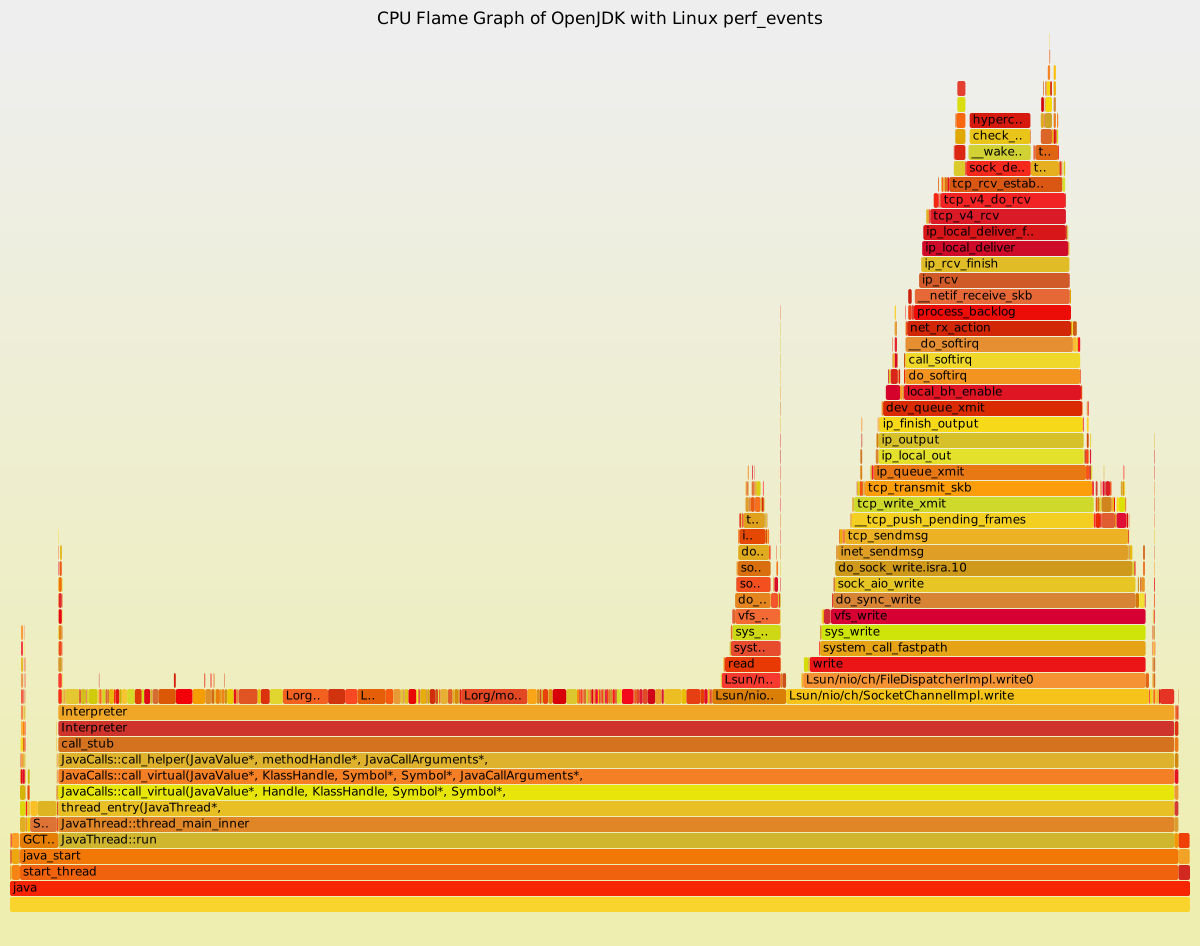

It worked! Java methods now had ancesty (stack depth), and appear as towers.
I was delighted and showed my colleagues straight away. Amer Ather, another performance engineer at Netflix, suggested I color the Java and kernel frames differently. He was only back at his desk for five minutes when I called him back (SVG):
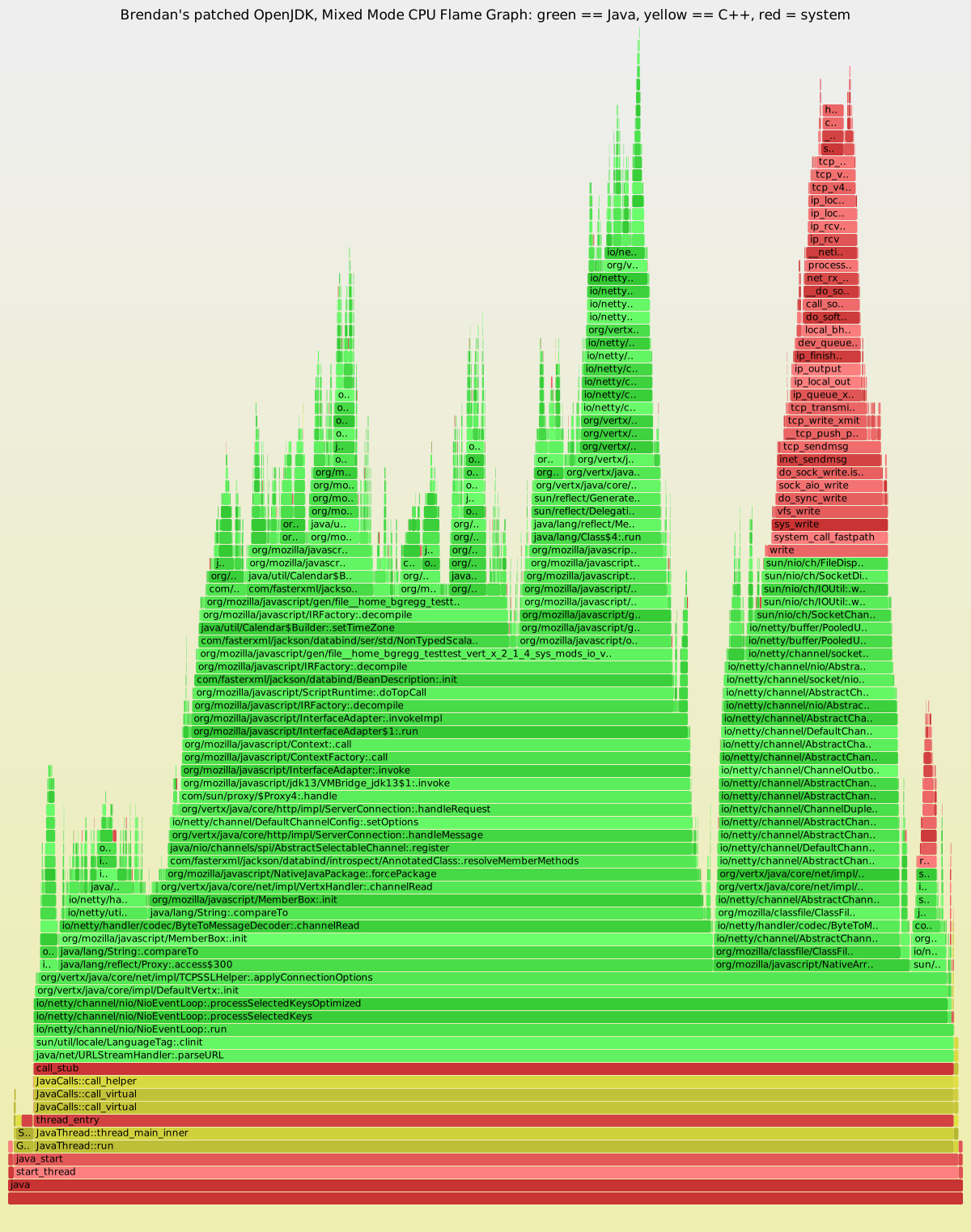
Done. (I also stripped the extra L from Java symbols.)
My hack was the following eight lines of code:
        if (defined $type and $type eq "java") {

                if ($name =~ /::/) {            # C++

                        $type = "yellow";

                } elsif ($name =~ m:/:) {       # Java (match "/" in path)

                        $type = "green"

                } else {                        # system

                        $type = "red";

                }
The "java" $type is from the command line option: --color=java. The $name is the function name. Here are some sample function names:
- Java
io/netty/channel/nio/NioEventLoop;.run
org/mozilla/classfile/ClassFileWriter;.addLoadConstant - C++JavaCalls::call_helper
JavaThread::thread_main_inner - Ctcp_v4_do_rcv
start_thread
write
If you cast your regular expression eye over these, you'll quickly see patterns. If it contains "::" it's C++, "/" it's Java, else it's C. And that's what I coded.
It mostly worked. But I've noticed the odd case where it gets things wrong. Sometimes the profiled Java symbols use "." instead of "/" as a delimiter. Or, somehow, I have Java methods that lack any package delimiter, so were colored red. I had similar issues with JIT'd code for Node.js.
Revisiting how flame graphs for Linux perf are generated (full instructions in Java Flame Graphs):
perf record -F 49 -a -g -- sleep 30; ./jmaps

perf script | ./stackcollapse-perf.pl | grep -v cpu_idle | ./flamegraph.pl --color=java > out.svg
It's beginning with the output of perf script (later perf versions added a way to emit a folded summary directly). Here is some truncated perf script output:
java  4811 cpu-clock:

    ffffffff8100122a hypercall_page ([kernel.kallsyms])

    ffffffff8100aca2 check_events ([kernel.kallsyms])

    ffffffff8104dffe __wake_up_sync_key ([kernel.kallsyms])

    ffffffff8152f86e sock_def_readable ([kernel.kallsyms])

[...]

    ffffffff81662142 system_call_fastpath ([kernel.kallsyms])

        7f62aadf2f7d write (/lib/x86_64-linux-gnu/libc-2.15.so)

        7f62961a5e8b Lsun/nio/ch/FileDispatcherImpl;.write0(Ljava/io/FileDescriptor;JI)I (/tmp/perf-4637.map)

        7f629619dd64 Lsun/nio/ch/SocketDispatcher;.write(Ljava/io/FileDescriptor;JI)I (/tmp/perf-4637.map)

        7f62961b3330 Lsun/nio/ch/IOUtil;.writeFromNativeBuffer(Ljava/io/FileDescriptor;Ljava/nio/ByteBuffer;JLsun/nio/ch/NativeDispatcher;)I (/tmp/perf-4637.map)

[...]

        7f62aa3b1618 JavaThread::thread_main_inner() (/mnt/openjdk8/build/linux-x86_64-normal-server-release/jdk/lib/amd64/server/libjvm.so)

        7f62aa3b186c JavaThread::run() (/mnt/openjdk8/build/linux-x86_64-normal-server-release/jdk/lib/amd64/server/libjvm.so)

        7f62aa272bf2 java_start(Thread*) (/mnt/openjdk8/build/linux-x86_64-normal-server-release/jdk/lib/amd64/server/libjvm.so)

        7f62aa8f2e9a start_thread (/lib/x86_64-linux-gnu/libpthread-2.15.so)
The stackcollapse-perf.pl tool plucks out the symbol name (second column) and discards everything else. But the last column – the segment printed in ( ) – provides more details for identifying code types. Eg:
- [kernel.kallsyms]: kernel code (I could also match the addr vs the kernel base address for this)
- /tmp/perf-PID.map: JIT'd code (Java, Node.js, ...)
This is what I made use of recently, by adding an --all option to stackcollapse-perf.pl to turn on all annotations. Annotations are inspired by the "[k]" annotations seen in perf report --stdiooutput. I append them after the function name, so tcp_sengmsg becomes tcp_sengmsg_[k], and that annotation is used and then stripped by flamegraph.pl.
Annontation suffixes:
Making use of both annotations and pattern matching, the "java" palette is now:
- green: JIT (Java, Node.js, ...)
- aqua: inlined
- yellow: C++
- orange: kernel
- red: native (user-level)
If you're automating flame graphs using my original tools, you might want to consider adding --all to the normal workflow for annotations. These are currently used by the "java" and "js" palettes. Eg:
perf record -F 49 -a -g -- sleep 30; ./jmaps

perf script | ./stackcollapse-perf.pl --all | grep -v cpu_idle | ./flamegraph.pl --color=java > out.svg
If you are using a different profiler (not Linux perf), you might want to consider enhancing its stackcollapse program to have an option to turn on annotations (or I can do it next time I use them). If you are implementing your own flame graph software, you might want to add similar color hues for code types.
Finally, it should be clear that changing the hue of code based on a regex is a trivial change to flamegraph.pl. You could add custom rules to your version to highlight your team's code, for example.
Coloring Flame Graphs: Code Hues的更多相关文章
- New JVM Option Enables Generation of Mixed-Mode Flame Graphs
转自 https://www.infoq.com/news/2015/08/JVM-Option-mixed-mode-profiles Java has added a new launch opt ...
- tunning-Instruments and Flame Graphs
On mac os, programs may need Instruments to tuning, and when you face too many probe messages, you'l ...
- Flame Graphs
http://www.brendangregg.com/flamegraphs.html Flame graphs are a visualization of profiled software, ...
- 火焰图(Flame Graphs)的安装和基本用法
火焰图(Flame Graphs) 一.概述: 火焰图(flame graph)是性能分析的利器,通过它可以快速定位性能瓶颈点. perf 命令(performance 的缩写)是 Linux 系统原 ...
- 使用Flame Graph进行系统性能分析
关键词:Flame Graph.perf.perl. FlameGraph是由BrendanGregg开发的一款开源可视化性能分析工具,形象的成为火焰图. 从底向上像火苗一样逐渐变小,也反映了相互之间 ...
- linux perf and tracer ,java Flame Graph
http://www.brendangregg.com/flamegraphs.html http://hg.openjdk.java.net/jdk8u/jdk8u/hotspot/rev/e826 ...
- 【Xamarin 跨平台机制原理剖析】
原文:[Xamarin 跨平台机制原理剖析] [看了请推荐,推荐满100后,将发补丁地址] Xamarin项目从喊口号到现在,好几个年头了,在内地没有火起来,原因无非有三,1.授权费贵 2.贵 3.原 ...
- Choosing a Linux Tracer ------Brendan Gregg's Blog
home Choosing a Linux Tracer (2015) 08 Jul 2015 Linux Tracing is Magic! A tracer is an advanced perf ...
- 【Xamain 跨平台机制原理剖析】
原文:[Xamain 跨平台机制原理剖析] [看了请推荐,推荐满100后,将发补丁地址] Xamarin项目从喊口号到现在,好几个年头了,在内地没有火起来,原因无非有三,1.授权费贵 2.贵 3.原生 ...
随机推荐
- PHP array_chunk()
定义和用法 array_chunk() 函数把一个数组分割为新的数组块. 其中每个数组的长度由参数 size 决定. 可选参数 preserve_key 是一个布尔值,它指定新数组是否使用原数组相同的 ...
- ORA-12547错误
http://www.linuxidc.com/Linux/2013-03/81330p3.htm << good http://www.verydemo.com/demo_c158_i6 ...
- 读写锁(read-write lock)机制-----多线程同步问题的解决
原文: http://blog.chinaunix.net/uid-27177626-id-3791049.html ----------------------------------------- ...
- bzoj1087【SCOI2005】互不侵犯King
1087: [SCOI2005]互不侵犯King Time Limit: 10 Sec Memory Limit: 162 MB Submit: 2405 Solved: 1413 [Submit ...
- Delphi 中控件路径加入不进去解决方法
使用notepa++打开project中的*.dproj文件,在里面找到相似例如以下的区域 <DCC_UnitSearchPath>T:\BusinessSkinForm1006Sourc ...
- EarthWarrior3D游戏ios源代码
这是一款不错的ios源代码源代码,EarthWarrior3D游戏源代码. 而且游戏源码支持多平台. 适用于cocos v2.1.0.0版本号 源代码下载: http://code.662p.com/ ...
- 常见的DP优化类型
常见的DP优化类型 1单调队列直接优化 如果a[i]单调增的话,显然可以用减单调队列直接存f[j]进行优化. 2斜率不等式 即实现转移方程中的i,j分离.b单调减,a单调增(可选). 令: 在队首,如 ...
- codeforces 931E Logical Expression dp
time limit per test 3 seconds memory limit per test 256 megabytes input standard input output standa ...
- php write excel
/** * 写excel方法 */ function writeExcel($tabArr, $dataArr,$path) { require_once CODE_BASE2 . '/util/ph ...
- Git 和 Redis 的基本认识
一: Git 二: Redis