
WPF ListView控件设置奇偶行背景色交替变换以及ListViewItem鼠标悬停动画
原文:WPF ListView控件设置奇偶行背景色交替变换以及ListViewItem鼠标悬停动画
利用WPF的ListView控件实现类似于Winform中DataGrid行背景色交替变换的效果,同时增加鼠标的悬停效果。
1.本文实现的效果如下:
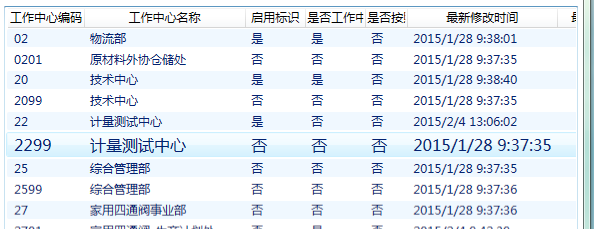
2.所有的效果,我通过C#代码实现。代码如下:
using System;

using System.Collections.Generic;

using System.Linq;

using System.Text;

using System.Windows.Controls;

using System.Windows;

using System.Windows.Media;

using System.ComponentModel;

using System.Windows.Media.Animation;

namespace BarCodeSystem

{

    public class ListViewItemStyleSelector:StyleSelector

    {

        private Dictionary> storyboards = new Dictionary>();

        ///

        /// 下面的示例演示如何定义一个为行定义 Style 的 StyleSelector。

        /// 此示例依据行索引定义 Background 颜色,为每行定义ListViewItem的动画板(Storyboard)。

        ///ListView控件在初始化的时候,每初始化一行ListViewItem的时候都会进入该函数

        ///

        ///

        ///

        ///

        public override Style SelectStyle(object item, DependencyObject container)

        {

            Style st = new Style();

            st.TargetType=typeof(ListViewItem);

            Setter backGroundSetter = new Setter();

            backGroundSetter.Property = ListViewItem.BackgroundProperty;

            ListView listview =

                ItemsControl.ItemsControlFromItemContainer(container)

                as ListView;//获得当前ListView

            int index =

                listview.ItemContainerGenerator.IndexFromContainer(container);//行索引

            if (index % 2 == 0)

            {

                backGroundSetter.Value = Brushes.AliceBlue;

            }

            else

            {

                backGroundSetter.Value = Brushes.Transparent;

            }

            st.Setters.Add(backGroundSetter);

            //获得当前ListViewItem

            ListViewItem iteml = (ListViewItem)listview.ItemContainerGenerator.ContainerFromIndex(index);

            //故事板列表,用来存放1.鼠标进入故事板2.鼠标离开故事板

            List sbl = new List();

            //声明故事板

            Storyboard storyboard = new Storyboard();

            //1.鼠标进入故事板

            //声明动画

            DoubleAnimation fontEnterAnimation = new DoubleAnimation();

            //动画的目标值

            fontEnterAnimation.To = 16;

            //开始之前的等待时间,设置0.5s的等待时间是为了模拟“悬停时间”

            fontEnterAnimation.BeginTime = TimeSpan.FromSeconds(0.5);

            //动画持续时间

            fontEnterAnimation.Duration = TimeSpan.FromSeconds(1);

            //动画缓动,可要可不要

            fontEnterAnimation.EasingFunction = new ElasticEase() { EasingMode=EasingMode.EaseOut};

            //绑定动画目标控件

            Storyboard.SetTarget(fontEnterAnimation, iteml);

            //绑定动画目标属性

            Storyboard.SetTargetProperty(fontEnterAnimation, new PropertyPath("FontSize"));

            //将动画板添加到故事板中

            storyboard.Children.Add(fontEnterAnimation);

            sbl.Add(storyboard);

            //2.鼠标离开故事板

            storyboard = new Storyboard();

            DoubleAnimation fontLeaveAnimation = new DoubleAnimation();

            fontLeaveAnimation.BeginTime = TimeSpan.FromSeconds(0);

            fontLeaveAnimation.Duration = TimeSpan.FromSeconds(0.5);

            Storyboard.SetTarget(fontLeaveAnimation, iteml);

            Storyboard.SetTargetProperty(fontLeaveAnimation, new PropertyPath("FontSize"));

            storyboard.Children.Add(fontLeaveAnimation);

            sbl.Add(storyboard);

            storyboards.Add(iteml, sbl);

            //绑定鼠标进入事件

            iteml.MouseEnter += new System.Windows.Input.MouseEventHandler(iteml_MouseEnter);

            //绑定鼠标离开事件

            iteml.MouseLeave += new System.Windows.Input.MouseEventHandler(iteml_MouseLeave);

            return st;

        }

        ///

        /// 鼠标进入事件

        ///

        ///

        ///

        private void iteml_MouseEnter(object sender, RoutedEventArgs e)

        {

            ListViewItem item=(ListViewItem)sender;

            List storyboard = storyboards[item];

            storyboard[0].Begin();

        }

        private void iteml_MouseLeave(object sender, RoutedEventArgs e)

        {

            ListViewItem item = (ListViewItem)sender;

            List storyboard = storyboards[item];

            storyboard[1].Begin();

        }

    }

}
3.Xaml文件中代码如下:
4.完成。
WPF ListView控件设置奇偶行背景色交替变换以及ListViewItem鼠标悬停动画的更多相关文章
- WPF常用控件应用demo
WPF常用控件应用demo 一.Demo 1.Demo截图如下: 2.demo实现过程 总体布局:因放大缩小窗体,控件很根据空间是否足够改变布局,故用WrapPanel布局. <ScrollVi ...
- C# winfrom ListView控件实现自由设置每一行字体及背景色等
背景:公司经常会需要将日志信息,输出到一个对话框中显示出来.之前一直采用的listbox控件,操作简单,使用方便,但是遗憾的是,不能自由控制每一行的状态. 于是想了如下几个方案: (1)重绘listb ...
- Android Material适配 为控件设置指定背景色和点击波纹效果
Android Material适配 为控件设置指定背景色和点击波纹效果,有需要的朋友可以参考下. 大部分时候,我们都需要为控件设置指定背景色和点击效果 4.x以下可以使用selector,5.0以上 ...
- 深入探讨WPF的ListView控件
接上一篇博客初步探讨WPF的ListView控件(涉及模板.查找子控件) 我们继续探讨ListView的用法 一.实现排序功能 需求是这样的:假如我们把学生的分数放入ListView,当我 ...
- C#中如何让ListView控件点击选中整行
将Listview控件的FullRowSelect属性置为True,当然Listview的View属性应该是Details. 2017年6月25日17:15:55
- 初步探讨WPF的ListView控件(涉及模板、查找子控件) - GavinJun
本文结合模板的应用初步介绍ListView的应用 一.Xaml中如何建立数据资源 大部分数据都会来自于后台代码,如何Xaml同样的建立数据源呢?比如建立一个学生List: 首先引入命名空间: xmln ...
- ListView控件--2016年12月9日
ListView属性 ListView 名称 说明 AccessKey 重写 WebControl.AccessKey 属性. 不支持将此属性设置 ListView 控件.(覆盖 WebContr ...
- ListView控件
打气筒工具:将R.layout.item_listview布局添加到相应的view控件里面 View view=LayoutInflater.from(ScondPro.this).inflate ...
- 创建 WPF 工具箱控件
创建 WPF 工具箱控件 WPF (Windows Presentation Framework) 工具箱控件模板允许您创建 WPF 控件,会自动添加到 工具箱 安装扩展的安装. 本主题演示如何使用模 ...
随机推荐
- redis文档翻译_key设置过期时间
Available since 1.0.0. 使用開始版本号1.01 Time complexity: O(1) 时间复杂度O(1) 出处:http://blog.csdn.net/colum ...
- 【34.88%】【codeforces 569C】Primes or Palindromes?
time limit per test3 seconds memory limit per test256 megabytes inputstandard input outputstandard o ...
- ios开发抽屉效果的封装使用
#import "DragerViewController.h" #define screenW [UIScreen mainScreen].bounds.size.width @ ...
- Make chrome extension
How to Make a Chrome Extension. https://robots.thoughtbot.com/how-to-make-a-chrome-extension Skip to ...
- SpringMVC ModelAndView跳转失效
今天隔壁的兄弟遇到一个奇怪的问题,他写好了一个表单用post提交到了addNew.do 里面,然后利用 return new ModelAndView("forward:success.js ...
- [NPM] Run npm scripts in series
After creating several npm script it becomes useful to run multiple scripts back-to-back in series. ...
- ITFriend创业败局(序):简要概述我的第一次创业经历
是时候, 面对过去,继续踏上未来之路了. 是时候,该给自己一个交待了,给ITFriend创业合伙人.ITFriend用户.关注我的朋友和网友们一个答复了. 是时候,全面认真总结过去的经历. ...
- 病毒软件,导致DNS失效的解决办法
问题症状,DNS失效了,ping域名总是失败. 问题回顾:几个周之前,某群友在群里上传了一个病毒软件,我想去测验下,最后果然中毒.前几天,把软件卸载了,上周末解决了删除最后一款软件导致无法上网的问题. ...
- 容易遗忘的JS知识点整理—hasOwnProperty相关
为了判断一个对象是否包含自定义属性而不是原型链上的属性,我们需要使用继承自 Object.prototype 的 hasOwnProperty方法.hasOwnProperty 是 JavaScrip ...
- Java易混点记录
1.Java 默认将所有成员变量和成员方法与 this 关联在一起,因此使用 this 在某些情况下是多余的. 2.只要类存在,程序就可以访问该类的类变量,语法如下: 类.类变量. 只要实例存在,程序 ...