
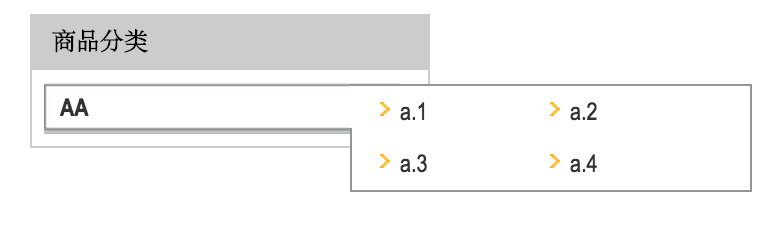
php左侧分类列表显示菜单
<!DOCTYPE>

<html>

<head>

    <meta http-equiv="content-type" content="text/html" charset="utf-8">

    <title>商品分类导般菜单</title>

    <style>

        body {font-family:\5B8B\4F53,Arial Narrow,arial,serif;background:#ffffff;font-size:12px; color:#313131;}

        body,div,dl,dt,dd,ul,ol,li,pre,form,fieldset,input,textarea,blockquote{padding:0; margin:0;}

        li{list-style-type:none;}

        .wrap {width: 960px; margin:0 auto;}

        .wrap .leftzone {float: left;width: 200px;margin:10px 0;}

        .modTop .sidetitle{height:28px;background:#ccc; font-weight:bold;}

        .modTop em{float:left;padding:6px 0 0 11px;font-style:normal;color:#000;}

        .sidecontent{border-left:#CCC 1px solid;border-right:#CCC 1px solid;border-bottom:#CCC 1px solid;padding:6px;}

        .my_left_category{width:180px;}

        .my_left_category h1{height:20px;font-size:14px;font-weight:bold;padding-left:15px;padding-top:8px;margin:0px;color:#FFF;}

        .my_left_category .my_left_cat_list{width:178px;line-height:13.5pt;}

        .my_left_category .my_left_cat_list h2 {margin:0px;padding:3px 5px 0px 9px;}

        .my_left_category .my_left_cat_list h2 a {color:#d6290b;font-weight:bold;font-size:14px;line-height:22px;}

        .my_left_category .my_left_cat_list h2 a:hover {color:#d6290b;font-weight:bold;font-size:14px;line-height:22px;}

        .my_left_category .h2_cat{width:178px;height:26px;background-image:url('./images/my_menubg.gif');background-repeat:no-repeat;line-height:26px;font-weight:normal;color:#333333;position:relative;}

        .my_left_category .h2_cat_1{width:178px;height:26px;line-height:26px;font-weight:normal;color:#333333;position:relative;}

        .my_left_category a{font-size:12px;text-decoration:none;color:#333333;}

        .my_left_category a:hover{text-decoration:underline;color:#ff3333;}

        .my_left_category h3{margin:0px;padding:0px;height:26px;font-size:12px;font-weight:normal;display:block;padding-left:8px;}

        .my_left_category h3 span{color:#999999; width:145px; float:right;}

        .my_left_category h3 a{    line-height:26px;}

        .my_left_category .h3_cat{display:none;width:204px;position:absolute;left:153px;margin-top:-26px;cursor:auto;}

        .my_left_category .shadow{position:inherit;width:204px;}

        .my_left_category .shadow_border{position:inherit;width:200px;border:1px solid #959595; margin-top:1px;border-left-width:0px;background:url('./images/shadow_border.gif') no-repeat 0px 21px;background-color:#ffffff;margin-bottom:3px}

        .my_left_category .shadow_border ul{margin:0; padding:0; margin-left:15px}

        .my_left_category .shadow_border ul li {list-style:none;padding-left:10px;background-image:url('./images/my_cat_sub_menu_dot.gif');background-repeat:no-repeat;background-position:0px 8px;float:left;width:75px;height:26px;overflow:hidden;letter-spacing:0px;}

        .my_left_category .active_cat{ z-index:99;background-position:0 -25px;cursor:pointer;}

        .my_left_category .active_cat h3 { font-weight:bold}

        .my_left_category .active_cat h3 span{ display:none;}

        .my_left_category .active_cat div{display:block;}

    </style>

</head>

<body>

<div class="wrap">

    <div class="leftzone">

        <div class="modTop"><div class="sidetitle"><em>商品分类</em></div></div>

        <div class="sidecontent">

            <div class="my_left_category">

                <div class="my_left_cat_list">

                    <div class="h2_cat" onmouseover="this.className='h2_cat active_cat'" onmouseout="this.className='h2_cat'">

                        <h3><a href="#">AA</a></h3>

                        <div class="h3_cat">

                            <div class="shadow">

                                <div class="shadow_border">

                                    <ul>

                                        <li><a href="#">a.1</a></li>

                                        <li><a href="#">a.2</a></li>

                                        <li><a href="#">a.3</a></li>

                                        <li><a href="#">a.4</a></li>

                                    </ul>

                                </div>

                            </div>

                        </div>

                    </div>

                </div>

            </div>

        </div>

    </div>

</div>

</body>

</html>
php左侧分类列表显示菜单的更多相关文章
- 分类导航菜单的制作(附源码)--HTML
不多说,直接贴代码哈!有疑问,可追加评论哈! demo.html: <!DOCTYPE html><html> <head> <title>分类导航菜单 ...
- 基于jquery网站左侧下拉菜单
网站左侧下拉菜单jQuery代码.这是一款蓝色风格的适合做后台下拉菜单代码.效果图如下: 在线预览 源码下载 实现的代码: <div class="container"& ...
- 纯css实现网上商城左侧垂直商品分类菜单
<!DOCTYPE html PUBLIC "-//W3C//DTD XHTML 1.0 Transitional//EN" "http://www.w3.org/ ...
- ecshop简单三部实现导航分类二级菜单
1.在page_header.lbi对应的位置(你想显示导航的位置)插入 (注意下面的"themes/模板名称/util.php"中的"模板名称"改成你模板文件 ...
- android开发(38) 使用 DrawerLayou t实现左侧抽屉式导航菜单
最近流行 左侧抽屉式的导航条菜单,知乎,360,QQ都使用了这样的导航菜单,我们也了解下: Android Design 的流行趋势:Navigation Drawer 导航抽屉 参考这篇文章:htt ...
- php后管理分类导航菜单
<!DOCTYPE> <html> <head> <meta http-equiv="Content-type" content=&quo ...
- ecshop如何去除后台左侧云服务中心菜单
介绍一下如何去除后台云服务中心菜单: 打开admin/templates/menu.htm,把539行的 document.getElementById("menu-ul").in ...
- 【CSS3】分类豆腐块菜单浮动效果
HTML <html> <head> <title></title> <style type="text/css"> # ...
- ionic js 侧栏菜单 把主要内容区域从一边拖动到另一边,来让左侧或右侧的侧栏菜单进行切换
ionic 侧栏菜单 一个容器元素包含侧边菜单和主要内容.通过把主要内容区域从一边拖动到另一边,来让左侧或右侧的侧栏菜单进行切换. 效果图如下所示: 用法 要使用侧栏菜单,添加一个父元素<ion ...
随机推荐
- 最小生成树 prime + 队列优化
存图方式 最小生成树prime+队列优化 优化后时间复杂度是O(m*lgm) m为边数 优化后简直神速,应该说对于绝大多数的题目来说都够用了 具体有多快呢 请参照这篇博客:堆排序 Heapsort / ...
- 第三方框架之ThinkAndroid 学习总结(一)
ThinkAndroid是一个免费的开源的.简易的.遵循Apache2开源协议发布的Android开发框架,其开发宗旨是简单.快速的进行Android应用程序的开发,包含Android mvc.简易s ...
- String.Format 格式说明
C#格式化数值结果表 字符 说明 示例 输出 C 货币 string.Format("{0:C3}", 2) $2.000 D 十进制 string.Format("{0 ...
- ffmpeg编译与移植问题
1.下载ffmpeg. 下载网址:http://www.ffmpeg.org/download.html 2.解压缩 tar -zxvf ffmpeg-2.0.1.tar.gz 3.配置,生成Make ...
- The Solution of UESTC 2016 Summer Training #1 Div.2 Problem B
Link http://acm.hust.edu.cn/vjudge/contest/121539#problem/B Description standard input/output Althou ...
- 一步一步学ROP之linux_x86篇
一步一步学ROP之linux_x86篇 作者:蒸米@阿里聚安全 一.序 ROP的全称为Return-oriented programming(返回导向编程),这是一种高级的内存攻击技术可以用来绕过 ...
- JavaScript多文件下载
对于文件的下载,可以说是一个十分常见的话题,前端的很多项目中都会有这样的需求,比如 highChart 统计图的导出,在线图片编辑中的图片保存,在线代码编辑的代码导出等等.而很多时候,我们只给了一个链 ...
- Generate input file for OVITO
using System; using System.Collections.Generic; using System.IO; using System.Linq; using System.Tex ...
- C语言 · 特殊回文数
问题描述 123321是一个非常特殊的数,它从左边读和从右边读是一样的. 输入一个正整数n, 编程求所有这样的五位和六位十进制数,满足各位数字之和等于n . 输入格式 输入一行,包含一个正整数n. 输 ...
- TDR测试原理
什么是TDR? TDR是英文Time Domain Reflectometry 的缩写,中文名叫时域反射计,是测量传输线特性阻抗的主要工具.TDR主要由三部分构成:快沿信号发生器,采样示波器和探头系统 ...