
在Keystone V3基础上改进的分布式认证体系
目标
使用java实现keystone v3相关功能与概念:
- api client authentication
- service discovery
- distributed multi-tenant authorization
架构
服务注册发现
(图1)
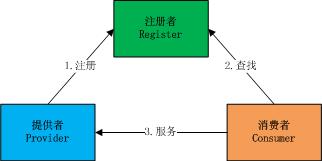
Register
服务中介与权限管理.
Provider
服务提供者.
Consumer
服务消费者.
分布式校验
(图2)
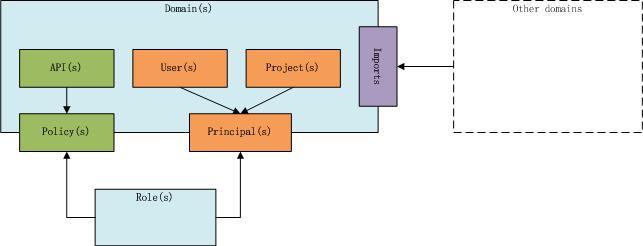
- Domain: 全局独立的服务提供者或消费者.
- API: 服务API(如果Domain对外提供服务,例如CDN服务), Domain的endpoint属性与API的method/path属性组成完成的服务URL.
- Policy: API策略. 即API与Role的关联表, 规定不同的Role(管理员/普通用户)能否访问的API集合.
- User: 子用户概念. 例如升龙5.0与云2.0作为CDN的消费者, 拥有自己独立的用户系统. 同时CDN又作为自己服务的消费者,也会有一套独立的用户系统.
- Project: 业务数据的逻辑集合. 例如升龙5.0, 云2.0以及CDN里面为不同业务方创建不同的项目划分数据归属.
- Principal: 用户策略. 即User, Project, 和Role的关联表, 规定User在不同Project中的角色, 与Policy配合实现细粒度控制用户对项目数据的操作.
- Role: 全局惟一的角色. 角色只是一抽象集合, 各个Domain的Policy会关联具体的API.
关键
- 域名与角色是全局惟一的. The domain name, role name and service name is globally unique across all domains.
- 用户名,项目名是域惟一的. The user name and project name are only unique to the owning domain.
用户类别:
系统管理用户: ADMIN域ADMIN项目ADMIN角色的用户. 允许:
- 创建新域.
- 销毁无用域, 无用域指至多只包含ADMIN项目的域.
- 创建新角色.
- 销毁无用角色, 无用角色指不在policy表或principal表出现的角色.
- 更新IP白名单.
- 更新全局域缓存.
系统管理用户不是超级管理用户. 系统用户不能干扰域的日常管理, 例如创建用户, 创建项目, 加减用户角色等.
域管理用户: 特定域ADMIN项目ADMIN角色的用户. 允许:
- 创建/销毁用户
- 创建/销毁项目
- 发布/更新服务与策略
- 验证TOKEN并返回Session信息(发起者domain,user,project,roles,effectMillis等)
项目管理用户: 特定域特定项目ADMIN角色的用户. 允许操作由各个域发布的策略(policy)决定.
项目普通用户: 除系统管理用户, 域管理用户, 项目管理用户外的其他用户.
项目管理用户与项目普通用户的允许行为 由域本身定义.
API类目
系统管理用户
- 创建新域:
curl -XPOST 'https://oauth.huya.com/v1/domain/createDomain'

-H "X-AUTH-DOMAIN:${domain}" #required

-H "X-AUTH-USER:${user}" #required

-H "X-AUTH-PROJECT:${project}" #optional, maybe null

-H "X-AUTH-EXPIRES:${HEX(expires_millis)}" #required, hex format of expires millliseonds

-H "X-AUTH-NONCE:${HEX(nonce_nanos)}" #required, hex format of nonce nanoseonds

-H "X-AUTH-SIGNATURE:${HEX(signature)} #required, hex format of signatue=MD5(domain,user,project(maybe null),SHA1(pass),HEX(expires_millis),HEX(nonce_nanos))"'

-d '{"domain":"my_domain","user":"my_admin","pass":"123","enabled":true}'

response: 200 OK

{"errno":0,"data":{"domain":"my_domain"}}

结果:

- 创建my_domain域

- 在my_domain域创建ADMIN项目

- 在my_domain域创建my_admin管理用户,其密码为123.
- 销毁无用域:
curl -XDELETE 'https://oauth.huya.com/v1/domain/destroyDomain?domain=my_domain2'

-H "X-AUTH-DOMAIN:${domain}" #required

-H "X-AUTH-USER:${user}" #required

-H "X-AUTH-PROJECT:${project}" #optional, maybe null

-H "X-AUTH-EXPIRES:${HEX(expires_millis)}" #required, hex format of expires millliseonds

-H "X-AUTH-NONCE:${HEX(nonce_nanos)}" #required, hex format of nonce nanoseonds

-H "X-AUTH-SIGNATURE:${HEX(signature)} #required, hex format of signatue=MD5(domain,user,project(maybe null),SHA1(pass),HEX(expires_millis),HEX(nonce_nanos))"

response: 200 OK

{"errno":0}

注意:

- 无用域必须没有项目或仅仅含有ADMIN项目. 删除域会清除该域下所有用户,项目,服务,策略等数据.
- 创建新角色:
curl -XPOST 'https://oauth.huya.com/v1/domain/createRole'

-H "X-AUTH-DOMAIN:${domain}" #required

-H "X-AUTH-USER:${user}" #required

-H "X-AUTH-PROJECT:${project}" #optional, maybe null

-H "X-AUTH-EXPIRES:${HEX(expires_millis)}" #required, hex format of expires millliseonds

-H "X-AUTH-NONCE:${HEX(nonce_nanos)}" #required, hex format of nonce nanoseonds

-H "X-AUTH-SIGNATURE:${HEX(signature)} #required, hex format of signatue=MD5(domain,user,project(maybe null),SHA1(pass),HEX(expires_millis),HEX(nonce_nanos))"'

-d '{"role":"SERVICE","remark":"服务角色"}'

response: 200 OK

{"errno":0,"data":{"role":"SERVICE","remark":"服务角色"}}
- 销毁无用角色:
curl -XDELETE 'https://oauth.huya.com/v1/domain/destroyRole?role=SERVICE2'

-H "X-AUTH-DOMAIN:${domain}" #required

-H "X-AUTH-USER:${user}" #required

-H "X-AUTH-PROJECT:${project}" #optional, maybe null

-H "X-AUTH-EXPIRES:${HEX(expires_millis)}" #required, hex format of expires millliseonds

-H "X-AUTH-NONCE:${HEX(nonce_nanos)}" #required, hex format of nonce nanoseonds

-H "X-AUTH-SIGNATURE:${HEX(signature)} #required, hex format of signatue=MD5(domain,user,project(maybe null),SHA1(pass),HEX(expires_millis),HEX(nonce_nanos))"

response: 200 OK

{"errno":0}

注意:

- 无用角色必须没有policy或principal引用.
- 刷新IP白名单:
curl -XPUT 'https://oauth.huya.com/v1/system/updateAllowHosts'

-H "X-AUTH-DOMAIN:${domain}" #required

-H "X-AUTH-USER:${user}" #required

-H "X-AUTH-PROJECT:${project}" #optional, maybe null

-H "X-AUTH-EXPIRES:${HEX(expires_millis)}" #required, hex format of expires millliseonds

-H "X-AUTH-NONCE:${HEX(nonce_nanos)}" #required, hex format of nonce nanoseonds

-H "X-AUTH-SIGNATURE:${HEX(signature)} #required, hex format of signatue=MD5(domain,user,project(maybe null),SHA1(pass),HEX(expires_millis),HEX(nonce_nanos))"

response: 200 OK

{"errno":0}
- 刷新全部域缓存:
curl -XPUT 'https://oauth.huya.com/v1/system/updateDomainCache'

-H "X-AUTH-DOMAIN:${domain}" #required

-H "X-AUTH-USER:${user}" #required

-H "X-AUTH-PROJECT:${project}" #optional, maybe null

-H "X-AUTH-EXPIRES:${HEX(expires_millis)}" #required, hex format of expires millliseonds

-H "X-AUTH-NONCE:${HEX(nonce_nanos)}" #required, hex format of nonce nanoseonds

-H "X-AUTH-SIGNATURE:${HEX(signature)} #required, hex format of signatue=MD5(domain,user,project(maybe null),SHA1(pass),HEX(expires_millis),HEX(nonce_nanos))"

response: 200 OK

{"errno":0}
域管理用户
- 创建用户
curl -XPOST 'https://oauth.huya.com/v1/domain/createUser'

-H "X-AUTH-DOMAIN:${domain}" #required

-H "X-AUTH-USER:${user}" #required

-H "X-AUTH-PROJECT:${project}" #optional, maybe null

-H "X-AUTH-EXPIRES:${HEX(expires_millis)}" #required, hex format of expires millliseonds

-H "X-AUTH-NONCE:${HEX(nonce_nanos)}" #required, hex format of nonce nanoseonds

-H "X-AUTH-SIGNATURE:${HEX(signature)} #required, hex format of signatue=MD5(domain,user,project(maybe null),SHA1(pass),HEX(expires_millis),HEX(nonce_nanos))"'

-d '{"user":"my_user","pass":"456","remark":"this is a test user","enabled":true}'

response: 200 OK

{"errno":0,"data":{"domain":"my_domain","user":"my_user","remark":"this is a test user","enabled":true}}
- 禁启用户
curl -XPUT 'https://oauth.huya.com/v1/domain/enableUser'

-H "X-AUTH-DOMAIN:${domain}" #required

-H "X-AUTH-USER:${user}" #required

-H "X-AUTH-PROJECT:${project}" #optional, maybe null

-H "X-AUTH-EXPIRES:${HEX(expires_millis)}" #required, hex format of expires millliseonds

-H "X-AUTH-NONCE:${HEX(nonce_nanos)}" #required, hex format of nonce nanoseonds

-H "X-AUTH-SIGNATURE:${HEX(signature)} #required, hex format of signatue=MD5(domain,user,project(maybe null),SHA1(pass),HEX(expires_millis),HEX(nonce_nanos))"'

-d '{"user":"my_user","enabled":true}'

response: 200 OK

{"errno":0}
- 销毁用户
curl -XDELETE 'https://oauth.huya.com/v1/domain/destroyUser?user=my_user2'

-H "X-AUTH-DOMAIN:${domain}" #required

-H "X-AUTH-USER:${user}" #required

-H "X-AUTH-PROJECT:${project}" #optional, maybe null

-H "X-AUTH-EXPIRES:${HEX(expires_millis)}" #required, hex format of expires millliseonds

-H "X-AUTH-NONCE:${HEX(nonce_nanos)}" #required, hex format of nonce nanoseonds

-H "X-AUTH-SIGNATURE:${HEX(signature)} #required, hex format of signatue=MD5(domain,user,project(maybe null),SHA1(pass),HEX(expires_millis),HEX(nonce_nanos))"

response: 200 OK

{"errno":0}
- 创建项目
curl -XPOST 'https://oauth.huya.com/v1/domain/createProject'

-H "X-AUTH-DOMAIN:${domain}" #required

-H "X-AUTH-USER:${user}" #required

-H "X-AUTH-PROJECT:${project}" #optional, maybe null

-H "X-AUTH-EXPIRES:${HEX(expires_millis)}" #required, hex format of expires millliseonds

-H "X-AUTH-NONCE:${HEX(nonce_nanos)}" #required, hex format of nonce nanoseonds

-H "X-AUTH-SIGNATURE:${HEX(signature)} #required, hex format of signatue=MD5(domain,user,project(maybe null),SHA1(pass),HEX(expires_millis),HEX(nonce_nanos))"'

-d '{"project":"my_project","remark":"这是我的测试项目!","enabled":true}'

response: 200 OK

{"errno":0,"data":{"domain":"my_domain","project":"my_project","remark":"这是我的测试项目!","enabled":true}}
- 禁启项目
curl -XPUT 'https://oauth.huya.com/v1/domain/enableProject'

-H "X-AUTH-DOMAIN:${domain}" #required

-H "X-AUTH-USER:${user}" #required

-H "X-AUTH-PROJECT:${project}" #optional, maybe null

-H "X-AUTH-EXPIRES:${HEX(expires_millis)}" #required, hex format of expires millliseonds

-H "X-AUTH-NONCE:${HEX(nonce_nanos)}" #required, hex format of nonce nanoseonds

-H "X-AUTH-SIGNATURE:${HEX(signature)} #required, hex format of signatue=MD5(domain,user,project(maybe null),SHA1(pass),HEX(expires_millis),HEX(nonce_nanos))"'

-d '{"project":"my_project2","enabled":true}'

response: 200 OK

{"errno":0}
- 销毁项目
curl -XDELETE 'https://oauth.huya.com/v1/domain/destroyProject?project=my_project2'

-H "X-AUTH-DOMAIN:${domain}" #required

-H "X-AUTH-USER:${user}" #required

-H "X-AUTH-PROJECT:${project}" #optional, maybe null

-H "X-AUTH-EXPIRES:${HEX(expires_millis)}" #required, hex format of expires millliseonds

-H "X-AUTH-NONCE:${HEX(nonce_nanos)}" #required, hex format of nonce nanoseonds

-H "X-AUTH-SIGNATURE:${HEX(signature)} #required, hex format of signatue=MD5(domain,user,project(maybe null),SHA1(pass),HEX(expires_millis),HEX(nonce_nanos))"

response: 200 OK

{"errno":0}
- 添加用户角色
curl -XPOST 'https://oauth.huya.com/v1/domain/addUserRole'

-H "X-AUTH-DOMAIN:${domain}" #required

-H "X-AUTH-USER:${user}" #required

-H "X-AUTH-PROJECT:${project}" #optional, maybe null

-H "X-AUTH-EXPIRES:${HEX(expires_millis)}" #required, hex format of expires millliseonds

-H "X-AUTH-NONCE:${HEX(nonce_nanos)}" #required, hex format of nonce nanoseonds

-H "X-AUTH-SIGNATURE:${HEX(signature)} #required, hex format of signatue=MD5(domain,user,project(maybe null),SHA1(pass),HEX(expires_millis),HEX(nonce_nanos))"'

-d '{"user":"my_user","project":"my_project","role":"SERVICE"}'

response: 200 OK

{"errno":0,"data":{"domain":"my_domain","user":"my_user","project":"my_project","role":"SERVICE"}}
- 查询用户角色
curl -XGET 'https://oauth.huya.com/v1/domain/getUserRoles?user=my_user&project=my_project'

-H "X-AUTH-DOMAIN:${domain}" #required

-H "X-AUTH-USER:${user}" #required

-H "X-AUTH-PROJECT:${project}" #optional, maybe null

-H "X-AUTH-EXPIRES:${HEX(expires_millis)}" #required, hex format of expires millliseonds

-H "X-AUTH-NONCE:${HEX(nonce_nanos)}" #required, hex format of nonce nanoseonds

-H "X-AUTH-SIGNATURE:${HEX(signature)} #required, hex format of signatue=MD5(domain,user,project(maybe null),SHA1(pass),HEX(expires_millis),HEX(nonce_nanos))"

response: 200 OK

{"errno":0,"data":["ADMIN","SERVICE"]}
- 删除用户角色
curl -XDELETE 'https://oauth.huya.com/v1/domain/delUserRole?user=my_user&project=my_project&role=ADMIN'

-H "X-AUTH-DOMAIN:${domain}" #required

-H "X-AUTH-USER:${user}" #required

-H "X-AUTH-PROJECT:${project}" #optional, maybe null

-H "X-AUTH-EXPIRES:${HEX(expires_millis)}" #required, hex format of expires millliseonds

-H "X-AUTH-NONCE:${HEX(nonce_nanos)}" #required, hex format of nonce nanoseonds

-H "X-AUTH-SIGNATURE:${HEX(signature)} #required, hex format of signatue=MD5(domain,user,project(maybe null),SHA1(pass),HEX(expires_millis),HEX(nonce_nanos))"

response: 200 OK

{"errno":0}
- 查询域用户
curl -XGET 'https://oauth.huya.com/v1/domain/getDomainUser'

-H "X-AUTH-DOMAIN:${domain}" #required

-H "X-AUTH-USER:${user}" #required

-H "X-AUTH-PROJECT:${project}" #optional, maybe null

-H "X-AUTH-EXPIRES:${HEX(expires_millis)}" #required, hex format of expires millliseonds

-H "X-AUTH-NONCE:${HEX(nonce_nanos)}" #required, hex format of nonce nanoseonds

-H "X-AUTH-SIGNATURE:${HEX(signature)} #required, hex format of signatue=MD5(domain,user,project(maybe null),SHA1(pass),HEX(expires_millis),HEX(nonce_nanos))"

response: 200 OK

{"errno":0,"data":[{"domain":"my_domain","user":"my_admin","enabled":true},{"domain":"my_domain","user":"my_user","remark":"this is a test user","enabled":true}]}
- 查询域项目
curl -XGET 'https://oauth.huya.com/v1/domain/getDomainProject'

-H "X-AUTH-DOMAIN:${domain}" #required

-H "X-AUTH-USER:${user}" #required

-H "X-AUTH-PROJECT:${project}" #optional, maybe null

-H "X-AUTH-EXPIRES:${HEX(expires_millis)}" #required, hex format of expires millliseonds

-H "X-AUTH-NONCE:${HEX(nonce_nanos)}" #required, hex format of nonce nanoseonds

-H "X-AUTH-SIGNATURE:${HEX(signature)} #required, hex format of signatue=MD5(domain,user,project(maybe null),SHA1(pass),HEX(expires_millis),HEX(nonce_nanos))"

response: 200 OK

{"errno":0,"data":[{"domain":"my_domain","project":"ADMIN","enabled":true},{"domain":"my_domain","project":"my_project","remark":"这是我的测试项目!","enabled":true}]}
- 发布/更新服务
curl -XPUT 'https://oauth.huya.com/v1/domain/publishService'

-H "X-AUTH-DOMAIN:${domain}" #required

-H "X-AUTH-USER:${user}" #required

-H "X-AUTH-PROJECT:${project}" #optional, maybe null

-H "X-AUTH-EXPIRES:${HEX(expires_millis)}" #required, hex format of expires millliseonds

-H "X-AUTH-NONCE:${HEX(nonce_nanos)}" #required, hex format of nonce nanoseonds

-H "X-AUTH-SIGNATURE:${HEX(signature)} #required, hex format of signatue=MD5(domain,user,project(maybe null),SHA1(pass),HEX(expires_millis),HEX(nonce_nanos))"'

-d '{"endpoint":"https://cdn.game.yy.com/v1","apis":[{"api":"api_name_0","method":"GET","path":"/service/action0","category":"test"},{"api":"api_name_1","method":"GET","path":"/service/action1","category":"test"},{"api":"api_name_2","method":"GET","path":"/service/action2","category":"test"},{"api":"api_name_3","method":"GET","path":"/service/action3","category":"test"},{"api":"api_name_4","method":"GET","path":"/service/action4","category":"test"},{"api":"api_name_5","method":"GET","path":"/service/action5","category":"test"},{"api":"api_name_6","method":"GET","path":"/service/action6","category":"test"},{"api":"api_name_7","method":"GET","path":"/service/action7","category":"test"},{"api":"api_name_8","method":"GET","path":"/service/action8","category":"test"},{"api":"api_name_9","method":"GET","path":"/service/action9","category":"test"}],"policies":[{"role":"SERVICE","rules":"test,test:*"}]}'

response: 200 OK

{"errno":0}

注意:

- 发布服务可以指定endpoint, apis, policies. 每次发布这些信息都是全量覆盖.
- 验证会话TOKEN
curl -XPOST 'https://oauth.huya.com/v1/domain/verifyRequest'

-H "X-AUTH-DOMAIN:${domain}" #required

-H "X-AUTH-USER:${user}" #required

-H "X-AUTH-PROJECT:${project}" #optional, maybe null

-H "X-AUTH-EXPIRES:${HEX(expires_millis)}" #required, hex format of expires millliseonds

-H "X-AUTH-NONCE:${HEX(nonce_nanos)}" #required, hex format of nonce nanoseonds

-H "X-AUTH-SIGNATURE:${HEX(signature)} #required, hex format of signatue=MD5(domain,user,project(maybe null),SHA1(pass),HEX(expires_millis),HEX(nonce_nanos))"'

-d '{"domain":"my_domain","user":"my_user","project":"my_project","expires":"1598b5b3eb7","nonce":"74a465fddab8b","signature":"56f8519d7f31460821e4722de0c77c5f","api":"api_name_0"}'

response: 200 OK

{"errno":0,"data":{"domain":"my_domain","user":"my_user","project":"my_project","expires":"1598b5b3eb7","nonce":"74a465fddab8b","signature":"56f8519d7f31460821e4722de0c77c5f","api":"api_name_0","roles":["SERVICE"]}}

- 如果指定api, 则根据policy规则校验

- 如果不指定api, 则仅仅验证签名
其他用户
- 查询全部域
curl -XGET 'https://oauth.huya.com/v1/domain/lookupService?service=my_domain'

-H "X-AUTH-DOMAIN:${domain}" #required

-H "X-AUTH-USER:${user}" #required

-H "X-AUTH-PROJECT:${project}" #optional, maybe null

-H "X-AUTH-EXPIRES:${HEX(expires_millis)}" #required, hex format of expires millliseonds

-H "X-AUTH-NONCE:${HEX(nonce_nanos)}" #required, hex format of nonce nanoseonds

-H "X-AUTH-SIGNATURE:${HEX(signature)} #required, hex format of signatue=MD5(domain,user,project(maybe null),SHA1(pass),HEX(expires_millis),HEX(nonce_nanos))"

response: 200 OK

{"errno":0,"data":{"endpoint":"https://cdn.game.yy.com/v1","apis":[{"api":"api_name_4","method":"GET","path":"/service/action4","category":"test"},{"api":"api_name_3","method":"GET","path":"/service/action3","category":"test"},{"api":"api_name_6","method":"GET","path":"/service/action6","category":"test"},{"api":"api_name_5","method":"GET","path":"/service/action5","category":"test"},{"api":"api_name_0","method":"GET","path":"/service/action0","category":"test"},{"api":"api_name_2","method":"GET","path":"/service/action2","category":"test"},{"api":"api_name_1","method":"GET","path":"/service/action1","category":"test"},{"api":"api_name_8","method":"GET","path":"/service/action8","category":"test"},{"api":"api_name_7","method":"GET","path":"/service/action7","category":"test"},{"api":"api_name_9","method":"GET","path":"/service/action9","category":"test"}]}}
- 查询全部角色
curl -XGET 'https://oauth.huya.com/v1/domain/getAllRole'

-H "X-AUTH-DOMAIN:${domain}" #required

-H "X-AUTH-USER:${user}" #required

-H "X-AUTH-PROJECT:${project}" #optional, maybe null

-H "X-AUTH-EXPIRES:${HEX(expires_millis)}" #required, hex format of expires millliseonds

-H "X-AUTH-NONCE:${HEX(nonce_nanos)}" #required, hex format of nonce nanoseonds

-H "X-AUTH-SIGNATURE:${HEX(signature)} #required, hex format of signatue=MD5(domain,user,project(maybe null),SHA1(pass),HEX(expires_millis),HEX(nonce_nanos))"

response: 200 OK

{"errno":0,"data":[{"role":"ADMIN","remark":"全局管理角色"},{"role":"SERVICE","remark":"服务角色"},{"role":"ut_role_d6a62c98_c243_4fcc_9a61_b732185ffb3d"}]}
- 查询域服务API
curl -XGET 'https://oauth.huya.com/v1/domain/lookupService?service=my_domain' \

-H "X-AUTH-DOMAIN:${DOMAIN}" \

-H "X-AUTH-USER:${USER}" \

-H "X-AUTH-PASS:${PASS}"

response: 200 OK

{"errno":0,"data":{"endpoint":"","apis":[{"api":"api_name_4","method":"GET","path":"/service/action4"},{"api":"api_name_3","method":"GET","path":"/service/action3"},{"api":"api_name_6","method":"GET","path":"/service/action6"},{"api":"api_name_5","method":"GET","path":"/service/action5"},{"api":"api_name_0","method":"GET","path":"/service/action0"},{"api":"api_name_2","method":"GET","path":"/service/action2"},{"api":"api_name_1","method":"GET","path":"/service/action1"},{"api":"api_name_8","method":"GET","path":"/service/action8"},{"api":"api_name_7","method":"GET","path":"/service/action7"},{"api":"api_name_9","method":"GET","path":"/service/action9"}]}}
请求头及签名规则:
请求头:
X-AUTH-DOMAIN: 域

X-AUTH-USER: 用户

X-AUTH-PROJECT: 项目,可选

X-AUTH-EXPIRES: 有效时间点毫秒时间戳的16进制

X-AUTH-NONCE: 惟一随机数值, 一般使用当前纳秒时间戳的16进制

X-AUTH-SIGNATURE: 用户签名, 规则见下
规则:
-带项目:

signature=md5sum(domain,user,project,sha1sum(pass),hex(expires_millis),hex(current_nanos))

-不带项目:

signature=md5sum(domain,user,sha1sum(pass),hex(expires_millis),hex(current_nanos))
例子:
- 服务请求方:
假设my_domain的my_user的密码为456, 其要访问my_project的数据. 则相应脚本:

expires_millis_hex=$(printf '%x' $(($(date +%s)*1000+5000)))

nonce_nanos_hex=$(printf '%x' $(date +%N))

pass_sha1=$(printf 456 | openssl sha1 | awk '{print $2}')

signature=$(printf '%s%s%s%s%s%s' my_domain my_user $pass_sha1 my_project $expires_millis_hex $nonce_nanos_hex | openssl md5 | awk '{print $2}')

curl -XGET 'https://test.huya.com/v1/api_name_0' \

-H "X-AUTH-DOMAIN:my_domain" \

-H "X-AUTH-USER:my_user" \

-H "X-AUTH-PROJECT:my_project" \

-H "X-AUTH-EXPIRES:${HEX(expires_millis_hex)}" \

-H "X-AUTH-NONCE:nonce_nanos_hex" \

-H "X-AUTH-SIGNATURE:signature" \
- 服务提供方:
提取http request中的X-AUTH-*头部,发往ikeystone验证, 成功返回对应用户的角色等信息:
假设test服务管理员为test, 密码也为456, 验证请求脚本(与ikeystone交互不需要项目)

expires_millis_hex=$(printf '%x' $(($(date +%s)*1000+5000)))

nonce_nanos_hex=$(printf '%x' $(date +%N))

pass_sha1=$(printf 456 | openssl sha1 | awk '{print $2}')

signature=$(printf '%s%s%s%s%s' test test $pass_sha1 $expires_millis_hex $nonce_nanos_hex | openssl md5 | awk '{print $2}')

curl -XPOST 'https://oauth.huya.com/v1/domain/verifyRequest' \

-H "X-AUTH-DOMAIN:my_domain" \

-H "X-AUTH-USER:my_user" \

-H "X-AUTH-EXPIRES:${HEX(expires_millis_hex)}" \

-H "X-AUTH-NONCE:nonce_nanos_hex" \

-H "X-AUTH-SIGNATURE:signature" \

-d '{"domain":"my_domain","user":"my_user","project":"my_project","expires":"1598b7efac5","nonce":"74c67a48ebe23","signature":"bd99837ae32dcda3f21c91b7f95671cf","api":"api_name_0"}'

response: 200 OK

{"errno":0,"data":{"domain":"my_domain","user":"my_user","project":"my_project","expires":"1598b7efac5","nonce":"74c67a48ebe23","signature":"bd99837ae32dcda3f21c91b7f95671cf","api":"api_name_0","roles":["SERVICE"]}}
参考
在Keystone V3基础上改进的分布式认证体系的更多相关文章
- python实现决策树C4.5算法(在ID3基础上改进)
一.概论 C4.5主要是在ID3的基础上改进,ID3选择(属性)树节点是选择信息增益值最大的属性作为节点.而C4.5引入了新概念"信息增益率",C4.5是选择信息增益率最大的属性作 ...
- C++在C的基础上改进了哪些细节
C++ 是在C语言的基础上改进的,C语言的很多语法在 C++ 中依然广泛使用,例如: C++ 仍然使用 char.short.int.long.float.double 等基本数据类型: ...
- VMware的存储野心(上):软件定义、分布式DAS支持
ChinaByte比特网 http://storage.chinabyte.com/291/12477791_2.shtml 11月29日(文/黄亮)- SDN(软件定义的网络,Software De ...
- [转]OpenStack Keystone V3
Keystone V3 Keystone 中主要涉及到如下几个概念:User.Tenant.Role.Token.下面对这几个概念进行简要说明. User:顾名思义就是使用服务的用户,可以是人.服务或 ...
- OpenStack Keystone V3 简介
Keystone V3 简介 Keystone 中主要涉及到如下几个概念:User.Tenant.Role.Token.下面对这几个概念进行简要说明. User:顾名思义就是使用服务的用户,可以是人. ...
- 沉淀,再出发——在Hadoop集群的基础上搭建Spark
在Hadoop集群的基础上搭建Spark 一.环境准备 在搭建Spark环境之前必须搭建Hadoop平台,尽管以前的一些博客上说在单机的环境下使用本地FS不用搭建Hadoop集群,可是在新版spark ...
- 框架使用的技术主要是SpringMVC 在此基础上进行扩展
框架使用的技术主要是SpringMVC 在此基础上进行扩展 1 Web前端使用 2 前段控制器采用SpringMVC零配置 3 IOC容器Spring 4 ORM使用 Mybites或者hiberna ...
- Swift基础之OC文件调用Swift代码(在上次的基础上写的)
前两天刚写过Swift调用OC,今天在原来的基础上,实现OC调用Swift. 首先,创建一个OneSwiftFile.swift文件,创建一个继承于NSObject的类(这个地方你可以自己选择继承的父 ...
- 使用openstackclient调用Keystone v3 API
本文内容属于个人原创,转载务必注明出处: http://www.cnblogs.com/Security-Darren/p/4138945.html 考虑到Keystone社区逐渐弃用第二版身份AP ...
随机推荐
- valgrind,arm-linux交叉编译
1. 下载及解压valgrind-3.9.0 2.CC=/opt/hisi-linux/x86-arm/arm-hisiv200-linux/target/bin/arm-hisiv200-linux ...
- 前端js实现打印excel表格
产品原型: 图片.png 功能需求:点击导出考勤表格按钮,会自动下载成Excel格式 图片.png 图片.png jsp页面代码: <div class="tools"> ...
- 【AJAX】AJAX实现搜索信息自己主动推荐并补全
好久没有继续看AJAX的视频教程了,今天就将最后一个教程案例做完.我们在搜索引擎中输入文字时文本框下会提示对应的信息,这个案例就是实现这样的基本功能,代码比較粗糙还须要进一步完好,当中有些地方也须要向 ...
- VS(Visual Studio)自动创建的文件格式
.sln:solution,解决方案文件: .vsxproj:解决方案下的项目文件: .vssettings:环境设置文件, 菜单栏 ⇒ [工具]⇒ [导入和导出设置]⇒ 进行环境设置的导入和导出操作 ...
- MySQL参数文件位置
对于linux/unix: mysql --help|grep my.cnf /etc/my.cnf, /etc/mysql/my.cnf, /usr/local/etc/my.cnf, ~/.m ...
- C语言学习笔记:12_变量的存储方式和生存期
/* * 12_变量的存储方式和生存期.c * * Created on: 2015年7月5日 * Author: zhong */ #include <stdio.h> #include ...
- 雷观(十):管理自己的任务列表(TodoList)很重要
由幼年,到青年,再到成年,你会发现自己有越来越多的事情要做.参加工作后,很可能要在多个战线上同时忙碌. 最常见的有,工作(可能会加班加点).爱情(不少人忙着恋爱,需要花费很多心思).个人娱乐(玩游戏看 ...
- HDU 4870 Rating 高斯消元法
链接:http://acm.hdu.edu.cn/showproblem.php?pid=4870 题意:用两个账号去參加一种比赛,初始状态下两个账号都是零分,每次比赛都用分数低的账号去比赛.有P的概 ...
- SVM明确的解释1__
线性可分问题
笔者:liangdas 出处:简单点儿,通俗点儿,机器学习 http://blog.csdn.net/liangdas/article/details/44251469 引言: 1995年Cor ...
- Python采用struct处理二进制
有时需要使用python二进制数据,实例,件.socket操作时.这时候.能够使用python的struct模块来完毕.能够用 struct来处理c语言中的结构体. struct模块中最重要的三个函数 ...