
flink DataStream API使用及原理
传统的大数据处理方式一般是批处理式的,也就是说,今天所收集的数据,我们明天再把今天收集到的数据算出来,以供大家使用,但是在很多情况下,数据的时效性对于业务的成败是非常关键的。
Spark 和 Flink 都是通用的开源大规模处理引擎,目标是在一个系统中支持所有的数据处理以带来效能的提升。两者都有相对比较成熟的生态系统。是下一代大数据引擎最有力的竞争者。
Spark 的生态总体更完善一些,在机器学习的集成和易用性上暂时领先。
Flink 在流计算上有明显优势,核心架构和模型也更透彻和灵活一些。
本文主要通过实例来分析flink的流式处理过程,并通过源码的方式来介绍流式处理的内部机制。
DataStream整体概述

主要分5部分,下面我们来分别介绍:
1.运行环境StreamExecutionEnvironment
StreamExecutionEnvironment是个抽象类,是流式处理的容器,实现类有两个,分别是
LocalStreamEnvironment:
RemoteStreamEnvironment:
/**

 * The StreamExecutionEnvironment is the context in which a streaming program is executed. A

 * {@link LocalStreamEnvironment} will cause execution in the current JVM, a

 * {@link RemoteStreamEnvironment} will cause execution on a remote setup.

 *

 * <p>The environment provides methods to control the job execution (such as setting the parallelism

 * or the fault tolerance/checkpointing parameters) and to interact with the outside world (data access).

 *

 * @see org.apache.flink.streaming.api.environment.LocalStreamEnvironment

 * @see org.apache.flink.streaming.api.environment.RemoteStreamEnvironment

 */
2.数据源DataSource数据输入
包含了输入格式InputFormat
    /**

     * Creates a new data source.

     *

     * @param context The environment in which the data source gets executed.

     * @param inputFormat The input format that the data source executes.

     * @param type The type of the elements produced by this input format.

     */

    public DataSource(ExecutionEnvironment context, InputFormat<OUT, ?> inputFormat, TypeInformation<OUT> type, String dataSourceLocationName) {

        super(context, type);

        this.dataSourceLocationName = dataSourceLocationName;

        if (inputFormat == null) {

            throw new IllegalArgumentException("The input format may not be null.");

        }

        this.inputFormat = inputFormat;

        if (inputFormat instanceof NonParallelInput) {

            this.parallelism = 1;

        }

    }
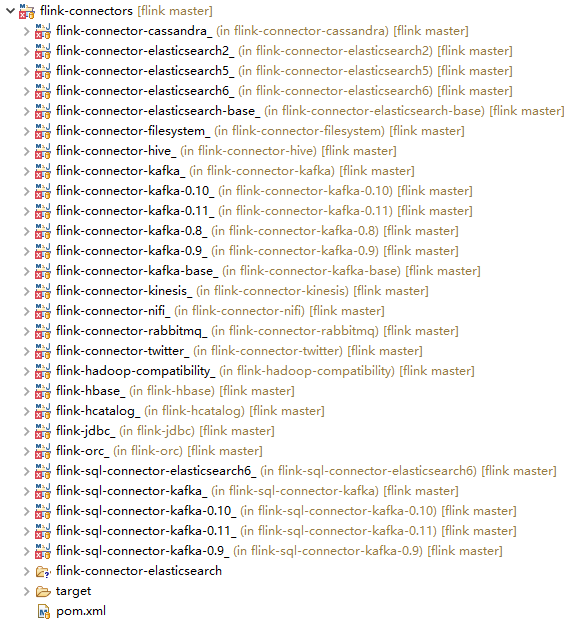
flink将数据源主要分为内置数据源和第三方数据源,内置数据源有 文件,网络socket端口及集合类型数据;第三方数据源实用Connector的方式来连接如kafka Connector,es connector等,自己定义的话,可以实现SourceFunction,封装成Connector来做。
3.DataStream转换
DataStream:同一个类型的流元素,DataStream可以通过transformation转换成另外的DataStream,示例如下
@link DataStream#map
@link DataStream#filter
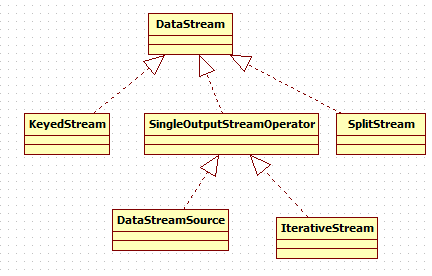
StreamOperator:流式算子的基本接口,三个实现类
AbstractStreamOperator:
OneInputStreamOperator:
TwoInputStreamOperator:
/**

 * Basic interface for stream operators. Implementers would implement one of

 * {@link org.apache.flink.streaming.api.operators.OneInputStreamOperator} or

 * {@link org.apache.flink.streaming.api.operators.TwoInputStreamOperator} to create operators

 * that process elements.

 *

 * <p>The class {@link org.apache.flink.streaming.api.operators.AbstractStreamOperator}

 * offers default implementation for the lifecycle and properties methods.

 *

 * <p>Methods of {@code StreamOperator} are guaranteed not to be called concurrently. Also, if using

 * the timer service, timer callbacks are also guaranteed not to be called concurrently with

 * methods on {@code StreamOperator}.

 *

 * @param <OUT> The output type of the operator

 */
4.DataStreamSink输出
    /**

     * Adds the given sink to this DataStream. Only streams with sinks added

     * will be executed once the {@link StreamExecutionEnvironment#execute()}

     * method is called.

     *

     * @param sinkFunction

     *            The object containing the sink's invoke function.

     * @return The closed DataStream.

     */

    public DataStreamSink<T> addSink(SinkFunction<T> sinkFunction) {

        // read the output type of the input Transform to coax out errors about MissingTypeInfo

        transformation.getOutputType();

        // configure the type if needed

        if (sinkFunction instanceof InputTypeConfigurable) {

            ((InputTypeConfigurable) sinkFunction).setInputType(getType(), getExecutionConfig());

        }

        StreamSink<T> sinkOperator = new StreamSink<>(clean(sinkFunction));

        DataStreamSink<T> sink = new DataStreamSink<>(this, sinkOperator);

        getExecutionEnvironment().addOperator(sink.getTransformation());

        return sink;

    }
5.执行
/**

     * Executes the JobGraph of the on a mini cluster of ClusterUtil with a user

     * specified name.

     *

     * @param jobName

     *            name of the job

     * @return The result of the job execution, containing elapsed time and accumulators.

     */

    @Override

    public JobExecutionResult execute(String jobName) throws Exception {

        // transform the streaming program into a JobGraph

        StreamGraph streamGraph = getStreamGraph();

        streamGraph.setJobName(jobName);

        JobGraph jobGraph = streamGraph.getJobGraph();

        jobGraph.setAllowQueuedScheduling(true);

        Configuration configuration = new Configuration();

        configuration.addAll(jobGraph.getJobConfiguration());

        configuration.setString(TaskManagerOptions.MANAGED_MEMORY_SIZE, "0");

        // add (and override) the settings with what the user defined

        configuration.addAll(this.configuration);

        if (!configuration.contains(RestOptions.BIND_PORT)) {

            configuration.setString(RestOptions.BIND_PORT, "0");

        }

        int numSlotsPerTaskManager = configuration.getInteger(TaskManagerOptions.NUM_TASK_SLOTS, jobGraph.getMaximumParallelism());

        MiniClusterConfiguration cfg = new MiniClusterConfiguration.Builder()

            .setConfiguration(configuration)

            .setNumSlotsPerTaskManager(numSlotsPerTaskManager)

            .build();

        if (LOG.isInfoEnabled()) {

            LOG.info("Running job on local embedded Flink mini cluster");

        }

        MiniCluster miniCluster = new MiniCluster(cfg);

        try {

            miniCluster.start();

            configuration.setInteger(RestOptions.PORT, miniCluster.getRestAddress().get().getPort());

            return miniCluster.executeJobBlocking(jobGraph);

        }

        finally {

            transformations.clear();

            miniCluster.close();

        }

    }
6.总结
Flink的执行方式类似于管道,它借鉴了数据库的一些执行原理,实现了自己独特的执行方式。
7.展望
Stream涉及的内容还包括Watermark,window等概念,因篇幅限制,这篇仅介绍flink DataStream API使用及原理。
下篇将介绍Watermark,下下篇是windows窗口计算。
参考资料
【1】https://baijiahao.baidu.com/s?id=1625545704285534730&wfr=spider&for=pc
【2】https://blog.51cto.com/13654660/2087705
flink DataStream API使用及原理的更多相关文章
- Flink DataStream API Programming Guide
Example Program The following program is a complete, working example of streaming window word count ...
- Flink DataStream API 中的多面手——Process Function详解
之前熟悉的流处理API中的转换算子是无法访问事件的时间戳信息和水位线信息的.例如:MapFunction 这样的map转换算子就无法访问时间戳或者当前事件的时间. 然而,在一些场景下,又需要访问这些信 ...
- Flink DataStream API
Data Sources 源是程序读取输入数据的位置.可以使用 StreamExecutionEnvironment.addSource(sourceFunction) 将源添加到程序.Flink 有 ...
- flink dataset api使用及原理
随着大数据技术在各行各业的广泛应用,要求能对海量数据进行实时处理的需求越来越多,同时数据处理的业务逻辑也越来越复杂,传统的批处理方式和早期的流式处理框架也越来越难以在延迟性.吞吐量.容错能力以及使用便 ...
- Flink Program Guide (2) -- 综述 (DataStream API编程指导 -- For Java)
v\:* {behavior:url(#default#VML);} o\:* {behavior:url(#default#VML);} w\:* {behavior:url(#default#VM ...
- Flink中API使用详细范例--window
Flink Window机制范例实录: 什么是Window?有哪些用途? 1.window又可以分为基于时间(Time-based)的window 2.基于数量(Count-based)的window ...
- Flink-v1.12官方网站翻译-P016-Flink DataStream API Programming Guide
Flink DataStream API编程指南 Flink中的DataStream程序是对数据流实现转换的常规程序(如过滤.更新状态.定义窗口.聚合).数据流最初是由各种来源(如消息队列.套接字流. ...
- Flink Program Guide (10) -- Savepoints (DataStream API编程指导 -- For Java)
Savepoint 本文翻译自文档Streaming Guide / Savepoints ------------------------------------------------------ ...
- Flink Program Guide (8) -- Working with State :Fault Tolerance(DataStream API编程指导 -- For Java)
Working with State 本文翻译自Streaming Guide/ Fault Tolerance / Working with State ---------------------- ...
随机推荐
- c++中重载、重写、覆盖的区别
Overload(重载):在C++程序中,可以将语义.功能相似的几个函数用同一个名字表示,但参数或返回值不同(包括类型.顺序不同),即函数重载.(1)相同的范围(在同一个类中):(2)函数名字相同:( ...
- Javascript函数的基本概念+匿名立即执行函数
函数声明.函数表达式.匿名函数 函数声明:function fnName () {…};使用function关键字声明一个函数,再指定一个函数名,叫函数声明. 函数表达式 var fnName = f ...
- Log4Net 用法记录
https://www.cnblogs.com/lzrabbit/archive/2012/03/23/2413180.html https://blog.csdn.net/guyswj/articl ...
- Ueditor 七牛集成
UEDITOR修改成功的 http://blog.csdn.net/uikoo9/article/details/41844747 http://blog.csdn.net/u010717403/ar ...
- 洛谷 P1358 扑克牌
P1358 扑克牌 题目描述 组合数学是数学的重要组成部分,是一门研究离散对象的科学,它主要研究满足一定条件的组态(也称组合模型)的存在.计数以及构造等方面的问题.组合数学的主要内容有组合计数.组合设 ...
- 每位iOS开发者不容错过的10大有用工具
内容简单介绍 1.iOS简单介绍 2.iOS开发十大有用工具之开发环境 3.iOS开发十大有用工具之图标设计 4.iOS开发十大有用工具之原型设计 5.iOS开发十大有用工具之演示工具 6.iOS开发 ...
- 高速数论变换(NTT)
今天的A题.裸的ntt,但我不会,于是白送了50分. 于是跑来学一下ntt. 题面非常easy.就懒得贴了,那不是我要说的重点. 重点是NTT,也称高速数论变换. 在非常多问题中,我们可能会遇到在模意 ...
- 玩转Bash脚本:选择结构之case
总第5篇 之前,我们谈到了if. 这次我们来谈还有一种选择结构--case. case与if if用于选择的条件,不是非常多的情况,假设选择的条件太多.一系列的if.elif,.也是醉了. 没错,ca ...
- ellipsize-TextView省略号的设定
ellipsize主要是当TextView的文字过长的时候,我们可以让它显示省略号 用法如下: 在xml中 <!--省略号在结尾--> android:ellipsize = " ...
- git -处理分支合并
1.分支间的合并 1)直接合并:把两个分支上的历史轨迹合二为一(就是所以修改都全部合并) zhangshuli@zhangshuli-MS-:~/myGit$ vim merge.txt zhangs ...