
警告异常:Could not open/create prefs root node Software\JavaSoft\Prefs at root 0x80000002. Windows RegCreateKeyEx(...) returned error code 5
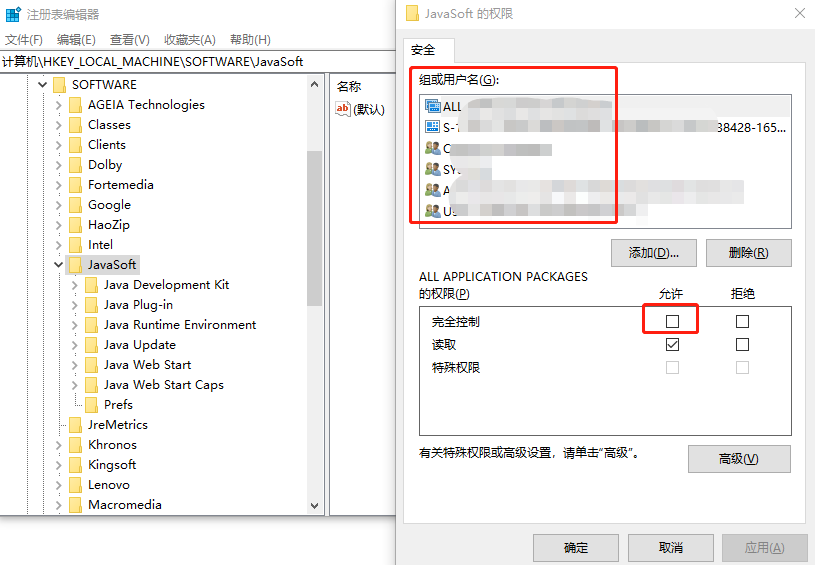
1、打开 regedit.exe 注册表编辑器
2、找出文件名称 HKEY_CURRENT_USER\Software\JavaSoft 和 HKEY_LOCAL_MACHINE\SOFTWARE\JavaSoft
3、右键“权限”,[完全控制]选项都勾选允许。
警告异常:Could not open/create prefs root node Software\JavaSoft\Prefs at root 0x80000002. Windows RegCreateKeyEx(...) returned error code 5的更多相关文章
- Jmeter(四十四)启动提示 Could not open/create prefs root node Software\JavaSoft\Prefs at root 0x80000002. Windows RegCreateKeyEx(...) returned error code 5.
有已知的已知:有些事情我们自己知道自己知道: 我们也知道有已知的未知:这是指我们知道有些事情自己不知道: 但是还有未知的未知:有些事情我们不知道自己不知道: ---美国国防部长 唐纳德·拉姆斯菲尔 ...
- Jmeter--报错 WARNING: Could not open/create prefs root node Software\JavaSoft\Prefs at root 0x80000002. Windows RegCreateKeyEx(...) returned error code 5.
今天要用Jmeter测试服务器性能,发现GUI界面总是有warning提示: WARNING: Could not open/create prefs root node Software\JavaS ...
- WARNING: Could not open/create prefs root node Software\JavaSoft\Prefs at root 0x80000002. Windows RegCreateKeyEx(...) returned error code 5
以下是我的程序(取自headfirst Java): import javax.sound.midi.*; public class MiniMiniMusicApp { public static ...
- 启动Jmeter4.0 后弹出警告: WARNING: Could not open/create prefs root node Software\JavaSoft\Prefs at root 0 x80000002. Windows RegCreateKeyEx(...) returned error code 5.
启动Jmeter4.0 后弹出命令窗口提示信息: WARNING: Could not open/create prefs root node Software\JavaSoft\Prefs at r ...
- JMeter启动时显示Could not open/create prefs root node Software\JavaSoft\Prefs at root 0X80000002
在windows 7上启动jmeter时,提示错误: Java.util.prefs.WindowsPreferences <init> WARNING: Could not open/c ...
- JMeter学习-006-Could not open/create prefs root node Software\JavaSoft\Prefs at root 0x80000002 解决办法(windows 7)
好久没用 JMeter 了,今天启动的时候,发现启动命令行窗口出现了警报,警告信息如下图所示:
- 有一个警告:Could not open/create prefs root node
WARNING: Could not open/create prefs root node Software\JavaSoft\Prefs at root 0x80000002. 虽然程序也能正常运 ...
- LDAP抛出Error Code 3 - Timelimit Exceeded 异常,导致CAS连接报错
最近公司使用CAS连接LDAP,实现单点登录.遇到了这个问题:登录后,抛出错误: 查看CAS后台,看到这个异常. javax.naming.TimeLimitExceededException: LD ...
- Ubuntu 12.04 root默认密码? 如何使用root登录?
在安装Ubuntu 12.04时并没有设置root的密码,登录的时候也没有使用root账户.当我们使用root权限时,一般都使用sudo命令进行.那么当我们安装完毕Ubuntu 12.04时,root ...
随机推荐
- Keepalived + Mysql 双主
VIP 192.168.1.41 Master 192.168.1.42 Slave 192.168.1.43 .配置 yum -y install mysql-server chkconfig -- ...
- 网站图标——favicon
首先推荐一个网站图标在线制作工具favicon: 插入图标只需在head中间加入以下代码: <link rel="icon" href="img/favicon.i ...
- Day1:循环语句(While,For)
一.while循环 while 条件: 条件为真执行的语句 esle: 条件为假执行的语句 #!/usr/bin/env python # -*- coding:utf-8 -*- # Author: ...
- GO语言学习(一)Windows 平台下 Go 语言的安装和环境变量设置
1. Go 语言 SDK 安装包下载和安装 GO语言安装包下载地址:https://www.golangtc.com/download 下载 go1.9.2.windows-amd64 2. Go 语 ...
- 如何在Win8/Win10上开启 dotNetFramework 2.0/3.5 功能
问题: 在Windows 8.Windows 10上安装一些软件时,系统可能会报出如下错误:你的电脑上的应用需要使用以下Windows功能: 解决方式: 首先呢,你需要准备好一个Win8/ ...
- python打印即时输出的方法
>>> import sys>>> sys.stdout.flush() 但是实验了,上面的报错,应该是不对的. 实验了,下面的报错,应该是不对的. 使用 prin ...
- RabbitMQ安全相关的网络资源介绍
无法用guest远程訪问RabbitMQ的的解决方式 Can't access RabbitMQ web management interface after fresh install http:/ ...
- Codeforces Round #315 (Div. 2) (ABCD题解)
比赛链接:http://codeforces.com/contest/569 A. Music time limit per test:2 seconds memory limit per test: ...
- C++中的虚析构函数、纯虚析构函数具体解释
C++中析构函数能够为纯虚函数吗? 众所周知.在实现多态的过程中,一般将基类的析构函数设为virtual.以便在delete的时候能够多态的链式调用.那么析构函数能否够设为纯虚呢? class CBa ...
- Django项目开发实例之我的博客
1.开发环境 2.创建virtualenv 3.安装相关包 Django Pillow 4.创建项目 添加应用: 5.设置静态文件和模板 6.运行测试 参考(http://www.cnblogs.co ...