
RN Animated透明度动画
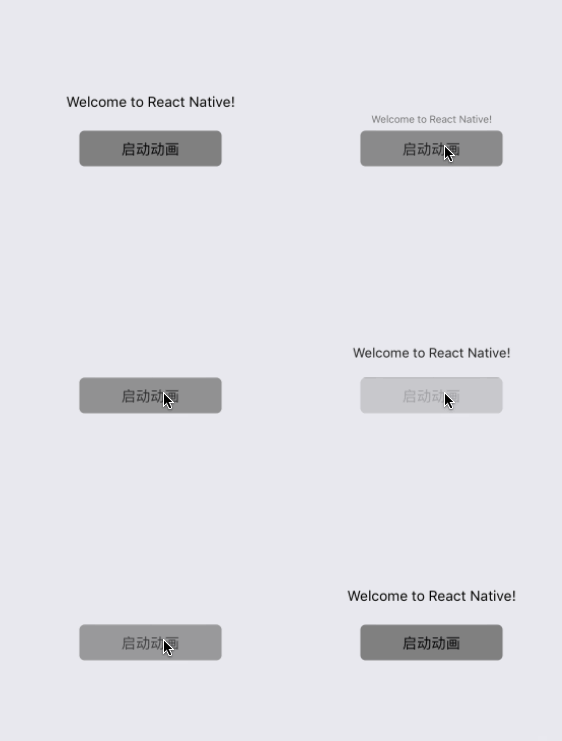
主要代码解析:
如果我们希望吧Animated.Value从0变化到1,把组件位置从60px移动到0px,把不透明度从0编导1,就可以使用style的属性来实现
<Animated.Text style={{

                    opacity: this.state.fadeAnim,//透明度动画

                    transform: [{

                        translateY: this.state.fadeAnim.interpolate({

                            inputRange: [0, 1],

                            outputRange: [60, 0] //线性插值,0对应60,0.6对应30,1对应0

                        }),

                    },

                        {

                            scale: this.state.fadeAnim

                        },

                    ],

                }}>
代码:
import React, {Component} from 'react';

import {

    AppRegistry,

    StyleSheet,

    Text,

    Animated,

    TouchableOpacity,

    View

} from 'react-native';

export default class AnimationAlphaScene extends Component {

    state: {

        fadeAnim: Animated,

        currentAlpha: number,

    };

    constructor(props) {

        super(props);

        this.state = {

            currentAlpha: 1.0,

            fadeAnim: new Animated.Value(1.0)

        };

    }

    startAnimation() {

        this.state.currentAlpha = this.state.currentAlpha == 1.0 ? 0.0 : 1.0;

        Animated.timing(

            this.state.fadeAnim,

            {toValue: this.state.currentAlpha}

        ).start();

    }

    render() {

        return (

            <View style={styles.container}>

                <Animated.Text style={{

                    opacity: this.state.fadeAnim,//透明度动画

                    transform: [{

                        translateY: this.state.fadeAnim.interpolate({

                            inputRange: [0, 1],

                            outputRange: [60, 0] //线性插值,0对应60,0.6对应30,1对应0

                        }),

                    },

                        {

                            scale: this.state.fadeAnim

                        },

                    ],

                }}>

                    Welcome to React Native!

                </Animated.Text>

                <TouchableOpacity onPress={() => this.startAnimation()} style={styles.button}>

                    <Text>启动动画</Text>

                </TouchableOpacity>

            </View>

        );

    }

}

const styles = StyleSheet.create({

    container: {

        flex: 1,

        marginTop: 20,

        justifyContent: 'center',

        alignItems: 'center',

    },

    button: {

        marginTop: 20,

        backgroundColor:'#808080',

        height:35,

        width:140,

        borderRadius:5,

        justifyContent: 'center',

        alignItems: 'center',

    },

});
RN Animated透明度动画的更多相关文章
- RN animated组动画
代码: export default class AnimationGroupScene extends Component { constructor() { super() ) ) ) } com ...
- RN animated缩放动画
效果图: 代码: import React, {Component} from 'react'; import { AppRegistry, StyleSheet, Text, Animated, T ...
- RN animated帧动画
效果图: 代码: export default class AnimationFrameScene extends Component { constructor () { super() this. ...
- js实现匀速运动及透明度动画
1.html代码 <body> <div id="container"> <span id="btn"></span& ...
- js动画实现透明度动画
在本次实例中,由于一般主流的浏览器对于透明度opacity最大值为1,但是在IE6最大值是100,此次例子是按主流浏览器的透明度来算的,所以定义的是小数,也可以定义为整数为单位,在运算的时候遇到主流的 ...
- 第一百四十二节,JavaScript,封装库--运动动画和透明度动画
JavaScript,封装库--运动动画和透明度动画 /** yi_dong_tou_ming()方法,说明 * * yi_dong_tou_ming()方法,将一个元素,进行一下动画操作 * 1,x ...
- js简单动画:匀速动画、缓动动画、多物体动画以及透明度动画
主要实现以下几种简单的动画效果(其实原理基本相同): 1.匀速动画:物体的速度固定 2.缓动动画:物体速度逐渐变慢 3.多物体动画 4.透明度动画 效果实现: 1.匀速动画(以物体左右匀速运动为例) ...
- Android 动画-alpha(渐变透明度动画效果)
今天苦于思索应用如何美观,首先从载入页面的第一眼开始,Android动画分为四种:alpha(渐变透明度),scale(渐变尺寸伸缩),translate(画面转换位置移动),rotate(画面转移旋 ...
- Vue系列之 => 使用第三方animated.css动画
<!DOCTYPE html> <html lang="en"> <head> <meta charset="UTF-8&quo ...
随机推荐
- Hibernate HQL的使用
1.简单查询(查询所有) Session session=HibernateUtil.getSessionFactory().getCurrentSession(); Transaction tx=s ...
- glob通配符
描述glob是shell使用的路径匹配符,类似于正则表达式,但是与正则表达式不完全相同.在linux操作中如文件匹配等等其实已经使用了glob通配符.由于其在路径匹配方面的强大,其他语言也有相应的实现 ...
- ElasticSearch6(三)-- Java API实现简单的增删改查
基于ElasticSearch6.2.4, Java API创建索引.查询.修改.删除,pom依赖和获取es连接 可查看此文章. package com.xsjt.learn; import java ...
- kubernetes-PetSet
什么是Pet?Pet是一个有状态应用程序,本质上它是一个具有确定性名称以及唯一身份的Pod,身份内容包括: DNS中可以识别的固定hostname 顺序化索引(Pet名称组成:PetSetName-O ...
- Django之ORM版学员管理系统
班级表 表结构 class Class(models.Model): id = models.AutoField(primary_key=True) # 主键 cname = models.CharF ...
- [LintCode] Majority Number 求大多数
Given an array of integers, the majority number is the number that occurs more than half of the size ...
- solus 系统 - 编译安裝 ibus-rime 中文输入法(附:小鹤双拼双形配置文件)
編譯方法參見官網 - https://github.com/rime/home/wiki/RimeWithIBus 安装依赖:列出几个可能用到的命令 #安裝cmake gcc等开发工具 sudo eo ...
- 洛谷P1118 数字三角形【dfs】【STL】
题目链接:https://www.luogu.org/problemnew/show/P1118 题意: 1~n的一个排列,相邻的两项加起来得到下一行. 现在给定最后一行的数字,问最初的1~n的排列是 ...
- hdu3746 Cyclic Nacklace【nxt数组应用】【最小循环节】
Cyclic Nacklace Time Limit: 2000/1000 MS (Java/Others) Memory Limit: 32768/32768 K (Java/Others)T ...
- Abhyankar's Conjecture
http://www.math.purdue.edu/about/purview/spring95/conjecture.html A Layman's Perspective of Abhyanka ...