
Requests+BeautifulSoup+正则表达式爬取猫眼电影Top100(名称,演员,评分,封面,上映时间,简介)
 # encoding:utf-8

 from requests.exceptions import RequestException

 import requests

 import re

 import json

 from multiprocessing import Pool

 def get_one_page(url):

     try:

         response = requests.get(url)

         if response.status_code == 200:

             return response.text

         return None

     except RequestException:

         return None

 def parse_one_page(html):

     pattern = re.compile('<dd>.*?board-index.*?>(\d+)</i>.*?data-src="(.*?)".*?name"><a'

                          +'.*?>(.*?)</a>.*?star">(.*?)</p>.*?releasetime">(.*?)</p>'

                           +'.*?integer">(.*?)</i>.*?fraction">(.*?)</i>.*?</dd>',re.S)

     items = re.findall(pattern, html)

     # print(items)

     for item in items:

         yield {

             'index': item[0],

             'image': item[1],

             'title': item[2],

             'actor': item[3].strip()[3:],

             'time': item[4].strip()[5:],

             'score': item[5]+item[6]

         }

 def write_to_file(content):

     with open('MaoyanTop100.txt', 'a', encoding='utf-8') as f:

         f.write(json.dumps(content, ensure_ascii=False)+'\n')

         f.close()

 def main(offset):

     url = "http://maoyan.com/board/4?offset="+str(offset)

     html = get_one_page(url)

     # print(html)

     # parse_one_page(html)

     for item in parse_one_page(html):

         print(item)

         write_to_file(item)

 if __name__ == '__main__':

     pool = Pool()

     # for i in range(10):

     #     main(i*10)

     # 加快效率

     pool.map(main, [i*10 for i in range(10)])
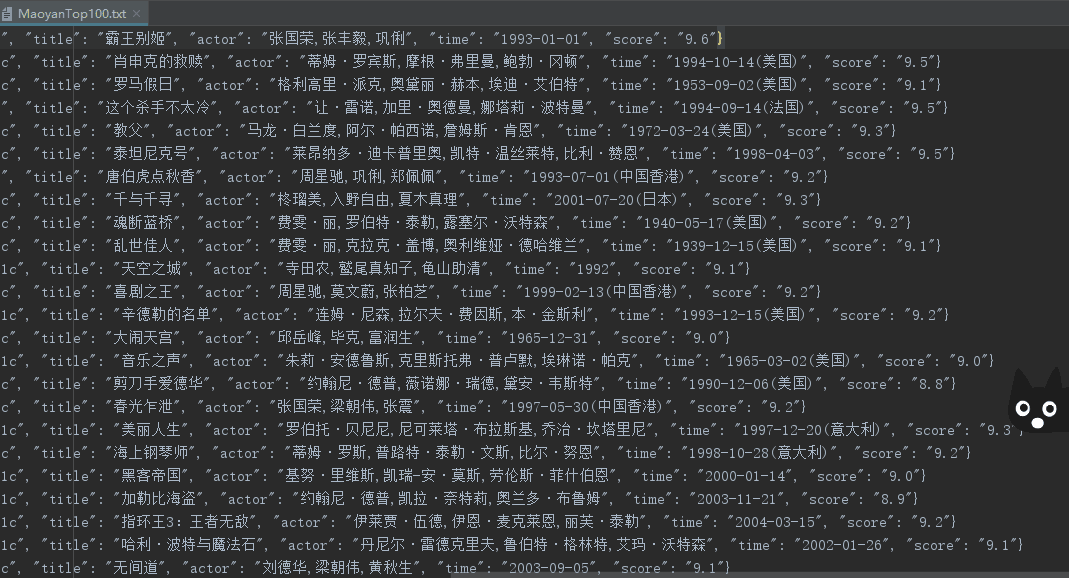
效果图:
更新(获取封面以及影片简介):
 # encoding:utf-8

 from requests.exceptions import RequestException

 import requests

 import json

 import re

 from urllib import request

 from bs4 import BeautifulSoup

 def get_one_page(url):

     try:

         response = requests.get(url)

         if response.status_code == 200:

             return response.text

         return None

     except RequestException:

         return None

 def parse_one_page(html):

     pattern = re.compile('<dd>.*?board-index.*?>(\d+)</i>.*?href="(.*?)".*?data-src="(.*?)".*?name"><a'

                          +'.*?>(.*?)</a>.*?star">(.*?)</p>.*?releasetime">(.*?)</p>'

                           +'.*?integer">(.*?)</i>.*?fraction">(.*?)</i>.*?</dd>',re.S)

     items = re.findall(pattern, html)

     # print(items)

     for item in items:

         yield {

             'index': item[0],

             'jump': item[1],

             'image': item[2],

             'title': item[3],

             'actor': item[4].strip()[3:],

             'time': item[5].strip()[5:],

             'score': item[6]+item[7]

         }

 def parse_summary_page(url):

     # url = 'https://maoyan.com/films/1203'

     head = {}

     # 使用代理

     head['User - Agent'] = 'User-Agent:Mozilla/5.0 (Windows NT 10.0; WOW64) AppleWebKit/537.36 (KHTML, like Gecko) Chrome/63.0.3239.26 Safari/537.36 Core/1.63.6788.400 QQBrowser/10.3.2843.400'

     req = request.Request(url, headers=head)

     response = request.urlopen(req)

     html = response.read()

     # 创建request对象

     soup = BeautifulSoup(html, 'lxml')

     # 找出div中的内容

     soup_text = soup.find('span', class_='dra')

     # 输出其中的文本

     # print(soup_text.text)

     return soup_text

 def write_to_file(content):

     with open('newMaoyanTop100.txt', 'a', encoding='utf-8') as f:

         f.write(json.dumps(content, ensure_ascii=False)+'\n')

         f.close()

 def main(offset):

     url = "http://maoyan.com/board/4?offset="+str(offset*10)

     html = get_one_page(url)

     for item in parse_one_page(html):

         # print(item['number'])

         # print(item['jump'])

         jump_url = "https://maoyan.com"+str(item['jump'])

         item['summary'] = str(parse_summary_page(jump_url)).replace("<span class=\"dra\">","").replace("</span>","")

         print(item)

         write_to_file(item)

     # 写txt

     # for item in parse_one_page(html):

     #     write_to_file(item['title'])

     # 爬取100张图片

     # path = 'E:\\myCode\\py_test\\MaoyanTop100\\images\\'

     # for item in parse_one_page(html):

     #     urllib.request.urlretrieve(item['image'], '{}{}.jpg'.format(path, item['index']))

 if __name__ == '__main__':

     for i in range(10):

         main(i)
Requests+BeautifulSoup+正则表达式爬取猫眼电影Top100(名称,演员,评分,封面,上映时间,简介)的更多相关文章
- requests和正则表达式爬取猫眼电影Top100练习
1 import requests 2 import re 3 from multiprocessing import Pool 4 from requests.exceptions import R ...
- python3.6 利用requests和正则表达式爬取猫眼电影TOP100
import requests from requests.exceptions import RequestException from multiprocessing import Pool im ...
- PYTHON 爬虫笔记八:利用Requests+正则表达式爬取猫眼电影top100(实战项目一)
利用Requests+正则表达式爬取猫眼电影top100 目标站点分析 流程框架 爬虫实战 使用requests库获取top100首页: import requests def get_one_pag ...
- 爬虫练习之正则表达式爬取猫眼电影Top100
#猫眼电影Top100import requests,re,timedef get_one_page(url): headers={ 'User-Agent':'Mozilla/5.0 (Window ...
- Requests+正则表达式爬取猫眼电影(TOP100榜)
猫眼电影网址:www.maoyan.com 前言:网上一些大神已经对猫眼电影进行过爬取,所用的方法也是各有其优,最终目的是把影片排名.图片.名称.主要演员.上映时间与评分提取出来并保存到文件或者数据库 ...
- Python爬虫实战之Requests+正则表达式爬取猫眼电影Top100
import requests from requests.exceptions import RequestException import re import json # from multip ...
- python爬虫从入门到放弃(九)之 Requests+正则表达式爬取猫眼电影TOP100
import requests from requests.exceptions import RequestException import re import json from multipro ...
- 整理requests和正则表达式爬取猫眼Top100中遇到的问题及解决方案
最近看崔庆才老师的爬虫课程,第一个实战课程是requests和正则表达式爬取猫眼电影Top100榜单.虽然理解崔老师每一步代码的实现过程,但自己敲代码的时候还是遇到了不少问题: 问题1:获取respo ...
- 14-Requests+正则表达式爬取猫眼电影
'''Requests+正则表达式爬取猫眼电影TOP100''''''流程框架:抓去单页内容:利用requests请求目标站点,得到单个网页HTML代码,返回结果.正则表达式分析:根据HTML代码分析 ...
随机推荐
- 限制SSH用户访问Linux中指定的目录
限制SSH用户访问Linux中指定的目录 http://os.51cto.com/art/201703/534895.htm#topx http://www.cnblogs.com/lykyl/arc ...
- Python识别字符型图片验证码
前言 验证码是目前互联网上非常常见也是非常重要的一个事物,充当着很多系统的 防火墙 功能,但是随时OCR技术的发展,验证码暴露出来的安全问题也越来越严峻.本文介绍了一套字符验证码识别的完整流程,对于验 ...
- MHA配置参数详解 【转】
mha配置参数详解: 参数名字 是否必须 参数作用域 默认值 示例 hostname Yes Local Only - hostname=mysql_server1, hostname=192.168 ...
- python实时得到鼠标的位置
1.#先下载pyautogui库,打开cmd输入pip install pyautogui,回车 2.代码如下: import os,time import pyautogui as pag try: ...
- zookeeper(百度百科http://baike.baidu.com/view/3061646.htm?fr=aladdin)
ZooKeeper是Hadoop的正式子项目,它是一个针对大型分布式系统的可靠协调系统,提供的功能包括:配置维护.名字服务.分布式同步.组服务等.ZooKeeper的目标就是封装好复杂易出错的关键服务 ...
- Snmp学习总结(一)——Snmp的基本概念
一.SNMP简单概述 1.1.什么是Snmp SNMP是英文"Simple Network Management Protocol"的缩写,中文意思是"简单网络管理协议& ...
- Vue+typescript报错项
39:1 Unable to resolve signature of class decorator when called as an expression. Type '<VC exten ...
- sort(排序) qsort(快排) bsearch(二分查找)
sort: 一.对int类型数组排序 int a[100]; int cmp ( int a , int b ) //不必强制转换 { return a < b;//升序排列. } sort ( ...
- [LeetCode] 98. Validate Binary Search Tree_Medium
Given a binary tree, determine if it is a valid binary search tree (BST). Assume a BST is defined as ...
- 制作正式版10.11 OS X El Capitan 安装U盘(优盘)
一.准备工作:1.准备一个 8GB 或以上容量的 U 盘,确保里面的数据已经妥善备份好(该过程会抹掉 U 盘全部数据)2.从官网Appstore下载下来的 “安装 OS X El Capitan”,当 ...