
步步为营-64-进程&线程
1 进程
using System;

using System.Collections.Generic;

using System.Diagnostics;

using System.Linq;

using System.Text;

using System.Threading.Tasks;

namespace 进程线程

{

    class Program

    {

        static void Main(string[] args)

        {

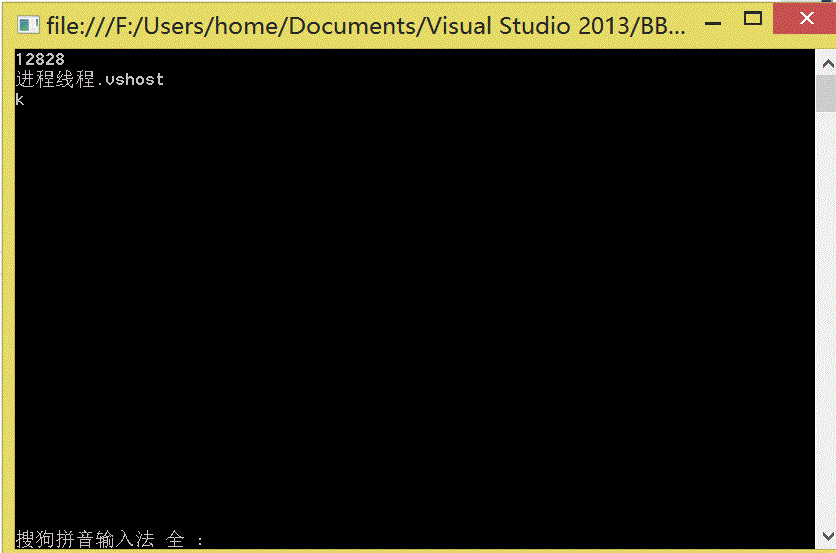
            //获取当前进程

            Process p1 = Process.GetCurrentProcess();

            Console.WriteLine(p1.Id);

            Console.WriteLine(p1.ProcessName);

            //打开新的进程

            Process p2 = Process.Start("cmd.exe");

            string  key = Console.ReadLine();

            if (key=="k")

            {

                //杀死进程

                p2.Kill();

            }

            Console.ReadLine();

        }

    }

}
2 应用程序域
using System;

using System.Collections.Generic;

using System.Linq;

using System.Text;

using System.Threading.Tasks;

namespace 应用程序域

{

    class Program

    {

        static void Main(string[] args)

        {

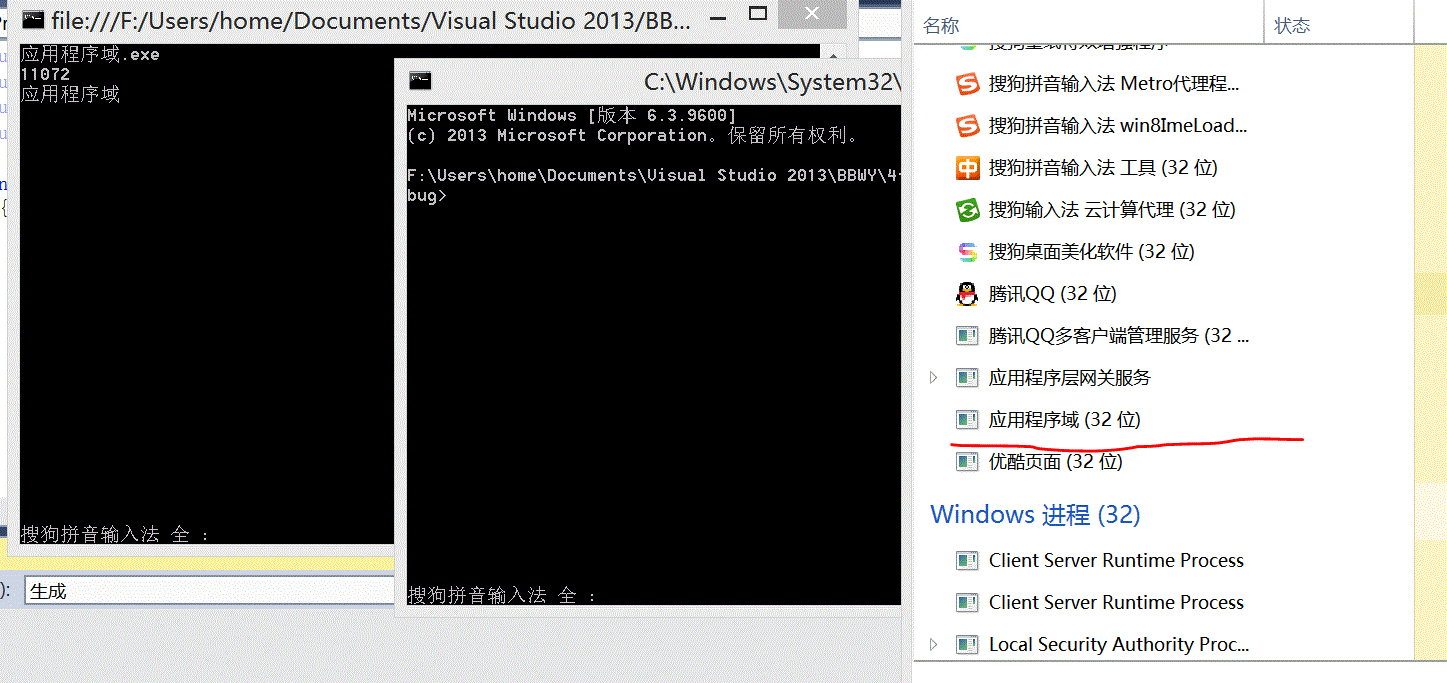
            //01 获取当前应用程序域

            AppDomain ad = AppDomain.CurrentDomain;

            Console.WriteLine(ad.FriendlyName);

            //02 在当前程序域中打开程序集,不会开启新进程

            AppDomain ap2= AppDomain.CreateDomain("xyxtl");

           int id = ap2.ExecuteAssembly("进程线程.exe");

            Console.Write(id);

           Console.ReadKey();

        }

    }

}
3 线程
using System;

using System.Collections.Generic;

using System.Linq;

using System.Text;

using System.Threading;

using System.Threading.Tasks;

namespace 线程

{

    class Program

    {

        static void Main(string[] args)

        {

            #region 01 获取当前线程-默认程序启动后,会有一个主线程

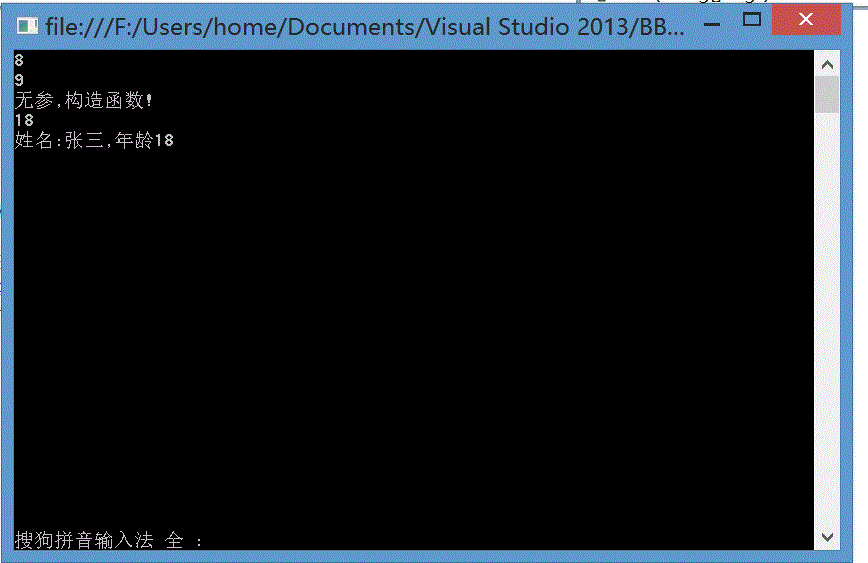
            Thread t1 = Thread.CurrentThread;

            Console.WriteLine(t1.ManagedThreadId);

            #endregion

            #region 02 开辟一个新线程 - 02-01 无参;02-02 有参

            //02-01 有参

            Thread t2 = new Thread(() =>

            {

                Console.WriteLine(Thread.CurrentThread.ManagedThreadId);//输出当前线程编号

                Console.WriteLine("无参,构造函数!");

            });

            t2.Start();

            //02-02 有参

            #endregion

            Thread t3 = new Thread((p) =>

            {

                //由于参数是object类型,如果想访问对象特有成员,需要进行类型转换

                Person p2 = p as Person;

                if (p2!=null)

                {

                    ;

                    Console.WriteLine(p2.Age);

                }

                Console.WriteLine(p.ToString());

            });

            t3.Start(new Person()

            {

                Name = "张三",

                Age = ,

            });

            Console.Read();

        }

        public class  Person

        {

            public string Name { get; set; }

            public int Age { get; set; }

            public override string ToString()

            {

                return string.Format("姓名:{0},年龄{1}",Name,Age);

            }

        }

    }

}
3.2 IsBackground属性
using System;

using System.Collections.Generic;

using System.ComponentModel;

using System.Data;

using System.Drawing;

using System.Linq;

using System.Text;

using System.Threading;

using System.Threading.Tasks;

using System.Windows.Forms;

namespace 前台线程与后台线程

{

    public partial class Form1 : Form

    {

        public Form1()

        {

            InitializeComponent();

        }

        private void button1_Click(object sender, EventArgs e)

        {

            Thread t1 = new Thread(() =>

            {

                while (true)

                {

                    Console.WriteLine();

                }

            });

            //休息5秒

           // Thread.Sleep(5000);

            t1.Start();

        }

        private void button2_Click(object sender, EventArgs e)

        {

            Thread t1 = new Thread(() =>

            {

                while (true)

                {

                    Console.WriteLine();

                }

            });

            t1.IsBackground = true;

            t1.Start();

        }

    }

}
当线程是后台线程时,主线程关闭,后台线程也随之关闭;
当线程是前台线程时,主线程关闭,前台线程不关闭;
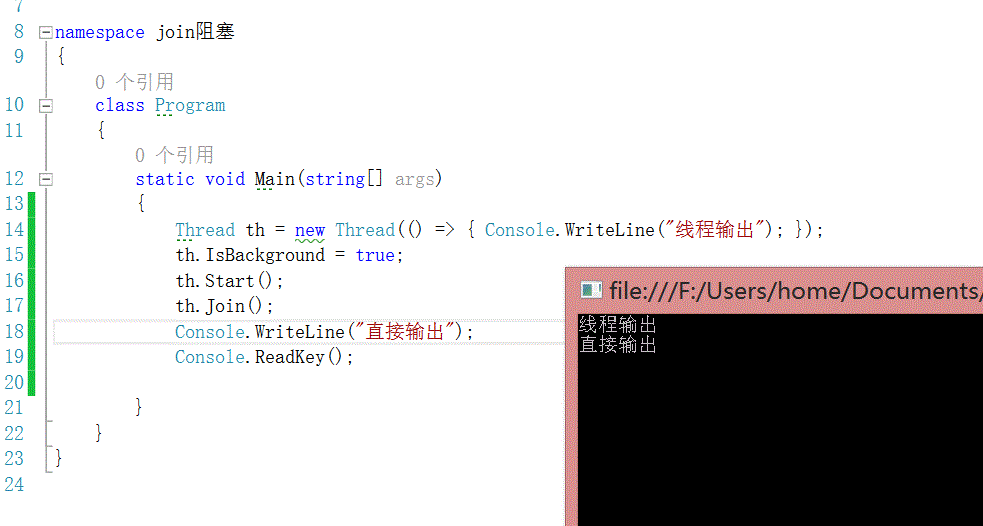
3.3 join 属性,阻塞join代码所在的当前线程==插队

4 lock
问题的引出
using System;

using System.Collections.Generic;

using System.Linq;

using System.Text;

using System.Threading;

using System.Threading.Tasks;

namespace Lock锁

{

    class Program

    {

        static void Main(string[] args)

        {

            int num = ;

            Thread th = new Thread(() =>

            {

                for (int i = ; i < ; i++)

                {

                    num--;

                }

            });

            th.IsBackground = true;

            th.Start();

            for (int i = ; i < ; i++)

            {

                num++;

            }

            Console.WriteLine(num);

            Console.ReadKey();

        }

    }

}

解决方法:加锁
using System;

using System.Collections.Generic;

using System.Linq;

using System.Text;

using System.Threading;

using System.Threading.Tasks;

namespace Lock锁

{

    class Program

    {

        static void Main(string[] args)

        {

            int num = ;

            Thread th = new Thread(() =>

            {

                for (int i = ; i < ; i++)

                {

                    lock ("B")

                    {

                        num --;

                    }

                }

            });

            th.IsBackground = true;

            th.Start();

            for (int i = ; i < ; i++)

            {

                lock ("B")

                {

                    num ++;

                }

            }

            Console.WriteLine(num);

            Console.ReadKey();

        }

    }

}
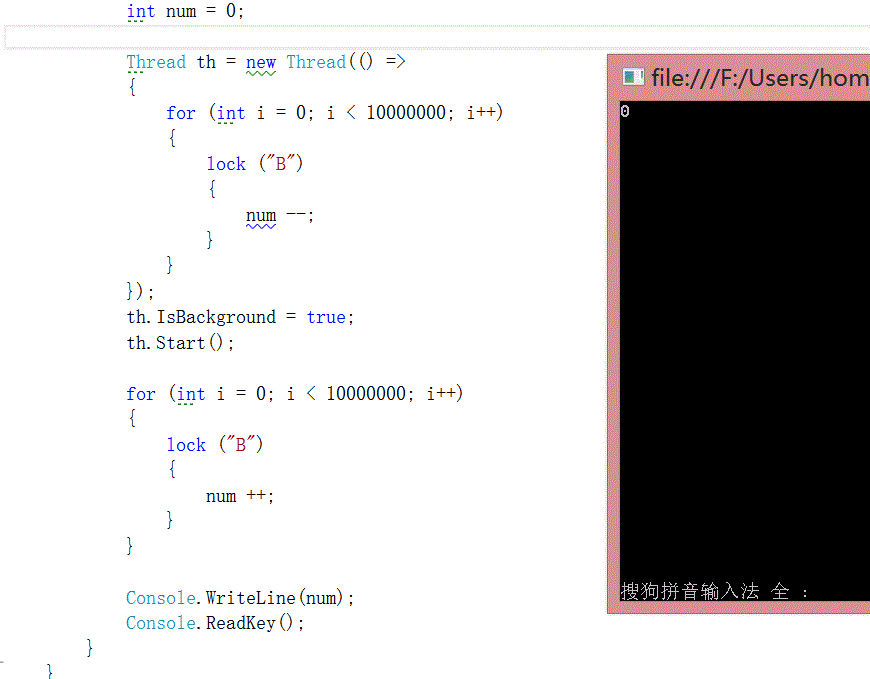
5 栈 stack
using System;

using System.Collections.Generic;

using System.Linq;

using System.Text;

using System.Threading.Tasks;

namespace 栈

{

    class Program

    {

        static void Main(string[] args)

        {

            //定义栈

            Stack<BaoZi> bzStack = new Stack<BaoZi>( );

            //入栈

            bzStack.Push(new BaoZi());

            //出栈

            if (bzStack.Count>)

            {

               BaoZi bz= bzStack.Pop();

            }

        }

        public class BaoZi

        {

        }

    }

}
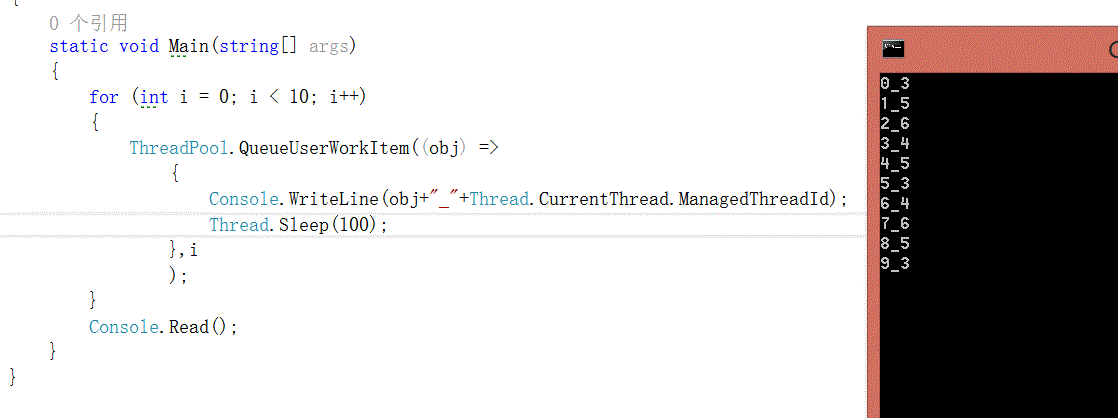
6 线程池
线程池中的线程都是后台线程
不能手动设置每个线程的属性(前台,优先级)
比较短的任务考虑线程池,比较长的任务考虑手动创建一个线程
using System;

using System.Collections.Generic;

using System.Linq;

using System.Text;

using System.Threading;

using System.Threading.Tasks;

namespace 线程池

{

    class Program

    {

        static void Main(string[] args)

        {

            for (int i = ; i < ; i++)

            {

                ThreadPool.QueueUserWorkItem((obj) =>

                    {

                        Console.WriteLine(obj+"_"+Thread.CurrentThread.ManagedThreadId);

                        Thread.Sleep();

                    },i

                    );

            }

            Console.Read();

        }

    }

}
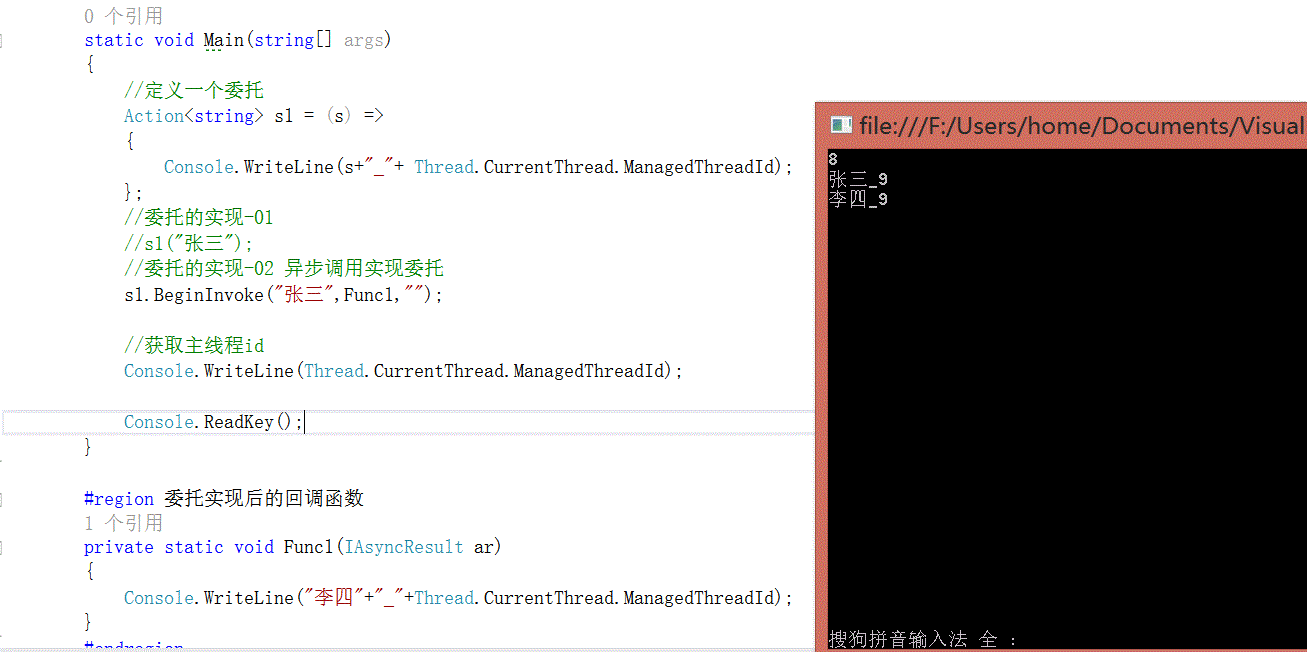
7 异步方式调用委托对象
using System;

using System.Collections.Generic;

using System.Linq;

using System.Text;

using System.Threading;

using System.Threading.Tasks;

namespace 异步方式调用委托对象

{

    class Program

    {

        static void Main(string[] args)

        {

            //定义一个委托

            Action<string> s1 = (s) =>

            {

                Console.WriteLine(s+"_"+ Thread.CurrentThread.ManagedThreadId);

            };

            //委托的实现-01

            //s1("张三");

            //委托的实现-02 异步调用实现委托

            s1.BeginInvoke("张三",Func1,"");

            //获取主线程id

            Console.WriteLine(Thread.CurrentThread.ManagedThreadId);

            Console.ReadKey();

        }

        #region 委托实现后的回调函数

        private static void Func1(IAsyncResult ar)

        {

            Console.WriteLine("李四"+"_"+Thread.CurrentThread.ManagedThreadId);

        }

        #endregion

    }

}
using System;

using System.Collections.Generic;

using System.Linq;

using System.Text;

using System.Threading;

using System.Threading.Tasks;

namespace 异步方式调用委托对象

{

    class Program

    {

        static void Main(string[] args)

        {

            //定义一个委托

            Action<string> s1 = (s) =>

            {

                Console.WriteLine(s+"_"+ Thread.CurrentThread.ManagedThreadId);

            };

            //委托的实现-01

            //s1("张三");

            //委托的实现-02 异步调用实现委托

           IAsyncResult result = s1.BeginInvoke("张三",Func1,"");

            //保证委托执行完成后,执行后续代码

            //只保证委托执行完成,不保证回调函数也执行完成

            s1.EndInvoke(result);

            //获取主线程id

            Console.WriteLine(Thread.CurrentThread.ManagedThreadId);

            Console.ReadKey();

        }

        #region 委托实现后的回调函数

        private static void Func1(IAsyncResult ar)

        {

            Console.WriteLine("李四"+"_"+Thread.CurrentThread.ManagedThreadId);

        }

        #endregion

    }

}

8 并行计算
using System;

using System.Collections.Generic;

using System.Diagnostics;

using System.Linq;

using System.Text;

using System.Threading.Tasks;

namespace 并行计算

{

    class Program

    {

        static void Main(string[] args)

        {

            Stopwatch  sp = new Stopwatch();

            sp.Start();

            //普通计算

            //for (int i = 0; i < 100000; i++)

            //{

            //    Console.WriteLine(i);

            //}

            //并行计算

            Parallel.For(1, 100000, (i) => { Console.WriteLine(i); });

            sp.Stop();

            Console.WriteLine(sp.Elapsed);

            Console.ReadKey();

        }

    }

}
步步为营-64-进程&线程的更多相关文章
- Linux查看进程线程个数
1.根据进程号进行查询: # pstree -p 进程号 # top -Hp 进程号 2.根据进程名字进行查询: # pstree -p `ps -e | grep server | awk '{pr ...
- python基础(16)-进程&线程&协程
进程之multiprocessing模块 Process(进程) Process模块是一个创建进程的模块,借助这个模块,就可以完成进程的创建. 介绍 初始化参数 Process([group [, t ...
- [5]windows内核情景分析---进程线程
本篇主要讲述进程的启动过程.线程的调度与切换.进程挂靠 进程的启动过程: BOOL CreateProcess ( LPCTSTR lpApplicationName, ...
- XV6源代码阅读-进程线程
Exercise1 源代码阅读 1.基本头文件:types.h param.h memlayout.h defs.h x86.h asm.h mmu.h elf.h types.h:仅仅是定义uint ...
- python学习笔记-进程线程
1.什么是进程(process)? 程序并不能单独运行,只有将程序装载到内存中,系统为它分配资源才能运行,而这种执行的程序就称之为进程.程序和进程的区别就在于:程序是指令的集合,它是进程运行的静态描述 ...
- 获取系统中所有进程&线程信息
读书笔记--[计算机病毒解密与对抗] 目录: 遍历进程&线程程序 终止进程 获取进程信息 获取进程内模块信息 获取进程命令行参数 代码运行环境:Win7 x64 VS2012 Update3 ...
- [skill] 进程 线程
在业务逻辑上: 进程线程没有区别. 在系统资源上: 进程拥有自己的地址空间.线程拥有自己的堆栈和临时变量,与其他线程共享地址空间. 在通信代价上: 线程间通信代价更低,实现更方便.进程通信相对开销比较 ...
- pyhon——进程线程、与协程基础概述
一直以来写博客都是实用主义者,只写用法,没信心写原理,但是每一次写作业的过程都有一种掘地三尺的感觉,终于,写博客困难症重症患者经历了漫长的思想斗争,还是决定把从网上淘到的各种杂货和自己的总结放在一起, ...
- android 进程/线程管理(一)----消息机制的框架
一:android 进程和线程 进程是程序运行的一个实例.android通过4大主件,弱化了进程的概念,尤其是在app层面,基本不需要关系进程间的通信等问题. 但是程序的本质没有变,尤其是多任务系统, ...
- android 进程/线程管理(二)----关于线程的迷思
一:进程和线程的由来 进程是计算机科技发展的过程的产物. 最早计算机发明出来,是为了解决数学计算而发明的.每解决一个问题,就要打纸带,也就是打点. 后来人们发现可以批量的设置命令,由计算机读取这些命令 ...
随机推荐
- Hdu 5072 Coprime(容斥+同色三角形)
原题链接 题意选出三个数,要求两两互质或是两两不互质.求有多少组这样的三个数. 分析 同色三角形n个点 每两个点连一条边(可以为红色或者黑色),求形成的三条边颜色相同的三角形的个数反面考虑这个问题,只 ...
- Struts2_day04
一.回顾 1什么是值栈 (1)action和servlet区别 2 如何获取值栈对象 3 值栈内部结构 (1)root和context 4 向值栈放数据 (1)向值栈放字符串 (2)向值栈放对象 (3 ...
- 用命令行发布android程序
在开发android程序的过程中,我们使用ant debug和ant installd这两个命令就够了,不涉及到APK的签名. 但是在正式发布我们的Android程序时,需要对APK签名.ant re ...
- angularjs指令中scope参数 true、false、{} 的区别详解
scope 有三个参数 true.false.{} scope 默认是 false,当 scope设置为true时,会从父作用域继承并创建一个新的作用域对象, 按照true .false的反向思维,我 ...
- Postfix 邮件服务 - 基础服务
环境 centos 6.5 x64 测试 IP:172.16.2.18 1.关闭selinux # cat /etc/selinux/config SELINUX=disabled 2.配置 ipta ...
- luogu P2726 [SHOI2005]树的双中心
传送门 强行安利->巨佬题解 如果只有一个点贡献答案,那么答案显然是这棵树的带权重心,这个是可以\(O(n)\)求的.一个\(O(n^2)\)暴力是枚举两个集合之间的分界边,然后对这两个集合分别 ...
- python 新式类的 __getattribute__
这个方法定义在object中,所以所有的新式类都继承有该方法,所有的新式类的实例在获取属性value的时候都会调用该方法,为了验证这一结论,我们重写一下该方法: class C(object): a ...
- tcp的连接断开
tcp的断开连接是需要主机完成四次挥手的过程的,并不是断网了就表示断开连接了.假如双方已经建立起了连接,突然一方断网(比如突然停电,或者网线突然被拔了),对于另一方来讲他并不会知道这个情况,他依然认为 ...
- Mysql 插入中文错误:Incorrect string value: '\xE7\xA8\x8B\xE5\xBA\x8F...' for column 'course' at row 1
create table my_user ( id tinyint(4) not null auto_increment, account varchar(255) default nul ...
- 2017-2018-2 20155303『网络对抗技术』Exp7:网络欺诈防范
2017-2018-2 『网络对抗技术』Exp7:网络欺诈防范 --------CONTENTS-------- 一.原理与实践说明 1.实践目标 2.实践内容概述 3.基础问题回答 二.实践过程记录 ...