
react-native组件封装与传值
转载链接:http://www.ncloud.hk/%E6%8A%80%E6%9C%AF%E5%88%86%E4%BA%AB/react-native-component-packaging-and-traditional-values/
刚接触React-Native的时候也是看官方文档,官方文档就是讲的基础的组件与与基础的API,然后就开始写一些简单的界面,但是发现自己写的简单界面代码非常的长,修改起来也是非常的麻烦,维护起来非常的费尽。那么今天就简单的介绍一下组件的封装和传值吧。你会发现节省了好多的代码。
效果图:(如下所示)
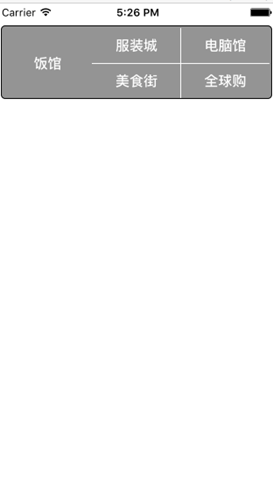
一、先说说没有封装之前的代码是什么样子的吧。
'use strict';
var React = require('react-native');
var {
    AppRegistry,
    StyleSheet,
    Text,
    View,
    PixelRatio,
    } = React;
var stylesForXC = StyleSheet.create({
    container : {
        height: 84,
        borderWidth:1,
        borderColor: 'black',
        flexDirection: 'row',
        marginTop: 25,
        marginLeft: 5,
        marginRight: 5,
        borderRadius: 5,    /*圆角半径*/
padding: 2,
        backgroundColor: '#949494'
},

    item: {
        flex: 1,
        height: 80
},

    flex: {
        flex: 1
},

    center: {
        justifyContent: 'center',/*垂直水平居中,其实是按照flexDriection的方向居中*/
alignItems : 'center',  /*水平居中*/
},

    font : {
        color: '#fff',
        fontSize: 16,
        fontWeight: 'bold',
    },

    lineLeft: {
        borderLeftWidth: 1/PixelRatio.get(),
        borderColor: '#fff',
    },

    lineCenter: {
        borderBottomWidth:1/PixelRatio.get(),
        borderColor: '#fff',
    }
})

'use strict';
var React = require('react-native');
var {
    AppRegistry,
    StyleSheet,
    Text,
    View,
    PixelRatio,
    } = React;
var stylesForXC = StyleSheet.create({
    container : {
        height: 84,
        borderWidth:1,
        borderColor: '#949494',
        flexDirection: 'row',
        marginTop: 25,
        marginLeft: 5,
        marginRight: 5,
        borderRadius: 5,    /*圆角半径*/
padding: 2,
        backgroundColor: '#949494',
    },

    item: {
        flex: 1,
        height: 80,
    },

    flex: {
        flex: 1,
    },

    center: {
        justifyContent: 'center',/*垂直水平居中,其实是按照flexDriection的方向居中*/
alignItems : 'center',  /*水平居中*/
},

    font : {
        color: '#fff',
        fontSize: 16,
        fontWeight: 'bold',
    },

    lineLeft: {
        borderLeftWidth: 1/PixelRatio.get(),
        borderColor: '#fff',
    },

    lineCenter: {
        borderBottomWidth:1/PixelRatio.get(),
        borderColor: '#fff',
    }
})

AppRegistry.registerComponent('wxsPrj', () => wxsPrj);
var betree2 = React.createClass({
    render: function() {
        return (
            <View style = {stylesForXC.flex}>
                <View style = {[stylesForXC.container]}>
                    <View style = {[stylesForXC.item,stylesForXC.center]}>
                        <Text style= {stylesForXC.font}>饭馆</Text>
                    </View>

                    <View style = {[stylesForXC.item,stylesForXC.lineLeft]}>
                        <View style = {[stylesForXC.center,stylesForXC.flex,stylesForXC.lineCenter]}>
                            <Text style= {stylesForXC.font}>服装城</Text>
                        </View>
                        <View style = {[stylesForXC.center,stylesForXC.flex]}>
                            <Text style= {stylesForXC.font}>美食街</Text>
                        </View>
                    </View>

                    <View style = {[stylesForXC.item,stylesForXC.lineLeft]}>
                        <View style = {[stylesForXC.center,stylesForXC.flex,stylesForXC.lineCenter]}>
                            <Text style= {stylesForXC.font}>电脑城</Text>
                        </View>
                        <View style = {[stylesForXC.center,stylesForXC.flex]}>
                            <Text style= {stylesForXC.font}>全球购</Text>
                        </View>
                    </View>
                </View>
            </View>
        );
    }
})

AppRegistry.registerComponent('betree2', () => betree2);
我们发现在主函数上界面布局很多,这样不利于模块化的思想,我们其实可以把里面的界面的布局封装成一个名为Box的组件,然后在主函数中对组件进行引用,这样看起来就好多了。
二、封装组件后的代码如下:
render:function(){
        return(
            <View style = {stylesForXC.flex}>
                <View style = {[stylesForXC.container]}>
                    <View style = {[stylesForXC.item,stylesForXC.center]}>
                        <Text style= {stylesForXC.font}>饭馆</Text>
                    </View>

                    <View style = {[stylesForXC.item,stylesForXC.lineLeft]}>
                        <View style = {[stylesForXC.center,stylesForXC.flex,stylesForXC.lineCenter]}>
                            <Text style= {stylesForXC.font}>服装城</Text>
                        </View>
                        <View style = {[stylesForXC.center,stylesForXC.flex]}>
                            <Text style= {stylesForXC.font}>美食街</Text>
                        </View>
                    </View>

                    <View style = {[stylesForXC.item,stylesForXC.lineLeft]}>
                        <View style = {[stylesForXC.center,stylesForXC.flex,stylesForXC.lineCenter]}>
                            <Text style= {stylesForXC.font}>电脑城</Text>
                        </View>
                        <View style = {[stylesForXC.center,stylesForXC.flex]}>
                            <Text style= {stylesForXC.font}>全球购</Text>
                        </View>
                    </View>
                </View>
            </View>
        );
    }
})

var betree2 = React.createClass({
    render: function() {
        return (
            <Box></Box>
        );
    }
})
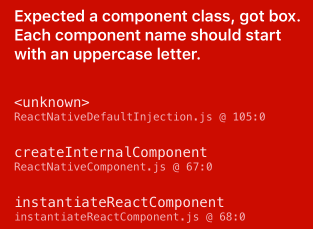
这样看起来把布局放进去,在主函数中调用就可以了,这样是不是就清晰很多了。有一点我们是需要注意的就是:这种定义的组件首字母一定要大写,不然会报错(如下图所示,意思就是说每个首字母的名字要大写,刚开始我也没注意这个细节)。
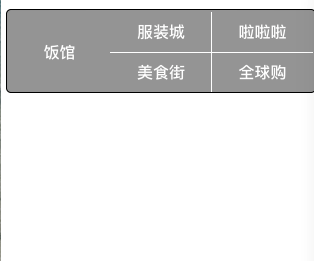
三、那么问题又来了,如果我想修改<Text>组件里面的内容(比如:'全球购'改为'电脑馆'),有人会说那好办自己找下里面的代码把''全球购'改为'电脑馆'不就可以了,那如果我成百个Text呢? 我们其实可以定义一个组件参数,这样就方便多了。代码如下:
var Box = React.createClass({
    render:function(){
        return(
            <View style = {stylesForXC.flex}>
                <View style = {[stylesForXC.container]}>
                    <View style = {[stylesForXC.item,stylesForXC.center]}>
                        <Text style= {stylesForXC.font}>{this.props.one}</Text>
                    </View>

                    <View style = {[stylesForXC.item,stylesForXC.lineLeft]}>
                        <View style = {[stylesForXC.center,stylesForXC.flex,stylesForXC.lineCenter]}>
                            <Text style= {stylesForXC.font}>{this.props.second1}</Text>
                        </View>
                        <View style = {[stylesForXC.center,stylesForXC.flex]}>
                            <Text style= {stylesForXC.font}>{this.props.second2}</Text>
                        </View>
                    </View>

                    <View style = {[stylesForXC.item,stylesForXC.lineLeft]}>
                        <View style = {[stylesForXC.center,stylesForXC.flex,stylesForXC.lineCenter]}>
                            <Text style= {stylesForXC.font}>{this.props.third1}</Text>
                        </View>
                        <View style = {[stylesForXC.center,stylesForXC.flex]}>
                            <Text style= {stylesForXC.font}>{this.props.third2}</Text>
                        </View>
                    </View>
                </View>
            </View>
        );
    }
})

var betree2 = React.createClass({
    render: function() {
        return (

            <Box one = "饭馆" second1 = "服装城"  second2 = "美食街" third1 = "电脑城" third2 = "全球购"></Box>

        );
    }
})
效果图如下所示:
react-native组件封装与传值的更多相关文章
- beeshell —— 开源的 React Native 组件库
介绍 beeshell 是一个 React Native 应用的基础组件库,基于 0.53.3 版本,提供一整套开箱即用的高质量组件,包含 JavaScript(以下简称 JS)组件和复合组件(包含 ...
- react native组件的创建
react native组件的创建 react文件加载顺序: react项目启动后,先加载index.js.在index.js中可以指向首页. import { AppRegistry } from ...
- React Native组件之Text
React Native组件之Text相当于iOS中的UILabel. 其基本属性如下: /** * Sample React Native App * https://github.com/face ...
- React Native组件之Switch和Picker和Slide
React Native组件Switch类似于iOS中的UISwitch:组件Slide类似于iOS中UIslider,组件Picker类似于iOS的UIPickerView.他们的使用方法和相关属性 ...
- React Native 组件之TextInput
React Native 组件之TextInput类似于iOS中的UITextView或者UITextField,是作为一个文字输入的组件,下面的TextInput的用法和相关属性. /** * Sa ...
- react native组件的生命周期
react native组件的生命周期 一.当页面第一次加载时,会依次调用: constructor() componentWillMount(): 这个函数调用时机是在组件创建,并初始化了状态之后, ...
- React Native组件(三)Text组件解析
相关文章 React Native探索系列 React Native组件系列 前言 此前介绍了最基本的View组件,接下来就是最常用的Text组件,对于Text组件的一些常用属性,这篇文章会给出简单的 ...
- React Native组件(二)View组件解析
相关文章 React Native探索系列 React Native组件系列 前言 了解了RN的组件的生命周期后,我们接着来学习RN的具体的组件.View组件是最基本的组件,也是首先要掌握的组件,这一 ...
- Android React Native组件的生命周期及回调函数
熟悉android的童鞋应该都清楚,android是有生命周期的,其很多组件也是有生命周期.今天小编和大家分享的React Native组件的生命周期,还不了解的童鞋,赶紧来围观吧 在android开 ...
- React Native组件解析(二)之Text
React Native组件解析(二)之Text 1. 概述 Text组件对应于iOS的UILabel,Android的TextView,用来显示文本.但是Text组件的内部使用的并不是flexbox ...
随机推荐
- C# Excel使用NPOI
程序处理excel使用using Microsoft.Office.Interop.Excel方式,运行程序需要电脑安装excel,而且excel版本还需要一样,使用起来不方便.使用NPOI不用电脑安 ...
- windows下设置计划任务自动执行PHP脚本
背景: 环境部署在linux下或者windows中,可以使用windows的自动任务设置自动执行脚本执行一些日常运维任务 图形界面设置相对比较简单 准备工作: wamp(集成的PHP执行环境) 已经写 ...
- IE中window的模态框与返回值
window.returnValue是javascript中html的window对象的属性,目的是返回窗口值,当用window.showModalDialog函数打开一个IE的模态窗口时,用于返回窗 ...
- 前端工程化-webpack(打包JS)(二)
一.第一种打包方式 webpack entry<entry> output 假设目录结构如下: index.html是入口文件 打包app.js为bundle.js如下 app.js 当使 ...
- mysql8.0CTE实现递归查询
+----+----------+--------------+| ID | ParentID | name |+----+----------+--------------+| 1 ...
- 两个inline-block元素上下不对齐,出现错位
摘要: 声明:此文章为转载(点击查看原文),如有侵权24小时内删除.联系QQ:1522025433. 问题描述:在类似 <div class="ovh"> <h3 ...
- Jmeter NonGUI模式
一般情况下我们都是在NonGUI模式下运行jmeter.这样做有两个好处 节省系统资源,能够产生更大的负载 可以通过命令行参数对测试场景进行更精细的配置 示例 创建luzhi.jmx脚本 jmeter ...
- windows 系统常用操作
1.所有端口使用情况 netstat -ano 2.查询xxxx端口pid netstat -aon|findstr "xxxx" 3.根据端口Pid查详情 tasklist|fi ...
- Thread类中的join方法
package charpter06; //类实现接口public class Processor implements Runnable { // 重写接口方法 @Override public v ...
- [转] 为什么javascript是单线程的却能让AJAX异步调用?
为什么JavaScript是单线程的却能让AJAX异步发送和回调请求,还有setTimeout也看起来像是多线程的? function foo() { console.log( 'first' ); ...