
Lab 5-1
Analyze the malware found in the file Lab05-01.dll using only IDA Pro. The goal of this lab is to give you hands-on experience with IDA Pro. If you’ve already worked with IDA Pro, you may choose to ignore these questions and focus on reverse-engineering the malware.
Questions and Short Answers
What is the address of DllMain?
A: DllMain is found at 0x1000D02E in the .text section.
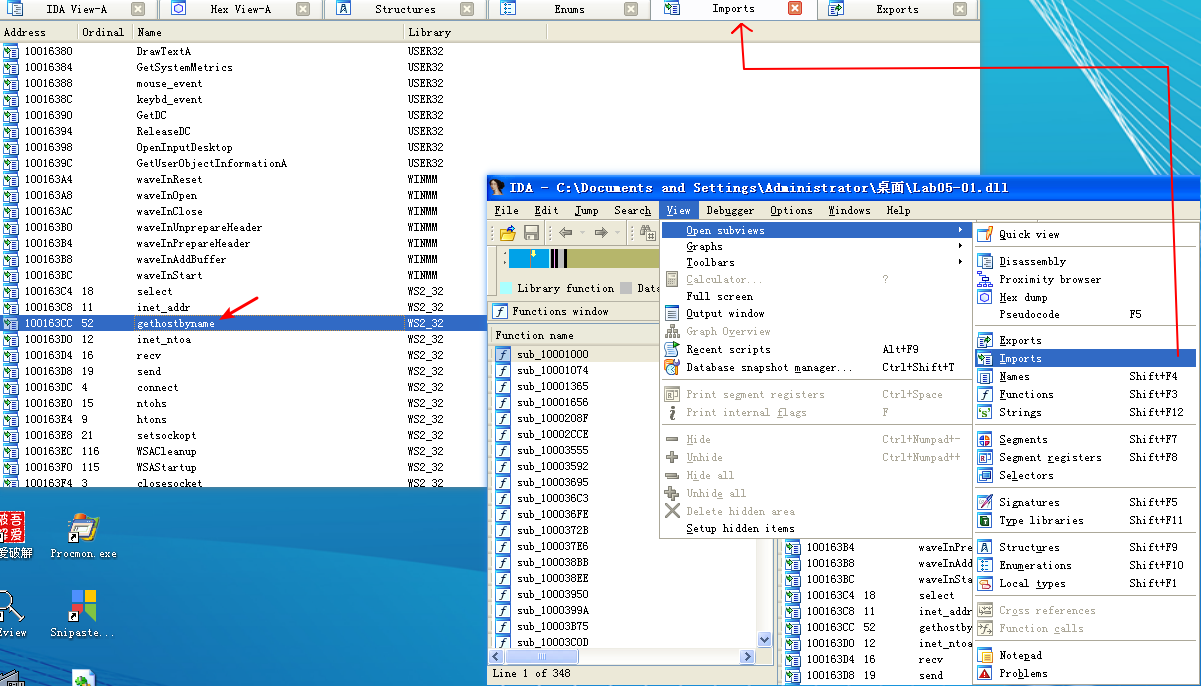
Use the Imports window to browse to gethostbyname. Where is the import located?
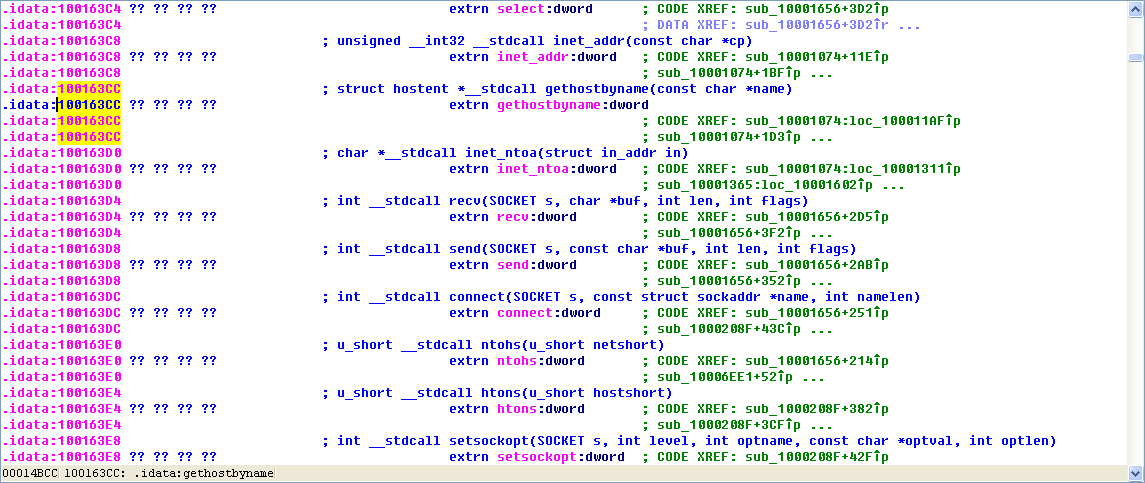
A: The import for gethostbyname is found at 0x100163CC in the .idata section.
How many functions call gethostbyname?
A: The gethostbyname import is called nine times by five different functions throughout the malware.
Focusing on the call to gethostbyname located at 0x10001757, can you figure out which DNS request will be made?
A: A DNS request for pics.practicalmalwareanalysis.com will be made by the malware if the call to gethostbyname at 0x10001757 succeeds.
How many local variables has IDA Pro recognized for the subroutine at 0x10001656?
A: IDA Pro has recognized 23 local variables for the function at 0x10001656.
How many parameters has IDA Pro recognized for the subroutine at 0x10001656?
A: IDA Pro has recognized one parameter for the function at 0x10001656.
Use the Strings window to locate the string \cmd.exe /c in the disassembly. Where is it located?
A: The string \cmd.exe /c is located at 0x10095B34.
What is happening in the area of code that references \cmd.exe /c?
A: That area of code appears to be creating a remote shell session for the attacker.
In the same area, at 0x100101C8, it looks like dword_1008E5C4 is a global variable that helps decide which path to take. How does the malware set dword_1008E5C4? (Hint: Use dword_1008E5C4’s cross-references.)
A: The OS version is stored in the global variable dword_1008E5C4.
A few hundred lines into the subroutine at 0x1000FF58, a series of comparisons use memcmp to compare strings. What happens if the string comparison to robotwork is successful (when memcmp returns 0)?
A: The registry values located at HKLM\SOFTWARE\Microsoft\Windows\CurrentVersion\WorkTime and WorkTimes are queried and sent over the remote shell connection.
What does the export PSLIST do?
A: The PSLIST export sends a process listing across the network or finds a particular process name in the listing and gets information about it.
Use the graph mode to graph the cross-references from sub_10004E79. Which API functions could be called by entering this function? Based on the API functions alone, what could you rename this function?
A: GetSystemDefaultLangID, send, and sprintf are API calls made from sub_10004E79. This function could be renamed to something useful like GetSystemLanguage.
How many Windows API functions does DllMain call directly? How many at a depth of 2?
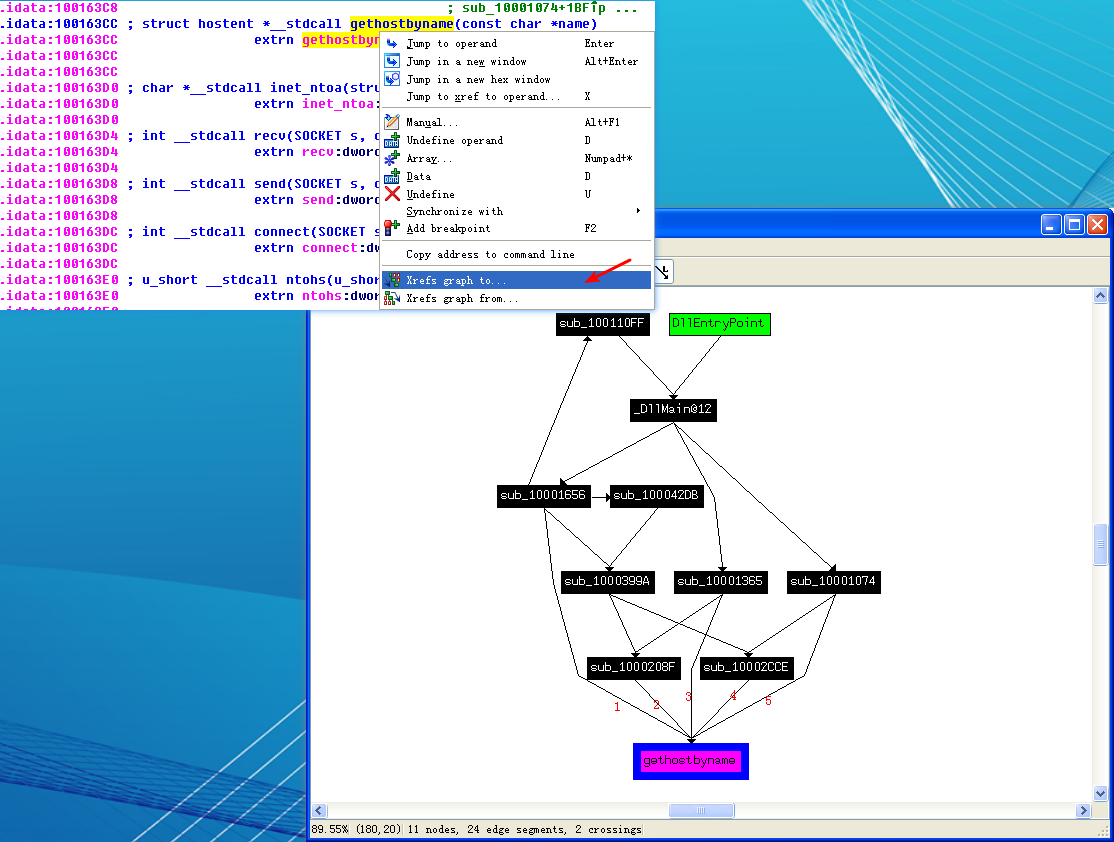
A: DllMain calls strncpy, strnicmp, CreateThread, and strlen directly. At a depth of 2, it calls a variety of API calls, including Sleep, WinExec, gethostbyname, and many other networking function calls.
At 0x10001358, there is a call to Sleep (an API function that takes one parameter containing the number of milliseconds to sleep). Looking backward through the code, how long will the program sleep if this code executes?
A: The malware will sleep for 30 seconds.
At 0x10001701 is a call to socket. What are the three parameters?
A: The arguments are 6, 1, and 2.
Using the MSDN page for socket and the named symbolic constants functionality in IDA Pro, can you make the parameters more meaningful? What are the parameters after you apply changes?
A: These arguments correspond to three symbolic constants: IPPROTO_TCP, SOCK_STREAM, and AF_INET.
Search for usage of the in instruction (opcode 0xED). This instruction is used with a magic string VMXh to perform VMware detection. Is that in use in this malware? Using the cross-references to the function that executes the in instruction, is there further evidence of VMware detection?
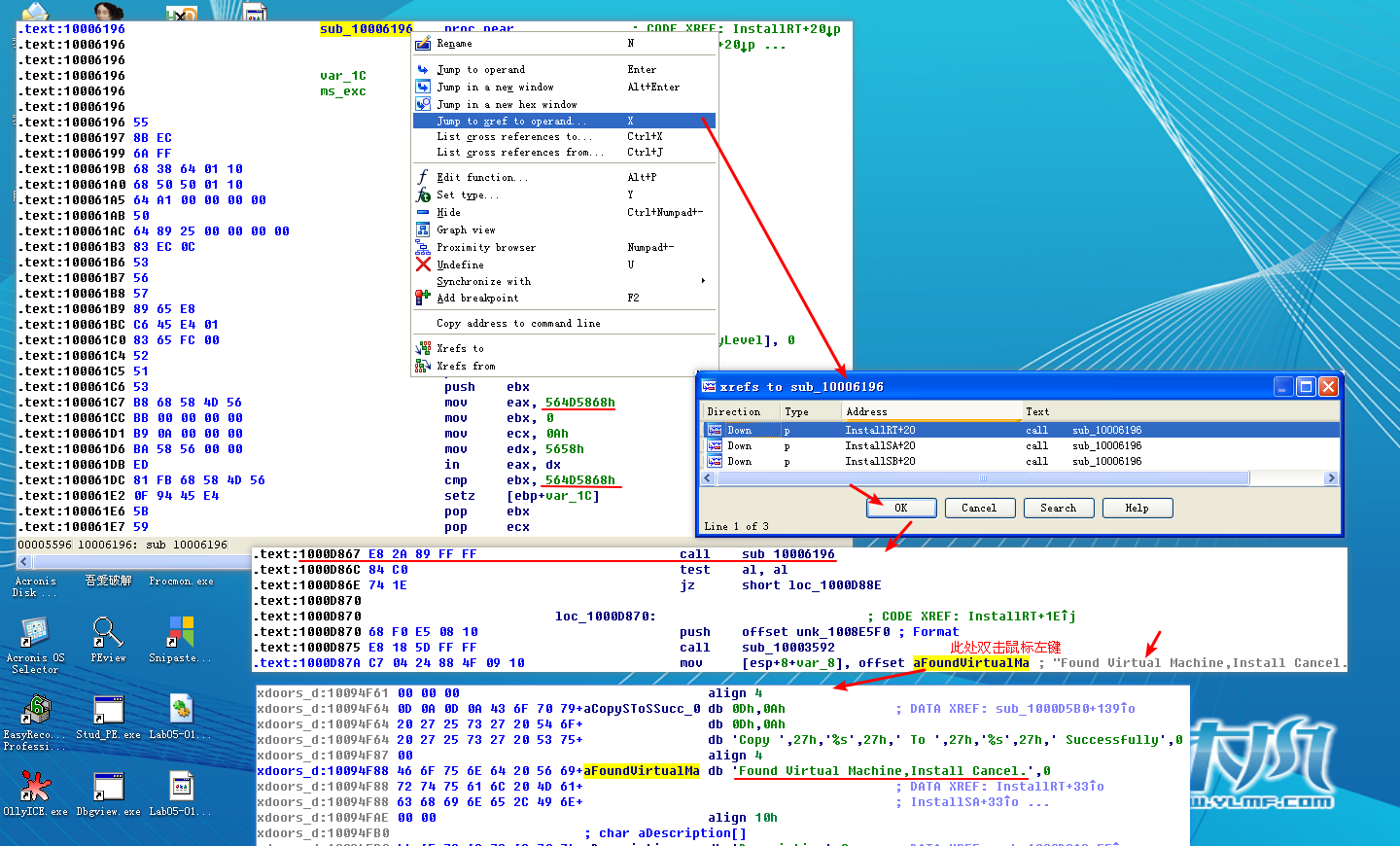
A: The in instruction is used for virtual machine detection at 0x100061DB, and the 0x564D5868h corresponds to the VMXh string. Using the cross- reference, we see the string Found Virtual Machine in the caller function.
Jump your cursor to 0x1001D988. What do you find?
A: Random data appears to exist at 0x1001D988.
If you have the IDA Python plug-in installed (included with the commercial version of IDA Pro), run Lab05-01.py, an IDA Pro Python script provided with the malware for this book. (Make sure the cursor is at 0x1001D988.) What happens after you run the script?
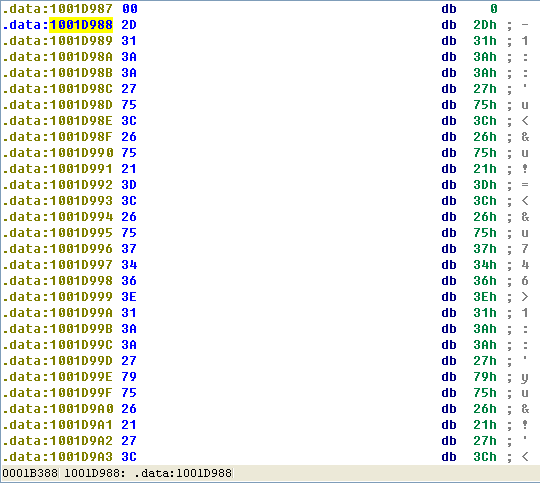
A: If you run Lab05-01.py, the random data is unobfuscated to reveal a string.
With the cursor in the same location, how do you turn this data into a single ASCII string?
A: By pressing the A key on the keyboard, we can turn this into the readable string: xdoor is this backdoor, string decoded for Practical Malware Analysis Lab :)1234.
Open the script with a text editor. How does it work?
A: The script works by XOR’ing 0x50 bytes of data with 0x55 and modifying the bytes in IDA Pro using PatchByte.
Detailed Analysis
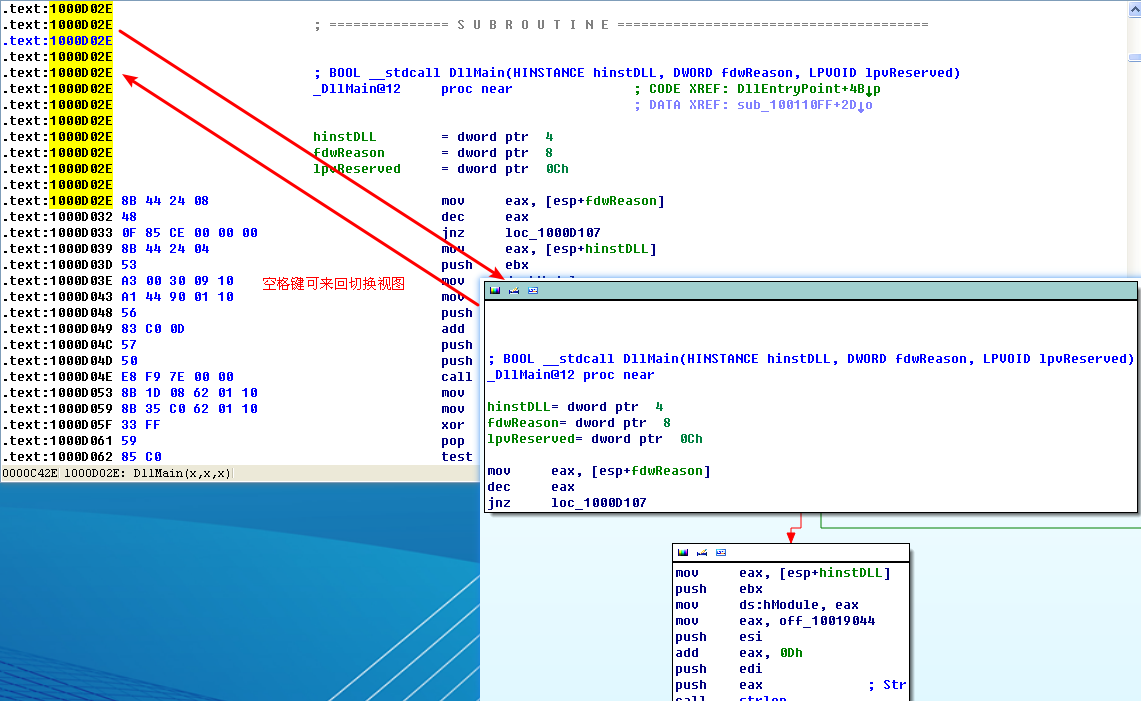
Once we load the malicious DLL into IDA Pro, we are taken directly to DllMain at 0x1000D02E. (You may need to display line numbers in the graph view by using Options -> General and checking Line Prefixes, or you can toggle between the graph and traditional view by pressing the spacebar, which allows you to see the line numbers without changing the options.) DllMain is where we want to begin analysis, because all code that executes from the DllEntryPoint until DllMain has likely been generated by the compiler, and we don’t want to get bogged down analyzing compiler-generated code.
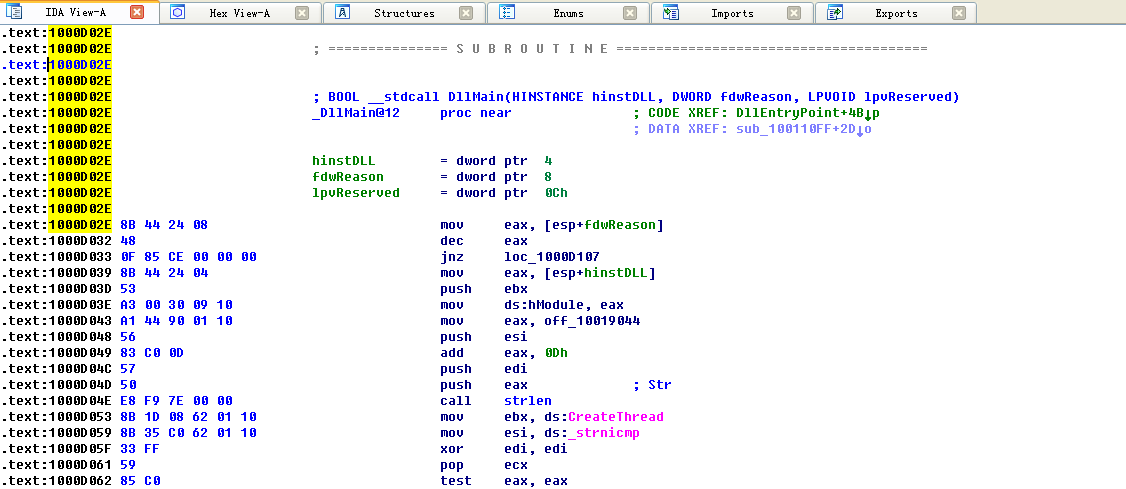

注:默认 Line prefixes 是勾选的。你也可以不勾选后,点击 OK 按钮看看效果。
To answer questions 2 through 4, we begin by viewing the imports of this DLL, by selecting View -> Open Subviews -> Imports. In this list, we find gethostbyname and double-click it to see it in the disassembly. The gethostbyname import resides at location 0x100163CC in the .idata section of the binary.
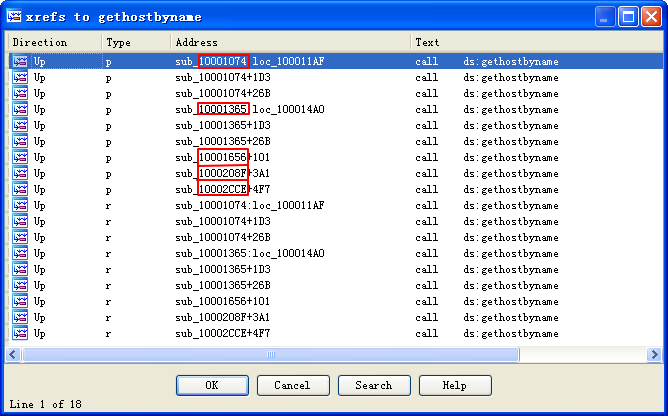
To see the number of functions that call gethostbyname, we check its cross-references by pressing CTRL-X with the cursor on gethostbyname, which brings up the window shown in Figure 5-1L. The text “Line 1 of 18” at the bottom of the window tells us that there are nine cross-references for gethostbyname. Some versions of IDA Pro double-count cross-references: p is a reference because it is being called, and r is a reference because it is a “read” reference (since it is call dword ptr [...] for an import, the CPU must read the import and then call into it). Examining the cross-reference list closely, you can see that gethostbyname is called by five separate functions.
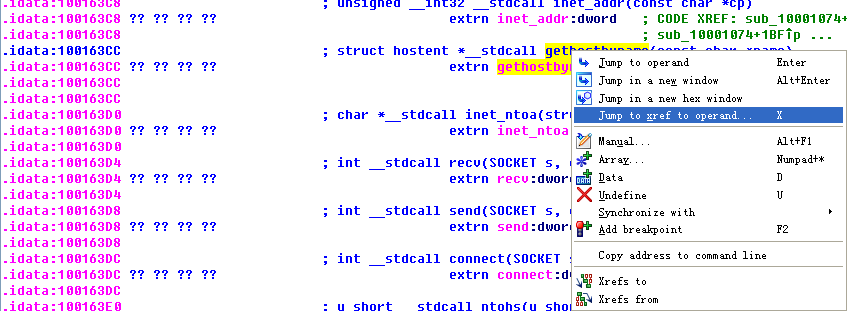
We press G on the keyboard to quickly navigate to 0x10001757. Once at this location, we see the following code, which calls gethostbyname.
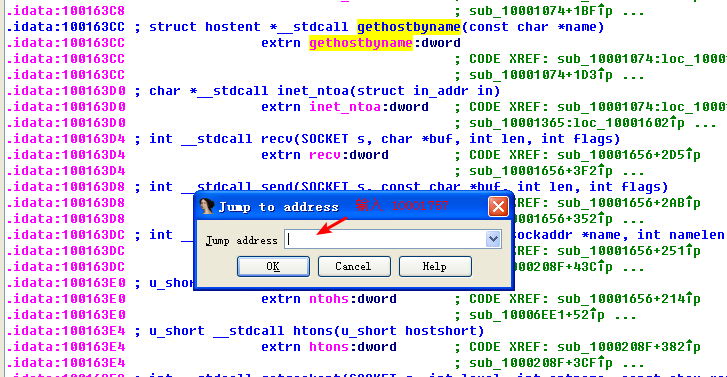
点击 OK 按钮。
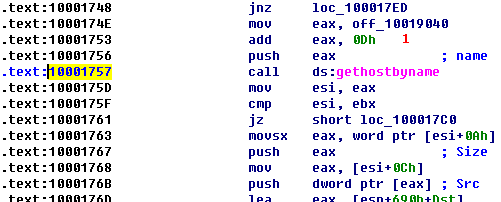
The gethostbyname method takes a single parameter—typically, a string containing a domain name. Therefore, we need to work backward and figure out what is in EAX when gethostbyname is called. It appears that off_10019040 is moved into EAX. If we double-click that offset, we see the string [This is RDO]pics.practicalmalwareanalysis.com at that location.
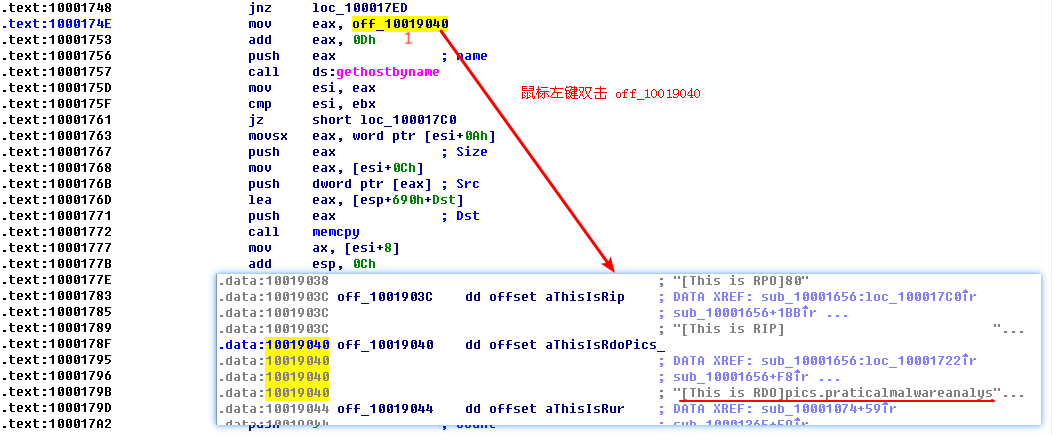
As you can see at \({\color{red}1}\), the pointer into the string is advanced by 0xD bytes, which gets a pointer to the string pics.practicalmalwareanalysis.com in EAX for the call to gethostbyname. Figure 5-2L shows the string in memory, and how adding 0xD to EAX advances the pointer to the location of the URL in memory. The call will perform a DNS request to get an IP address for the domain.
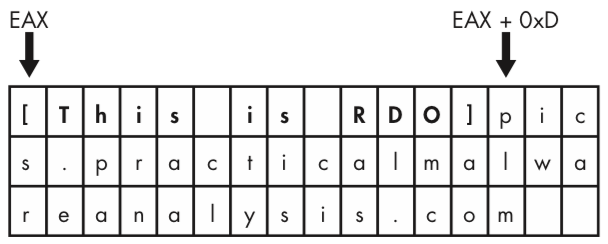
Figure 5-2L: Adjustment of the string pointer to access the URL
To answer questions 5 and 6, we press G on the keyboard to navigate to 0x10001656 in order to analyze sub_10001656. In Figure 5-3L, we see what IDA Pro has done to recognize and label the function’s local variables and parameters. The labeled local variables correspond to negative offsets, and we count 23 of them, most of which are prepended with var_. The freeware version of IDA Pro counts only 20 local variables, so the version you are using may detect a slightly different number of local variables. The parameters are labeled and referenced with positive offsets, and we see that IDA Pro has recognized one parameter for the function labeled arg_0.
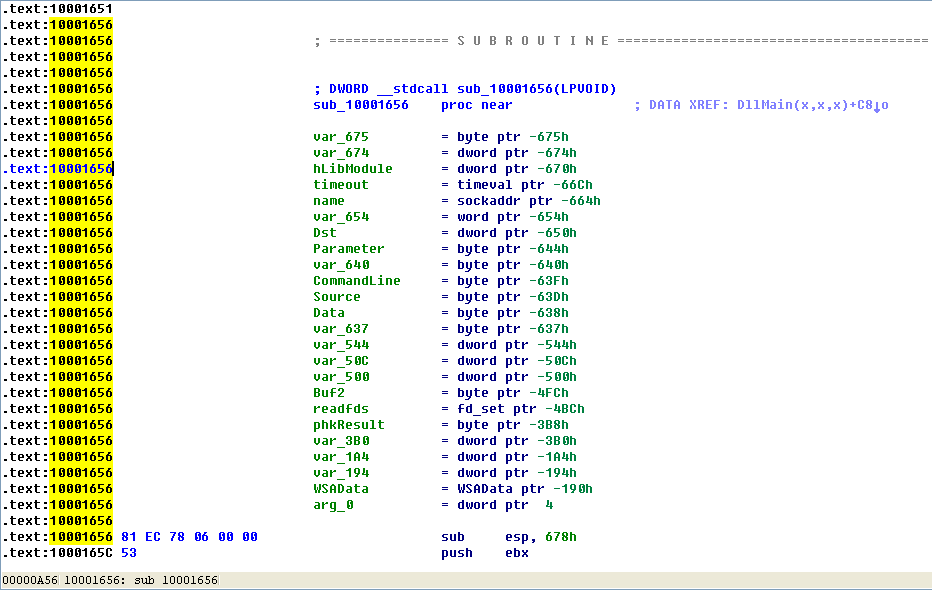
Figure 5-3L: IDA Pro function layout — recognizing local variables and parameters
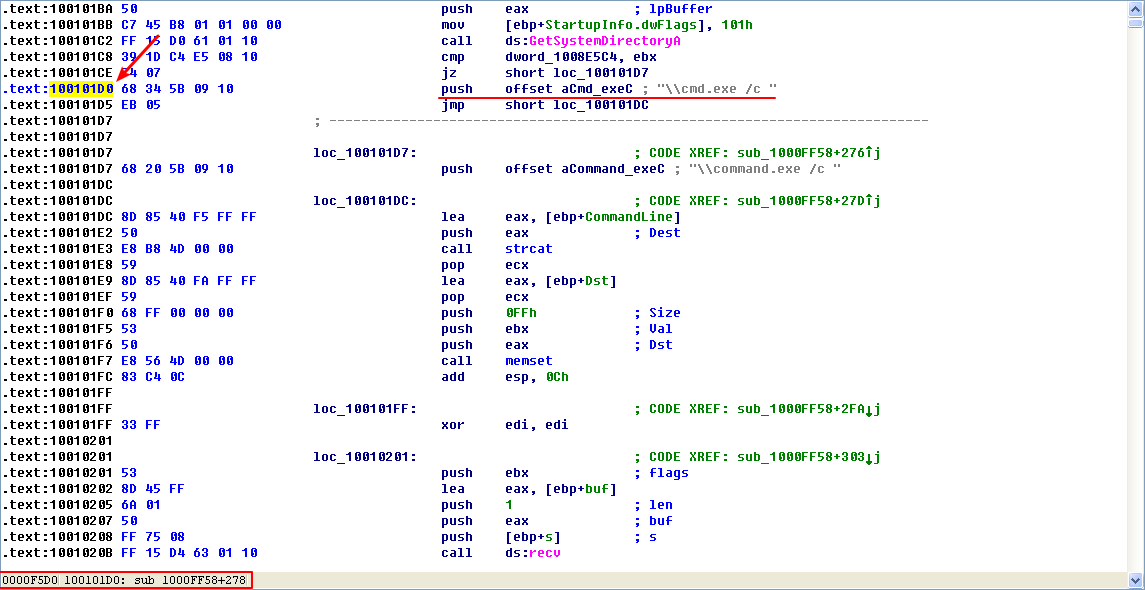
To answer questions 7 through 10, we begin by viewing the strings for this DLL by selecting View -> Open Subviews -> Strings. In this list, double-click \cmd.exe /c to see it in the disassembly. Notice that the string resides in the xdoors_d section of the PE file at 0x10095B34. On checking the cross-references to this string, we see that there is only one at 0x100101D0, where this string is pushed onto the stack.
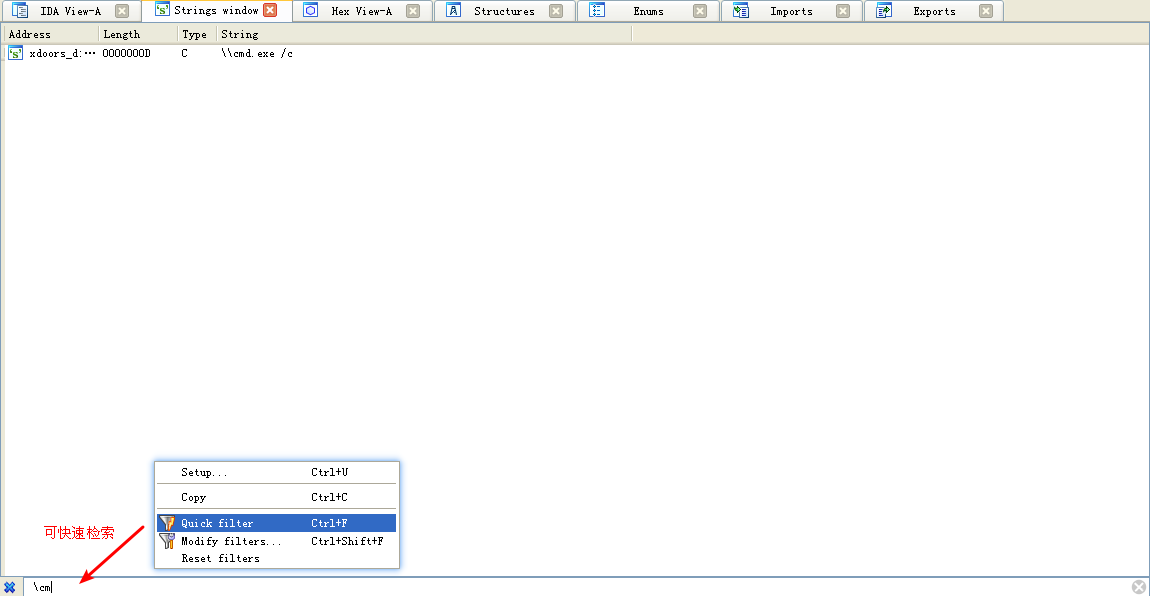
注:在空白处鼠标右键 -> Quick filter 或 快捷键 Ctrl+F可快速检索字符串。

在 10095B34 处,鼠标右键:
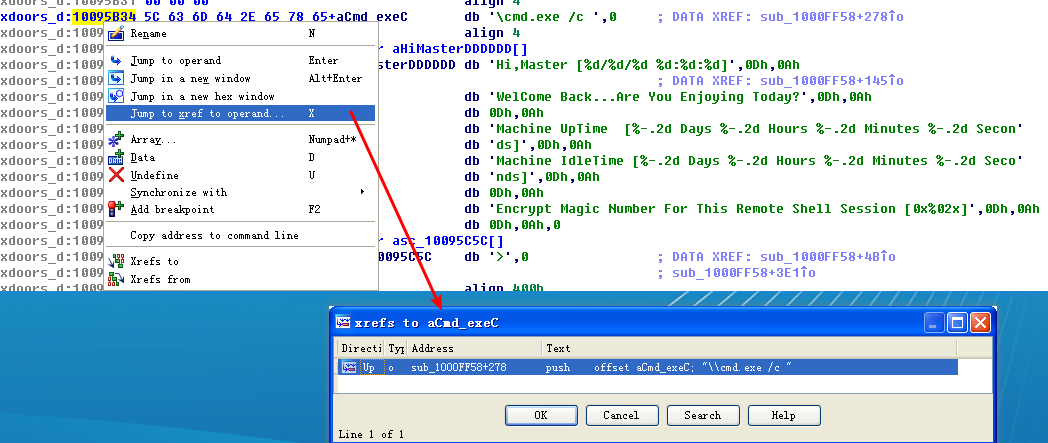
注:十六进制计算:1000FF58 + 278 = 100102D0
上图点击 OK 按钮:
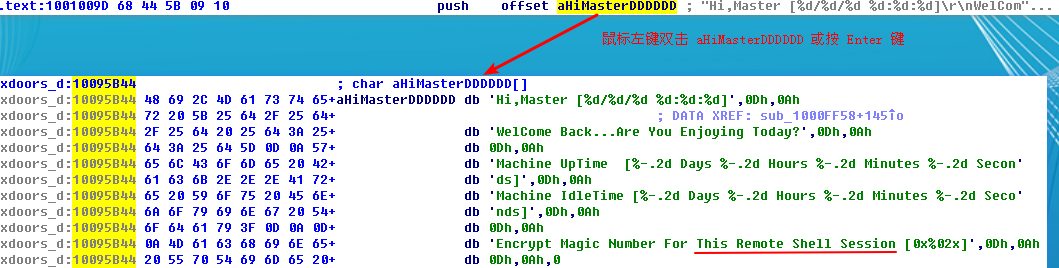
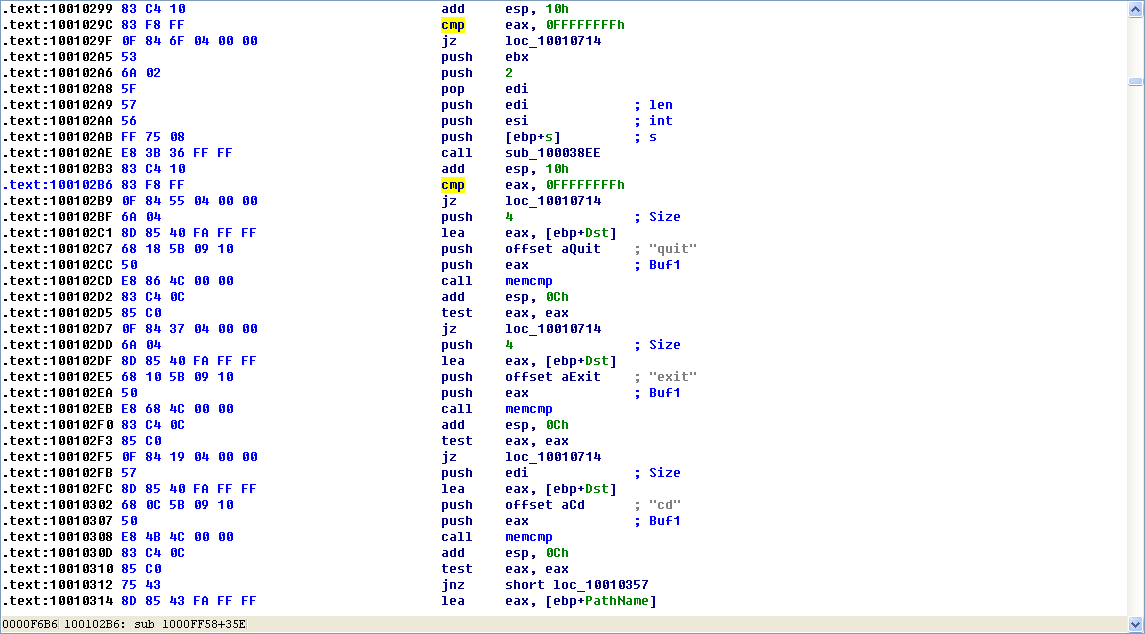
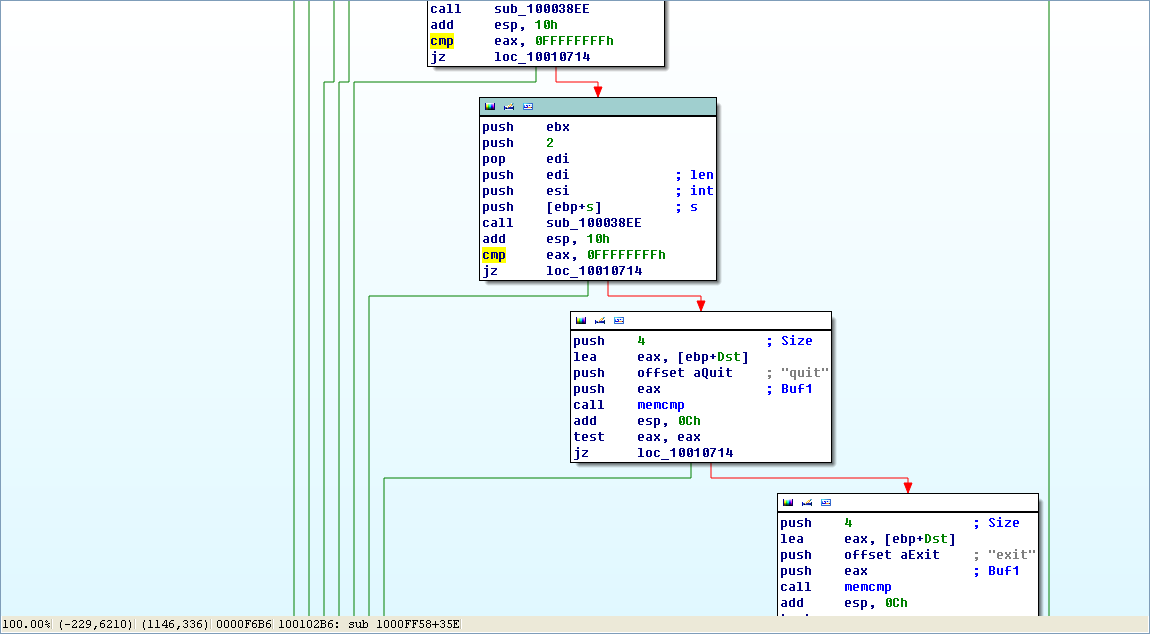
Examining the graph view of this function shows a series of memcmp functions that are comparing strings such as cd, exit, install, inject, and uptime. We also see that the string reference earlier in the function at 0x1001009D contains the string This Remote Shell Session. Examining the function and the calls it makes shows a series of calls to recv and send. Using these three pieces of evidence, we can guess that we are looking at a remote shell session function.
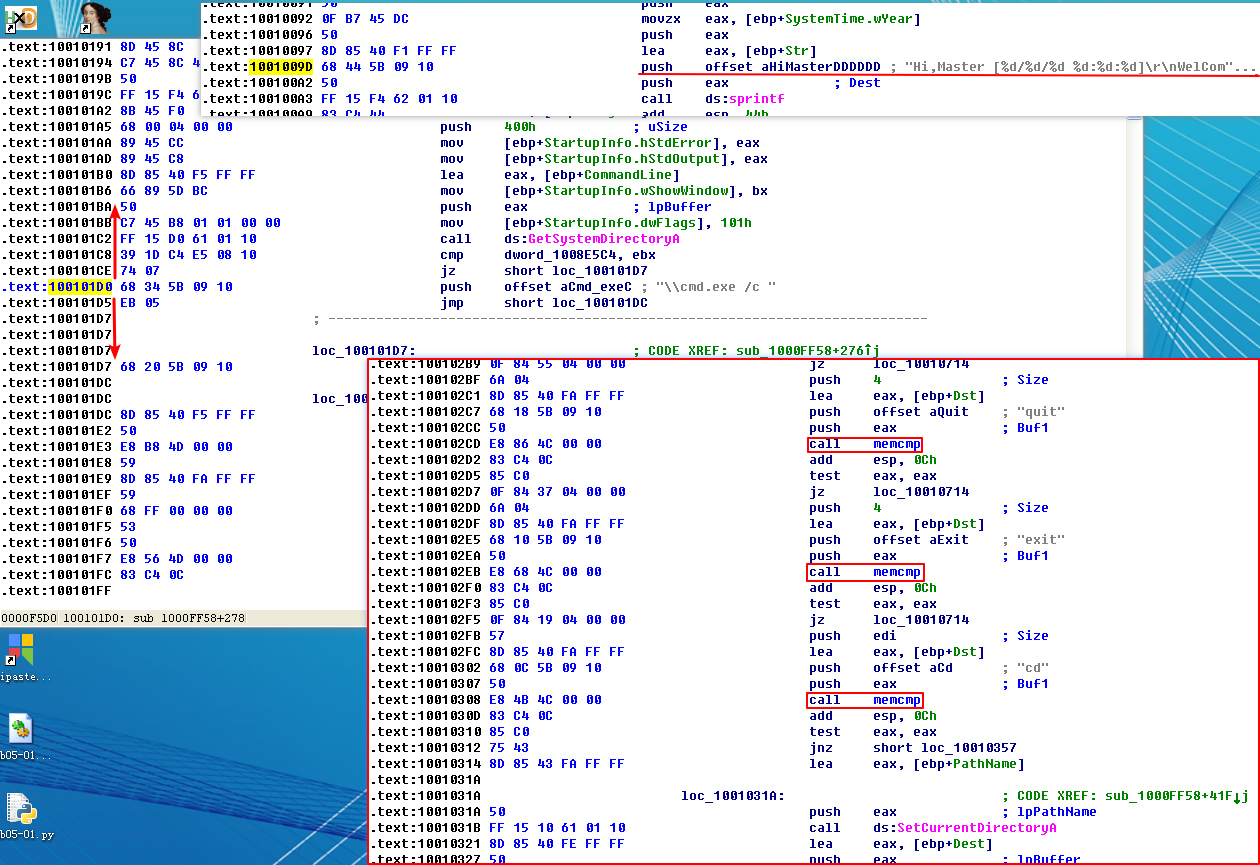
注:在 0x100101D0 上、下不远处我们可以看到上图内容。
选中 cmp 函数(使 cmp 变黄),之后按空格键可查看视图:
The dword_1008E5C4 is a global variable that we can double-click (at 0x100101C8) to show its location in memory at 0x1008E5C4, within the .data section of the DLL. Checking the cross-references by pressing CTRL-X shows that it is referenced three times, but only one reference modifies dword_1008E5C4.
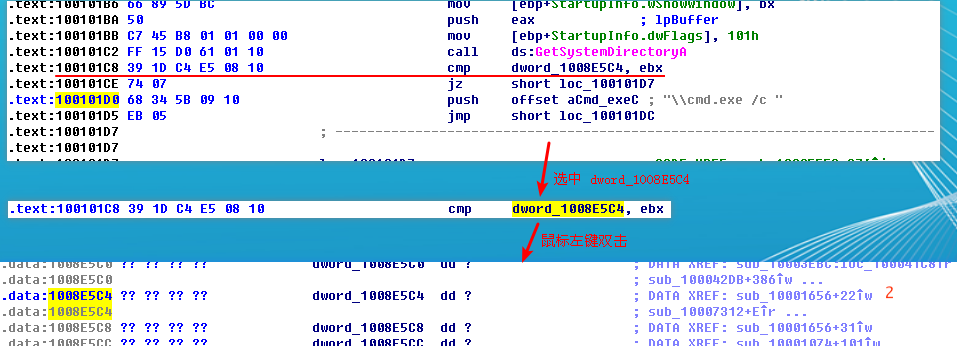
The following listing shows how dword_1008E5C4 is modified.
上图 \({\color{red}2}\) 处,十六进制计算 10001656 + 22 = 10001678。鼠标左键双击 \({\color{red}2}\) 处的 sub_10001656+22 跳到下图处:
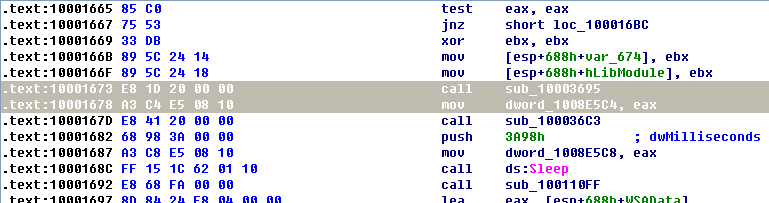
注:G 键跳到地址 0x10001673。
We see that EAX is moved into dword_1008E5C4, and that EAX is the return value from the function call made in the previous instruction. Therefore, we need to determine what that function returns. To do so, we examine sub_10003695 by double-clicking it and looking at the disassembly. The sub_10003695 function contains a call to GetVersionEx, which obtains information about the current version of the OS, as shown in the following listing.
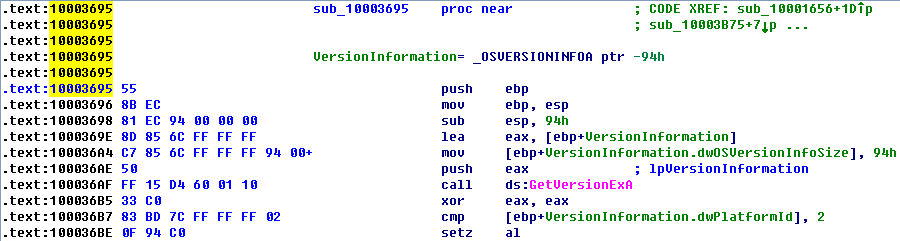
The dwPlatformId is compared to the number 2 in order to determine how to set the AL register. AL will be set if the PlatformId is VER_PLATFORM_WIN32_NT. This is just a simple check to make sure that the OS is Windows 2000 or higher, and we can conclude that the global variable will typically be set to 1.
As previously discussed, the remote shell function at 0x1000FF58 contains a series of memcmp functions starting at 0x1000FF58. At 0x10010452, we see the memcmp with robotwork, as follows:
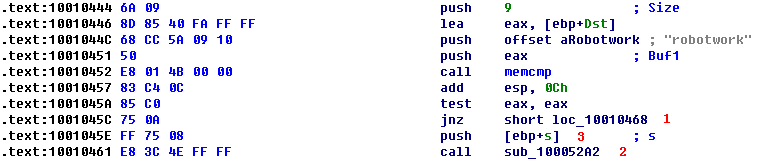
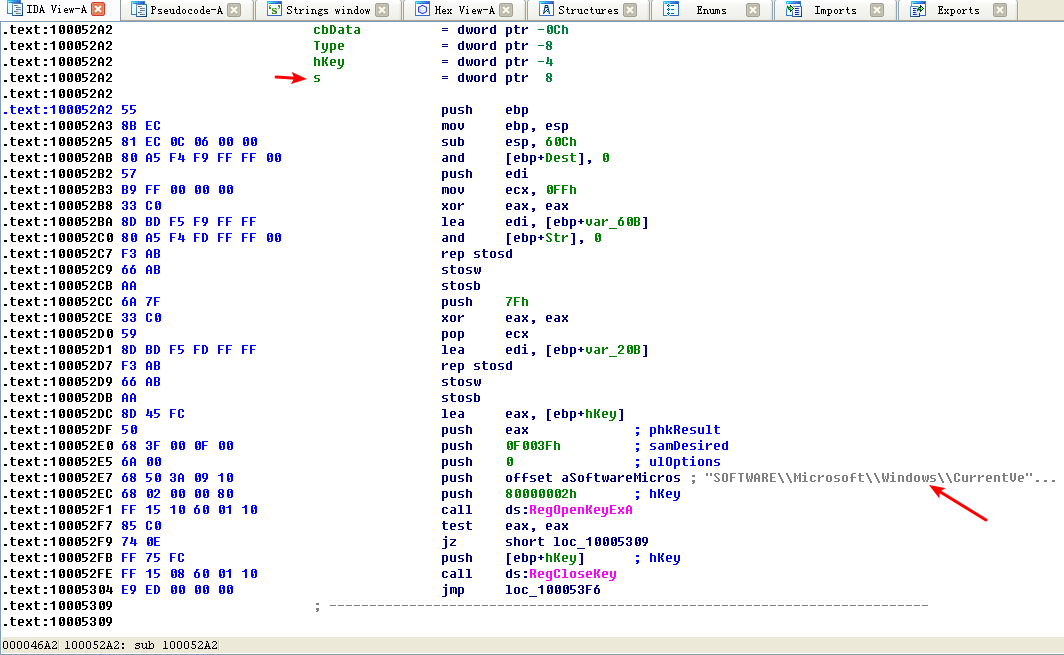
The jnz at \({\color{red}1}\) will not be taken if the string matches robotwork, and the call at \({\color{red}2}\) will be called. Examining sub_100052A2, we see that it queries the registry at HKLM\SOFTWARE\Microsoft\Windows\CurrentVersion\WorkTime and WorkTimes, and then returns this information over the network socket that was passed to the function at \({\color{red}3}\).
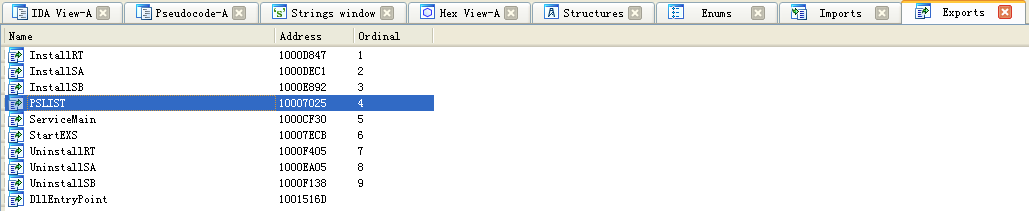
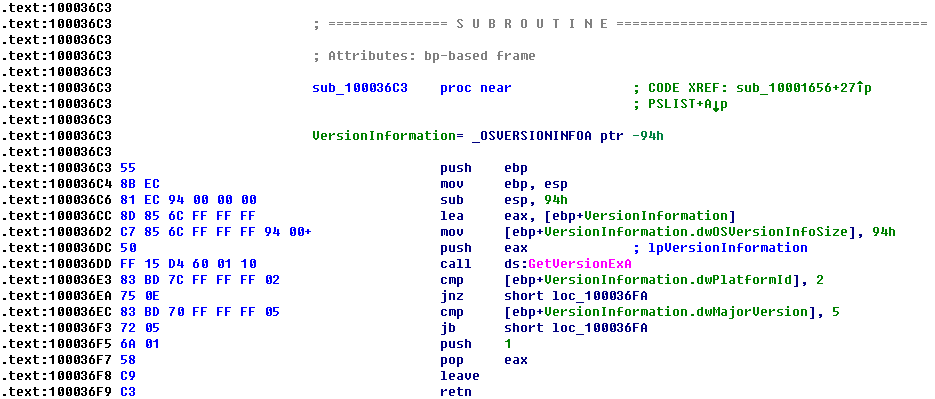
To answer question 11, we begin by viewing the exports for this DLL by selecting View -> Open Subviews -> Exports. We find PSLIST in this list and double-click it to move the cursor to 0x10007025, the start of the export’s code. This function appears to take one of two paths, depending on the result of sub_100036C3. The sub_100036C3 function checks to see if the OS version is Windows Vista/7 or XP/2003/2000. Both code paths use CreateToolhelp32Snapshot to help them grab a process listing, which we infer from the strings and API calls. Both code paths return the process listing over the socket using send.

To answer questions 12 and 13, we graph a function’s cross-references by selecting View -> Graphs -> Xrefs From when the cursor is on the function name of interest. We go to sub_10004E79 by pressing G on the keyboard and entering 0x10004E79.

Figure 5-4L: Graph of cross-references from sub_10004E79
Figure 5-4L shows the result of graphing the cross-references for sub_10004E79. We see that this function calls GetSystemDefaultLangID and send. This information tells us that the function likely sends the language identifier over a network socket, so we can right-click the function name and give it a more meaningful name, such as send_languageID.
NOTE
Performing a quick analysis like this is an easy way to get a high-level overview of a binary. This approach is particularly handy when analyzing large binaries.
To determine how many Windows API functions DllMain calls directly, we scroll through the method and look for API calls, or select View -> Graphs -> Xrefs From to open the dialog shown in Figure 5-5L.
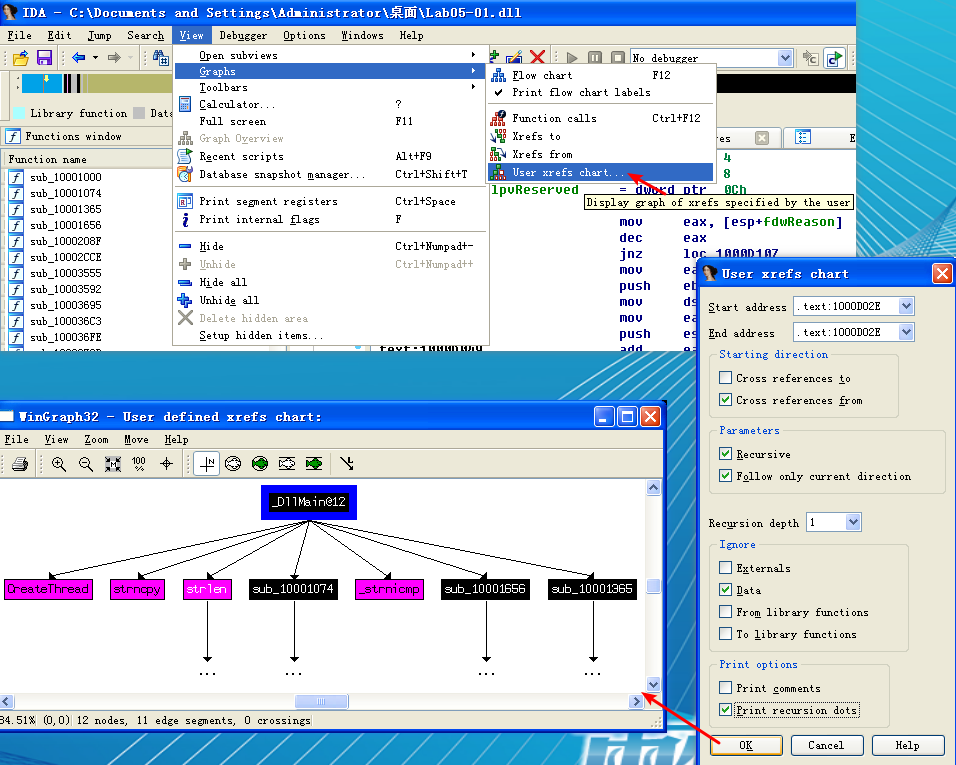
Figure 5-5L: Dialog for setting a custom cross-reference graph from 0x1000D02E
The start and end address should correspond to the start of DllMain—specifically, 0x1000D02E. Because we care only about the cross-references from DllMain, we select a recursion depth of 1 to display only the functions that DllMain calls directly. down-left of Figure 5-5L shows the resulting graph. (Cross-reference graph for DllMain with a recursive depth of 1, the API calls are seen in pink.) To see all functions called at a recursive depth of 2, follow the same steps and select a recursion depth of 2. The result will be a much larger graph, which even shows a recursive call back to DllMain.
As referenced in question 14, there is a call to Sleep at 0x10001358, as shown in the following listing. Sleep takes one parameter—the number of milliseconds to sleep—and we see it pushed on the stack as EAX.
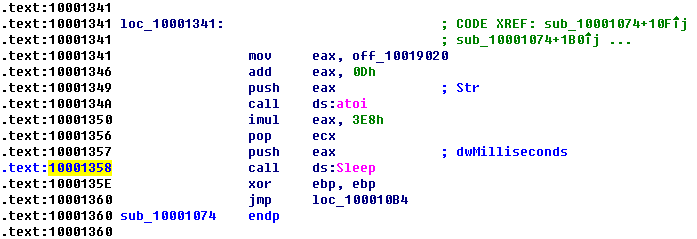
Working backward, it looks like EAX is multiplied by 0x3E8 (or 1000 in decimal), which tells us that the result of the call to atoi is multiplied by 1000 to get the number of seconds to sleep. Again working backward, we also see that off_10019020 is moved into EAX. We can see what is at the offset by double-clicking it. This is a reference to the string [This is CTI]30.

Next, we see that 0xD is added to the offset, which causes EAX to point to 30 for the call to atoi, which will convert the string 30 into the number 30. Multiplying 30 by 1000, we get 30,000 milliseconds (30 seconds), and that is how long this program will sleep if the strings are the same upon execution.
As referenced in question 15, a call to socket at 0x10001701 is shown in the left column of Table 5-1L. We see that 6, 1, and 2 are pushed onto the stack. These numbers correspond to symbolic constants that are described on the MSDN page for socket. Right-clicking each of the numbers and selecting Use Symbolic Constant presents a dialog listing all of the constants that IDA Pro has for a particular value. In this example, the number 2 corresponds to AF_INET, which is used for setting up an IPv4 socket; 1 stands for SOCK_STREAM, and 6 stands for IPPROTO_TCP. Therefore, this socket will be configured for TCP over IPv4 (commonly used for HTTP).
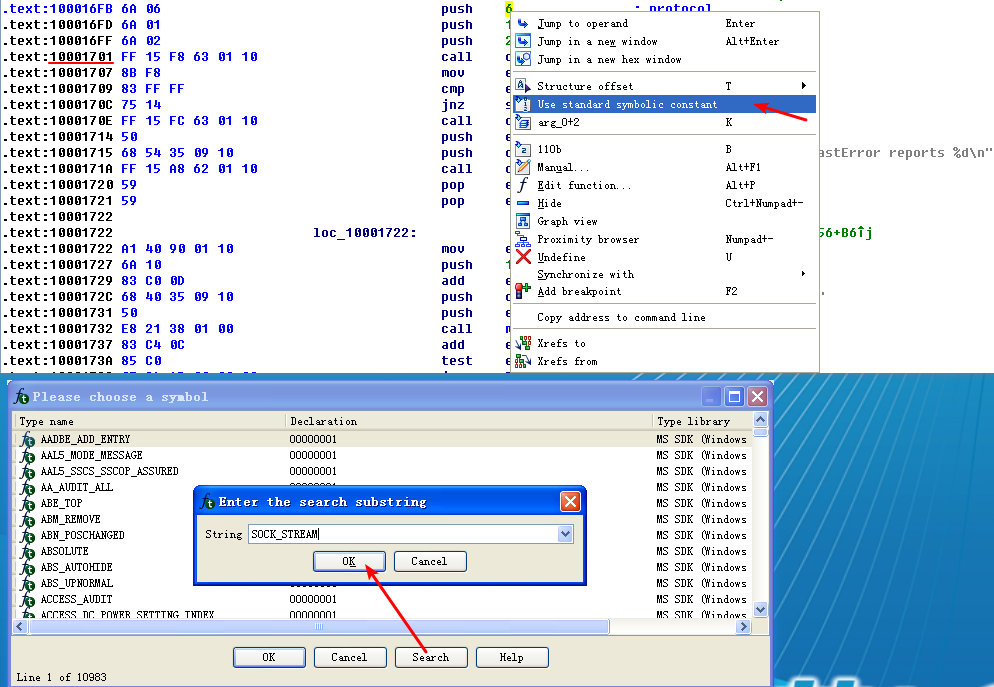
找到,鼠标左键双击对应的条目即可:

| Before symbolic constants | After symbolic constants |
|---|---|
| 100016FB push 6 | 100016FB push IPPROTO_TCP |
| 100016FD push 1 | 100016FD push SOCK_STREAM |
| 100016FF push 2 | 100016FF push AF_INET |
| 10001701 call ds:socket | 10001701 call ds:socket |
Table 5-1L: Applying Symbolic Constants for a Call to socket
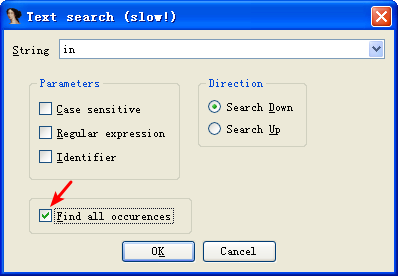
To answer question 17, we search for the in instruction by selecting Search -> Text and entering in (we could also select Search -> Sequence of Bytes and searching for ED, the opcode for the in instruction). If we check Find All Occurrences in the search dialog, either option will present a new window listing all matches. Scrolling through the results shows only one instance of the in instruction at 0x100061DB, as follows:
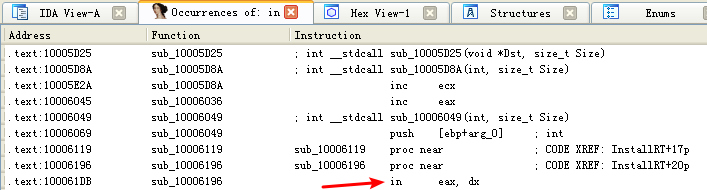
选中 in eax, dx 所在行,鼠标左键双击:

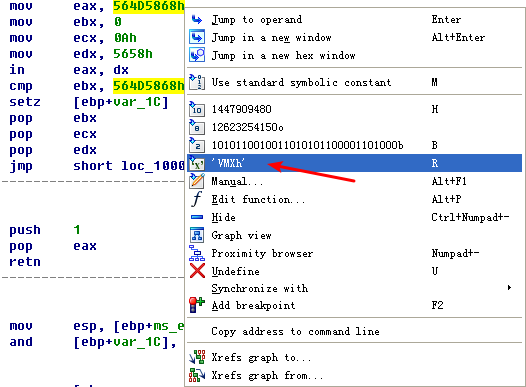
The mov instruction at 0x100061C7 moves 0x564D5868 into EAX. Right-clicking this value shows that it corresponds to the ASCII string VMXh, which confirms that this snippet of code is an anti-virtual machine technique being employed by the malware. (We discuss the specifics of this technique and others in Chapter 17.) Checking the cross-references to the function that executes this technique offers further confirmation when we see Found Virtual Machine in the code after a comparison.
As referenced by question 18, we jump our cursor to 0x1001D988 using the G key. Here, we see what looks like random bytes of data and nothing readable. As suggested, we run the Python script provided by selecting File -> Script File and selecting the Python script, shown in the following listing.
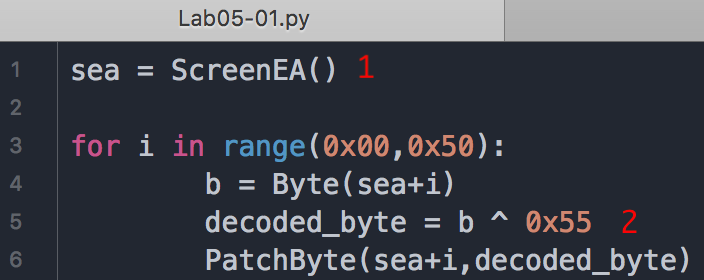
At \({\color{red}1}\), the script grabs the current location of the cursor, for use as an offset to decode the data. Next, it loops from 0 to 0x50 and grabs the value of each byte using the call to Byte. It takes each byte and XORs it with 0x55 at \({\color{red}2}\). Finally, it patches the byte in the IDA Pro display without modifying the original file. You can easily customize this script for your own use.
After the script runs, we see that the data at 0x1001D988 has been changed to something more readable. We can turn this into an ASCII string by pressing the A key on the keyboard with the cursor at 0x1001D988. This reveals the string xdoor is this backdoor, string decoded for Practical Malware Analysis Lab :)1234.
Lab05-01.py 脚本执行后:
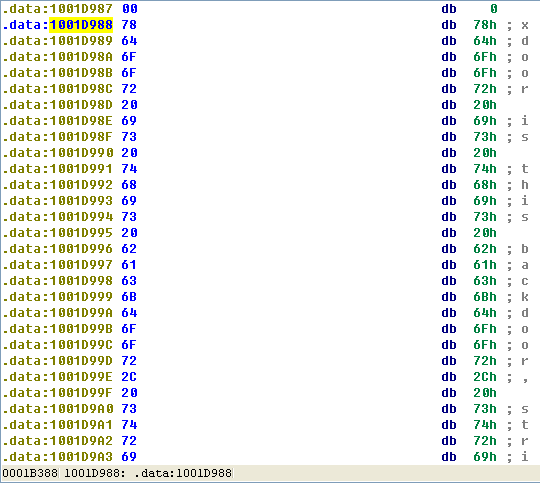
Lab05-01.py 脚本执行前:
Preference
Lab 5-1的更多相关文章
- MIT 6.828 JOS学习笔记18. Lab 3.2 Part B: Page Faults, Breakpoints Exceptions, and System Calls
现在你的操作系统内核已经具备一定的异常处理能力了,在这部分实验中,我们将会进一步完善它,使它能够处理不同类型的中断/异常. Handling Page Fault 缺页中断是一个非常重要的中断,因为我 ...
- MIT 6.828 JOS学习笔记17. Lab 3.1 Part A User Environments
Introduction 在这个实验中,我们将实现操作系统的一些基本功能,来实现用户环境下的进程的正常运行.你将会加强JOS内核的功能,为它增添一些重要的数据结构,用来记录用户进程环境的一些信息:创建 ...
- MIT 6.828 JOS学习笔记16. Lab 2.2
Part 3 Kernel Address Space JOS把32位线性地址虚拟空间划分成两个部分.其中用户环境(进程运行环境)通常占据低地址的那部分,叫用户地址空间.而操作系统内核总是占据高地址的 ...
- MIT 6.828 JOS学习笔记15. Lab 2.1
Lab 2: Memory Management lab2中多出来的几个文件: inc/memlayout.h kern/pmap.c kern/pmap.h kern/kclock.h kern/k ...
- MIT 6.828 JOS学习笔记10. Lab 1 Part 3: The kernel
Lab 1 Part 3: The kernel 现在我们将开始具体讨论一下JOS内核了.就像boot loader一样,内核开始的时候也是一些汇编语句,用于设置一些东西,来保证C语言的程序能够正确的 ...
- MIT 6.828 JOS学习笔记7. Lab 1 Part 2.2: The Boot Loader
Lab 1 Part 2 The Boot Loader Loading the Kernel 我们现在可以进一步的讨论一下boot loader中的C语言的部分,即boot/main.c.但是在我们 ...
- python opencv 利用Lab空间把春天的场景改为秋天
前一段时间实现了Reinhard颜色迁移算法,感觉挺有意思的,然后在代码上随意做了一些更改,有了一些发现,把Lab通道的a通道值改为127左右,可以将绿色改为黄色,而对其他颜色的改动非常小,因此可以将 ...
- Acadia Lab 228 + Lab 222
又是一对串烧实验,布好线后非常方便就可以一起完成. 连线方案一模一样: Lab 228 数码管骰子 核心代码如下: def loop() : global cnt global btn_read,se ...
- Acadia Lab 203 + Lab 231
在做完 Lab 6 之后,惊觉选做实验缺口很大,于是遍历了一遍夏任务,找到了一条最省力的路线. 做完 Lab 6 的连线不用拆,可以接下来做以下两个实验: Lab 203 网络时钟 核心代码如下: v ...
- GJM : 【技术干货】给The Lab Renderer for Unity中地形添加阴影
感谢您的阅读.喜欢的.有用的就请大哥大嫂们高抬贵手"推荐一下"吧!你的精神支持是博主强大的写作动力以及转载收藏动力.欢迎转载! 版权声明:本文原创发表于 [请点击连接前往] ,未经 ...
随机推荐
- Linux服务器搭建Nexus-Maven私服(适合新手比较基础)
背景 在使用maven构建项目的时候,几乎都会涉及到一个“私服”的概念,那么到底什么是私服?使用私服有能够带来哪些益处? 私服:私服是指私有服务器,是架设在局域网的一种特殊的远程仓库,目的是代理远程仓 ...
- FireMonkey 源码学习(2)
三.TControl FireMonkey重写了TControl的代码,实现了众多接口,如下图: 基类上实现了众多功能,这里不详细描述. 四.TEdit 编辑框是从TControl—TStyledCo ...
- noip模拟【noname】
noname [问题描述] 给定一个长度为n的正整数序列,你的任务就是求出至少需要修改序列中的多少个数才能使得该数列成为一个严格(即不允许相等)单调递增的正整数序列,对序列中的任意一个数,你都可以将其 ...
- tp框架中的一些疑点知识-8
NaN是Number对象的一个属性, 表示一个特殊值, 表示不是一个 数字, 引用/赋值时, 要使用: Number.NaN 判断 一个值是不是 NaN, 用 isNaN() 函数, 它是一个js的全 ...
- 【特性】MySQL 8 新特性
MySQL 8.0 正式版 8.0.11 已发布,官方表示 MySQL 8 要比 MySQL 5.7 快 2 倍,还带来了大量的改进和更快的性能! 注意:从 MySQL 5.7 升级到 MySQL 8 ...
- hihoCoder week6 01背包
01背包 题目链接 https://hihocoder.com/contest/hiho6/problem/1 #include <bits/stdc++.h> using namespa ...
- Component 父子组件关系
我们把组件编写的代码放到构造器外部或者说单独文件 我们需要先声明一个对象,对象里就是组件的内容. var zdy = { template:`<div>Panda from China!& ...
- Linux(CentOS)上面搭建Nginx环境
总体上来说,Linux 这个系统其实挺好用的 除了看不见界面,但是用起来确实是比Window好用太多了,不废话了,直接说搭建环境的步骤! 安装Nginx 编译运行时的环境 参考博客:http://ww ...
- C语言 分割字符串
对指针的操作有点迷糊 只好采用下面一些比较low的手段 char str[100]; char delims[] = ";"; char *result = NULL; sprin ...
- 20165306 实验一Java开发环境的熟悉
Java开发环境的熟悉 实验报告封面 实验内容与步骤 Java开发环境的熟悉-1 1.建立"自己学号exp1"的目录 2.在"自己学号exp1"目录下建立src ...