
利用itext导出PDF的小例子
我这边使用的jar包:
itext-2.1.7.jar
itextasian-1.5.2.jar
代码,简单的小例子,导出pdf:
PdfService.java:
package com.cy.service;

import java.awt.Color;

import java.io.File;

import java.io.FileOutputStream;

import java.io.IOException;

import org.springframework.stereotype.Service;

import com.lowagie.text.Cell;

import com.lowagie.text.Chunk;

import com.lowagie.text.Document;

import com.lowagie.text.DocumentException;

import com.lowagie.text.Element;

import com.lowagie.text.Font;

import com.lowagie.text.PageSize;

import com.lowagie.text.Paragraph;

import com.lowagie.text.Phrase;

import com.lowagie.text.Rectangle;

import com.lowagie.text.pdf.BaseFont;

import com.lowagie.text.pdf.PdfPCell;

import com.lowagie.text.pdf.PdfPTable;

import com.lowagie.text.pdf.PdfWriter;

@Service

public class PdfService {

    public static void main(String[] args) throws Exception {

        //准备的参数

        String specName = "基本VLAN基本VLAN基本VLAN基本VLAN基本VLAN基本VLAN基本VLAN基本VLAN基本VLAN基本VLAN基本VLAN基本VLAN基本VLAN";

        String matureTitle = "成熟度:";

        String matureWord = "成熟特性 受控特性 不可商用";

        String descriptionTitle = "描述:";

        String descriptionWord = "从便利性、渲染效果综合来看,还是用XmlWorker好些。虽然渲染效果没有达到极致,但十分有利于用户自定义模板";

        String remarkTitle = "备注:";

        String remarkWord = "对于美制裁中兴一事,商务部新闻发言人高峰19日在回答记者提问时再次强调";

        String boardName = "CloudEngine 12800 V200R001C00";

        String pathTitle = "路径";

        String pathWord = "CloudEngine 12800 V200R001C00>CE12800";

        String xiangqTitle = "详情";

        String xiangqWord = "美方行径引起了市场对美国贸易和投资环境的普遍担忧,美方的行为表面针对中国,但最终伤害的是美国自身,不仅会使其丧失数以万计的就业机会,还会影响成百上千的美国关联企业";

        String beizTitle = "备注";

        String beizWord = "将会动摇国际社会对美国投资和营商环境稳定的信心。希望美方不要自作聪明,否则只会自食其果。也希望美方不要低估中方的决心,如果美方坚持通过单边主义的保护政策,不惜伤害中美两国企业利益";

         String outPath = "test.pdf";

         Rectangle rect = new Rectangle(PageSize.A4);

         Document doc=new Document(rect);

        //中文字体,解决中文不能显示问题

         BaseFont bfChinese=BaseFont.createFont("STSong-Light", "UniGB-UCS2-H", BaseFont.NOT_EMBEDDED);

         //设置字体样式

         Font textFont = new Font(bfChinese,11,Font.NORMAL); //正常

         Font boldFont = new Font(bfChinese,11,Font.BOLD); //加粗

         Font titleFont = new Font(bfChinese,15,Font.BOLD); //二级标题

         Color grayColor = new Color(204,204,204);

         PdfWriter.getInstance(doc, new FileOutputStream(new File(outPath)));

         doc.open();

         doc.newPage();

         //规格名称

//         Paragraph p= new Paragraph(specName, titleFont);

//         p.setAlignment(Element.ALIGN_CENTER);

//         doc.add(p);

         PdfPTable head = new PdfPTable(1);

         head.setTotalWidth(new float[]{520}); //设置列宽

         head.setLockedWidth(true); //锁定列宽

         head.setSpacingBefore(10f); // 前间距

         head.setSpacingAfter(10f); // 后间距

         PdfPCell cell1 = new PdfPCell(new Phrase(specName, titleFont));

         cell1.setBorderWidth(0);

         cell1.setBackgroundColor(grayColor);

         cell1.setMinimumHeight(20); //设置单元格高度

         cell1.setHorizontalAlignment(Cell.ALIGN_CENTER); //设置水平居中

         cell1.setVerticalAlignment(Cell.ALIGN_MIDDLE); //设置垂直居中

         head.addCell(cell1);

         doc.add(head);

         //成熟度、描述、备注

         Paragraph p = new Paragraph();

         Phrase ph = new Phrase();

         Chunk c1 = new Chunk(matureTitle, boldFont) ;

         Chunk c2 = new Chunk(matureWord, textFont) ;

         ph.add(c1);

         ph.add(c2);

         p.add(ph);

         p.setLeading(20);

         doc.add(p);

         p = new Paragraph();

         ph = new Phrase();

         c1 = new Chunk(descriptionTitle, boldFont) ;

         c2 = new Chunk(descriptionWord, textFont) ;

         ph.add(c1);

         ph.add(c2);

         p.add(ph);

         p.setLeading(20);

         doc.add(p);

         p = new Paragraph();

         ph = new Phrase();

         c1 = new Chunk(remarkTitle, boldFont) ;

         c2 = new Chunk(remarkWord, textFont) ;

         ph.add(c1);

         ph.add(c2);

         p.add(ph);

         p.setLeading(20);

         doc.add(p);

         //创建2列的详情表格

         PdfPTable table = new PdfPTable(2);

         table.setSpacingBefore(20f);                    //table前间距

         table.setTotalWidth(new float[]{ 100, 420});     //设置列宽

         table.setLockedWidth(true); //锁定列宽

         PdfPCell cell;

         //第一行 实例名

         cell = new PdfPCell(new Phrase(" ", textFont));

         cell.setMinimumHeight(30); //设置单元格高度

         cell.setBackgroundColor(grayColor);

         table.addCell(cell);

         cell = new PdfPCell(new Phrase(boardName, textFont));

         cell.setBackgroundColor(grayColor);

         cell.setUseAscender(true); //设置可以居中

         cell.setHorizontalAlignment(Cell.ALIGN_CENTER); //设置水平居中

         cell.setVerticalAlignment(Cell.ALIGN_MIDDLE); //设置垂直居中

         table.addCell(cell);

         //第二行 路径

         cell = new PdfPCell(new Phrase(pathTitle, textFont));

         cell.setMinimumHeight(40);

         cell.setUseAscender(true);

         cell.setHorizontalAlignment(Cell.ALIGN_CENTER);

         table.addCell(cell);

         cell = new PdfPCell(new Phrase(pathWord, textFont));

         cell.setUseAscender(true);

         cell.setHorizontalAlignment(Cell.ALIGN_CENTER);

         table.addCell(cell);

         //第三行 详情

         cell = new PdfPCell(new Phrase(xiangqTitle, textFont));

         cell.setMinimumHeight(80);

         cell.setUseAscender(true);

         cell.setHorizontalAlignment(Cell.ALIGN_CENTER);

         table.addCell(cell);

         cell = new PdfPCell(new Phrase(xiangqWord, textFont));

         cell.setUseAscender(true);

         cell.setHorizontalAlignment(Cell.ALIGN_CENTER);

         table.addCell(cell);

         //第四行 备注

         cell = new PdfPCell(new Phrase(beizTitle, textFont));

         cell.setMinimumHeight(120);

         cell.setUseAscender(true);

         cell.setHorizontalAlignment(Cell.ALIGN_CENTER);

         table.addCell(cell);

         cell = new PdfPCell(new Phrase(beizWord, textFont));

         cell.setUseAscender(true);

         cell.setHorizontalAlignment(Cell.ALIGN_CENTER);

         table.addCell(cell);

         doc.add(table);

         doc.close();

         System.out.println("------------->>写出完毕");

    }

}
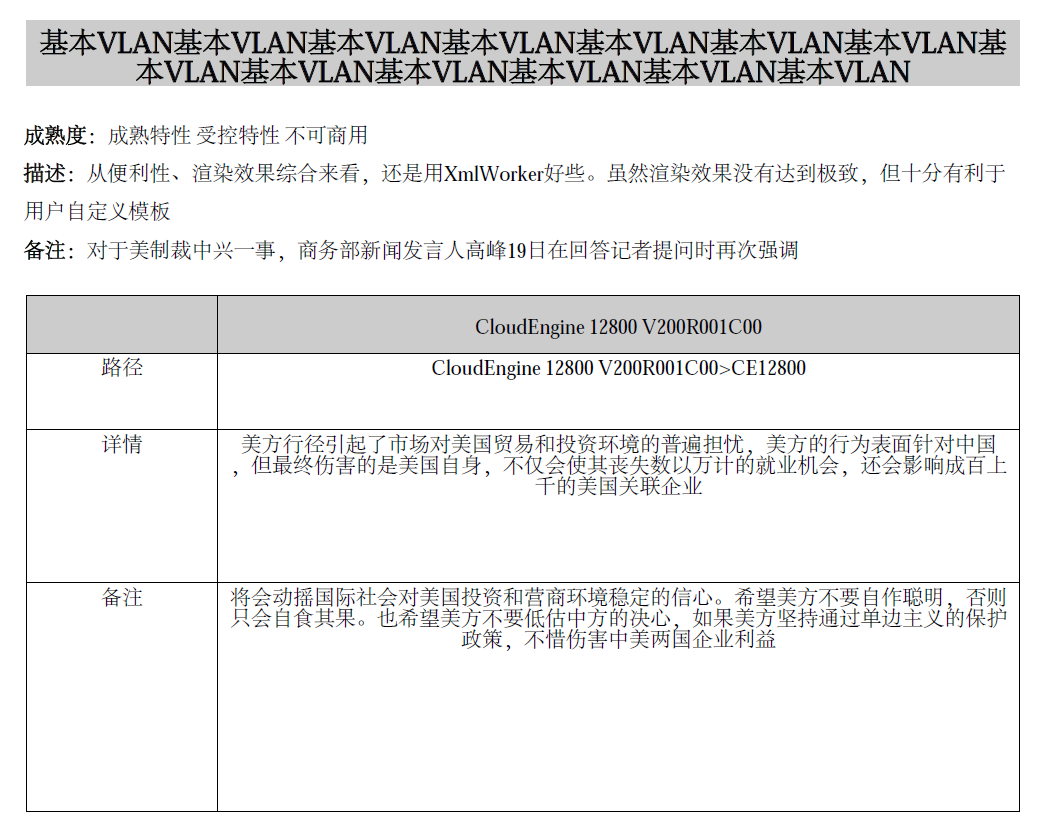
运行之后导出的效果:
利用itext导出PDF的小例子的更多相关文章
- java利用itext导出pdf
项目中有一功能是导出历史记录,可以导出pdf和excel,这里先说导出pdf.在网上查可以用那些方式导出pdf,用itext比较多广泛. 导出pdf可以使用两种方式,一是可以根据已有的pdf模板,进行 ...
- Java利用IText导出PDF(更新)
我很久以前写的还是上大学的时候写的:https://www.cnblogs.com/LUA123/p/5108007.html ,今天心血来潮决定更新一波. 看了下官网(https://itextpd ...
- 利用itext生成pdf的简单例子
一.itext简介 iText是著名的开放源码的站点sourceforge一个项目,是用于生成PDF文档的一个java类库.通过iText不仅可以生成PDF或rtf的文档,而且可以将XML.Html文 ...
- Itext导出PDF,word,图片案例
iText导出pdf.word.图片 一.前言 在企业的信息系统中,报表处理一直占比较重要的作用,本文将介绍一种生成PDF报表的Java组件--iText.通过在服务器端使用Jsp或JavaBean生 ...
- 利用FR导出PDF汉字乱码的处理
利用FR导出pdf,然后在unigui中显示,发现汉字乱码,改成gb2312,不乱码,但不自动折行,最后是改成DefaultCharSet搞定.FR版本:5.4.6 后记:有的浏览器中还是乱码,把字体 ...
- 新知识:Java 利用itext填写pdf模板并导出(昨天奋战到深夜四点,知道今天两点终于弄懂)
废话少说,不懂itext干啥用的直接去百度吧. ***************制作模板******************* 1.先用word做出界面 2.再转换成pdf格式 3.用Adobe Acr ...
- iText导出pdf、word、图片
一.前言 在企业的信息系统中,报表处理一直占比较重要的作用,本文将介绍一种生成PDF报表的Java组件--iText.通过在服务器端使用Jsp或JavaBean生成PDF报表,客户端采用超级连接显示或 ...
- (转)关于使用iText导出pdf
一.iText简介 iText是著名的开放源码的站点sourceforge一个项目,是用于生成PDF文档的一个java类库.通过iText不仅可以生成PDF或rtf的文档,而且可以将XML.Html文 ...
- iText导出PDF(图片,水印,页眉,页脚)
项目需要导出PDF,导出的内容包含图片和文本,而且图片的数量不确定,在网上百度发现大家都在用iText,在官网发现可以把html转换为PDF,但是需要收费,那就只能自己写了. 在开始之前先在网上百度了 ...
随机推荐
- linux lamp编译环境安装
apache 安装:http://blog.csdn.net/wplblog/article/details/52172128 编译安装 mysql安装:http://www.centoscn.com ...
- A Spy in the Metro(UVA 1025 ACM/ICPC World Finals2003)
---恢复内容开始--- 题意:有n(2<=n<=50)个车站,从左到右编号为1~n,有M1辆列车从第1站向右开,还有M2辆列车从第N站向左开.在时刻0,间谍从第1站出发,目的是在时刻T( ...
- 一次scrapy失败的提示信息:由于连接方在一段时间后没有正确答复或连接的主机没有反 应,连接尝试失败
2017-10-31 19:09:26 [scrapy.extensions.logstats] INFO: Crawled 8096 pages (at 67 pages/min), scraped ...
- 查看win电脑支持的最大内存?
wmic memphysical get maxcapacity 67108864 大约64G
- nodeJs项目 相关命令
npm install -g cnpm --registry=https://registry.npm.taobao.org npm run dev
- sourcetree删除github远程仓库文件
sourcetree删除远程仓库的master分支文件步骤 第一步:删除本地远程仓库分支的所需要文件或者文件夹(本地和远程仓库同步) 第二步:回到sourcetree提交,推送 第三步:刷新远程仓库
- webpack执行命令参数
在webpack执行命令之后可以添加一些参数,这些参数都有自己的作用,下面是参数列表: $ webpack --config XXX.js //使用另一份配置文件(比如webpack.config2. ...
- mysql-The-server-quit-without-updating-PID-file
mysql 编译后执行 /etc/init.d/mysqld start 启动失败 提示:"The server quit without updating PID file" 排 ...
- mysql之mysqldump——备份与还原
导出数据库里的某一张表 [root@localhost ~]# mysqldump -uroot -p test bptest>fi.mysql #导出test数据库中的bptest表 Ente ...
- xencenter如何安装Centos7虚拟机系统
xencenter的ip地址192.168.245.134(win10系统) 首先我们在win10系统安装好xencenter(这个软件可以直接在xenserver启动后,通过访问xenserver的 ...