
c# 画布验证码
using System;
using System.Collections.Generic;
using System.ComponentModel;
using System.Data;
using System.Drawing;
using System.Linq;
using System.Text;
using System.Threading.Tasks;
using System.Windows.Forms;

namespace WindowsFormsApplication3
{
    public partial class Form1 : Form
    {
        public Form1()
        {
            InitializeComponent();
        }

        private void lblColor1_Click(object sender, EventArgs e)
        {
            Label lbl = sender as Label;
            ColorDialog cd = new ColorDialog();
            DialogResult dr = cd.ShowDialog();
            if (dr == System.Windows.Forms.DialogResult.OK)
            {
                lbl.BackColor = cd.Color;
            }
        }

        private void btnGenerate_Click(object sender, EventArgs e)
        {
            Random ran = new Random();
            string code = "";
            ; i < ; i++)
            {
                , );
                code += c;
            }
            ;
            Bitmap bmp = null;
            if (!(int.TryParse(txtLineNum.Text, out lineNum) && ckLine.Checked))
            {
                VerifyCode vc = new VerifyCode();
                bmp = vc.Draw();
            }
            else
            {
                VerifyCode vc = new VerifyCode(ckLine.Checked, lblColor1.BackColor, lblColor2.BackColor, int.Parse(txtLineNum.Text), code);
                bmp = vc.Draw();
            }
            picImg.Image = bmp;
        }
    }
}
using System;
using System.Collections.Generic;
using System.Drawing;
using System.Drawing.Drawing2D;
using System.Linq;
using System.Text;
using System.Threading.Tasks;

namespace WindowsFormsApplication3
{
    public class VerifyCode
    {
        private bool _line = false;

        public bool Line
        {
            get { return _line; }
            set { _line = value; }
        }

        private Color _color1 = Color.Blue;

        public Color Color1
        {
            get { return _color1; }
            set { _color1 = value; }
        }
        private Color _color2 = Color.DarkRed;

        public Color Color2
        {
            get { return _color2; }
            set { _color2 = value; }
        }
        ;

        public int LineNum
        {
            get { return _lineNum; }
            set { _lineNum = value; }
        }

        private string _code = "ABCD";

        public string Code
        {
            get { return _code; }
            set { _code = value; }
        }

        public VerifyCode()
        {
        }

        public VerifyCode(bool ckline, Color color1, Color color2, int lineNum, string code)
        {
            this.Line = ckline;
            this.Color1 = color1;
            this.Color2 = color2;
            this.LineNum = lineNum;
            this.Code = code;
        }

        public Bitmap Draw()
        {
            if (this.Line)
            {
                return DrawImg(this.Line);
            }
            else
            {
                return DrawImg();
            }

        }

        private Bitmap DrawImg()
        {
            Bitmap bmp = , );
            Graphics grap = Graphics.FromImage(bmp);
            grap.Clear(Color.White);

            Font font = , FontStyle.Regular);
            Rectangle r = , , bmp.Width, bmp.Height);
            LinearGradientBrush lgb = new LinearGradientBrush(r, this.Color1, this.Color2, 1.2f, true);
            grap.DrawString(, );
            grap.Dispose();
            return bmp;
        }

        private Bitmap DrawImg(bool ckline)
        {
            Bitmap bmp = , );
            Graphics grap = Graphics.FromImage(bmp);
            grap.Clear(Color.White);

            //一半的干扰线
            Random random = new Random();
            ; i < ; i++)
            {
                int x1 = random.Next(bmp.Width);
                int x2 = random.Next(bmp.Width);
                int y1 = random.Next(bmp.Height);
                int y2 = random.Next(bmp.Height);

                );
                );
                ) ?  :  - int_Red - int_Green;
                int_Blue = (int_Blue > ) ?  : int_Blue;
                grap.DrawLine(new Pen(Color.FromArgb(int_Red, int_Green, int_Blue)), x1, y1, x2, y2);
            }

            Font font = , FontStyle.Regular);
            Rectangle r = , , bmp.Width, bmp.Height);
            LinearGradientBrush lgb = new LinearGradientBrush(r, this.Color1, this.Color2, 1.2f, true);
            grap.DrawString(, );
            grap.Dispose();
            //一半的干扰点
            ; i < ; i++)
            {
                int x1 = random.Next(bmp.Width);
                int x2 = random.Next(bmp.Height);

                );
                );
                ) ?  :  - int_Red - int_Green;
                int_Blue = (int_Blue > ) ?  : int_Blue;

                bmp.SetPixel(x1, x2, Color.FromArgb(int_Red, int_Green, int_Blue));
            }

            return bmp;
        }
    }
}
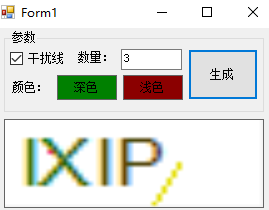
效果
c# 画布验证码的更多相关文章
- GD图片(画布)的制作及验证码的应用
创建画布:创建画布的函数有 imagecreatetruecolor(width,height);创建画布 width指画布的宽height指画布的高 imagecolorallocate(img,r ...
- angular中使用canvas画布做验证码
//填充画布,五位随机数 drawNumber(): void { this.clearCanvas(); let ctx: CanvasRenderingContext2D = this.myGra ...
- ecshop验证码
<?php //仿制ecshop验证码(四位大写字母和数字.背景) //处理码值(四位大写字母和数字组成) //所有的可能的字符集合 $chars = 'ABCDEFGHIJKLMNOPQRST ...
- webform:图片水印、验证码制作
一.图片水印 1:引命名空间System.Drawing; 前端代码 <div> <asp:FileUpload ID="FileUpload1" runat=& ...
- 构建ASP.NET MVC4+EF5+EasyUI+Unity2.x注入的后台管理系统(16)-权限管理系统-漂亮的验证码
系列目录 我们上一节建了数据库的表,但我发现很多东西还未完善起来,比如验证码,我们先做好验证码吧,验证码我们再熟悉不过了,为了防止恶意的登录,我们必须在登录页面加入验证码,下面我将分享一个验证码,这个 ...
- android图片验证码--自绘控件
自绘控件的内容都是自己绘制出来的 大致流程如下: 1.定义一个类继承view 使用TypedArray初始化属性集合 在view的构造方法中 有一个AttributeSet的参数 很明显是用来保存控件 ...
- webform(十)——图片水印和图片验证码
两者都需要引入命名空间:using System.Drawing; 一.图片水印 前台Photoshuiyin.aspx代码: <div> <asp:FileUpload ID=&q ...
- 利用PHP绘图函数实现简单验证码功能
index.php __________________________________________________________________________________________ ...
- webform文件上传、图片水印、验证码
文件上传: 所用控件:FileUpload 使用时的思路: 1.判断用户是否选中了文件 FileUpload.FileName获取选中的文件名,判断长度,如果长度大于零就代表已经选择了文件 JS端:通 ...
随机推荐
- Reader和Writer
- DB2日常维护常用命令
1.检查是否有僵尸进程 ps -emo THREAD | grep -i Z | grep -i 实例名 2.处理死锁 --第一步:查看所有死锁 db2 get snapshot for lock ...
- pb 11 数据窗口空白,预览pb崩溃解决方案
注册表中找到:HKEY_CURRENT_USER\Software\Sybase\PowerBuilder\11.5 删掉
- 背水一战 Windows 10 (120) - 后台任务: 后台上传任务
[源码下载] 背水一战 Windows 10 (120) - 后台任务: 后台上传任务 作者:webabcd 介绍背水一战 Windows 10 之 后台任务 后台上传任务 示例演示 uwp 的后台上 ...
- 前端切图神器-cutterman
之前我写过一篇关于前端切图的博客:https://www.cnblogs.com/tu-0718/p/9741058.html 但上面的方法在切图量大时依然很费时间,下面向大家推荐这款免费切图神器 c ...
- 机器学习入门12 - 分类 (Classification)
原文链接:https://developers.google.com/machine-learning/crash-course/classification/ 1- 指定阈值 为了将逻辑回归值映射到 ...
- 记一次 net 使用 data.oracleclient 使用错误OCIEnvCreate 失败, 返回代码为-1
前提: 公司除了领导和开发人员具有管理员权限,其他人员使用的都是域账号. 过程: 应要求开发一个 winfrom项目,使用data.oracleclient 本地开发,调试无误,放到服务器共享域用户 ...
- mysql 开发基础系列20 事务控制和锁定语句(上)
一.概述 在mysql 里不同存储引擎有不同的锁,默认情况下,表锁和行锁都是自动获得的,不需要额外的命令, 有的情况下,用户需要明确地进行锁表或者进行事务的控制,以便确保整个事务的完整性.这样就需要使 ...
- 没搞懂的package.json
事情是这样的,今天上午,后端同学 clone 了我们的一个小程序项目,希望到自己的电脑上跑起来. 然而,令人尴尬的是,他在 npm install 之后,项目并没有如愿运行,并抛出一个大大的错误. 后 ...
- Android--多线程之图文混排
前言 本周一直在说Android多线程的那些事儿,本篇博客聊一聊Android开发中一个比较经典的案例,网络数据图文混排,本片博客的案例只涉及关于开启多线程访问网络数据,不涉及缓存的内容.众所周知,从 ...