
ASP.NET MVC - NPOI读取Excel
引入:
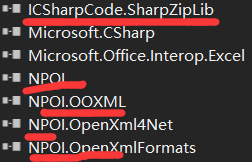
using System;

using System.Data;

using System.IO;

using NPOI.SS.UserModel;

using NPOI.XSSF.UserModel;

using NPOI.HSSF.UserModel;

namespace NPOIOprateExcel

{

    public class ExcelUtility

    {

        /// <summary>

        /// 将excel导入到datatable

        /// </summary>

        /// <param name="filePath">excel路径</param>

        /// <param name="isColumnName">第一行是否是列名</param>

        /// <returns>返回datatable</returns>

        public static DataTable ExcelToDataTable(string filePath, bool isColumnName)

        {

            DataTable dataTable = null;

            FileStream fs = null;

            DataColumn column = null;

            DataRow dataRow = null;

            IWorkbook workbook = null;

            ISheet sheet = null;

            IRow row = null;

            ICell cell = null;

            int startRow = 0;

            try

            {

                using (fs = File.OpenRead(filePath))

                {

                    // 2007版本

                    if (filePath.IndexOf(".xlsx") > 0)

                        workbook = new XSSFWorkbook(fs);

                    // 2003版本

                    else if (filePath.IndexOf(".xls") > 0)

                        workbook = new HSSFWorkbook(fs);

                    if (workbook != null)

                    {

                        sheet = workbook.GetSheetAt(0);//读取第一个sheet,也能循环读取每个sheet

                        dataTable = new DataTable();

                        if (sheet != null)

                        {

                            int rowCount = sheet.LastRowNum+1;//+1 包括列名的行,总行数

                            if (rowCount > 0)

                            {

                                IRow firstRow = sheet.GetRow(0);//第一行

                                int cellCount = firstRow.LastCellNum;//列数

                                //构建datatable的列

                                if (isColumnName)

                                {

                                    startRow = 0;//要读取列名则=0 否则=1

                                    for (int i = firstRow.FirstCellNum; i < cellCount; ++i)

                                    {

                                        cell = firstRow.GetCell(i);

                                        if (cell != null)

                                        {

                                            if (cell.StringCellValue != null)

                                            {

                                                column = new DataColumn(cell.StringCellValue);

                                                dataTable.Columns.Add(column);

                                            }

                                        }

                                    }

                                }

                                else

                                {

                                    for (int i = firstRow.FirstCellNum; i < cellCount; ++i)

                                    {

                                        column = new DataColumn("column" + (i + 1));

                                        dataTable.Columns.Add(column);

                                    }

                                }

                                //填充行

                                for (int i = startRow; i < rowCount; ++i) //要读取列名则i<rowCount 否则i <= rowCount

                                {

                                    row = sheet.GetRow(i);

                                    if (row == null) continue;

                                    dataRow = dataTable.NewRow();

                                    for (int j = row.FirstCellNum; j < cellCount; ++j)

                                    {

                                        cell = row.GetCell(j);

                                        if (cell == null)

                                        {

                                            dataRow[j] = "";

                                        }

                                        else

                                        {

                                            //CellType(Unknown = -1,Numeric = 0,String = 1,Formula = 2,Blank = 3,Boolean = 4,Error = 5,)

                                            switch (cell.CellType)

                                            {

                                                case CellType.Blank:

                                                    dataRow[j] = "";

                                                    break;

                                                case CellType.Numeric:

                                                    short format = cell.CellStyle.DataFormat;

                                                    //对时间格式(2015.12.5、2015/12/5、2015-12-5等)的处理

                                                    if (format == 14 || format == 31 || format == 57 || format == 58)

                                                        dataRow[j] = cell.DateCellValue;

                                                    else

                                                        dataRow[j] = cell.NumericCellValue;

                                                    break;

                                                case CellType.String:

                                                    dataRow[j] = cell.StringCellValue;

                                                    break;

                                            }

                                        }

                                    }

                                    dataTable.Rows.Add(dataRow);

                                }

                            }

                        }

                    }

                }

                return dataTable;

            }

            catch (Exception)

            {

                if (fs != null)

                {

                    fs.Close();

                }

                return null;

            }

        }

    }

}
ASP.NET MVC - NPOI读取Excel的更多相关文章
- asp.net 使用NPOI读取excel文件
asp.net 使用NPOI读取excel文件内容 NPOI下载地址:NPOI public class ExcelHelper { /// <summary> /// 读取Excel文件 ...
- ASP.NET MVC NPOI导入Excel DataTable批量导入到数据库
使用NPOI导入Excel 首先在MVC项目中导入NPOI 查询NPOI安装,排序依据,选择:最高下载量,选择第一个. 在控制器中创建ExcelController 在Index视图中写入代码: @u ...
- asp.net mvc Dateset读取Excel数据
//处理Excel //读取Excel [NonAction] public static DataSet ExcelToDS(string Path) { //根据情况选择合适的连接字符,参考msd ...
- asp.net MVC NPOI导出excel通用
一.创建一个类文件添加 public class ExportToExcelColumn { public ExportToExcelColumn(string _Columnnames, strin ...
- asp.net mvc NPOI 生成Excel文件
private string PushToDown(string addtime) { DataTable dt = _bCreateCode.PushtoExcel(addtime); //1.实例 ...
- Asp.net MVC NPOI导出Excel
public class NpoiMemoryStream : MemoryStream { public NpoiMemoryStream() { AllowClose = true; } publ ...
- .NET Core 使用NPOI读取Excel返回泛型List集合
我是一名 ASP.NET 程序员,专注于 B/S 项目开发.累计文章阅读量超过一千万,我的博客主页地址:https://www.itsvse.com/blog_xzz.html 网上有很多关于npoi ...
- NPOI读取Excel帮助类,支持xls与xlsx,实现公式解析,空行的处理
NPOI读取Excel(2003或者2010)返回DataTable.支持公式解析,空行处理. /// <summary>读取excel /// 默认第一行为表头 /// </sum ...
- NPOI读取Excel表格类
public class NPOIHelper { private HSSFWorkbook workbook; public static IWorkbook Lo ...
随机推荐
- JSP学习记录
<%@ page contentType="text/html;charset=gb2312" %> <html> <h1>计算器</h1 ...
- springboot定时任务处理
定时任务是一种很常见的应用场景,springboot中的定时任务完全用的spring的那一套,用起来比较简单,需要注意的是线程池配置的那一块 使用 @EnableScheduling 注解就可以开启定 ...
- Spring_xml和注解混合方式开发
1. spring核心配置文件: <?xml version="1.0" encoding="UTF-8"?> <beans xmlns=&q ...
- ThinkPHP3.2中字段unique验证出错的解决方法
protected $_validate=array( array('stu_id','','学号已存在',1,'unique',1), ) 当一次插入多条数据时: 在进行循环 使用create验证时 ...
- .net中 登录 才能下载文件的方法 Response.WriteFile实现下载
protected void Button2_Click(object sender, EventArgs e) { //可以在这里加是否登录的判断 string fileName = "c ...
- HDU 1019(求最小公倍数 **)
题意是求一组数的最小公倍数,不用存,每次输入即刻处理即可. 补充一点:两个自然数的最大公约数与它们的最小公倍数的乘积等于这两个数的乘积. 代码如下: #include <bits/stdc++. ...
- tomcat自动重新加载应用
前言 当应用配置文件发生变化时,无需重启tomcat,可以使tomcat重新加载应用. 场景 假设存在一个J2EE应用A,对应war文件名称为A.war,部署在tomcat的webapps目录下,即: ...
- ETL脚本的版本管理方法和 SourceTree 使用
=============================使用git管理Kettle 作业的一个注意=============================之前 ETL 作业是用 svn 管理的, ...
- POI导出Excel 错误THE MAXIMUM COLUMN WIDTH FOR AN INDIVIDUAL CELL IS 255 CHARACTERS
int orgColWidth = (arrColWidth[column.Ordinal] + 1); if (liekuan > 255) liekuan = 255; //设置列宽 she ...
- 【三】Eureka服务注册与发现
1.是什么 Eureka是Netflix的一个子模块,也是核心模块之一.Eureka是一个基于 REST 服务,用于定位服务,以实现云端中间层服务发现和故障转移.服务注册与发现对于微服务架构来说是非常 ...