
js string和number
number
Js只有一种数字类型(包括整型,浮点型)
极大或极小的可用科学计数法来表示。(7.7123e+1)
所有js数字均为64位
Js所有的数字都存储为浮点型
小数的最大位数是17位
0开头的为八进制 0x开头的为16进制
console.log(Number.MAX_VALUE); 最大值
console.log(Number.MIN_VALUE);最小值
console.log(Number.NEGATIVE_INFINITY);极大值
console.log(Number.POSITIVE_INFINITY);极小值
IsNaN 判断是不是NaN
console.log(Number.isNaN(NaN)); true
console.log(Number.isNaN(Number.NaN)); true
console.log(Number.isNaN(0/0)); true
console.log(Number.isNaN('NaN')); false
console.log(Number.isNaN('')); false
console.log(Number.isNaN('123')); false
console.log(Number.isNaN(true)); false
console.log(Number.isNaN(undefined)); false
console.log(Number.isNaN(' ')); false
toFixed();四舍五入为指定小数位数的数字
var n=12345.6789;
console.log(n.toFixed()); 12346
console.log(n.toFixed(1)); 12345.7
console.log(n.toFixed(2)); 12345.68
console.log(n.toFixed(6)); 12345.678900
console.log(1.23e+20.toFixed(2)); 123000000000000000000.00
console.log(1.23e-20.toFixed(2)); 0.00
console.log(2.45.toFixed(1)); 2.5
toExponential(x);把对象的值转变为指数计数法,x规定小数位数
var n=77.1234;
console.log(n.toExponential()); 7.71234e+1
console.log(n.toExponential(2)); 7.71e+1
console.log(n.toExponential(4)); 7.7123e+1
Toprecision();对象的值超出指定位数时将其转换为指数计数法;
var n=5.1234567;
console.log(n.toPrecision()); 5.1234567
console.log(n.toPrecision(1)); 5
console.log(n.toPrecision(2)); 5.1
console.log(n.toPrecision(5)); 5.1235
console.log((1234.567).toPrecision(2)); 1.2e+3
String对象
var str='king';
console.log(typeof str); //string
var strObj=new String('king');
console.log(typeof strObj); //obj
console.log(strObj[0]); //k
console.log(strObj.length); //4
console.log(strObj.valueOf()); //king
console.log(strObj.toString()); //king
console.log("nana"[0]); //n
console.log("helloworld".length); //10
//charAt()根据下标返回指定的字符
var str='king';
console.log(str.charAt(0)); //k
console.log(str.charAt(1)); //i
console.log(str.charAt(2)); //n
console.log(str.charAt(3)); //g
console.log(str.charAt(10)); //
console.log(str.charAt(b)); //-1
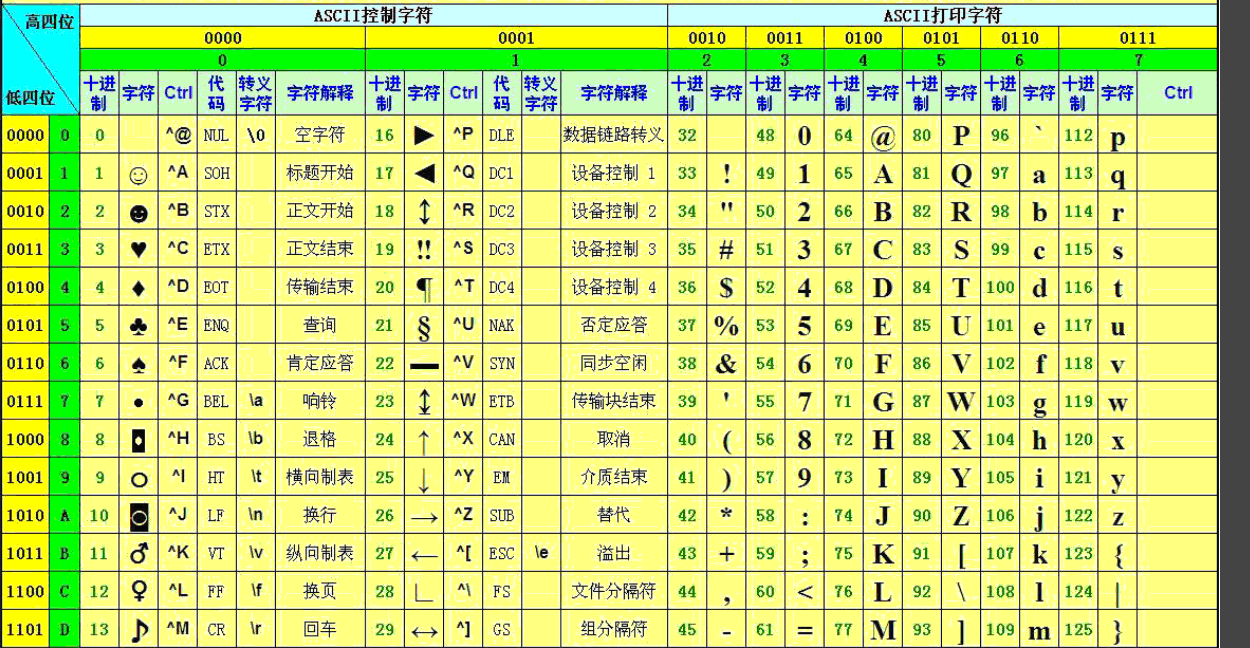
//charCodeAt():返回指定字符的ASCII码值
var str='abcdef';
console.log(str.charCodeAt(0));//a的ASCII码值97
console.log(str.charCodeAt(100)); 空的值为 NaN
console.log(str.charCodeAt(-123)); NaN
//fromCharCode():根据指定的ASCII放回对应的字符
console.log(String.fromCharCode(97)); //a
console.log(String.fromCharCode(65,66,67));
var str='hello ';
console.log(str.concat('world'));
// hello world
console.log(str.concat('world ','!'));
// hello world!
//字符串搜索相关
var str='this is a test';
var str='this is a test';
console.log(str.indexOf('t')); 0
console.log(str.indexOf('is')); 2
console.log(str.indexOf('Is')); -1
console.log(str.indexOf('i')); 2
console.log(str.indexOf('i',3)); 5//此处的3指的是从第三位开始
通过indexOf()可以统计一个字符在指定字符串中出现的次数
var str='sssssdlkfjlwk34jlksdfjlksjdlf234';
var count=0;
var pos=str.indexOf('s');
while(pos!=-1){
count++;
pos=str.indexOf('s',pos+1);
}
console.log(count);
lastIndexOf():最后一次出现的位置
var str='this is a test';
console.log(str.indexOf('is'));
2
console.log(str.lastIndexOf('is'));
5
比较两个字符串
console.log('h'.localeCompare('j'));
104和106
大 显示负数
后面小 显示正数
match():找到一个或多个正则表达式的结果
var str='this is a test of
king show time';
var
re=/IS/i; i不区分大小写
console.log(str.match(re));
var str='QWERTYUIOPASDFGHJKLZXCVBNMqwertyuioasdfghjkzxcvbnm';
console.log(str.match(/[a-f]/ig));
g是全局匹配(搜索)
search():根据正则表达式进行搜索
var str='this is a test';
console.log(str.search(/is/));
2
console.log(str.search(/IS/));
-1
console.log(str.search(/IS/i));
2
var str='this is a test';
var
newStr=str.replace(/IS/ig,'!'); th! ! a test
把is替换成!
var str="2015-09-26";
var
newStr=str.replace(/(\d{4})-(\d{2})-(\d{2})/,"$2/$3/$1");
09/26/2015 换位置
截取字符串
var str='abcdef';
console.log(str.slice(2)); cdef
console.log(str.slice(0,2)); 左开右闭
ab 只显示0 1
后面闭合相当于没有
console.log(str.slice(-3));
def
console.log(str.slice(-4,-2));
cd
console.log(str.slice(0,-1));
abcde
console.log(str.substr(3));
def
console.log(str.substr(0,4));
abcd
split()将字符串拆分成数组
var
str='2015-08-12';
var
arr=str.split('-'); ["2015", "08",
"12"]
console.log(arr);
var
str='a b c d e f';
var
arr=str.split(' ');
["a", "b", "c", "d",
"e", "f"]
console.log(arr);
arr=str.split('
',2);
["a", "b"]
console.log(arr);
字符串大小写相关
(大写换小写 小写换大写)
console.log("KING".toLowerCase());
console.log("KING".toLocaleLowerCase());
console.log('nana'.toUpperCase());
console.log('nana'.toLocaleUpperCase());
trim()
var str=' abc ';
alert("!"+str+"!");
有空格
alert("!"+str.trim()+"!");
没有空格
产生锚点
var
str="this is a test";
document.body.innerHTML=str.anchor('contents_anchor');
this is a test 把变量this is a test输入进str.anchor('contents_anchor');
括号里面
产生链接
var title='this is of king
show time';
var
url='http://phpfamily.org';
document.write('Click
Me to Visit My Blog'+title.link(url)); 把链接代替到英文字母里 点字母跳入到链接里
js string和number的更多相关文章
- IE6,IE7,IE8下报JS错误:expected identifier, string or number的原因及解决的方法
今天在调试一个页面的时候遇到一个问题,在IE9下执行得非常好的脚本,在IE8里打开的时候弹出错误:expected identifier, string or number,依照经验,应该是定义对象的 ...
- JavaScript在IE6,IE7下报错'expected identifier, string or number'
问题: 代码在Forefox和IE8下工作正常,但是在IE6下报错: expected identifier, string or number 假如变量options有多个选项,那么我们可以用逗号分 ...
- js中声明Number的五种方式
转载自:http://www.jb51.net/article/34191.htm <!DOCTYPE html> <html> <head> <meta c ...
- ie6 ie7下报脚本错误"Expected identifier, string or number" 的原因和解决方法
在IE6和ie7里面,脚本报错"Expected identifier, string or number" 写下这个是个之前我已经很头疼了,因为我的代码在其他浏览器里都是正常的, ...
- err Invalid input of type: 'dict'. Convert to a byte, string or number first
一个问题引发的血案: 用python向redis写入数据报错: redis.exceptions.DataError: Invalid input of type: 'dict'. Convert t ...
- js 中的 number 为何很怪异
js 中的 number 为何很怪异 声明:需要读者对二进制有一定的了解 对于 JavaScript 开发者来说,或多或少都遇到过 js 在处理数字上的奇怪现象,比如: > 0.1 + 0.2 ...
- js String方法总结
字符方法(3) charAt(pos: number): string; // 返回特定位置的字符. charCodeAt(index: number): number; // 返回表示给定索引的字符 ...
- Right in the Center (js string algorithm)
Right in the Center (js string algorithm) codewars https://www.codewars.com/kata/5f5da7a415fbdc0001a ...
- javax.script.ScriptException: ReferenceError: "window" is not defined in security.js at line number 10
使用jmeter执行加密登录接口的测试遇到的问题. 问题记录: 今天使用jmeter执行加密登录接口的测试,因为测试环境的应用包是以前的老版本(可能有两年了),所以需要替换加密文件:security. ...
随机推荐
- C#操作Access数据库中遇到的问题(待续)
(1)在向Access中插入数据时,显示语法错误,后来将生成的sql语句单独拿到Access数据库中运行,能正确插入数据,从网上寻找资料,有人的sql语句正常,但是该语句在Access中运行错误,错误 ...
- springboot 开启事务以及手动提交事务
添加依赖,sprongboot 会默认开启事务管理 org.springframework.boot spring-boot-starter-jdbc 在需要的服务类里添加注解 @Autowired ...
- 两将军问题、拜占庭将军问题、TCP三路握手过程的联系
2015年初时产生了一个疑问:基于不可靠的通信链路,为什么在两将军问题中永远无法达到共识,而在TCP三路握手中可以? 今天抽出了一些时间进行研究发现,实际上TCP三路握手也不是完全可靠的,只是一个近似 ...
- Suse linux enterprise 11添加设置中文输入法的方法
Suse中输入法的设置没有在控制中心中,而是在应用程序里默认会安装好的SCIM输入法设置里边添加. 打开SCIM输入法设置->输入法引擎->全局设置,有很多国家的输入法可以选择,想要的找到 ...
- Redis 哨兵节点之间相互自动发现机制(自动重写哨兵节点的配置文件)
Redis的哨兵机制中,如果是多哨兵模式,哨兵节点之间也是可以相互感知的,各种搜索之后出来的是千篇一律的一个基础配置文件,在配置当前哨兵节点的配置文件中,并没有配置其他哨兵节点的任何信息.如下是一个哨 ...
- Java8内置的函数式编程接口应用场景和方式
首先,我们先定义一个函数式编程接口 @FunctionalInterface public interface BooleanFunctionalInterface<T> { boolea ...
- Spring开始
Spring 主要作用:spring的主要作用是解耦,降低代码间的耦合度(指降低类和类之间的耦合度).根据功能的不同,可以将系统中的代码分成主业务逻辑和系统级业务逻辑两类.Spring根据代码功能的特 ...
- C# File API
[C# File API] 1.System.IO.File Provides static methods for the creation, copying, deletion, moving, ...
- c#Socket Tcp服务端编程
创建一个socket服务类,绑定监听端口, 然后创建一个线程listen连接的客户端, 把监听到的客户端加入dictionary里面,以便于管理, 同时创建receive线程,循环接收数据加入list ...
- Vue项目碰到"‘webpack-dev-server’不是内部或外部命令,也不是可运行的程序或批处理文件"报错
解决办法: 最后将项目里的“node_modules”文件夹删除,然后在cmd中cd到项目目录,依次运行命令:npm install和npm run build,最后运行npm run dev后项目成 ...