
js string和number
number
Js只有一种数字类型(包括整型,浮点型)
极大或极小的可用科学计数法来表示。(7.7123e+1)
所有js数字均为64位
Js所有的数字都存储为浮点型
小数的最大位数是17位
0开头的为八进制 0x开头的为16进制
console.log(Number.MAX_VALUE); 最大值
console.log(Number.MIN_VALUE);最小值
console.log(Number.NEGATIVE_INFINITY);极大值
console.log(Number.POSITIVE_INFINITY);极小值
IsNaN 判断是不是NaN
console.log(Number.isNaN(NaN)); true
console.log(Number.isNaN(Number.NaN)); true
console.log(Number.isNaN(0/0)); true
console.log(Number.isNaN('NaN')); false
console.log(Number.isNaN('')); false
console.log(Number.isNaN('123')); false
console.log(Number.isNaN(true)); false
console.log(Number.isNaN(undefined)); false
console.log(Number.isNaN(' ')); false
toFixed();四舍五入为指定小数位数的数字
var n=12345.6789;
console.log(n.toFixed()); 12346
console.log(n.toFixed(1)); 12345.7
console.log(n.toFixed(2)); 12345.68
console.log(n.toFixed(6)); 12345.678900
console.log(1.23e+20.toFixed(2)); 123000000000000000000.00
console.log(1.23e-20.toFixed(2)); 0.00
console.log(2.45.toFixed(1)); 2.5
toExponential(x);把对象的值转变为指数计数法,x规定小数位数
var n=77.1234;
console.log(n.toExponential()); 7.71234e+1
console.log(n.toExponential(2)); 7.71e+1
console.log(n.toExponential(4)); 7.7123e+1
Toprecision();对象的值超出指定位数时将其转换为指数计数法;
var n=5.1234567;
console.log(n.toPrecision()); 5.1234567
console.log(n.toPrecision(1)); 5
console.log(n.toPrecision(2)); 5.1
console.log(n.toPrecision(5)); 5.1235
console.log((1234.567).toPrecision(2)); 1.2e+3
String对象
var str='king';
console.log(typeof str); //string
var strObj=new String('king');
console.log(typeof strObj); //obj
console.log(strObj[0]); //k
console.log(strObj.length); //4
console.log(strObj.valueOf()); //king
console.log(strObj.toString()); //king
console.log("nana"[0]); //n
console.log("helloworld".length); //10
//charAt()根据下标返回指定的字符
var str='king';
console.log(str.charAt(0)); //k
console.log(str.charAt(1)); //i
console.log(str.charAt(2)); //n
console.log(str.charAt(3)); //g
console.log(str.charAt(10)); //
console.log(str.charAt(b)); //-1
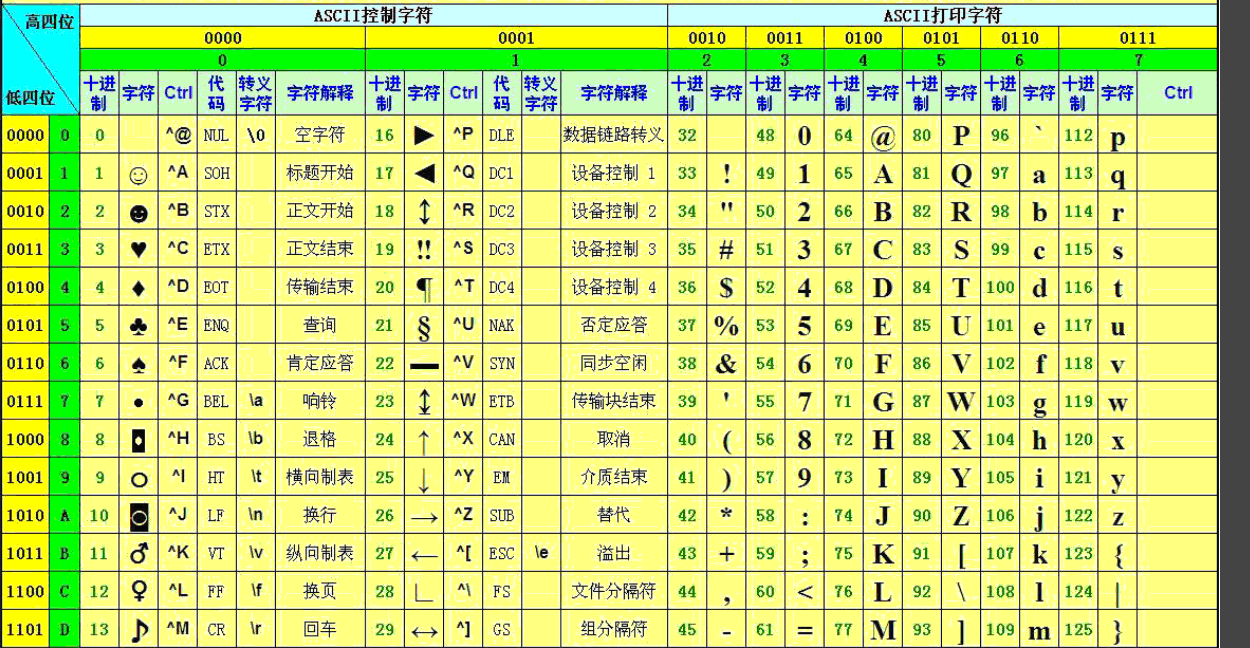
//charCodeAt():返回指定字符的ASCII码值
var str='abcdef';
console.log(str.charCodeAt(0));//a的ASCII码值97
console.log(str.charCodeAt(100)); 空的值为 NaN
console.log(str.charCodeAt(-123)); NaN
//fromCharCode():根据指定的ASCII放回对应的字符
console.log(String.fromCharCode(97)); //a
console.log(String.fromCharCode(65,66,67));
var str='hello ';
console.log(str.concat('world'));
// hello world
console.log(str.concat('world ','!'));
// hello world!
//字符串搜索相关
var str='this is a test';
var str='this is a test';
console.log(str.indexOf('t')); 0
console.log(str.indexOf('is')); 2
console.log(str.indexOf('Is')); -1
console.log(str.indexOf('i')); 2
console.log(str.indexOf('i',3)); 5//此处的3指的是从第三位开始
通过indexOf()可以统计一个字符在指定字符串中出现的次数
var str='sssssdlkfjlwk34jlksdfjlksjdlf234';
var count=0;
var pos=str.indexOf('s');
while(pos!=-1){
count++;
pos=str.indexOf('s',pos+1);
}
console.log(count);
lastIndexOf():最后一次出现的位置
var str='this is a test';
console.log(str.indexOf('is'));
2
console.log(str.lastIndexOf('is'));
5
比较两个字符串
console.log('h'.localeCompare('j'));
104和106
大 显示负数
后面小 显示正数
match():找到一个或多个正则表达式的结果
var str='this is a test of
king show time';
var
re=/IS/i; i不区分大小写
console.log(str.match(re));
var str='QWERTYUIOPASDFGHJKLZXCVBNMqwertyuioasdfghjkzxcvbnm';
console.log(str.match(/[a-f]/ig));
g是全局匹配(搜索)
search():根据正则表达式进行搜索
var str='this is a test';
console.log(str.search(/is/));
2
console.log(str.search(/IS/));
-1
console.log(str.search(/IS/i));
2
var str='this is a test';
var
newStr=str.replace(/IS/ig,'!'); th! ! a test
把is替换成!
var str="2015-09-26";
var
newStr=str.replace(/(\d{4})-(\d{2})-(\d{2})/,"$2/$3/$1");
09/26/2015 换位置
截取字符串
var str='abcdef';
console.log(str.slice(2)); cdef
console.log(str.slice(0,2)); 左开右闭
ab 只显示0 1
后面闭合相当于没有
console.log(str.slice(-3));
def
console.log(str.slice(-4,-2));
cd
console.log(str.slice(0,-1));
abcde
console.log(str.substr(3));
def
console.log(str.substr(0,4));
abcd
split()将字符串拆分成数组
var
str='2015-08-12';
var
arr=str.split('-'); ["2015", "08",
"12"]
console.log(arr);
var
str='a b c d e f';
var
arr=str.split(' ');
["a", "b", "c", "d",
"e", "f"]
console.log(arr);
arr=str.split('
',2);
["a", "b"]
console.log(arr);
字符串大小写相关
(大写换小写 小写换大写)
console.log("KING".toLowerCase());
console.log("KING".toLocaleLowerCase());
console.log('nana'.toUpperCase());
console.log('nana'.toLocaleUpperCase());
trim()
var str=' abc ';
alert("!"+str+"!");
有空格
alert("!"+str.trim()+"!");
没有空格
产生锚点
var
str="this is a test";
document.body.innerHTML=str.anchor('contents_anchor');
this is a test 把变量this is a test输入进str.anchor('contents_anchor');
括号里面
产生链接
var title='this is of king
show time';
var
url='http://phpfamily.org';
document.write('Click
Me to Visit My Blog'+title.link(url)); 把链接代替到英文字母里 点字母跳入到链接里
js string和number的更多相关文章
- IE6,IE7,IE8下报JS错误:expected identifier, string or number的原因及解决的方法
今天在调试一个页面的时候遇到一个问题,在IE9下执行得非常好的脚本,在IE8里打开的时候弹出错误:expected identifier, string or number,依照经验,应该是定义对象的 ...
- JavaScript在IE6,IE7下报错'expected identifier, string or number'
问题: 代码在Forefox和IE8下工作正常,但是在IE6下报错: expected identifier, string or number 假如变量options有多个选项,那么我们可以用逗号分 ...
- js中声明Number的五种方式
转载自:http://www.jb51.net/article/34191.htm <!DOCTYPE html> <html> <head> <meta c ...
- ie6 ie7下报脚本错误"Expected identifier, string or number" 的原因和解决方法
在IE6和ie7里面,脚本报错"Expected identifier, string or number" 写下这个是个之前我已经很头疼了,因为我的代码在其他浏览器里都是正常的, ...
- err Invalid input of type: 'dict'. Convert to a byte, string or number first
一个问题引发的血案: 用python向redis写入数据报错: redis.exceptions.DataError: Invalid input of type: 'dict'. Convert t ...
- js 中的 number 为何很怪异
js 中的 number 为何很怪异 声明:需要读者对二进制有一定的了解 对于 JavaScript 开发者来说,或多或少都遇到过 js 在处理数字上的奇怪现象,比如: > 0.1 + 0.2 ...
- js String方法总结
字符方法(3) charAt(pos: number): string; // 返回特定位置的字符. charCodeAt(index: number): number; // 返回表示给定索引的字符 ...
- Right in the Center (js string algorithm)
Right in the Center (js string algorithm) codewars https://www.codewars.com/kata/5f5da7a415fbdc0001a ...
- javax.script.ScriptException: ReferenceError: "window" is not defined in security.js at line number 10
使用jmeter执行加密登录接口的测试遇到的问题. 问题记录: 今天使用jmeter执行加密登录接口的测试,因为测试环境的应用包是以前的老版本(可能有两年了),所以需要替换加密文件:security. ...
随机推荐
- React事件处理
function ActionLink() { function handleClick(e) { e.preventDefault(); console.log('链接被点击'); } return ...
- 变量 range while for input
1.程序 =数据结构+算法 1.1.数字计算机的编码指令的次序 1.4.程序(program)是为实现特定目标或解决特定问题而用计算机语言编写的命令序列的集合.为实现预期目的而进行操作的一系列语句和指 ...
- FutureTask原理解析
原文链接:http://www.studyshare.cn/blog-front/blog/details/1130 首先写一个简单的Demo public static void main(Stri ...
- Spring事务实现分析
一.Spring声明式事务用法 1.在spring配置文件中配置事务管理器 <bean id="baseDataSource" class="com.alibaba ...
- 自定义编写js格式化数字的函数
在处理网页的时候,有时候会需要显示很长的数字,但是当数字的长度比较长的时候,就很难看一个数字到底是多大.这种情况下,一些网站在处理数字的时候,当数字的长度大于3个时,就用逗号把他们分开,这是一个比较常 ...
- python入门(十一):异常
1.异常概念: >>> a Traceback (most recent call last): File "<stdin>", line 1, i ...
- 使用quaggaJS识别图片中的条形码
quaggaJS是一个纯JS的插件,用于识别图片中的条形码,很方便.一般用于移动端拍照识别,也可以在网页端上传图片识别. github下载地址 首先要指定正确格式的条形码,常见的条形码编码类型有EAN ...
- 大数据入门到精通18--sqoop 导入关系库到hdfs中和hive表中
一,选择数据库,这里使用标准mysql sakila数据库 mysql -u root -D sakila -p 二.首先尝试把表中的数据导入到hdfs文件中,这样后续就可以使用spark来dataf ...
- [InstFiles]在Inno中打包隐藏和系统文件的头文件
本文来自:http://www.kngstr.com 简介: 一直以来,Inno的作者都没有提供打包隐藏文件和系统文件的功能. 但是,如果我们做批量打包,批量封装的时候,总会需要这样的功能,因为我们不 ...
- mysql 文件
慢查询日志 log_query_time 查询时间超过这个值则会出现在慢查询日志中,默认值是10 log_slow_queries 是否开启慢查询 log_queries_not_using_ind ...