
python selenium-webdriver 生成测试报告
测试最后的一个重要的过程就是生成一份完整的测试报告,生成测试报告的主要是通过python的一个第三方模块HTMLTestRunner.py生成,但是生成的测试报告不是特别的美观,而且没有办法统计测试结果分类,同时也没有办法把测试结果的图片保存下来。通过github 查找到一个改版后的HTMLTestRunner,但是发现美观是美观些,但是有些小问题,而且也不能把我的测试结果截图显示,所以自己又在其基础上增加了图片、测试结果的饼图分布、对测试结果进行错误、失败、通过进行分类。
生成的报告
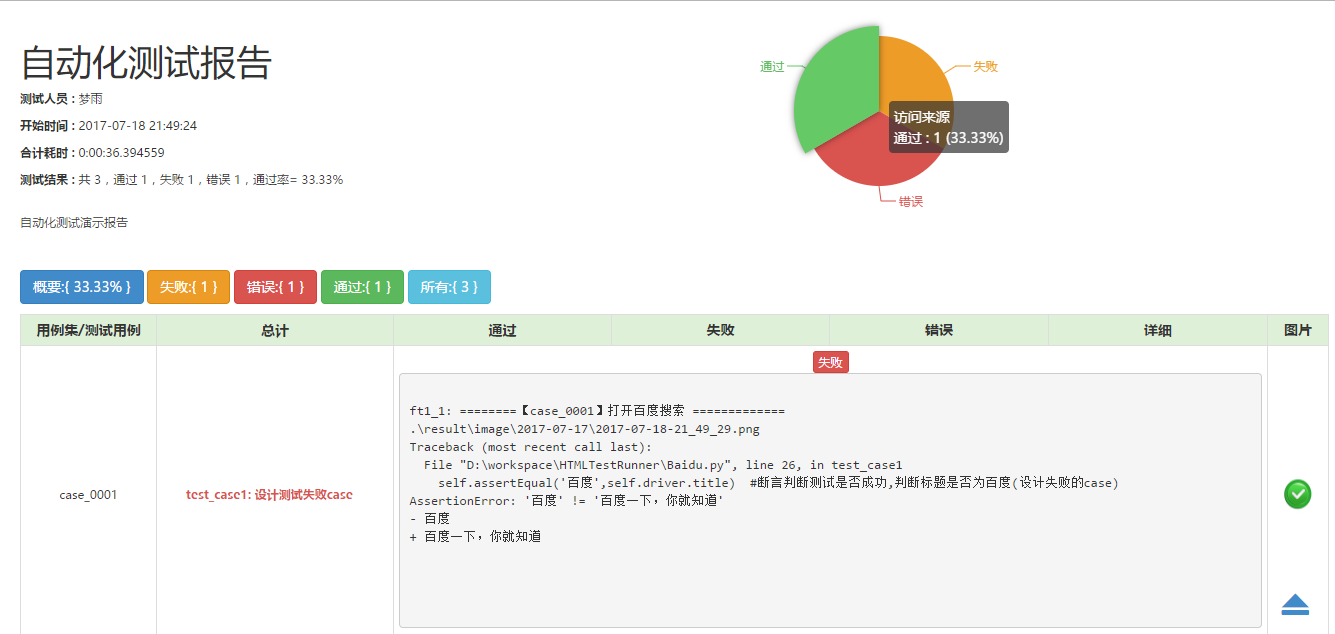
下面看下如何生成报告,接下来我们为写一个测试演示的代码生成一份报告,生成报告的时候主要利用unittest和HTMLTestReport构建。

# -*- coding: utf-8 -*-
from selenium import webdriver
import unittest
import os,sys,time
import HTMLTestReport

class Baidu(unittest.TestCase):

    def setUp(self):
        self.driver = webdriver.Chrome()
        self.driver.implicitly_wait(30)
        self.driver.maximize_window()
        self.base_url = "https://www.baidu.com"
        self.driver.get(self.base_url)

    def test_case1(self):
        '''设计测试失败case'''
        print ("========【case_0001】打开百度搜索 =============")
        current_time = time.strftime("%Y-%m-%d-%H_%M_%S", time.localtime(time.time()))
        # 必须打印图片路径HTMLTestRunner才能捕获并且生成路径,\image\**\\**.png 是获取路径的条件,必须这样的目录
        pic_path = '.\\result\\image\\' + '2017-07-17\\' + current_time +'.png'  #设置存储图片路径,测试结果图片可以按照每天进行区分
        print (pic_path)  #打印图片路径
        time.sleep(2)
        self.driver.save_screenshot(pic_path)  #截图,获取测试结果
        self.assertEqual('百度',self.driver.title)  #断言判断测试是否成功,判断标题是否为百度(设计失败的case)

    def test_case2(self):
        '''设计测试过程中报错的case'''
        print ("========【case_0002】搜索selenium =============")
        self.driver.find_element_by_id("kw").clear()
        self.driver.find_element_by_id("kw").send_keys(u"selenium")
        self.driver.find_element_by_id('su').click()
        time.sleep(2)
        current_time = time.strftime("%Y-%m-%d-%H_%M_%S", time.localtime(time.time()))
        pic_path = '.\\result\\image\\'+ '2017-07-17\\' + current_time + '.png'
        print (pic_path)
        self.driver.save_screenshot(pic_path)  #截图测试结果
        self.assertIn1('selenium',self.driver.title)   #断言书写错误,导致case出错

    def test_case3(self):
        '''设计测试成功的case'''
        print ("========【case_0003】 搜索梦雨情殇博客=============")
        self.driver.find_element_by_id("kw").clear()
        self.driver.find_element_by_id("kw").send_keys(u"梦雨情殇")
        self.driver.find_element_by_id('su').click()
        time.sleep(2)
        current_time = time.strftime("%Y-%m-%d-%H_%M_%S", time.localtime(time.time()))
        pic_path = '.\\result\\image\\'+ '2017-07-17\\' + current_time + '.png'
        print (pic_path)
        self.driver.save_screenshot(pic_path)
        self.assertIn('梦雨情殇',self.driver.title)

    def tearDown(self):
        self.driver.quit()

if __name__ == "__main__":
    '''生成测试报告'''
    current_time = time.strftime("%Y-%m-%d-%H_%M_%S", time.localtime(time.time()))
    testunit = unittest.TestSuite()   #构建测试套件
    testunit.addTest(Baidu("test_case1"))
    testunit.addTest(Baidu("test_case2"))
    testunit.addTest(Baidu("test_case3"))
    report_path = ".\\result\\SoftTestReport_" + current_time  + '.html'  #生成测试报告的路径
    fp = open(report_path, "wb")
    runner = HTMLTestReport.HTMLTestRunner(stream=fp, title=u"自动化测试报告",description='自动化测试演示报告',tester='梦雨')
    runner.run(testunit)
    fp.close()
过程很简单,过程需要理解整个过程,HTMLTestReport代码已经共享,请下载整体工程。
#coding=utf-8
"""
A TestRunner for use with the Python unit testing framework. It
generates a HTML report to show the result at a glance.
The simplest way to use this is to invoke its main method. E.g.
import unittest
import HTMLTestRunner
... define your tests ...
if __name__ == '__main__':
HTMLTestRunner.main()
For more customization options, instantiates a HTMLTestRunner object.
HTMLTestRunner is a counterpart to unittest's TextTestRunner. E.g.
# output to a file
fp = file('my_report.html', 'wb')
runner = HTMLTestRunner.HTMLTestRunner(
stream=fp,
title='My unit test',
description='This demonstrates the report output by HTMLTestRunner.'
)
# Use an external stylesheet.
# See the Template_mixin class for more customizable options
runner.STYLESHEET_TMPL = '<link rel="stylesheet" href="my_stylesheet.css" type="text/css">'
# run the test
runner.run(my_test_suite)
------------------------------------------------------------------------
Copyright (c) 2004-2007, Wai Yip Tung
All rights reserved.
Redistribution and use in source and binary forms, with or without
modification, are permitted provided that the following conditions are
met:
* Redistributions of source code must retain the above copyright notice,
this list of conditions and the following disclaimer.
* Redistributions in binary form must reproduce the above copyright
notice, this list of conditions and the following disclaimer in the
documentation and/or other materials provided with the distribution.
* Neither the name Wai Yip Tung nor the names of its contributors may be
used to endorse or promote products derived from this software without
specific prior written permission.
THIS SOFTWARE IS PROVIDED BY THE COPYRIGHT HOLDERS AND CONTRIBUTORS "AS
IS" AND ANY EXPRESS OR IMPLIED WARRANTIES, INCLUDING, BUT NOT LIMITED
TO, THE IMPLIED WARRANTIES OF MERCHANTABILITY AND FITNESS FOR A
PARTICULAR PURPOSE ARE DISCLAIMED. IN NO EVENT SHALL THE COPYRIGHT OWNER
OR CONTRIBUTORS BE LIABLE FOR ANY DIRECT, INDIRECT, INCIDENTAL, SPECIAL,
EXEMPLARY, OR CONSEQUENTIAL DAMAGES (INCLUDING, BUT NOT LIMITED TO,
PROCUREMENT OF SUBSTITUTE GOODS OR SERVICES; LOSS OF USE, DATA, OR
PROFITS; OR BUSINESS INTERRUPTION) HOWEVER CAUSED AND ON ANY THEORY OF
LIABILITY, WHETHER IN CONTRACT, STRICT LIABILITY, OR TORT (INCLUDING
NEGLIGENCE OR OTHERWISE) ARISING IN ANY WAY OUT OF THE USE OF THIS
SOFTWARE, EVEN IF ADVISED OF THE POSSIBILITY OF SUCH DAMAGE.
"""
# URL: http://tungwaiyip.info/software/HTMLTestRunner.html
__author__ = "Wai Yip Tung"
__version__ = "0.8.2.2"
"""
Change History
Version 0.8.2.1 -
* 改为支持python3
Version 0.8.2.1 -
* 支持中文,汉化
* 调整样式,美化(需要连入网络,使用的百度的Bootstrap.js)
* 增加 通过分类显示、测试人员、通过率的展示
* 优化“详细”与“收起”状态的变换
* 增加返回顶部的锚点
Version 0.8.2
* Show output inline instead of popup window (Viorel Lupu).
Version in 0.8.1
* Validated XHTML (Wolfgang Borgert).
* Added description of test classes and test cases.
Version in 0.8.0
* Define Template_mixin class for customization.
* Workaround a IE 6 bug that it does not treat <script> block as CDATA.
Version in 0.7.1
* Back port to Python 2.3 (Frank Horowitz).
* Fix missing scroll bars in detail log (Podi).
"""
# TODO: color stderr
# TODO: simplify javascript using ,ore than 1 class in the class attribute?
import datetime
import io
import sys
import time
import unittest
from xml.sax import saxutils
import sys
# ------------------------------------------------------------------------
# The redirectors below are used to capture output during testing. Output
# sent to sys.stdout and sys.stderr are automatically captured. However
# in some cases sys.stdout is already cached before HTMLTestRunner is
# invoked (e.g. calling logging.basicConfig). In order to capture those
# output, use the redirectors for the cached stream.
#
# e.g.
# >>> logging.basicConfig(stream=HTMLTestRunner.stdout_redirector)
# >>>
class OutputRedirector(object):
""" Wrapper to redirect stdout or stderr """
def __init__(self, fp):
self.fp = fp
def write(self, s):
self.fp.write(s)
def writelines(self, lines):
self.fp.writelines(lines)
def flush(self):
self.fp.flush()
stdout_redirector = OutputRedirector(sys.stdout)
stderr_redirector = OutputRedirector(sys.stderr)
# ----------------------------------------------------------------------
# Template
class Template_mixin(object):
"""
Define a HTML template for report customerization and generation.
Overall structure of an HTML report
HTML
+------------------------+
|<html> |
| <head> |
| |
| STYLESHEET |
| +----------------+ |
| | | |
| +----------------+ |
| |
| </head> |
| |
| <body> |
| |
| HEADING |
| +----------------+ |
| | | |
| +----------------+ |
| |
| REPORT |
| +----------------+ |
| | | |
| +----------------+ |
| |
| ENDING |
| +----------------+ |
| | | |
| +----------------+ |
| |
| </body> |
|</html> |
+------------------------+
"""
STATUS = {
0: '通过',
1: '失败',
2: '错误',
}
DEFAULT_TITLE = '单元测试报告'
DEFAULT_DESCRIPTION = ''
DEFAULT_TESTER='测试员'
# ------------------------------------------------------------------------
# HTML Template
HTML_TMPL = r"""<?xml version="1.0" encoding="UTF-8"?>
<!DOCTYPE html PUBLIC "-//W3C//DTD XHTML 1.0 Strict//EN" "http://www.w3.org/TR/xhtml1/DTD/xhtml1-strict.dtd">
<html xmlns="http://www.w3.org/1999/xhtml">
<head>
<title>%(title)s</title>
<meta name="generator" content="%(generator)s"/>
<meta http-equiv="Content-Type" content="text/html; charset=UTF-8"/>
<link href="static/css/bootstrap.min.css" rel="stylesheet">
<script src="static/js/jquery.min.js"></script>
<script src="static/js/bootstrap.min.js"></script>
<script src="static/js/echarts/echarts-all-3.js"></script>
%(stylesheet)s
</head>
<body >
<script language="javascript" type="text/javascript">
output_list = Array();
window.onload=function(){
showCase('0') ;
}
/*level 调整增加只显示通过用例的分类 --
0:Summary //all hiddenRow
1:Failed //pt hiddenRow, ft none
2:Pass //pt none, ft hiddenRow
3:All //pt none, ft none
*/
function showCase(level) {
trs = document.getElementsByTagName("tr");
for (var i = 1; i < trs.length; i++) {
tr = trs[i];
id = tr.id;
if(level == 0 ){//概要
tr.className = 'hiddenRow'
document.getElementById('total_row').className = 'text-center active';
}
if(level == 1){//失败
console.info(id.substr(id.length-2,id.length));
if ( id.substr(id.length-2,id.length) == '失败') {
tr.className = ''
}else{
tr.className = 'hiddenRow'
}
}
if(level==2) {//通过
if (id.substr(0,2) == 'pt') {
tr.className = '';
}
else {
tr.className = 'hiddenRow';
}
}
if(level == 3 ){//所有
tr.className='';
document.getElementById('total_row').className = 'hiddenRow';
}
if(level == 4 ){//错误
console.info(id.substr(id.length-2,id.length));
if ( id.substr(id.length-2,id.length) == '错误') {
tr.className = ''
}else{
tr.className = 'hiddenRow'
}
}
}
//加入【详细】切换文字变化
detail_class=document.getElementsByClassName('detail');
//console.log(detail_class.length)
if (level == 3) {
for (var i = 0; i < detail_class.length; i++){
detail_class[i].innerHTML="收起"
}
}
else{
for (var i = 0; i < detail_class.length; i++){
detail_class[i].innerHTML="详细"
}
}
}
function showClassDetail(cid, count) {
var id_list = Array(count);
var toHide = 1;
for (var i = 0; i < count; i++) {
//ID修改 点 为 下划线 -
tid0 = 't' + cid.substr(1) + '_' + (i+1);
tid = 'f' + tid0;
tr = document.getElementById(tid);
if (!tr) {
tid = 'p' + tid0;
tr = document.getElementById(tid);
}
id_list[i] = tid;
if (tr.className) {
toHide = 0;
}
}
for (var i = 0; i < count; i++) {
tid = id_list[i];
//修改点击无法收起的BUG,加入【详细】切换文字变化
if (toHide) {
document.getElementById(tid).className = 'hiddenRow';
document.getElementById(cid).innerText = "详细"
}
else {
document.getElementById(tid).className = '';
document.getElementById(cid).innerText = "收起"
}
}
}
function html_escape(s) {
s = s.replace(/&/g,'&');
s = s.replace(/</g,'<');
s = s.replace(/>/g,'>');
return s;
}
</script>
%(heading)s
%(report)s
%(ending)s
</body>
</html>
"""
# variables: (title, generator, stylesheet, heading, report, ending)
# ------------------------------------------------------------------------
# Stylesheet
#
# alternatively use a <link> for external style sheet, e.g.
# <link rel="stylesheet" href="$url" type="text/css">
STYLESHEET_TMPL = """
<style type="text/css" media="screen">
body { font-family: Microsoft YaHei,Tahoma,arial,helvetica,sans-serif;padding: 20px; font-size: 80%; }
table { font-size: 100%; }
/* -- heading ---------------------------------------------------------------------- */
.heading {
margin-top: 0ex;
margin-bottom: 1ex;
}
.heading .description {
margin-top: 4ex;
margin-bottom: 6ex;
}
/* -- report ------------------------------------------------------------------------ */
#total_row { font-weight: bold; }
.passCase { color: #5cb85c; }
.failCase { color: #d9534f; font-weight: bold; }
.errorCase { color: #f0ad4e; font-weight: bold; }
.hiddenRow { display: none; }
.testcase { margin-left: 2em; }
</style>
"""
# ------------------------------------------------------------------------
# Heading
#
HEADING_TMPL = """<div class='heading'>
<div id="main" style="width: 300px;height:300px; float:right;margin-right:300px;margin-top:-80px"></div>
<h1 style="font-family: Microsoft YaHei">%(title)s</h1>
%(parameters)s
<p class='description'>%(description)s</p>
</div>
""" # variables: (title, parameters, description)
HEADING_ATTRIBUTE_TMPL = """<p class='attribute'><strong>%(name)s : </strong> %(value)s</p>
""" # variables: (name, value)
# ------------------------------------------------------------------------
# Report
#
# 汉化,加美化效果
REPORT_TMPL = """
<p id='show_detail_line'>
<a class="btn btn-primary" href='javascript:showCase(0)'>概要:{ %(passrate)s }</a>
<a class="btn btn-warning" href='javascript:showCase(1)' id=''>失败:{ %(fail)s }</a>
<a class="btn btn-danger" href='javascript:showCase(4)'>错误:{ %(error)s }</a>
<a class="btn btn-success" href='javascript:showCase(2)'>通过:{ %(Pass)s }</a>
<a class="btn btn-info" href='javascript:showCase(3)'>所有:{ %(count)s }</a>
<input id='fail' type="hidden" value="%(fail)s"/>
<input id='error' type="hidden" value="%(error)s"/>
<input id='Pass' type="hidden" value="%(Pass)s"/>
</p>
<table id='result_table' class="table table-condensed table-bordered table-hover">
<colgroup>
<col align='left' />
<col align='right' />
<col align='right' />
<col align='right' />
<col align='right' />
<col align='right' />
</colgroup>
<tr id='header_row' class="text-center success" style="font-weight: bold;font-size: 14px;">
<td>用例集/测试用例</td>
<td>总计</td>
<td>通过</td>
<td>失败</td>
<td>错误</td>
<td>详细</td>
<td>图片</td>
</tr>
%(test_list)s
<tr id='total_row' class="text-center active">
<td colspan='2'>总计</td>
<td>%(count)s</td>
<td>%(Pass)s</td>
<td>%(fail)s</td>
<td>%(error)s</td>
<td>通过率:%(passrate)s</td>
</tr>
</table>
""" # variables: (test_list, count, Pass, fail, error ,passrate)
REPORT_CLASS_TMPL = r"""
<tr class='%(style)s warning'>
<td>%(desc)s</td>
<td class="text-center">%(count)s</td>
<td class="text-center">%(Pass)s</td>
<td class="text-center">%(fail)s</td>
<td class="text-center">%(error)s</td>
<td class="text-center"><a href="javascript:showClassDetail('%(cid)s',%(count)s)" class="detail" id='%(cid)s'>Detail</a></td>
<td></td>
</tr>
""" # variables: (style, desc, count, Pass, fail, error, cid)
#失败 的样式,去掉原来JS效果,美化展示效果 -
REPORT_TEST_WITH_OUTPUT_TMPL = r"""
<tr id='%(tid)s_%(status)s' class='%(Class)s'>
<td align='center' style="vertical-align:middle">%(caseid)s</td>
<td class='%(style)s' style="vertical-align:middle"><div class='testcase'>%(desc)s</div></td>
<td colspan='4' align='center'>
<!--默认收起错误信息 -
<button id='btn_%(tid)s' type="button" class="btn btn-danger btn-xs collapsed" data-toggle="collapse" data-target='#div_%(tid)s'>%(status)s</button>
<div id='div_%(tid)s' class="collapse"> -->
<!-- 默认展开错误信息 - -->
<button id='btn_%(tid)s' type="button" class="btn btn-danger btn-xs" data-toggle="collapse" data-target='#div_%(tid)s'>%(status)s</button>
<div id='div_%(tid)s' class="collapse in" style="text-align:left">
<pre>
%(script)s
</pre>
</div>
</td>
<td align='center'style="vertical-align:middle">
<a href="%(image)s" title="%(image)s">
<img src=".\\image\\data.jpg" height=40 width=40 border=0 /></a>
</td>
</tr>
""" # variables: (tid, Class, style, desc, status)
# 通过 的样式,加标签效果 -
REPORT_TEST_NO_OUTPUT_TMPL = r"""
<tr id='%(tid)s' class='%(Class)s'>
<td class='%(style)s'><div class='testcase'>%(desc)s</div></td>
<td colspan='5' align='center'><span class="label label-success success">%(status)s</span></td>
</tr>
""" # variables: (tid, Class, style, desc, status)
REPORT_TEST_OUTPUT_TMPL = r"""
%(id)s: %(output)s
""" # variables: (id, output)
REPORT_TEST_OUTPUT_IMAGE = r"""
%(screenshot)s
"""
REPORT_TEST_OUTPUT_CASEID = r"""
%(case_id)s
"""
# ------------------------------------------------------------------------
# ENDING
#
# 增加返回顶部按钮
ENDING_TMPL = """<div id='ending'> </div>
<div style=" position:fixed;right:50px; bottom:30px; width:20px; height:20px;cursor:pointer">
<a href="#"><span class="glyphicon glyphicon-eject" style = "font-size:30px;" aria-hidden="true">
</span></a></div>
<script type="text/javascript">
// 基于准备好的dom,初始化echarts实例
var myChart = echarts.init(document.getElementById('main'));
var fail= document.getElementById('fail').value;
var error=document.getElementById('error').value;
var Pass=document.getElementById('Pass').value;
// 指定图表的配置项和数据
option = {
color:[ 'rgb(237,156,40)', 'rgb(217,83,79)','rgb(92,184,92)'],
tooltip : {
trigger: 'item',
formatter: "{a} <br/>{b} : {c} ({d}%)"
},
legend: {
orient: 'vertical',
left: 'left'
},
series : [
{
name: '访问来源',
type: 'pie',
radius : '50%',
center: ['50%', '50%'],
data:[
{value:fail, name:'失败'},
{value:error, name:'错误'},
{value:Pass, name:'通过'}
],
itemStyle: {
emphasis: {
shadowBlur: 10,
shadowOffsetX: 0,
shadowColor: 'rgba(0, 0, 0, 0.5)'
}
}
}
]
};
// 使用刚指定的配置项和数据显示图表。
myChart.setOption(option);
</script>
"""
# -------------------- The end of the Template class -------------------
TestResult = unittest.TestResult
class _TestResult(TestResult):
# note: _TestResult is a pure representation of results.
# It lacks the output and reporting ability compares to unittest._TextTestResult.
def __init__(self, verbosity=1):
TestResult.__init__(self)
self.stdout0 = None
self.stderr0 = None
self.success_count = 0
self.failure_count = 0
self.error_count = 0
self.verbosity = verbosity
# result is a list of result in 4 tuple
# (
# result code (0: success; 1: fail; 2: error),
# TestCase object,
# Test output (byte string),
# stack trace,
# )
self.result = []
#增加一个测试通过率
self.passrate=float(0)
def startTest(self, test):
TestResult.startTest(self, test)
# just one buffer for both stdout and stderr
self.outputBuffer = io.StringIO()
stdout_redirector.fp = self.outputBuffer
stderr_redirector.fp = self.outputBuffer
self.stdout0 = sys.stdout
self.stderr0 = sys.stderr
sys.stdout = stdout_redirector
sys.stderr = stderr_redirector
def complete_output(self):
"""
Disconnect output redirection and return buffer.
Safe to call multiple times.
"""
if self.stdout0:
sys.stdout = self.stdout0
sys.stderr = self.stderr0
self.stdout0 = None
self.stderr0 = None
return self.outputBuffer.getvalue()
def stopTest(self, test):
# Usually one of addSuccess, addError or addFailure would have been called.
# But there are some path in unittest that would bypass this.
# We must disconnect stdout in stopTest(), which is guaranteed to be called.
self.complete_output()
def addSuccess(self, test):
self.success_count += 1
TestResult.addSuccess(self, test)
output = self.complete_output()
self.result.append((0, test, output, ''))
if self.verbosity > 1:
sys.stderr.write('ok ')
sys.stderr.write(str(test))
sys.stderr.write('\n')
else:
sys.stderr.write('.')
def addError(self, test, err):
self.error_count += 1
TestResult.addError(self, test, err)
_, _exc_str = self.errors[-1]
output = self.complete_output()
self.result.append((2, test, output, _exc_str))
if self.verbosity > 1:
sys.stderr.write('E ')
sys.stderr.write(str(test))
sys.stderr.write('\n')
else:
sys.stderr.write('E')
def addFailure(self, test, err):
self.failure_count += 1
TestResult.addFailure(self, test, err)
_, _exc_str = self.failures[-1]
output = self.complete_output()
self.result.append((1, test, output, _exc_str))
if self.verbosity > 1:
sys.stderr.write('F ')
sys.stderr.write(str(test))
sys.stderr.write('\n')
else:
sys.stderr.write('F')
class HTMLTestRunner(Template_mixin):
"""
"""
def __init__(self, stream=sys.stdout, verbosity=1,title=None,description=None,tester=None):
self.stream = stream
self.verbosity = verbosity
if title is None:
self.title = self.DEFAULT_TITLE
else:
self.title = title
if description is None:
self.description = self.DEFAULT_DESCRIPTION
else:
self.description = description
if tester is None:
self.tester = self.DEFAULT_TESTER
else:
self.tester = tester
self.startTime = datetime.datetime.now()
def run(self, test):
"Run the given test case or test suite."
result = _TestResult(self.verbosity)
test(result)
self.stopTime = datetime.datetime.now()
self.generateReport(test, result)
print('\nTime Elapsed: %s' % (self.stopTime-self.startTime), file=sys.stderr)
return result
def sortResult(self, result_list):
# unittest does not seems to run in any particular order.
# Here at least we want to group them together by class.
rmap = {}
classes = []
for n,t,o,e in result_list:
cls = t.__class__
if cls not in rmap:
rmap[cls] = []
classes.append(cls)
rmap[cls].append((n,t,o,e))
r = [(cls, rmap[cls]) for cls in classes]
return r
#替换测试结果status为通过率
def getReportAttributes(self, result):
"""
Return report attributes as a list of (name, value).
Override this to add custom attributes.
"""
startTime = str(self.startTime)[:19]
duration = str(self.stopTime - self.startTime)
status = []
status.append('共 %s' % (result.success_count + result.failure_count + result.error_count))
if result.success_count: status.append('通过 %s' % result.success_count)
if result.failure_count: status.append('失败 %s' % result.failure_count)
if result.error_count: status.append('错误 %s' % result.error_count )
if status:
status = ','.join(status)
self.passrate = str("%.2f%%" % (float(result.success_count) / float(result.success_count + result.failure_count + result.error_count) * 100))
else:
status = 'none'
return [
('测试人员', self.tester),
('开始时间',startTime),
('合计耗时',duration),
('测试结果',status + ",通过率= "+self.passrate),
]
def generateReport(self, test, result):
report_attrs = self.getReportAttributes(result)
generator = 'HTMLTestRunner %s' % __version__
stylesheet = self._generate_stylesheet()
heading = self._generate_heading(report_attrs)
report = self._generate_report(result)
ending = self._generate_ending()
output = self.HTML_TMPL % dict(
title = saxutils.escape(self.title),
generator = generator,
stylesheet = stylesheet,
heading = heading,
report = report,
ending = ending,
)
self.stream.write(output.encode('utf8'))
def _generate_stylesheet(self):
return self.STYLESHEET_TMPL
#增加Tester显示 -
def _generate_heading(self, report_attrs):
a_lines = []
for name, value in report_attrs:
line = self.HEADING_ATTRIBUTE_TMPL % dict(
name = saxutils.escape(name),
value = saxutils.escape(value),
)
a_lines.append(line)
heading = self.HEADING_TMPL % dict(
title = saxutils.escape(self.title),
parameters = ''.join(a_lines),
description = saxutils.escape(self.description),
tester= saxutils.escape(self.tester),
)
return heading
#生成报告 添加注释
def _generate_report(self, result):
rows = []
sortedResult = self.sortResult(result.result)
for cid, (cls, cls_results) in enumerate(sortedResult):
# subtotal for a class
np = nf = ne = 0
for n,t,o,e in cls_results:
if n == 0: np += 1
elif n == 1: nf += 1
else: ne += 1
# format class description
if cls.__module__ == "__main__":
name = cls.__name__
else:
name = "%s.%s" % (cls.__module__, cls.__name__)
doc = cls.__doc__ and cls.__doc__.split("\n")[0] or ""
desc = doc and '%s: %s' % (name, doc) or name
row = self.REPORT_CLASS_TMPL % dict(
style = ne > 0 and 'errorClass' or nf > 0 and 'failClass' or 'passClass',
desc = desc,
count = np+nf+ne,
Pass = np,
fail = nf,
error = ne,
cid = 'c%s' % (cid+1),
)
rows.append(row)
for tid, (n,t,o,e) in enumerate(cls_results):
self._generate_report_test(rows, cid, tid, n, t, o, e)
report = self.REPORT_TMPL % dict(
test_list = ''.join(rows),
count = str(result.success_count+result.failure_count+result.error_count),
Pass = str(result.success_count),
fail = str(result.failure_count),
error = str(result.error_count),
passrate =self.passrate,
)
return report
def _generate_report_test(self, rows, cid, tid, n, t, o, e):
# e.g. 'pt1.1', 'ft1.1', etc
has_output = bool(o or e)
# ID修改点为下划线,支持Bootstrap折叠展开特效 -
tid = (n == 0 and 'p' or 'f') + 't%s_%s' % (cid+1,tid+1)
name = t.id().split('.')[-1]
doc = t.shortDescription() or ""
desc = doc and ('%s: %s' % (name, doc)) or name
tmpl = has_output and self.REPORT_TEST_WITH_OUTPUT_TMPL or self.REPORT_TEST_NO_OUTPUT_TMPL
# utf-8 支持中文 -
# o and e should be byte string because they are collected from stdout and stderr?
#if isinstance(o, str):
# TODO: some problem with 'string_escape': it escape \n and mess up formating
# uo = unicode(o.encode('string_escape'))
# uo = o.decode('latin-1')
# uo = o
#else:
# uo = o
uo = o
if isinstance(e, str):
# TODO: some problem with 'string_escape': it escape \n and mess up formating
# ue = unicode(e.encode('string_escape'))
# ue = e.decode('latin-1')
ue = e
else:
ue = e
script = self.REPORT_TEST_OUTPUT_TMPL % dict(
id = tid,
output = saxutils.escape(uo+ue),
)
image = self.REPORT_TEST_OUTPUT_IMAGE % dict(
screenshot = saxutils.escape(uo+ue)
)
caseid = self.REPORT_TEST_OUTPUT_CASEID % dict(
case_id = saxutils.escape(uo+ue)
)
row = tmpl % dict(
tid = tid,
Class = (n == 0 and 'hiddenRow' or 'none'),
style = n == 2 and 'errorCase' or (n == 1 and 'failCase' or 'passCase'),
desc = desc,
script = script,
image = image[image.find("image"):(int(image.find("png"))+3)],
caseid = caseid[caseid.find("case"):(int(caseid.find("case"))+9)],
status = self.STATUS[n],
)
rows.append(row)
if not has_output:
return
def _generate_ending(self):
return self.ENDING_TMPL
##############################################################################
# Facilities for running tests from the command line
##############################################################################
# Note: Reuse unittest.TestProgram to launch test. In the future we may
# build our own launcher to support more specific command line
# parameters like test title, CSS, etc.
class TestProgram(unittest.TestProgram):
"""
A variation of the unittest.TestProgram. Please refer to the base
class for command line parameters.
"""
def runTests(self):
# Pick HTMLTestRunner as the default test runner.
# base class's testRunner parameter is not useful because it means
# we have to instantiate HTMLTestRunner before we know self.verbosity.
if self.testRunner is None:
self.testRunner = HTMLTestRunner(verbosity=self.verbosity)
unittest.TestProgram.runTests(self)
main = TestProgram
##############################################################################
# Executing this module from the command line
##############################################################################
if __name__ == "__main__":
main(module=None)
python selenium-webdriver 生成测试报告的更多相关文章
- Python+selenium自动化生成测试报告
批量执行完用例后,生成的测试报告是文本形式的,不够直观,为了更好的展示测试报告,最好是生成HTML格式的. unittest里面是不能生成html格式报告的,需要导入一个第三方的模块:HTMLTest ...
- Python Selenium Webdriver常用方法总结
Python Selenium Webdriver常用方法总结 常用方法函数 加载浏览器驱动: webdriver.Firefox() 打开页面:get() 关闭浏览器:quit() 最大化窗口: m ...
- Python+Selenium+webdriver环境搭建(windows)以及相关资源下载链接
今天记录一下测试小菜鸟alter在测试入门的一点关于python+Selenium+webdriver环境搭建的经历以及资源分享.欢迎交流学习,批评指正. 一.Python的下载与安装 1.pytho ...
- python selenium webdriver入门基本操作
python selenium webdriver入门基本操作 未经作者允许,禁止转载! from selenium import webdriver import time driver=webdr ...
- python+selenium +unittest生成HTML测试报告
python+selenium+HTMLTestRunner+unittest生成HTML测试报告 首先要准备HTMLTestRunner文件,官网的HTMLTestRunner是python2语法写 ...
- Selenium2+python自动化54-unittest生成测试报告(HTMLTestRunner)
前言 批量执行完用例后,生成的测试报告是文本形式的,不够直观,为了更好的展示测试报告,最好是生成HTML格式的. unittest里面是不能生成html格式报告的,需要导入一个第三方的模块:HTMLT ...
- Python+Selenium WebDriver API:浏览器及元素的常用函数及变量整理总结
由于网页自动化要操作浏览器以及浏览器页面元素,这里笔者就将浏览器及页面元素常用的函数及变量整理总结一下,以供读者在编写网页自动化测试时查阅. from selenium import webdrive ...
- Python + Selenium WebDriver Api 知识回顾
一直再用 Selenium WebDriver 但是用的都比较零散,也没有做过总结,今天借此机会,整理一下,方便大家使用时查阅 webDriver 的属性 ['CONTEXT_CHROME', 'C ...
- Python +selenium之集成测试报告与unittest单元测试
随着软件不断迭代,对应的功能也会越来越多,从而对应的测试用例也会呈指数增长.如果将全部的测试用例集成在一个文件中就会显得特别的臃肿而且维护成本也会很高. 一个很好的放大就是将这些测试yo你给里按照功能 ...
- Python Selenium 之生成Beautiful可视化报告
提到自动化测试,少不了自动化生成测试报告,更少不了漂亮的测试报告呀!刚好看到在github上有个大神分享了BeautifulReport,与unittest测试框架完美的结合起来,就能生成Beauti ...
随机推荐
- Microsoft SQL - 数据库管理系统
数据库管理系统(Server Management Studio) SQL Server Management Studio是一个数据库管理系统软件,数据库可以看成是一个个存储数据的文件,而Manag ...
- css3基础一
1,css简介 CSS 用于控制网页的样式和布局.样式定义如何显示html元素,样式通常保存在外部的 .css 文件中.通过仅仅编辑一个简单的 CSS 文档,外部样式表使你有能力同时改变站点中所有页面 ...
- 20165337岳源 第四次实验 Android开发
1.实验要求: 参考<Java和Android开发学习指南(第二版)(EPUBIT,Java for Android 2nd)>第二十四章 参考http://www.cnblogs.com ...
- 正则表达式、BeautifulSoup、Lxml进行性能对比
爬取方法 性能 使用难度 安装难度 正则表达式 快 困难 简单(内置) BeautifulSoup 慢 简单 简单 Lxml 快 简单 相对困难
- golang 之 flag.String
无论是c语言还是golang语言或是其他语言,启动应用程序时都可以带一些参数,然后系统根据传入的参数进行特点的工作.如:./main -b /home/backupdir -d true 那么如何更好 ...
- python序列化模块的速度比较
# -*- coding: utf-8 -*- # @Time : 2019-04-01 17:41 # @Author : cxa # @File : dictest.py # @Software: ...
- 华为QUIDWAY系列路由器的单臂路由配置案例
作者:邓聪聪 单臂路由 单臂路由(router-on-a-stick)是指在路由器的一个接口上通过配置子接口(或“逻辑接口”,并不存在真正物理接口)的方式,实现原来相互隔离的不同VLAN(虚拟局域网) ...
- boost::function 介绍
本片文章主要介绍boost::function的用法. boost::function 就是一个函数的包装器(function wrapper),用来定义函数对象. 1. 介绍 Boost.Func ...
- 微信小程序采坑(一)
1.微信小程序如何让text内容空格 <text decode="{{true}}" space="{{true}}"> </text> ...
- 003_crlf注入漏洞
一. (1) 线上收到一个crlf 注入的漏洞. 同时启用80和443才会暴露,配置如下: server { listen 80; listen 443 ssl; server_name www.jy ...