
学习笔记: 特性Attribute详解,应用封装
///
/// 特性:中括号声明
///
/// 错觉:每一个特性都可以带来对应的功能
///
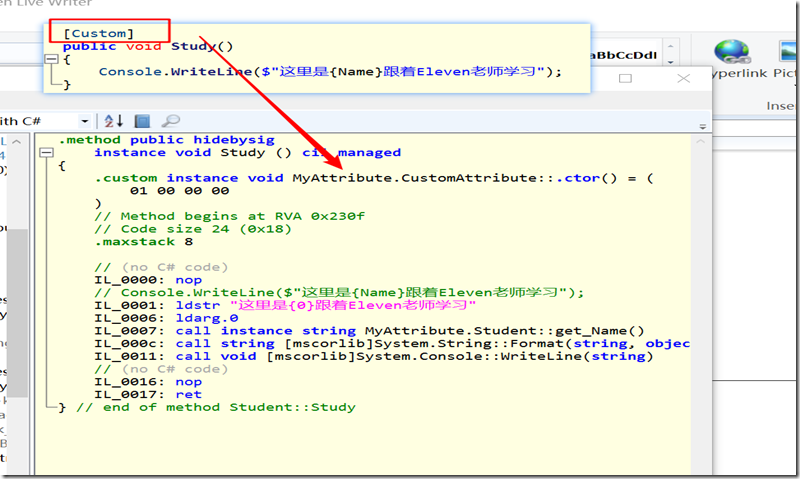
/// 实际上特性添加后,编译会在元素内部产生IL,但是我们是没办法直接使用的,
/// 而且在metadata里面会有记录
///
/// 特性,本身是没用的
/// 程序运行的过程中,我们能找到特性,而且也能应用一下
/// 任何一个可以生效的特性,都是因为有地方主动使用了的
一个应用场景: 可以用特性标注枚举值,以便 程序用到该枚举的 中文
public enum UserState
{
/// <summary>
/// 正常
/// </summary>
[Remark("正常")]
Normal = 0,//左边是字段名称 右边是数据库值 哪里放描述? 注释
/// <summary>
/// 冻结
/// </summary>
[Remark("冻结")]
Frozen = 1,
/// <summary>
/// 删除
/// </summary>
//[Remark("删除")]
Deleted = 2
}
//枚举项加一个描述 实体类的属性也可以Display
//别名 映射
public class RemarkAttribute : Attribute
{
public RemarkAttribute(string remark)
{
this._Remark = remark;
}
private string _Remark = null;
public string GetRemark()
{
return this._Remark;
}
}public static class RemarkExtension
{
public static string GetRemark(this Enum value)
{Type type = value.GetType();
FieldInfo field = type.GetField(value.ToString());
if (field.IsDefined(typeof(RemarkAttribute),true)){
RemarkAttribute attribute = (RemarkAttribute)field.GetCustomAttribute(typeof(RemarkAttribute));
return attribute.GetRemark();
}
else
{
return value.ToString();
}
}}
static void Main(string[] args){
Console.WriteLine(UserState.Frozen.GetRemark());
Console.WriteLine(UserState.Deleted.GetRemark());}
应用场景: 展示在页面的表格,每列的字段名 怎么展示? 写死吗? MVC中的 Display即为了解决该问题
做数据检查 , 比如 注册时用户名长度检查,qq检查
MVC中 常用的 model.isvalidate() 简单实现如下
核心: 自定义的attr都继承抽象类, 只需在main中调用 扩展方法, 所有实现了 该抽象特性类的的特性 都会调用 重写的validate方法 进行自己的逻辑验证
public class Student
{
[CustomAttribute]
public int Id { get; set; }
[Leng(5, 10)]//还有各种检查
public string Name { get; set; }
[Leng(20, 50)]
public string Accont { get; set; }[Long(10000, 999999999)]
public long QQ { get; set; }[CustomAttribute]
public void Study()
{
Console.WriteLine($"这里是{this.Name}跟着Eleven老师学习");
}[Custom()]
[return: Custom()]
public string Answer([Custom]string name)
{
return $"This is {name}";
}
}
public abstract class AbstractValidateAttribute : Attribute
{
public abstract bool Validate(object value);
}public static class ValidateExtension
{
public static bool Validate(this object obj)
{
Type type = obj.GetType();
foreach (var prop in type.GetProperties())
{if (prop.IsDefined(typeof(AbstractValidateAttribute), true))
{
object[] attributeArray = prop.GetCustomAttributes(typeof(AbstractValidateAttribute), true);
foreach (AbstractValidateAttribute attribute in attributeArray)
{
if (!attribute.Validate(prop.GetValue(obj)))
{
return false;//表示终止
}
}
}
//if (prop.IsDefined(typeof(LongAttribute), true))
//{
// var attribute = (LongAttribute)prop.GetCustomAttribute(typeof(LongAttribute), true);
// if (!attribute.Validate(prop.GetValue(obj)))
// return false;
//}//if (prop.IsDefined(typeof(LengAttribute), true))
//{
// LengAttribute attribute = (LengAttribute)prop.GetCustomAttribute(typeof(LengAttribute), true);
// if (!attribute.Validate(prop.GetValue(obj)))
// return false;
//}
}return false;
}
}public class LongAttribute: AbstractValidateAttribute
{
private long _Min, _Max = 0;
public LongAttribute(long min,long max)
{
this._Min = min;
this._Max = max;
}public override bool Validate(object value)
{
if(value!=null && !string.IsNullOrWhiteSpace(value.ToString()))
{
if( long.TryParse(value.ToString(), out long lResult))
{
if (lResult > _Min && lResult < _Max)
return true;
}}
return false;
}
}public class LengAttribute : AbstractValidateAttribute
{
private long _Min, _Max = 0;
public LengAttribute(long min, long max)
{
this._Min = min;
this._Max = max;
}public override bool Validate(object value)
{
if (value != null && !string.IsNullOrWhiteSpace(value.ToString()))
{
int length = value.ToString().Length;
if (length > _Min && length < _Max)
return true;}
return false;
}
}
学习笔记: 特性Attribute详解,应用封装的更多相关文章
- expect学习笔记及实例详解【转】
1. expect是基于tcl演变而来的,所以很多语法和tcl类似,基本的语法如下所示:1.1 首行加上/usr/bin/expect1.2 spawn: 后面加上需要执行的shell命令,比如说sp ...
- Docker技术入门与实战 第二版-学习笔记-3-Dockerfile 指令详解
前面已经讲解了FROM.RUN指令,还提及了COPY.ADD,接下来学习其他的指令 5.Dockerfile 指令详解 1> COPY 复制文件 格式: COPY <源路径> .. ...
- Redis学习笔记4-Redis配置详解
在Redis中直接启动redis-server服务时, 采用的是默认的配置文件.采用redis-server xxx.conf 这样的方式可以按照指定的配置文件来运行Redis服务.按照本Redi ...
- Struts2学习笔记二 配置详解
Struts2执行流程 1.简单执行流程,如下所示: 在浏览器输入请求地址,首先会被过滤器处理,然后查找主配置文件,然后根据地址栏中输入的/hello去每个package中查找为/hello的name ...
- linux命令学习笔记-eval命令详解
功能说明:重新运算求出参数的内容. 语 法:eval [参数] 补充说明:eval可读取一连串的参数,然后再依参数本身的特性来执行. 参 数:参数不限数目,彼此之间用分号分开. .eval命令将会首先 ...
- Struts2学习笔记(二)——配置详解
1.Struts2配置文件加载顺序: default.properties(默认常量配置) struts-default.xml(默认配置文件,主要配置bean和拦截器) struts-plugin. ...
- Android学习笔记之Activity详解
1 理解Activity Activity就是一个包含应用程序界面的窗口,是Android四大组件之一.一个应用程序可以包含零个或多个Activity.一个Activity的生命周期是指从屏幕上显示那 ...
- [C#] 类型学习笔记二:详解对象之间的比较
继上一篇对象类型后,这里我们一起探讨相等的判定. 相等判断有关的4个方法 CLR中,和相等有关系的方法有这么4种: (1) 最常见的 == 运算符 (2) Object的静态方法ReferenceEq ...
- vue.js学习笔记(二)——vue-router详解
vue-router详解 原文链接:www.jianshu.com 一.前言 要学习vue-router就要先知道这里的路由是什么?为什么我们不能像原来一样直接用<a></a> ...
随机推荐
- Windows PowerShell 入門(9)-エラー編
対象読者 Windows PowerShellでコマンドレット操作ができる方 何らかのプログラミング経験があればなお良い 必要環境 Windows PowerShell エラーをリダイレクトする リダ ...
- requests库入门13-会话对象
会话对象可以在跨请求保持某些参数,会话对象有requests api的大部分方法,我理解会话对象就是一个资源共享池 使用requests.Session()可以创建会话对象的实例 还是以之前GitHu ...
- boost 实现http断点续传
// testc.cpp : Defines the entry point for the console application. // #include "stdafx.h" ...
- mysql5.6基于主从复制的mmm高可用架构详解
MMM规划192.168.3.12 master192.168.3.13 slave1192.168.3.198 slave2 MMM部署步骤1.配置主主复制及主从同步集群2.安装主从节点所需要的支持 ...
- Light OJ 1148
题意: 给你N 个人, 每个人说出有多少人和他一队, 不包括他自己, 输出总人数最少值 思路: 排个序, 按照给的数目把人分为一组,就可以得出最少人数 #include<bits/stdc++. ...
- Laravel 自定义分页、可以调整、显示数目
{{-- 增加输入框,跳转任意页码和显示任意条数 --}} <ul class="pagination pagination-sm"> <li> <s ...
- Java中常用的加密算法小结
散列算法(单向散列,不可逆) MD5(Message Digest Algorithm 5) SHA(Secure Hash Algorithm) 对称加密(加密解密使用同一密钥,速度快) D ...
- PHP中使用Redis长连接笔记
pconnect函数声明 其中time_out表示客户端闲置多少秒后,就断开连接.函数连接成功返回true,失败返回false: pconnect(host, port, time_out, pers ...
- linux学习之软件包安装
本学习基于redhat系统或者centos系统 一.软件包的安装 1.rpm安装,rpm安装分为俩种,一种是直接安装xxx.rpm包,另一种是通过yum安装一系列的rpm包. #推荐使用yum安装,y ...
- redhat7.3 superset的离线安装
superset是一个python 开发的可视化工具,可以与kylin连接进行数据分析,在官网的讲解中,采用了在线安装方式,生产环境中有yum源,但是没有网,不得不采用离线安装方式.(我们先在有网的环 ...