
spring cloud feign覆写默认配置级feign client的日志打印
一、覆写fegin的默认配置
1、新增配置类FeignConfiguration.java
package com.config;

import org.springframework.context.annotation.Bean;

import org.springframework.context.annotation.Configuration;

import feign.Contract;

import feign.Logger;

@Configuration

public class FeignConfiguration {

    @Bean

    public Contract feignContract() {

        //这里可以配置默认配置

        return new feign.Contract.Default();

    }

    @Bean

    Logger.Level feignLoggerLevel() {

        return Logger.Level.FULL;

    }

}
需要之一的是此配置文件不能再spring cloud扫描包的路径下,否则会有问题出现
2、定义一个FeignClient2.java
package com.pupeiyuan.feignClient;

import java.util.List;

import org.springframework.cloud.netflix.feign.FeignClient;

import org.springframework.web.bind.annotation.PathVariable;

import org.springframework.web.bind.annotation.RequestMapping;

import org.springframework.web.bind.annotation.RequestMethod;

import com.config.FeignConfiguration;

import com.pupeiyuan.bean.NhReportStatusHistory;

import feign.Param;

import feign.RequestLine;

@FeignClient(name = "MULTIPLE",configuration = FeignConfiguration.class)

public interface FeignClient2 {
@RequestLine("GET /getDate/{id}")
public List<NhReportStatusHistory> dataList(@Param("id") Long id);
}
3、controller中调用
FeignClientController.java
package com.pupeiyuan.controller;

import java.util.List;

import org.springframework.beans.factory.annotation.Autowired;

import org.springframework.web.bind.annotation.GetMapping;

import org.springframework.web.bind.annotation.PathVariable;

import org.springframework.web.bind.annotation.RestController;

import com.pupeiyuan.bean.NhReportStatusHistory;

import com.pupeiyuan.feignClient.FeignClient2;

import com.pupeiyuan.feignClient.UserFeignClient;

@RestController

public class FeignClientController {

    @Autowired

    private FeignClient2 feignClient2;

    @GetMapping("/movie2/{id}")

      public List<NhReportStatusHistory> list2(@PathVariable Long id) {

        return this.feignClient2.dataList(id);

      }

}
实现的效果和上一篇文章是一样的

二、feign client的日志打印
默认情况下feign是没有日志打印出来的,需要增加相关配置:
1、创建Feign的配置文件,并在其中设置日志等级
/**

 * Feign 客户端配置

 *

 * @author xushiling

 * @date 2018/8/13

 */

@Configuration

public class FeignConfiguration {

    @Bean

    Logger.Level feignLoggerLevel() {

        //这里记录所有,根据实际情况选择合适的日志level

        return Logger.Level.FULL;

    }

}
这里的level级别控制如下
NONE, No logging (DEFAULT).
BASIC, Log only the request method and URL and the response status code and execution time.
HEADERS, Log the basic information along with request and response headers.
FULL, Log the headers, body, and metadata for both requests and responses.
NONE, 不记录 (DEFAULT).
BASIC, 仅记录请求方式和URL及响应的状态代码与执行时间.
HEADERS, 日志的基本信息与请求及响应的头.
FULL, 记录请求与响应的头和正文及元数据.
2、在客户端接口指定此配置
package com.pupeiyuan.feignClient;

import java.util.List;

import org.springframework.cloud.netflix.feign.FeignClient;

import org.springframework.web.bind.annotation.PathVariable;

import org.springframework.web.bind.annotation.RequestMapping;

import org.springframework.web.bind.annotation.RequestMethod;

import com.config.FeignConfiguration;

import com.pupeiyuan.bean.NhReportStatusHistory;

import feign.Param;

import feign.RequestLine;

@FeignClient(name = "MULTIPLE",configuration = FeignConfiguration.class)

public interface FeignClient2 {
@RequestLine("GET /getDate/{id}")
public List<NhReportStatusHistory> dataList(@Param("id") Long id);
}
3、配置文件开启日志记录
application.properties设置:
logging.level.com.haoait.client.UserServiceClient:debug
如果是yml配置文件则做如下配置:
logging:

  level:

    com.haoait.client.UserServiceClient:debug
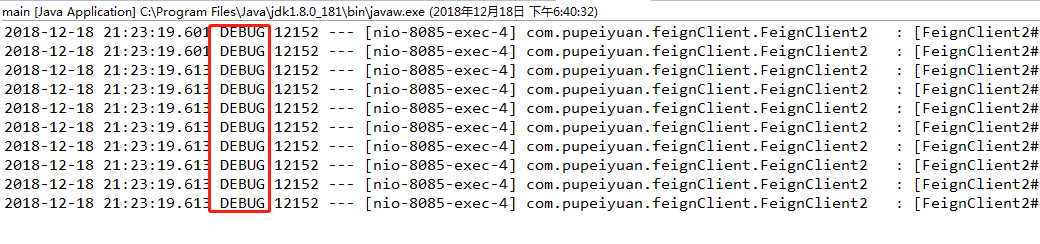
日志输出如下:
spring cloud feign覆写默认配置级feign client的日志打印的更多相关文章
- feign三:覆写feign的默认配置及feign的日志
feign三:覆写feign的默认配置及feign的日志 默认配置复写 本项目地址:http://192.168.1.103:7601 本例是通过feign调用 eureka项目中的/eureka/a ...
- Spring Cloud第十一篇 | 分布式配置中心高可用
本文是Spring Cloud专栏的第十一篇文章,了解前十篇文章内容有助于更好的理解本文: Spring Cloud第一篇 | Spring Cloud前言及其常用组件介绍概览 Spring Cl ...
- Spring Cloud(七):配置中心(Git 版与动态刷新)【Finchley 版】
Spring Cloud(七):配置中心(Git 版与动态刷新)[Finchley 版] 发表于 2018-04-19 | 更新于 2018-04-24 | Spring Cloud Confi ...
- SpringCloud学习笔记(10)----Spring Cloud Netflix之声明式 REST客户端 -Feign的高级特性
1. Feign的默认配置 Feign 的默认配置 Spring Cloud Netflix 提供的默认实现类:FeignClientsConfiguration 解码器:Decoder feignD ...
- Spring Cloud Alibaba(二) 配置中心多项目、多配置文件、分目录实现
介绍 之前Spring Cloud Config基础篇这篇文章介绍了Spring Cloud Config 配置中心基础的实现,今天继续聊下Spring Cloud Config 并结合nacos做服 ...
- Spring Cloud中五大神兽总结(Eureka/Ribbon/Feign/Hystrix/zuul)
Spring Cloud中五大神兽总结(Eureka/Ribbon/Feign/Hystrix/zuul) 1.Eureka Eureka是Netflix的一个子模块,也是核心模块之一.Eureka是 ...
- Spring Cloud config之一:分布式配置中心入门介绍
Spring Cloud Config为服务端和客户端提供了分布式系统的外部化配置支持.配置服务器为各应用的所有环境提供了一个中心化的外部配置.它实现了对服务端和客户端对Spring Environm ...
- Spring Cloud(九):配置中心(消息总线)【Finchley 版】
Spring Cloud(九):配置中心(消息总线)[Finchley 版] 发表于 2018-04-19 | 更新于 2018-05-07 | 我们在 Spring Cloud(七):配置中心 ...
- 【SpringCloud构建微服务系列】使用Spring Cloud Config统一管理服务配置
一.为什么要统一管理微服务配置 对于传统的单体应用而言,常使用配置文件来管理所有配置,比如SpringBoot的application.yml文件,但是在微服务架构中全部手动修改的话很麻烦而且不易维护 ...
随机推荐
- Navicat for Mysql连接mysql数据库时出现 2003-Can't connect to MySql server on 'localhost'(10061)
一.环境:linux服务器下 二.问题:在windows7下使用Navicat for Mysql连接mysql数据库时出现 2003-Can't connect to MySql server on ...
- 什么是联机分析处理(OLAP)
OLAP的提出引起了很大的反响,OLAP作为一类产品同联机事务处理 (OLTP) 明显区分开来. 当今的数据处理大致可以分成两大类:联机事务处理OLTP(on-line transaction pro ...
- VMware网络问题
配置好网络的虚拟机,隔一段时间后可能会发现网络不可用了,此时可以检查一下以下3个服务是否开启 一般情况下,启动以上三个服务后网络就通了. 如果以上服务都启动了还不行,那就重启一下网络: # servi ...
- VMware虚拟机环境配置--网络配置
Hadoop集群搭建第一篇. 环境: VMware workstation 12, centos 6.5 配置虚拟机网络连接模式为NAT模式(共享主机的ip地址). 桥接模式: 和主机windows是 ...
- WPF DataGrid中鼠标双击某一列,弹出窗体作为(增加、修改、详细)按钮的快捷键。
跟触发器行为有关,什么是触发器什么是行为,百度其他人写的乱七八糟的,我并不能看懂.在此先强行记忆,后知后觉,再回来理解. <i:Interaction.Triggers> <i:Ev ...
- MyBatis-进阶1
接入门的实例,我们知道MyBatis可以使用注解和配置文件实现接口和sql语句的绑定. 那么一个接口方法同时使用注解和xml配置会怎么样. @Select("select * from us ...
- SpringSocial业务系统与社交网站的绑定与解绑
SpringSocial提供了了以下三个服务,我们要做的仅仅是调用它们的服务,但是SpringSocial仅仅只提供了数据,没有提供视图 ⒈拿到所有社交网站与业务系统的绑定信息 SpringSocia ...
- Git常用命令总结(超实用)【转】
转自:https://www.linuxprobe.com/git-common-commands.html 本文由LinuxProbe.Com团队成员逄增宝整理发布,原文来自:Linux就这么学. ...
- async_retrying
from async_retrying import retry import aiohttp import asyncio @retry(attempts=6) async def fetch(): ...
- Nginx 测试环境配置,留作笔记使用
Nginx 测试环境配置,留做笔记 以下全是配置文件的配置,如果有疑问还请移步Nginx官网参考官方文档. 环境: [root@CentOS6-M01 conf]# cat /etc/redhat-r ...