
Scrapy基础01
一、Scarpy简介
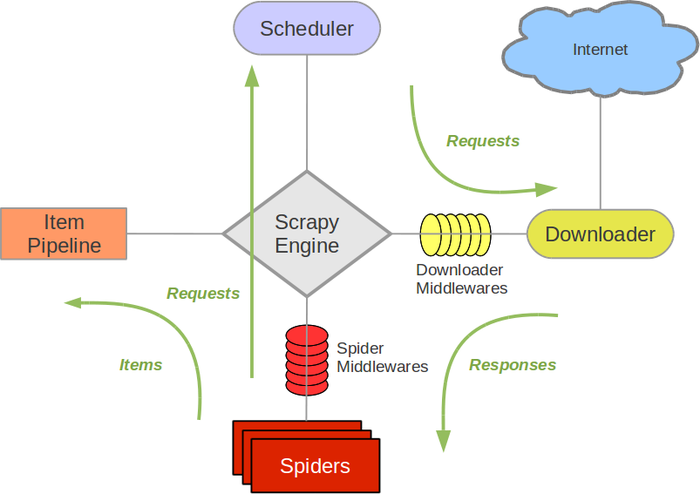
Scrapy基于事件驱动网络框架 Twisted 编写。(Event-driven networking)
因此,Scrapy基于并发性考虑由非阻塞(即异步)的实现。
参考:武Sir笔记
参考:Scrapy架构概览
二、爬取chouti.com新闻示例
# chouti.py

# -*- coding: utf-8 -*-

import scrapy

from scrapy.http import Request

from scrapy.selector import HtmlXPathSelector

from ..items import Day24SpiderItem

# For windows:

import sys,io

sys.stdout=io.TextIOWrapper(sys.stdout.buffer,encoding='gb18030')

class ChoutiSpider(scrapy.Spider):

    name = 'chouti'

    allowed_domains = ['chouti.com']

    start_urls = ['http://chouti.com/']

    def parse(self, response):

        # print(response.body)

        # print(response.text)

        hxs = HtmlXPathSelector(response)

        item_list = hxs.xpath('//div[@id="content-list"]/div[@class="item"]')

        # 找到首页所有消息的连接、标题、作业信息然后yield给pipeline进行持久化

        for item in item_list:

            link = item.xpath('./div[@class="news-content"]/div[@class="part1"]/a/@href').extract_first()

            title = item.xpath('./div[@class="news-content"]/div[@class="part2"]/@share-title').extract_first()

            author = item.xpath('./div[@class="news-content"]/div[@class="part2"]/a[@class="user-a"]/b/text()').extract_first()

            yield Day24SpiderItem(link=link,title=title,author=author)

        # 找到第二页、第三页、、、第十页的消息,全部爬取下来做持久化

        # hxs.xpath('//div[@id="dig_lcpage"]//a/@href').extract()

        '''或者用正则精确匹配'''

        page_url_list = hxs.xpath('//div[@id="dig_lcpage"]//a[re:test(@href,"/all/hot/recent/\d+")]/@href').extract()

        for url in page_url_list:

            url = "http://dig.chouti.com" + url

            print(url)

            yield Request(url, callback=self.parse, dont_filter=False)
# pipelines.py

# -*- coding: utf-8 -*-

# Define your item pipelines here

#

# Don't forget to add your pipeline to the ITEM_PIPELINES setting

# See: http://doc.scrapy.org/en/latest/topics/item-pipeline.html

class Day24SpiderPipeline(object):

    def __init__(self,file_path):

        self.file_path = file_path  # 文件路径

        self.file_obj = None        # 文件对象:用于读写操作

    @classmethod

    def from_crawler(cls, crawler):

        """

        初始化时候,用于创建pipeline对象

        :param crawler:

        :return:

        """

        val = crawler.settings.get('STORAGE_CONFIG')

        return cls(val)

    def process_item(self, item, spider):

        print(">>>> ",item)

        if 'chouti' == spider.name:

            self.file_obj.write(item.get('link') + "\n" + item.get('title') + "\n" + item.get('author') + "\n\n")

        return item

    def open_spider(self, spider):

        """

        爬虫开始执行时,调用

        :param spider:

        :return:

        """

        if 'chouti' == spider.name:

            # 如果不加:encoding='utf-8' 会导致文件里中文乱码

            self.file_obj = open(self.file_path,mode='a+',encoding='utf-8')

    def close_spider(self, spider):

        """

        爬虫关闭时,被调用

        :param spider:

        :return:

        """

        if 'chouti' == spider.name:

            self.file_obj.close()
# items.py

# -*- coding: utf-8 -*-

# Define here the models for your scraped items

#

# See documentation in:

# http://doc.scrapy.org/en/latest/topics/items.html

import scrapy

class Day24SpiderItem(scrapy.Item):

    link = scrapy.Field()

    title = scrapy.Field()

    author = scrapy.Field()
# settings.py

# -*- coding: utf-8 -*-

# Scrapy settings for day24spider project

#

# For simplicity, this file contains only settings considered important or

# commonly used. You can find more settings consulting the documentation:

#

#     http://doc.scrapy.org/en/latest/topics/settings.html

#     http://scrapy.readthedocs.org/en/latest/topics/downloader-middleware.html

#     http://scrapy.readthedocs.org/en/latest/topics/spider-middleware.html

BOT_NAME = 'day24spider'

SPIDER_MODULES = ['day24spider.spiders']

NEWSPIDER_MODULE = 'day24spider.spiders'

# Crawl responsibly by identifying yourself (and your website) on the user-agent

#USER_AGENT = 'day24spider (+http://www.yourdomain.com)'

# Obey robots.txt rules

ROBOTSTXT_OBEY = True

# Configure maximum concurrent requests performed by Scrapy (default: 16)

#CONCURRENT_REQUESTS = 32

# Configure a delay for requests for the same website (default: 0)

# See http://scrapy.readthedocs.org/en/latest/topics/settings.html#download-delay

# See also autothrottle settings and docs

#DOWNLOAD_DELAY = 3

# The download delay setting will honor only one of:

#CONCURRENT_REQUESTS_PER_DOMAIN = 16

#CONCURRENT_REQUESTS_PER_IP = 16

# Disable cookies (enabled by default)

#COOKIES_ENABLED = False

# Disable Telnet Console (enabled by default)

#TELNETCONSOLE_ENABLED = False

# Override the default request headers:

#DEFAULT_REQUEST_HEADERS = {

#   'Accept': 'text/html,application/xhtml+xml,application/xml;q=0.9,*/*;q=0.8',

#   'Accept-Language': 'en',

#}

# Enable or disable spider middlewares

# See http://scrapy.readthedocs.org/en/latest/topics/spider-middleware.html

#SPIDER_MIDDLEWARES = {

#    'day24spider.middlewares.Day24SpiderSpiderMiddleware': 543,

#}

# Enable or disable downloader middlewares

# See http://scrapy.readthedocs.org/en/latest/topics/downloader-middleware.html

#DOWNLOADER_MIDDLEWARES = {

#    'day24spider.middlewares.MyCustomDownloaderMiddleware': 543,

#}

# Enable or disable extensions

# See http://scrapy.readthedocs.org/en/latest/topics/extensions.html

#EXTENSIONS = {

#    'scrapy.extensions.telnet.TelnetConsole': None,

#}

# Configure item pipelines

# See http://scrapy.readthedocs.org/en/latest/topics/item-pipeline.html

ITEM_PIPELINES = {

   'day24spider.pipelines.Day24SpiderPipeline': 300,

}

# Enable and configure the AutoThrottle extension (disabled by default)

# See http://doc.scrapy.org/en/latest/topics/autothrottle.html

#AUTOTHROTTLE_ENABLED = True

# The initial download delay

#AUTOTHROTTLE_START_DELAY = 5

# The maximum download delay to be set in case of high latencies

#AUTOTHROTTLE_MAX_DELAY = 60

# The average number of requests Scrapy should be sending in parallel to

# each remote server

#AUTOTHROTTLE_TARGET_CONCURRENCY = 1.0

# Enable showing throttling stats for every response received:

#AUTOTHROTTLE_DEBUG = False

# Enable and configure HTTP caching (disabled by default)

# See http://scrapy.readthedocs.org/en/latest/topics/downloader-middleware.html#httpcache-middleware-settings

#HTTPCACHE_ENABLED = True

#HTTPCACHE_EXPIRATION_SECS = 0

#HTTPCACHE_DIR = 'httpcache'

#HTTPCACHE_IGNORE_HTTP_CODES = []

#HTTPCACHE_STORAGE = 'scrapy.extensions.httpcache.FilesystemCacheStorage'

STORAGE_CONFIG = "chouti.json"

DEPTH_LIMIT = 1
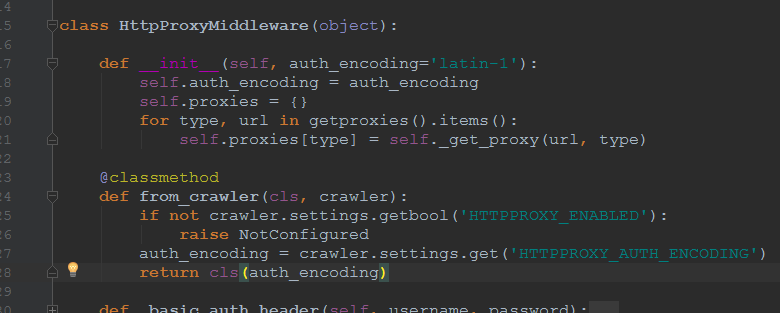
三、classmethod方法应用
from_crawler() --> __init__()
Scrapy基础01的更多相关文章
- javascript基础01
javascript基础01 Javascript能做些什么? 给予页面灵魂,让页面可以动起来,包括动态的数据,动态的标签,动态的样式等等. 如实现到轮播图.拖拽.放大镜等,而动态的数据就好比不像没有 ...
- Androd核心基础01
Androd核心基础01包含的主要内容如下 Android版本简介 Android体系结构 JVM和DVM的区别 常见adb命令操作 Android工程目录结构 点击事件的四种形式 电话拨号器Demo ...
- java基础学习05(面向对象基础01)
面向对象基础01 1.理解面向对象的概念 2.掌握类与对象的概念3.掌握类的封装性4.掌握类构造方法的使用 实现的目标 1.类与对象的关系.定义.使用 2.对象的创建格式,可以创建多个对象3.对象的内 ...
- Linux基础01 学会使用命令帮助
Linux基础01 学会使用命令帮助 概述 在linux终端,面对命令不知道怎么用,或不记得命令的拼写及参数时,我们需要求助于系统的帮助文档:linux系统内置的帮助文档很详细,通常能解决我们的问题, ...
- 可满足性模块理论(SMT)基础 - 01 - 自动机和斯皮尔伯格算术
可满足性模块理论(SMT)基础 - 01 - 自动机和斯皮尔伯格算术 前言 如果,我们只给出一个数学问题的(比如一道数独题)约束条件,是否有程序可以自动求出一个解? 可满足性模理论(SMT - Sat ...
- LibreOJ 2003. 「SDOI2017」新生舞会 基础01分数规划 最大权匹配
#2003. 「SDOI2017」新生舞会 内存限制:256 MiB时间限制:1500 ms标准输入输出 题目类型:传统评测方式:文本比较 上传者: 匿名 提交提交记录统计讨论测试数据 题目描述 ...
- java基础 01
java基础01 1. /** * JDK: (Java Development ToolKit) java开发工具包.JDK是整个java的核心! * 包括了java运行环境 JRE(Java Ru ...
- 0.Python 爬虫之Scrapy入门实践指南(Scrapy基础知识)
目录 0.0.Scrapy基础 0.1.Scrapy 框架图 0.2.Scrapy主要包括了以下组件: 0.3.Scrapy简单示例如下: 0.4.Scrapy运行流程如下: 0.5.还有什么? 0. ...
- 081 01 Android 零基础入门 02 Java面向对象 01 Java面向对象基础 01 初识面向对象 06 new关键字
081 01 Android 零基础入门 02 Java面向对象 01 Java面向对象基础 01 初识面向对象 06 new关键字 本文知识点:new关键字 说明:因为时间紧张,本人写博客过程中只是 ...
随机推荐
- 【Loj116】有源汇有上下界最大流(网络流)
[Loj116]有源汇有上下界最大流(网络流) 题面 Loj 题解 模板题. #include<iostream> #include<cstdio> #include<c ...
- 【HDU1848】Fibonacci again and again(博弈论)
[HDU1848]Fibonacci again and again(博弈论) 题面 Hdu 你有三堆石子,每堆石子的个数是\(n,m,p\),你每次可以从一堆石子中取走斐波那契数列中一个元素等数量的 ...
- HDU5909Tree Cutting
题目大意 给定一颗树,每个点有点权,问对于每个m,有多少个联通块的权值异或和为m. 题解 解法1:可以考虑树形dp,设dp[u][i]表示以u为根的子树中u必须选,联通块权值异或值为i的联通块个数. ...
- BZOJ2801/洛谷P3544 [POI2012]BEZ-Minimalist Security(题目性质发掘+图的遍历+解不等式组)
题面戳这 化下题面给的式子: \(z_u+z_v=p_u+p_v-b_{u,v}\) 发现\(p_u+p_v-b_{u,v}\)是确定的,所以只要确定了一个点\(i\)的权值\(x_i\),和它在同一 ...
- sscanf、sprintf、stringstream常见用法
转载自:https://blog.csdn.net/jllongbell/article/details/79092891 前言: 以前没有接触过stringstream这个类的时候,常用的字符串和数 ...
- jsp model1
一.model1(纯jsp技术): 1.dao:data access object,数据访问对象,即专门对数据库进行操作的类,一般说dao不含业务逻辑. 2.当进行跳转时候,需要用servlet来实 ...
- Centos 6.5 安装和使用docker
基于本人一贯的习惯,关于“某某某是什么”这样的问题,请百度吧,会有更专业的人士,会比我说的更详细更深,这里我只给出本人亲历的安装和使用过程. 1.安装 先检查服务器环境,docker要求操作系统Cen ...
- tyvj/joyoi 1305 最大子序和
带了一个转化的单调队列裸题. 转化为前缀和相减即可. 有一点需要注意:从0开始入队而不是1,因为要统计第一个. (从网上找的对拍程序,结果别人写错了) /** freopen("in.in& ...
- python解决json序列化时间格式
简单实例 import json from datetime import datetime from datetime import date info = { "name": ...
- POJ 2987 Firing (最大权闭合图)
Firing Time Limit: 5000MS Memory Limit: 131072K Total Submissions: 12108 Accepted: 3666 Descript ...