
AspectJ用注解替换xml配置
AspectJ基于注解的使用
AspectJ简介
AspectJ是一个基于Java语言的AOP框架,一般
其主要用途:自定义开发
一般情况下spring自动生成代理,要配置aop,
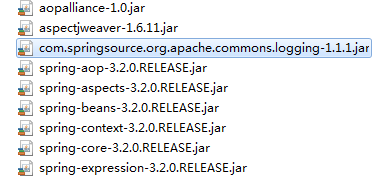
首先确定目标类,aspectj 切入点表达式,需要导入jar包
spring-framework-3.0.2.RELEASE-dependencies\org.aspectj\com.springsource.org.aspectj.weaver\1.6.8.RELEASE
除了以上这个关键包,还有spring所需的5个基础包,以及其他三个包,具体情况如下图:
在xml文件中需要配置扫描注解类
<?xml version="1.0" encoding="UTF-8"?>

<beans xmlns="http://www.springframework.org/schema/beans"

       xmlns:xsi="http://www.w3.org/2001/XMLSchema-instance"

       xmlns:aop="http://www.springframework.org/schema/aop"

       xmlns:context="http://www.springframework.org/schema/context"

       xsi:schemaLocation="http://www.springframework.org/schema/beans

                              http://www.springframework.org/schema/beans/spring-beans.xsd

                              http://www.springframework.org/schema/aop

                              http://www.springframework.org/schema/aop/spring-aop.xsd

                              http://www.springframework.org/schema/context

                              http://www.springframework.org/schema/context/spring-context.xsd">

        <!-- 1.扫描 注解类 -->

    <context:component-scan base-package="com.xk.proxy.aspectJ_zhujie"></context:component-scan>

</beans>
接着在service层用注解替换原先xml文件中的Bean
@Service("userServiceId")

public class UserServiceImpl implements UserService {

}
替换
<bean id="userServiceId" class="xxx.xxx.UserServiceImpl"></bean>
在切面类中用注解替换相应Bean
@Component

public class MyAspect {

    }
替换
<bean id="myAspectId" class="xxx.xxx.xxx.aspectJ.MyAspect"></bean>
接着必须要进行aspectj 自动代理配置,否则即使声明了切面,也无法获取切面类中的方法
<!-- 1.扫描 注解类 -->

<context:component-scan base-package="xxx.xxx.xxx.aspectJ_zhujie"></context:component-scan>
添加注解@Aspect ,声明切面,以获取切面方法
@Component

@Aspect

public class MyAspect {

    }
注解@Aspect替换了
<aop:aspect ref="myAspectId">
<aop:aspect> 将切面类 声明“切面”,从而获得通知(方法) ref 切面类引用
接着替换 公共切入点
<aop:pointcut expression="execution(* xxx.xxx.proxy.aspectJ.UserServiceImpl.*(..))" id="myPointCut"/>
这里涉及到了切入点表达式
execution()用于描述方法
语法:execution(修饰符 返回值 包.类.方法名(参数) throws异常)
修饰符,一般省略
返回值,不能省略,
方法名,不能省略
‘ * ’表示任意
(参数)
() 表示无参
(..) 表示参数任意
用注解替换为
//声明公共切入点

@Pointcut("execution(* xxx.xxx.proxy.aspectJ.UserServiceImpl.*(..))")

private void myPointCut(){

}
这里我用的是环绕通知类型,所以替换环绕
<aop:around method="myAround" pointcut-ref="myPointCut"/>
@Around(value = "myPointCut()")

public Object myAround(ProceedingJoinPoint joinPoint) throws Throwable{

        System.out.println("前");

        //手动执行目标方法

        Object obj = joinPoint.proceed();

        System.out.println("后");

        return obj;

    }
最后替换抛出异常
<aop:after-throwing method="myAfterThrowing" pointcut="execution(* xxx.xxx.UserServiceImpl.*(..))" throwing="e"/>
@AfterThrowing(value="execution(* xxx.xxx.UserServiceImpl.*(..))" ,throwing="e")

public void myAfterThrowing(JoinPoint joinPoint,Throwable e){

    System.out.println("抛出异常通知 : " + e.getMessage());

  }
最终切面类:
/**

 * 切面类,可含有多个通知

 */

@Component

@Aspect

public class MyAspect {

    //切入点当前有效

    //@Before("execution(*xxx.xxx.UserServiceImpl.*(..))")

    public void myBefore(JoinPoint joinPoint){

        System.out.println("前置通知 : " + joinPoint.getSignature().getName());

    }

    //声明公共切入点

    @Pointcut("execution(*xxx.xxx.UserServiceImpl.*(..))")

    private void myPointCut(){

    }

//  @AfterReturning(value="myPointCut()" ,returning="ret")

    public void myAfterReturning(JoinPoint joinPoint,Object ret){

        System.out.println("后置通知 : " + joinPoint.getSignature().getName() + " , -->" + ret);

    }

//  @Around(value = "myPointCut()")

    public Object myAround(ProceedingJoinPoint joinPoint) throws Throwable{

        System.out.println("前");

        //手动执行目标方法

        Object obj = joinPoint.proceed();

        System.out.println("后");

        return obj;

    }

//  @AfterThrowing(value="execution(* xxx.xxx.UserServiceImpl.*(..))" ,throwing="e")

    public void myAfterThrowing(JoinPoint joinPoint,Throwable e){

        System.out.println("抛出异常通知 : " + e.getMessage());

    }

    @After("myPointCut()")

    public void myAfter(JoinPoint joinPoint){

        System.out.println("最终通知");

    }

}
最终spring配置:
<!-- 1.扫描 注解类 -->

<context:component-scan base-package="com.xk.proxy.aspectJ_zhujie"></context:component-scan>

<!-- 2.确定 aop注解生效 -->

<aop:aspectj-autoproxy></aop:aspectj-autoproxy>
aop注解总结:
@Aspect 声明切面,修饰切面类,从而获得 通知。
通知
@Before 前置
@AfterReturning 后置
@Around 环绕
@AfterThrowing 抛出异常
@After 最终
切入点
@PointCut ,修饰方法 private void xxx(){} 之后通过“方法名”获得切入点引用
AspectJ用注解替换xml配置的更多相关文章
- Spring使用AspectJ注解和XML配置实现AOP
本文演示的是Spring中使用AspectJ注解和XML配置两种方式实现AOP 下面是使用AspectJ注解实现AOP的Java Project首先是位于classpath下的applicationC ...
- @ComponentScan注解及其XML配置
开发中会经常使用包扫描,只要标注了@Controller.@Service.@Repository,@Component 注解的类会自动加入到容器中,ComponentScan有注解和xml配置两种方 ...
- [spring]Bean注入——使用注解代替xml配置
使用注解编程,主要是为了替代xml文件,使开发更加快速. 一.使用注解前提: <?xml version="1.0" encoding="UTF-8"?& ...
- mybatis使用注解替代xml配置,动态生成Sql
mybatis使用注解替代xml配置时,遇到判断条件是否为null或者为空时,@Select很难搞定,不知道怎么办? mybatis3中增加了使用注解来配置Mapper的新特性,使用 SelectPr ...
- Spring基础篇——通过Java注解和XML配置装配bean
自动化装配的确有很大的便利性,但是却并不能适用在所有的应用场景,比如需要装配的组件类不是由自己的应用程序维护,而是引用了第三方的类库,这个时候自动装配便无法实现,Spring对此也提供了相应的解决方案 ...
- 注解 和 xml 配置的优缺点【转】
java annotation(注解) 的优点缺点 Annotation和xml各自作为配置项的优点与缺点. Annotation 一.Annotation 的优点 1.保存在 class 文件中,降 ...
- Spring_Task初探(注解,XML配置)
这几天想写一个动态添加任务项目找了找Spring下的自带定时功能发现还真有,然后网上找了找资料写了个demo 写了两种方式来执行定时的任务(XML配置和注解) 先建两个普通的任务类(XML配置调用的任 ...
- Spring基础篇——通过Java注解和XML配置装配bean(转载)
作者:陈本布衣 出处:http://www.cnblogs.com/chenbenbuyi 本文版权归作者和博客园共有,欢迎转载分享,但必须保留此段声明,且在文章页面明显位置给出原文链接,否则保留 ...
- 【SSH网上商城项目实战02】基本增删查改、Service和Action的抽取以及使用注解替换xml
转自:https://blog.csdn.net/eson_15/article/details/51297698 上一节我们搭建好了Struts2.Hibernate和Spring的开发环境,并成功 ...
随机推荐
- C#定时备份正在播放的幻灯片、word文档、excel电子表格,mht格式文档
控制台应用, 代码如下: using System; using System.Collections.Generic; using System.IO; using System.Linq; usi ...
- Python:Day21
序列化 我们把对象(变量)从内存中变成可存储或可传输的过程称之为序列化 json模块
- 爬虫之selenium模拟点击
在利用爬虫爬取页面HTML信息得时候有的当你运用request方法爬取时爬下来得HTML信息和网站信息不相符,这也导致以后得爬去无法进行,这也是反扒机制之一,解决办法时利用代码进行模拟网页点击,来爬去 ...
- C# GDI+双缓冲技术
我想有很多搞图形方面的朋友都会用到双缓冲技术的时候,而且有的时候她的确是个头疼的问题.最近我也要用双缓冲技术,程序怎么调试都不合适,当要对图形进行移动时,总是会出现闪烁抖动.在网上找了些资料,说得都不 ...
- CRC-16 (Modbus)
typedef unsigned char uint8_t; typedef unsigned short uint16_t; typedef unsigned int uint32_t; #defi ...
- .Net Core 在 Linux-Centos上的部署实战教程(四) ---- 总结
问题: 1.网站部署上访问不了,可能是防火墙/安全组的原因 2.在后台运行这块上 我查了一些类似的部署博客 好多人都是用守护进程搞的,本人也算Linux小白 不懂这样做的好处是啥 有大佬的话 可 ...
- java.util.Stack类中 empty() 和 isEmpty() 方法的作用
最近在学习算法和数据结构,用到Java里的Stack类,但程序运行结果一直和我预料的不一样,网上也没查清楚,最后查了API,才搞明白. java.util.Stack继承类 java.util.Vec ...
- Python api接口和SQL数据库关联
数据库表创建 服务器环境配置.连接 .操作.数据库 API接口 原则:
- 安装SQL Server时,提示VS Shell 安装失败,退出代码为 1638。
在安装SQL Server时,提示“安装 Microsoft Visual C++ 2015 Redistributable 时出错VS Shell 安装失败,退出代码为 1638”. 原因:是由于你 ...
- iOS-响应链(Responder Chain)
2017.05.08 20:40* 字数 1306 阅读 740评论 6喜欢 9 工作接近一年,很久没有更新博客.工作中学到很多知识点后面将花时间整理,作为对一年知识学习的总结: 下面是本篇博客的写作 ...