
height、clientHeight、offsetHeight、scrollHeight、height()、 innerHeight()、outerHeight()等的区别
1.height
height是css属性,这个属性定义元素内容区的高度,在内容区外面可以增加内边距、边框和外边距。
当 box-sizing: content-box 时,高度应用到元素的内容框。
当 box-sizing:border-box时,高度包含了内容框、内边距和边框。
2.clientHeight
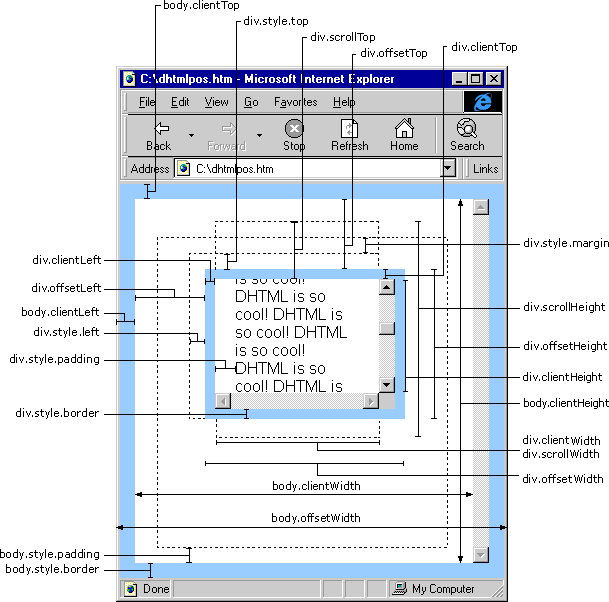
Element.clientHeight只读属性是没有的CSS或内联布局框元素为零,否则它的像素单元内的高度,但不包括填充水平滚动条的高度,边界或边缘。
// 包含元素的content+padding
dom.clientHeight
3.offsetHeight
Element.offsetHeight只读属性是元素包括垂直边距和边框的高度,为整数。
// 包含元素的content+padding+border
dom.offsetHeight
4.scrollHeight
Element.scrollHeight只读属性是测量一个元素的含量的高低,包括内容不可见的屏幕上由于溢出。
// 滚动高度
dom.scrollHeight
5.jQuery height()
height() 方法设置或返回元素的高度(不包括内边距、边框或外边距)。
6.jQuery innerHeight()
innerHeight() 方法返回元素的高度(包括内边距)。
7.jQuery outerHeight()
outerHeight() 方法返回元素的高度(包括内边距和边框)。
outerHeight(true) 方法返回元素的高度(包括内边距、边框和外边距)。
参考api:https://developer.mozilla.org/en-US/docs/Web/API/Element/scrollHeight
参考文章:https://www.cnblogs.com/yuteng/articles/1894578.html
height、clientHeight、offsetHeight、scrollHeight、height()、 innerHeight()、outerHeight()等的区别的更多相关文章
- clientHeight ,offsetHeight,style.height,scrollHeight有区别与联系
style.height 包括 元素的滚动条,不包括边框clientHeight 不包括元素的滚动条和边框,只有在没有元素的滚动条的情况下,style.height相等于clientHeightoff ...
- 关于height、offsetheight、clientheight、scrollheight、innerheight、outerheight的区别一览
平时,不管在pc端页面还是移动端页面,因为我们一般很少会设置某个块的的高度,但是呢,我有时候有需要取到这些高度以便于我们方便进行判断和下一步的编写.一般这个时候我都是直接的获取一个块的高度.heigh ...
- clientHeight & offsetHeight & scrollHeight
clientHeight & offsetHeight & scrollHeight scrollWidth/scrollHeight,offsetWidth/offsetHeight ...
- 关于height、offsetheight、clientheight、scrollheight、innerheight、outerheight的区别
二.也是平时经常用到的offsetheight 它返回的高度是内容高+padding+边框,但是注意哦,木有加margin哦,当然一般也木有啥需要把margin加进去的,以上代码为例,结果显示上图h2 ...
- javascript - 所有的视图属性和方法(offsetHeight、clientHeight、scrollHeight、innerHeight等)
注意:本文只简单的介绍了各个视图的属性和方法.如果想要知道兼容性或者更多,请至文章底部参考链接处. 本文内容分为五大部分: Window视图属性 innerHeight 和 innerWidth ou ...
- JavaScript获取浏览器高度和宽度值(documentElement,clientHeight,offsetHeight,scrollHeight,scrollTop,offsetParent,offsetY,innerHeight)
IE中: document.body.clientWidth ==> BODY对象宽度 document.body.clientHeight ==> BODY对象高度 document.d ...
- clientHeight,offsetHeight,scrollHeight迷一样的三个值
https://blog.csdn.net/qq_39083004/article/details/78498178 https://www.imooc.com/article/17571 推荐 o ...
- 关于body/documentElement ---->clientHeight, offsetHeight, scrollHeight
http://blog.csdn.net/woxueliuyun/article/details/8638427 http://blog.sina.com.cn/s/blog_9dd702d50101 ...
- 各种高度的区别及height、clientHeight、scrollHeight、offsetHeight的区分
1.height.clientHeight.scrollHeight.offsetHeight 我们来实现test中的onclick事件 function justAtest() { ...
- height、clientHeight、scrollHeight、offsetHeight区别
转自 http://www.cnblogs.com/yuteng/articles/1894578.html 我们来实现test中的onclick事件 function justAtest() ...
随机推荐
- findBugs安装
点击“Help->InstallNew Software”,如下图所示: 2 接着如下图所示: 3 Name”输入“findBugs”,“Location”输入“http://findbugs. ...
- Day 4-2 time & datetime模块
time模块. import time time.time() #输出: 1523195163.140625 time.localtime() # 获取的是操作系统的时间,可以添加一个时间戳参数 # ...
- 剑指offer(5)
题目: 用两个栈来实现一个队列,完成队列的Push和Pop操作. 队列中的元素为int类型. 解法: 一个栈专门用来存数,当需要输出数时,把所有数倒到第二个栈,当然,若此时第二个栈中已经有数了(之前倒 ...
- 【gedit】 显示行号
打开gedit文本编辑器->Edit(编辑)->preferences(预设)->view(视图)->在Display line numbers前打勾->close
- Java语言中姐种遍历List的方法总结
遍历 List 的方法: 1. for 2. advanced for 3. Iterator 4. while 5. ListIterator List<E> list 1. for f ...
- python之路--基础数据类型的补充与深浅copy
一 . join的用法 lst =['吴彦祖','谢霆锋','刘德华'] s = '_'.join(lst) print(s) # 吴彦祖_谢霆锋_刘德华 # join() "*" ...
- StringBuilder与String有哪些区别?
System.String具备不可修改性,在程序中这样的特性容易产生性能上的问题.针对这个问题.NET提供的StringBuilder类可以解决类似的问题. String 和 StringBuilde ...
- ASP.NET4.0所有网页指令
ASP.NET网页指令(Page Directive)就是在网页开头的标签声明: <% Page Language="C#" %> 而指令的作用在于指定网页和用户控件编 ...
- windows 10 multi virtual desktop keyboard shortcut
windows 10 multi virtual desktop keyboard shortcut windows 10 multi desktop keyboard shortcut https: ...
- dataTable之自定义按钮实现全表 复制 打印 导出 重载
//本文对常用表格插件datatable 的自定义按钮功能键进行详细解释//其中 15-78行是定义表单//16 18 19 三行定义自定义功能按钮 实现对全表的 复制 打印 导出(csv即excel ...