
SpringBoot整合Druid数据源
关于SpringBoot数据源请参考我上一篇文章:https://www.cnblogs.com/yueshutong/p/9409295.html
一:Druid介绍
1. Druid是什么?
Druid是Java语言中最好的数据库连接池。Druid能够提供强大的监控和扩展功能。
2. 在哪里下载druid
- 正式版本下载:
maven中央仓库: http://central.maven.org/maven2/com/alibaba/druid/
3. 怎么获取Druid的源码
Druid是一个开源项目,源码托管在github上,源代码仓库地址是 https://github.com/alibaba/druid。同时每次Druid发布正式版本和快照的时候,都会把源码打包,你可以从上面的下载地址中找到相关版本的源码
二:SpringBoot集成
首先在你的SpringBoot项目导入依赖
1.导入依赖
<dependency>
    <groupId>com.alibaba</groupId>
    <artifactId>druid</artifactId>
    <version>1.1.10</version>
</dependency>
<dependency>
    <groupId>mysql</groupId>
    <artifactId>mysql-connector-java</artifactId>
    <scope>runtime</scope>
</dependency>
2.配置数据源与连接池
spring:
  datasource:
    driver-class-name: com.mysql.jdbc.Driver
    url: jdbc:mysql://localhost:3306/user?useUnicode=true&characterEncoding=utf-8&useSSL=false
    username: root
    password: 123456
    type: com.alibaba.druid.pool.DruidDataSource
#   数据源其他配置
    initialSize: 5
    minIdle: 5
    maxActive: 20
    maxWait: 60000
    timeBetweenEvictionRunsMillis: 60000
    minEvictableIdleTimeMillis: 300000
    validationQuery: SELECT 1 FROM DUAL
    testWhileIdle: true
    testOnBorrow: false
    testOnReturn: false
    poolPreparedStatements: true
#   配置监控统计拦截的filters,去掉后监控界面sql无法统计,'wall'用于防火墙
    filters: stat,wall,log4j
    maxPoolPreparedStatementPerConnectionSize: 20
    useGlobalDataSourceStat: true
    connectionProperties: druid.stat.mergeSql=true;druid.stat.slowSqlMillis=500
3.注入DataSource
@Configuration
public class DruidConfig {
    @ConfigurationProperties(prefix = "spring.datasource")
    @Bean
    public DataSource druid() {
        return new DruidDataSource();
    }

    //配置Druid的监控
    // 1、配置一个管理后台的Servlet
    @Bean
    public ServletRegistrationBean statViewServlet() {
        //配置参数参考ResourceServlet类
        ServletRegistrationBean bean = new ServletRegistrationBean(new StatViewServlet(), "/druid/*");
        Map<String, String> initParams = new HashMap<>();
        initParams.put("loginUsername", "admin");
        initParams.put("loginPassword", "123456");
        initParams.put("allow", "");//默认就是允许所有访问
        initParams.put("deny", "192.168.15.21");//拒绝谁
        bean.setInitParameters(initParams);
        return bean;
    }

    //2、配置一个web监控的filter
    @Bean
    public FilterRegistrationBean webStatFilter() {
        FilterRegistrationBean bean = new FilterRegistrationBean();
        bean.setFilter(new WebStatFilter());
        Map<String, String> initParams = new HashMap<>();
        initParams.put("exclusions", "*.js,*.css,/druid/*");
        bean.setInitParameters(initParams);
        bean.setUrlPatterns(Arrays.asList("/*"));
        return bean;
    }
}
4.启动应用
访问http://localhost:8080/druid体验强大的Druid!
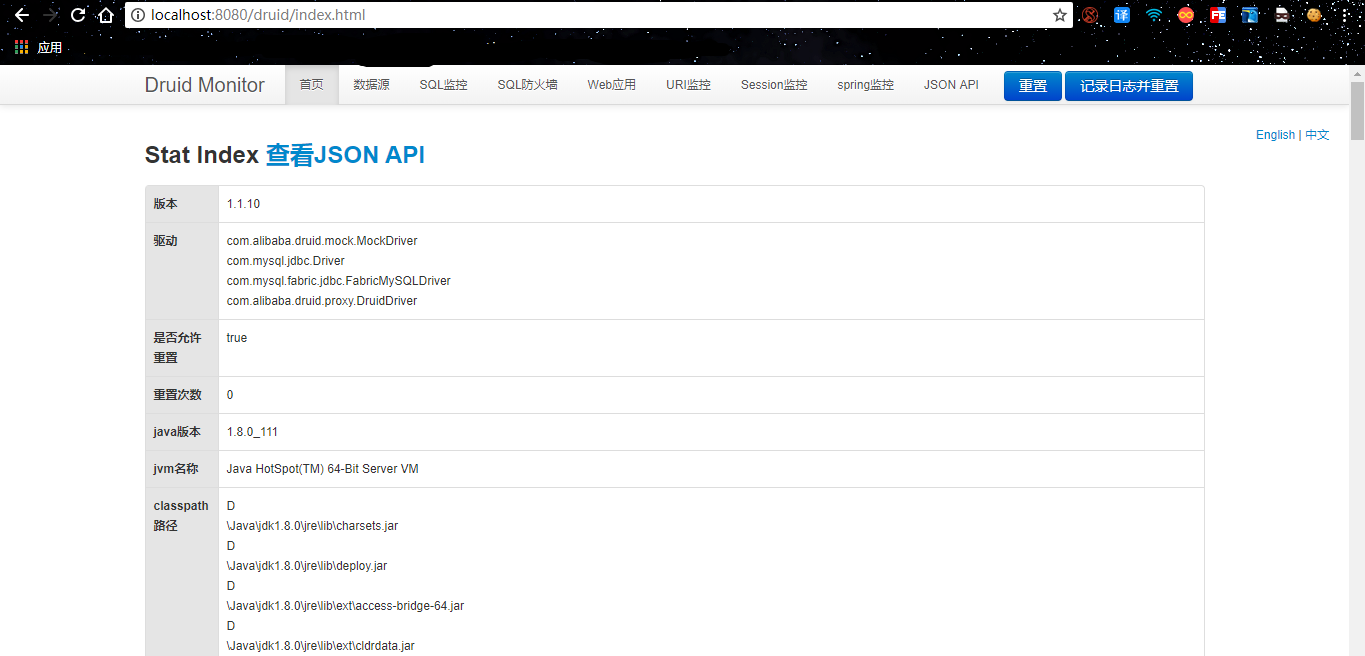
官方Spring boot集成文档:https://github.com/alibaba/druid/tree/master/druid-spring-boot-starter
SpringBoot整合Druid数据源的更多相关文章
- SpringBoot整合jdbc及整合Druid数据源
一.整合jdbc 1.创建一个springInitializr项目 勾选 web----springweb.SQL----JDBC API,MYSQL Diver 2.连接数据库 3.创建yml 4. ...
- springboot配置Druid数据源
springboot配置druid数据源 Author:SimpleWu springboot整合篇 前言 对于数据访问层,无论是Sql还是NoSql,SpringBoot默认采用整合SpringDa ...
- Springboot整合druid
目录 Springboot整合druid application.yml DruidConfig 数据监控地址:http://localhost:8080/druid Springboot整合drui ...
- SpringBoot整合Druid数据连接池
SpringBoot整合Druid数据连接池 Druid是什么? Druid是Alibaba开源的的数据库连接池.Druid能够提供强大的监控和扩展功能. 在哪里下载druid maven中央仓库: ...
- 【SpringBoot | Druid】SpringBoot整合Druid
SpringBoot整合Druid Druid是个十分强大的后端管理工具,具体的功能和用途请问阿里爸爸 1. 在pom.xml中导入包 <!-- alibaba 的druid数据库连接池 --& ...
- springBoot整合多数据源
springBoot整合相关 1:springBoot整合多数据源: 应用场景: 项目需要同时连接两个不同的数据库A, B,并且它们都为主从架构,一台写库,多台读库. 工具/版本: jdk1. ...
- springboot 配置DRUID数据源
druid 是阿里开源的数据库连接池. 开发时整合 druid 数据源过程. 1.修改pom.xml <dependency> <groupId>mysql</gro ...
- springboot整合druid、mybatis
目的: 1.springboot配置数据库连接池druid 测试druid中url监控 2.springboot整合mybatis 测试查删案例 3.springboot整合pagehelper sp ...
- springboot整合druid和配置资源监控
1.添加依赖,在maven repository中搜索 <dependency> <groupId>com.alibaba</groupId> <artifa ...
随机推荐
- mysql之代码执行结构
本文内容: 什么是代码执行结构 顺序结构 分支结构 循环结构 首发日期:2018-04-18 什么是代码执行结构: 这里所说的代码执行结构就是多条sql语句的执行顺序. 代码执行结构主要用于触发器.存 ...
- Linux命令工作中常用总结
1. 搜索 在vi和vim中如果打开一个很大的文件,不容易找到对应的内容,可以使用自带的搜索关键字进行搜索定位: 在vi和vim界面中输入:"/"(反斜杠),之后会出现一个输入框让 ...
- matlab练习程序(点云下采样)
点云处理有时因为数据量太大,我们需要对其进行下采样. 这里的方法是先将点云填入固定大小的三维网格中,然后每个网格中选一个点生成新的点云. 新点云即为下采样后的点云. 这里使用斯坦福兔子作为测试点云. ...
- LeetCode题解之Keys and Rooms
1.题目描述 2.问题分析 使用深度优先遍历 3.代码 bool canVisitAllRooms(vector<vector<int>>& rooms) { int ...
- How to monitor tempdb in MS SQL
Error: tempdb is full due to active_transaction. select ss.[host_name], ss.login_name, ss.original_l ...
- asp.net 调用 WNetAddConnection2 window api 访问被拒绝
通过Asp.net 程序调用局域网另外一台机器文件,显示拒绝访问,单独编写控制台程序正常. 修改iis 应用程序池标识,为管理员用户即可!!
- MySQL复制错误1837的相关缺陷一例
故障现象 主从gtid报错,复制错误1837,这个复制故障可以说是第一次遇到. Last_Errno: 1837 Last_Error: Error 'When @@SESSION.GTID_NEXT ...
- python列表与元组的用法
python列表与元组的用法 目录: 列表的用法: 1.增 append + extend 2.删 del remove 3.改 insert 4.查 index 5.反向 ...
- 在Linux上编译Hadoop-2.4.0实践与总结
问题导读: 1.编译源码前需要安装哪些软件? 2.安装之后该如何设置环境变量? 3.为什么不要使用JDK1.8? 4.mvn package -Pdist -DskipTests -Dtar的作用是什 ...
- Codeforces Round #542 B Two Cakes
B. Two Cakes time limit per test 1 second memory limit per test 256 megabytes input standard input o ...