
Zookeeper与Kafka集群搭建
一 :环境准备:
- 物理机window7 64位
- vmware 3个虚拟机 centos6.8 IP为:192.168.17.[129 -131]
- JDK1.7安装配置
- 各虚拟机之间配置免密登录
- 安装clustershell用于集群各节点统一操作配置
1 :在此说明一下免密和clustershell的操作和使用方式
1.1 :配置免密登录(各集群节点间,互相操作对方时,只需要输入对方ip或者host即可,不需要输入密码,即:免密登录)
1.1.2 :生成密钥文件和私钥文件 命令
ssh-keygen -t rsa
1.1.3 :查看生成秘钥文件
ls /root/.ssh
1.1.4 : 将秘钥拷贝到对方机器
ssh-copy-id -i /root/.ssh/id_rsa.pub 192.168.17.129
ssh-copy-id -i /root/.ssh/id_rsa.pub 192.168.17.130
ssh-copy-id -i /root/.ssh/id_rsa.pub 192.168.17.131
1.1.5 :测试互相是否连接上
可以分别在不同节点间互相登录操作一下
ssh root@192.168.17.130
hostname
1.2 : clustershell的安装
备注一下,我是安装的centos6.6 mini无界面版本,通过yun install clustershell安装时,会提示no package ,原因yum源中的包长期没有更新,所以使用来epel-release
安装命令:
sudo yum install epel-release
然后在yum install clustershell 就可以通过epel来安装了
1.2.2 : 配置cluster groups
vim /etc/clustershell/groups
添加一个组名:服务器IP或者host
kafka:192.168.17.129 192.168.17.130 192.168.17.131
二 :Zookeeper和Kafka下载
本文使用的zookeeper和kafka版本分别为:3.4.8 , 0.10.0.0
1 :首先到官网进行下载:
将压缩包放在自己指定的目录下,我这里放在了/opt/kafka 目录下
然后,通过clush 将压缩包copy到其它几个服务节点中
clush -g kafka -c /opt/kafka
2 :通过clush来解压缩所有节点的zk和kafka压缩包
clush -g kafka tar zxvf /opt/kafka/zookeeper-3.4.8
clush -g kafka tar zxvf /opt/kafka/kafka_2.11-0.10.1.0
3 : 将zoo_sample.cfg 拷贝一份为zoo.cfg (默认的zookeeper配置文件)
修改配置,zoo.cfg文件
# The number of milliseconds of each tick

tickTime=

# The number of ticks that the initial

# synchronization phase can take

initLimit=

# The number of ticks that can pass between

# sending a request and getting an acknowledgement

syncLimit=

# the directory where the snapshot is stored.

# do not use /tmp for storage, /tmp here is just

# example sakes.

dataDir=/tmp/zookeeper

# the port at which the clients will connect

clientPort=   ## zk 默认端口

## 节点IP和端口

server.=192.168.17.129::

server.=192.168.17.130::

server.=192.168.17.131::

# the maximum number of client connections.

# increase this if you need to handle more clients

#maxClientCnxns=

#

# Be sure to read the maintenance section of the

# administrator guide before turning on autopurge.

#

# http://zookeeper.apache.org/doc/current/zookeeperAdmin.html#sc_maintenance

#

# The number of snapshots to retain in dataDir

#autopurge.snapRetainCount=

# Purge task interval in hours

# Set to "" to disable auto purge feature

#autopurge.purgeInterval=
3 : 创建tmp/zookeeper 用来存储zk信息
mkdir /tmp/zookeeper
4 : 为每个tmp/zookeeper 设置一个myid的文件,内容为节点id 1 or 2 or 3
echo "1" > myid
clush -g kafka "service iptables status"clush -g kafka "service iptables stop"
clush -g kafka /opt/kafka/zookeeper/bin/zkServer.sh start /opt/kafka/zookeeper/conf/zoo.cfg
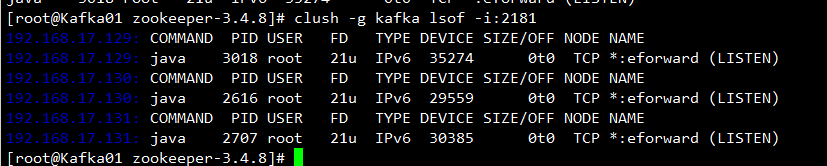
clush -g kafka lsof -i:2181
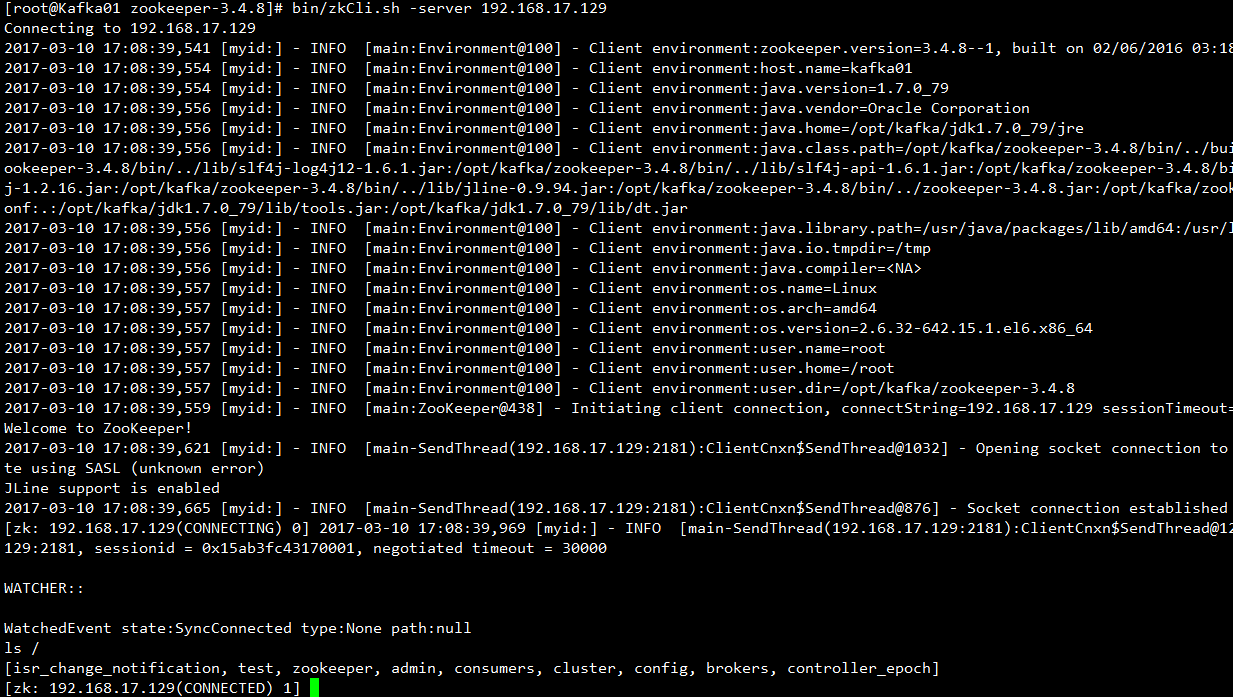
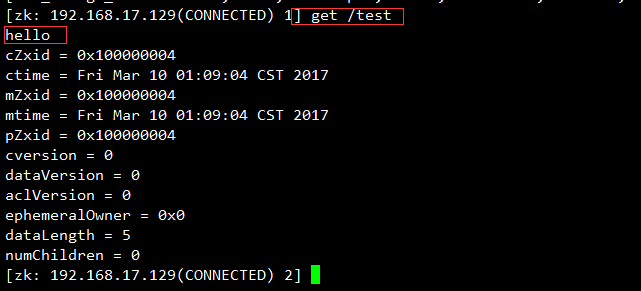
bin/zkCli.sh -server 192.168.17.130:2181create /test hello
三 :Kafka安装部署
zookeeper.connect=192.168.17.129:2181,192.168.17.130:2181,192.168.17.131:2181
/opt/kafka/kafka_2.11-0.10.1.0/bin/kafka-server-start.sh -daemon /opt/kafka/kafka_2.11-0.10.1.0/config/server.properties
bin/kafka-topics.sh --zookeeper 192.168.17.129:2181 -topic topicTest --create --partition 3 --replication-factor 2
[root@Kafka01 kafka_2.11-0.10.1.0]# bin/kafka-topics.sh --zookeeper 192.168.17.129:2181 -topic topicTest --describe

bin/kafka-console-consumer.sh --zookeeper 192.168.17.130:2181 --topic topicTest
bin/kafka-console-producer.sh --broker-list kafka02:9092 --topic topicTest



Zookeeper与Kafka集群搭建的更多相关文章
- zookeeper及kafka集群搭建
zookeeper及kafka集群搭建 1.有关zookeeper的介绍可参考:http://www.cnblogs.com/wuxl360/p/5817471.html 2.zookeeper安装 ...
- zookeeper与Kafka集群搭建及python代码测试
Kafka初识 1.Kafka使用背景 在我们大量使用分布式数据库.分布式计算集群的时候,是否会遇到这样的一些问题: 我们想分析下用户行为(pageviews),以便我们设计出更好的广告位 我想对用户 ...
- CentOS 7 Zookeeper 和 Kafka 集群搭建
环境 CentOS 7.4 Zookeeper-3.6.1 Kafka_2.13-2.4.1 Kafka-manager-2.0.0.2 本次安装的软件全部在 /home/javateam 目录下. ...
- Zookeeper + Kafka 集群搭建
第一步:准备 1. 操作系统 CentOS-7-x86_64-Everything-1511 2. 安装包 kafka_2.12-0.10.2.0.tgz zookeeper-3.4.9.tar.gz ...
- 搭建zookeeper和Kafka集群
搭建zookeeper和Kafka集群: 本实验拥有3个节点,均为CentOS 7系统,分别对应IP为10.211.55.11.10.211.55.13.10.211.55.14,且均有相同用户名 ( ...
- Docker快速搭建Zookeeper和kafka集群
使用Docker快速搭建Zookeeper和kafka集群 镜像选择 Zookeeper和Kafka集群分别运行在不同的容器中zookeeper官方镜像,版本3.4kafka采用wurstmeiste ...
- 使用Docker快速搭建Zookeeper和kafka集群
使用Docker快速搭建Zookeeper和kafka集群 镜像选择 Zookeeper和Kafka集群分别运行在不同的容器中zookeeper官方镜像,版本3.4kafka采用wurstmeiste ...
- CentOS 7搭建Zookeeper和Kafka集群
环境 CentOS 7.4 Zookeeper-3.6.1 Kafka_2.13-2.4.1 Kafka-manager-2.0.0.2 本次安装的软件全部在 /home/javateam 目录下. ...
- zookeeper集群及kafka集群搭建
1.zookeeper集群搭建 1.1 上传安装包 官网推荐至少3个节点,我们这里也用三个节点192.169.2.18 192.169.1.82 192.169.1.95 准备好安装包,zooke ...
随机推荐
- js bool true false 比较
.想到一个好玩的,运行如下 javascript : if ('0') alert("'0' is true"); if ('0' == false) alert(" ...
- WMWARE下/sbin/scsi_id 返回值为空
[root@HE1 ~]# /sbin/scsi_id -g -u /dev/sdb 第一种是从VMWARE层面去解决,用文本编辑器修改vmx文件,在vmx文件中任意位置(通常在最后)添加如下行: d ...
- VAST3.0规范
VAST3.0视频广告投放规范 Posted on 2014年2月15日 1.术语 随着视频广告行业的发展,某些术语已经得到了广泛的采用.以下定义该文档中与视频广告投放相关的一些术语: 广告荚(Ad ...
- Pomelo框架
一个典型的多进程MMO运行架构, 如下图所示: pomelo框架的组成如图所示: 架构把游戏服务器做了抽象, 抽象成为两类:前端服务器和后端服务器, 如图: 前端服务器(frontend)的职责: 负 ...
- 游戏开发之在UE4中编写C++代码控制角色
当你运行我们上次做完的项目,你可能会意识到我们移动的摄像机还是默认的那个摄像机,这个默认的摄像机可以自由飞翔.这一节,我们要使得开始的角色是我们的一个Avatar类的实例对象,并且使用键盘控制我们的角 ...
- 关于pandas精度控制
最近使用pandas处理一批数据,数据中包含几个columns,它们的数据精度,例如 3.25165,1451684684168.0,0.23 处理完之后保存csv时发现,1451684684168. ...
- (二)Windows下Redis的主从复制
Redis拥有非常强大的主从复制功能,而且还支持一个master可以拥有多个slave,而一个slave又可以拥有多个slave,从而形成强大的多级服务器集群架构.目前在同一台window下安装三个r ...
- ubuntu 压缩软件
7-zip 安装: sudo apt-get install p7zip-full 使用方法: 7z x file file是你要解压的文件名 更多使用方法: man 7z rar sudo apt- ...
- ubuntu linux 下 mysql 学习笔记
'#' 后为注释 以下为在shell中的操作: 打开终端(terminal)1.登录MySQL mysql-u root -p 输入密码:******2.几个简单的命令 (1)show databas ...
- MVC无刷新查询,PagedList分页控件使用,导出Excel
使用MVC开发也有一段时间了,总结下无刷新部分视图的使用.PagedList分页控件的使用. @using PagedList @model StaticPagedList<T> < ...