
asp.net权限认证:OWIN实现OAuth 2.0 之客户端模式(Client Credential)
客户端模式定义
客户端使用自己的名义,而不是用户的名义,向“服务提供商” 进行认证。
如何理解这句话? 乍一看,定义有点拗口,刚接触的童鞋可能完全不知所云。
没关系,我们先把他的工作流程图画出来,如下:
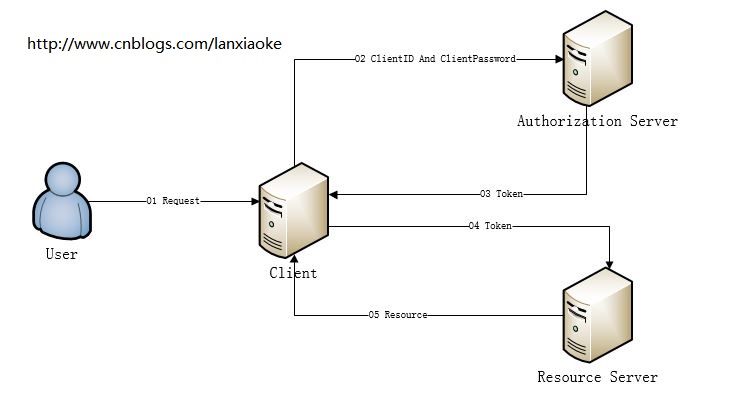
据上图,可以得出一个大概的结论
1、用户(User)通过客户端(Client)访问受限资源(Resource)
2、因为资源受限,所以需要授权;而这个授权是Client与Authentication之间完成的,可以说跟User没有什么关系
3、根据2得出,Resource与User没有关联关系,即User不是这个Resource的Owner(所有者)
既然是这样,那大概可以推出这种认证的适用范围。
第一,肯定不能用作登录认证!因为登录认证后需要得到用户的一些基本信息,如昵称,头像之类,这些信息是属于User的;
第二,适用于一些对于权限要求不强的资源认证,比如:仅用于区分用户是否登录,排除匿名用户获取资源
新建一个资源项目:ResourceServer
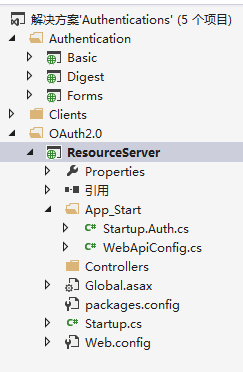
引用owin:install-package Microsoft.Owin -Version 2.1.0
新增Startup.cs
[assembly: OwinStartup(typeof(ResourceServer.Startup))]

namespace ResourceServer

{

    public partial class Startup

    {

        public void Configuration(IAppBuilder app)

        {

            ConfigureAuth(app);

        }

    }

}
新增Startup.Auth.cs
namespace ResourceServer

{

    public partial class Startup

    {

        public void ConfigureAuth(IAppBuilder app)

        {
       // 这句是资源服务器认证token的关键,认证逻辑在里边封装好了,我们看不到

            app.UseOAuthBearerAuthentication(new Microsoft.Owin.Security.OAuth.OAuthBearerAuthenticationOptions());

        }

    }

}
新增ValuesController.cs
namespace ResourceServer.Controllers

{

    [Authorize]

    public class ValuesController : ApiController

    {

        public string Get()

        {

            return "lanxiaoke";

        }

    }

}
新建认证服务项目
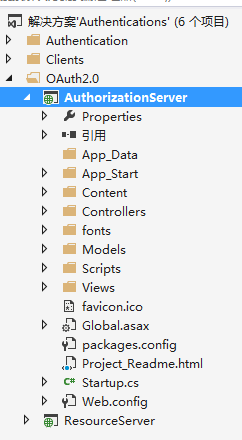
修改Startup.Auth.cs
public partial class Startup

    {

        public void ConfigureAuth(IAppBuilder app)

        {

            // Setup Authorization Server

            app.UseOAuthAuthorizationServer(new OAuthAuthorizationServerOptions

            {

                TokenEndpointPath = new PathString("/OAuth/Token"),

                ApplicationCanDisplayErrors = true,

#if DEBUG

                AllowInsecureHttp = true,

#endif

                // Authorization server provider which controls the lifecycle of Authorization Server

                Provider = new OAuthAuthorizationServerProvider

                {

                    OnValidateClientAuthentication = ValidateClientAuthentication,

                    OnGrantClientCredentials = GrantClientCredetails

                },

                // Authorization code provider which creates and receives authorization code

                AuthorizationCodeProvider = new AuthenticationTokenProvider

                {

                    OnCreate = CreateAuthenticationCode,

                    OnReceive = ReceiveAuthenticationCode,

                },

                // Refresh token provider which creates and receives referesh token

                RefreshTokenProvider = new AuthenticationTokenProvider

                {

                    OnCreate = CreateRefreshToken,

                    OnReceive = ReceiveRefreshToken,

                }

            });

        }

        private Task ValidateClientAuthentication(OAuthValidateClientAuthenticationContext context)

        {

            string clientId;

            string clientSecret;

            if (context.TryGetBasicCredentials(out clientId, out clientSecret) ||

                context.TryGetFormCredentials(out clientId, out clientSecret))

            {

                if (clientId == "123456" && clientSecret == "abcdef")

                {

                    context.Validated();

                }

            }

            return Task.FromResult(0);

        }

        private Task GrantClientCredetails(OAuthGrantClientCredentialsContext context)

        {

            var identity = new ClaimsIdentity(new GenericIdentity(context.ClientId, OAuthDefaults.AuthenticationType), context.Scope.Select(x => new Claim("urn:oauth:scope", x)));

            context.Validated(identity);

            return Task.FromResult(0);

        }

        private readonly ConcurrentDictionary<string, string> _authenticationCodes =

            new ConcurrentDictionary<string, string>(StringComparer.Ordinal);

        private void CreateAuthenticationCode(AuthenticationTokenCreateContext context)

        {

            context.SetToken(Guid.NewGuid().ToString("n") + Guid.NewGuid().ToString("n"));

            _authenticationCodes[context.Token] = context.SerializeTicket();

        }

        private void ReceiveAuthenticationCode(AuthenticationTokenReceiveContext context)

        {

            string value;

            if (_authenticationCodes.TryRemove(context.Token, out value))

            {

                context.DeserializeTicket(value);

            }

        }

        private void CreateRefreshToken(AuthenticationTokenCreateContext context)

        {

            context.SetToken(context.SerializeTicket());

        }

        private void ReceiveRefreshToken(AuthenticationTokenReceiveContext context)

        {

            context.DeserializeTicket(context.Token);

        }

    }
自此,认证服务项目算是建好了,因为对于客户端模式,认证服务器只需要返回token
新增Client项目
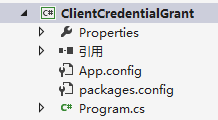
     static void Main(string[] args)

        {

            var authorizationServerUri = new Uri("http://localhost:8270/");

            var authorizationServerDescription = new AuthorizationServerDescription

            {

                TokenEndpoint = new Uri(authorizationServerUri, "OAuth/Token")

            };

            var client = new WebServerClient(authorizationServerDescription, "123456", "abcdef");

            var state = client.GetClientAccessToken(new[] { "scopes1", "scopes2" });

            var token = state.AccessToken;

            Console.WriteLine("Token: {0}", token);

            var resourceServerUri = new Uri("http://localhost:8001/");

            var httpClient = new HttpClient(client.CreateAuthorizingHandler(token));

            var values = httpClient.GetStringAsync(new Uri(resourceServerUri, "api/Values")).Result;

            Console.WriteLine("Result: {0}", values);

            Console.ReadKey();

        }
OK,Client环境搭好了,我们来运行下试试
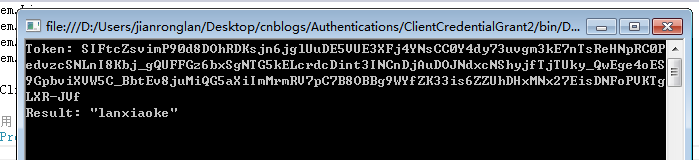
认证成功!
asp.net权限认证系列
- asp.net权限认证:Forms认证
- asp.net权限认证:HTTP基本认证(http basic)
- asp.net权限认证:Windows认证
- asp.net权限认证:摘要认证(digest authentication)
- asp.net权限认证:OWIN实现OAuth 2.0 之客户端模式(Client Credential)
- asp.net权限认证:OWIN实现OAuth 2.0 之密码模式(Resource Owner Password Credential)
- asp.net权限认证:OWIN实现OAuth 2.0 之授权码模式(Authorization Code)
- asp.net权限认证:OWIN实现OAuth 2.0 之简化模式(Implicit)
asp.net权限认证:OWIN实现OAuth 2.0 之客户端模式(Client Credential)的更多相关文章
- asp.net权限认证:OWIN实现OAuth 2.0 之密码模式(Resource Owner Password Credential)
asp.net权限认证系列 asp.net权限认证:Forms认证 asp.net权限认证:HTTP基本认证(http basic) asp.net权限认证:Windows认证 asp.net权限认证 ...
- asp.net权限认证:OWIN实现OAuth 2.0 之简化模式(Implicit)
asp.net权限认证系列 asp.net权限认证:Forms认证 asp.net权限认证:HTTP基本认证(http basic) asp.net权限认证:Windows认证 asp.net权限认证 ...
- (转)基于OWIN WebAPI 使用OAuth授权服务【客户端模式(Client Credentials Grant)】
适应范围 采用Client Credentials方式,即应用公钥.密钥方式获取Access Token,适用于任何类型应用,但通过它所获取的Access Token只能用于访问与用户无关的Open ...
- 基于OWIN WebAPI 使用OAuth授权服务【客户端模式(Client Credentials Grant)】
适应范围 采用Client Credentials方式,即应用公钥.密钥方式获取Access Token,适用于任何类型应用,但通过它所获取的Access Token只能用于访问与用户无关的Open ...
- asp.net权限认证:OWIN实现OAuth 2.0 之授权码模式(Authorization Code)
asp.net权限认证系列 asp.net权限认证:Forms认证 asp.net权限认证:HTTP基本认证(http basic) asp.net权限认证:Windows认证 asp.net权限认证 ...
- asp.net权限认证:Windows认证
asp.net权限认证系列 asp.net权限认证:Forms认证 asp.net权限认证:HTTP基本认证(http basic) asp.net权限认证:Windows认证 asp.net权限认证 ...
- asp.net权限认证:Forms认证
asp.net权限认证系列 asp.net权限认证:Forms认证 asp.net权限认证:HTTP基本认证(http basic) asp.net权限认证:Windows认证 asp.net权限认证 ...
- asp.net权限认证:HTTP基本认证(http basic)
asp.net权限认证系列 asp.net权限认证:Forms认证 asp.net权限认证:HTTP基本认证(http basic) asp.net权限认证:Windows认证 asp.net权限认证 ...
- asp.net权限认证:摘要认证(digest authentication)
asp.net权限认证系列 asp.net权限认证:Forms认证 asp.net权限认证:HTTP基本认证(http basic) asp.net权限认证:Windows认证 asp.net权限认证 ...
随机推荐
- 用Quick Cocos2dx做一个连连看(一)
呵呵,不知道能不能坚持下来,先写着吧. 预备知识:Quick Cocos2dx 2.2.5基本知识 或者 Cocos2dx基本知识, lua入门 开发工具:Sublime Text 2.0/3.0 原 ...
- Content Provider 小结
Android中的四大组件之一ContentProvider,它支持多个应用间进行存储和读取数据等操作,实现不同应用间的数据共享. ContentProvider,解释为内容提供商.顾名思义,就是对外 ...
- java数组的声明由几种方式
数组的声明由几种方式: 1,String []a = new String[length];再赋值 a[0]=?;....... 2,new完就直接初始化: String []a = new Stri ...
- UVA 11551 Experienced Endeavour
矩阵快速幂. 题意事实上已经告诉我们这是一个矩阵乘法的运算过程. 构造矩阵:把xi列的bij都标为1. 例如样例二: #include<cstdio> #include<cstrin ...
- 最小化安装Linux记录
挂载点: /boot 挂载点 100M swap 交换分区 / 根分区 最小化安装: 基本--基本.兼容库.调试工具 开发--开发工具 修改hostname 永久设置:/etc/sysconfig/ ...
- 用简单的http抓包来实现微信公众网页如何模拟登录
一.准备工具: 系统:XP 浏览器:IE8 抓包工具:HttpWatch(它可以查看url请求的数据包) 二.抓包思路: 浏览器上的任何获取数据的方式都符合http协议的请求,只要发送符合要求的数据就 ...
- java监听事件
2014年2月23日 09:51:54 成功添加了打开官网的事件, 回头研究下,那个打开url的类 java的System.getProperty()方法可以获取的值 ################ ...
- CreateForm(
/// <summary> /// 打开新的子窗体 /// </summary> /// <param name="strName">窗体的类名 ...
- IOS 微信
原文:http://blog.csdn.net/ysy441088327/article/details/8441608 按照常例,列一些网址先: 微信开放平台首页: http://open.weix ...
- html块级元素和内联元素区别详解
块级元素(block)特性: 总是独占一行,表现为另起一行开始,而且其后的元素也必须另起一行显示; 宽度(width).高度(height).内边距(padding)和外边距(margin)都可控制; ...