
java应用测试报告生成(一): sonarqube配合Jenkins生成测试报告及覆盖率
环境准备:
1.Jenkins集成环境(安装 sonarqube插件)
2.安装sonarqube服务(下载sonarqube安装包并解压,目录到"sonarqube-5.4/bin/linux-x86-64"下运行命令"./sonar.sh start"启动服务)
启动服务后jps看到如下结果
 Jps

 SearchServer

 WrapperSimpleApp

 WebServer
Jenkins配置: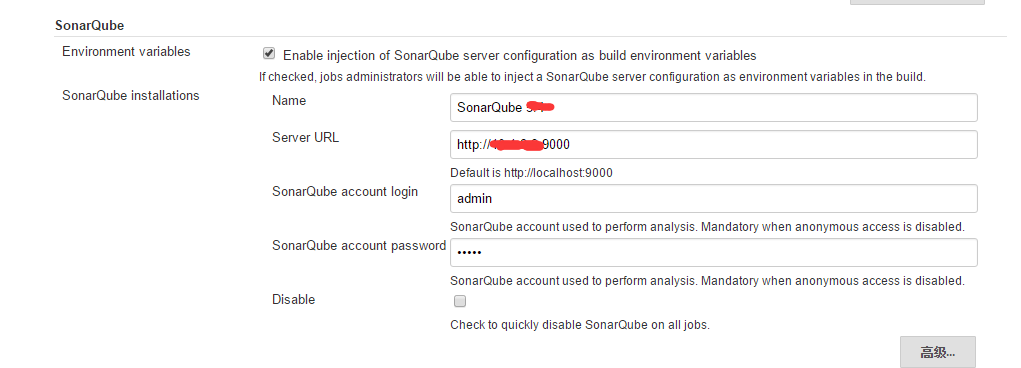
项目配置:
项目pom.xml添加如下配置(添加及配置jacoco插件):
    <build>

        <plugins>

            <plugin>

                <artifactId>maven-compiler-plugin</artifactId>

                <version>3.1</version>

                <configuration>

                    <source>1.7</source>

                    <target>1.7</target>

                </configuration>

            </plugin>

            <plugin>

                <groupId>org.jacoco</groupId>

                <artifactId>jacoco-maven-plugin</artifactId>

                <executions>

                    <execution>

                        <id>pre-test</id>

                        <goals>

                            <goal>prepare-agent</goal>

                        </goals>

                    </execution>

                    <execution>

                        <id>post-test</id>

                        <phase>test</phase>

                        <goals>

                            <goal>report</goal>

                        </goals>

                    </execution>

                </executions>

            </plugin>

            <plugin>

                <groupId>org.apache.maven.plugins</groupId>

                <artifactId>maven-compiler-plugin</artifactId>

                <version>3.1</version>

                <configuration>

                    <encoding>UTF-</encoding>

                </configuration>

            </plugin>

            <plugin>

                <groupId>org.mortbay.jetty</groupId>

                <artifactId>jetty-maven-plugin</artifactId>

                <version>8.1..v20140903</version>

                <configuration>

                    <stopPort></stopPort>

                    <stopKey>foo</stopKey>

                    <scanIntervalSeconds></scanIntervalSeconds>

                    <webApp>

                        <contextPath>/p_test</contextPath>

                    </webApp>

                </configuration>

            </plugin>

        </plugins>

        <pluginManagement>

            <plugins>

                <plugin>

                    <groupId>org.jacoco</groupId>

                    <artifactId>jacoco-maven-plugin</artifactId>

                    <version>0.7.5.201505241946</version>

                </plugin>

            </plugins>

        </pluginManagement>

    </build>

    <!--覆盖率 -->

    <profiles>

        <profile>

            <id>coverage-per-test</id>

            <build>

                <plugins>

                    <plugin>

                        <groupId>org.apache.maven.plugins</groupId>

                        <artifactId>maven-surefire-plugin</artifactId>

                        <version>2.9</version>

                        <configuration>

                            <!--忽略某个目录的测试代码 -->

                            <includes>

                                <include>**/*Test.java</include>

                            </includes>

                            <properties>

                                <property>

                                    <name>listener</name>

                                    <value>org.sonar.java.jacoco.JUnitListener</value>

                                </property>

                            </properties>

                            <systemPropertyVariables>

                                <jacoco-agent.destfile>target/jacoco.exec</jacoco-agent.destfile>

                            </systemPropertyVariables>

                        </configuration>

                    </plugin>

                </plugins>

            </build>

            <dependencies>

                <dependency>

                    <groupId>org.sonarsource.java</groupId>

                    <artifactId>sonar-jacoco-listeners</artifactId>

                    <version>3.8</version>

                    <scope>test</scope>

                </dependency>

                <dependency>

                    <groupId>org.jacoco</groupId>

                    <artifactId>org.jacoco.agent</artifactId>

                    <version>0.7.5.201505241946</version>

                    <scope>test</scope>

                </dependency>

            </dependencies>

        </profile>

    </profiles>

</project>
项目运行无误就可以提交Jenkins了,找到Jenkins的该项目配置,在add post-build steps 中选择"Invoke Standalone SonarQube Analysis"
在Analysis properties中添加如下内容:
# must be unique in a given SonarQube instance

sonar.projectKey=p_test

# this is the name displayed in the SonarQube UI

sonar.projectName=p_test

sonar.projectVersion=1.0

# Path is relative to the sonar-project.properties file. Replace "\" by "/" on Windows.

# Since SonarQube 4.2, this property is optional if sonar.modules is set.

# If not set, SonarQube starts looking for source code from the directory containing

# the sonar-project.properties file.

# Encoding of the source code. Default is default system encoding

#sonar.sourceEncoding=UTF-

sonar.svn.username=***

sonar.svn.password.secured=***

sonar.java.coveragePlugin=jacoco

sonar.sources=src/main/java

sonar.tests=src/test/java/

sonar.binaries=target/classes

sonar.junit.reportsPath=target/surefire-reports

sonar.surefire.reportsPath=target/surefire-reports
注意填写访问代码源的账号和密码,其他如果需要可以更改项目名,收集报告的目录等:
编译项目,点击sonarqube按钮可以进入查看页面: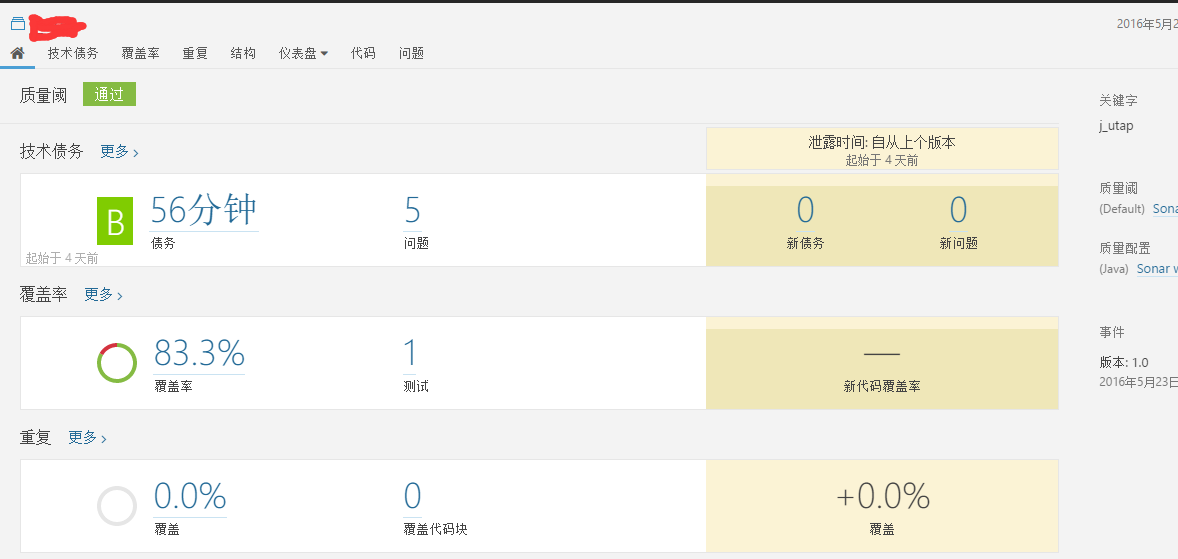
点击测试可以继续看到测试的方法以及通过情况.
java应用测试报告生成(一): sonarqube配合Jenkins生成测试报告及覆盖率的更多相关文章
- centos7搭建sonarqube环境+jenkins部署全流程
一.简介sonarqube是一个用于代码质量管理的开源平台,用于管理源代码的质量 不遵循代码标准sonar可以通过PMD,CheckStyle,Findbugs等等代码规则检测工具规范代码编写.潜在的 ...
- 集成TFS Build生成与SonarQube获取代码分析结果
软件项目在开发过程中,往往由于任务重.时间紧等原因忽略软件代码的质量和规范检查,只注重软件功能的开发和交付.等软件交付上线以后,由于代码质量导致的问题会耗费开发和运维人员的大量时间.研发表明,项目上线 ...
- .net持续集成sonarqube篇之 sonarqube与jenkins集成(插件模式)
系列目录 Jenkins通过插件集成Sonarqube 通过上一节我们了解了如何配置以使jenkins ci环境中可以执行sonarqube构建,其实Sonarqube官方也提供了jenkins插件以 ...
- Jenkins+Allure测试报告+飞书机器人发送通知
一.前言 之前讲了jenkins如何设置定时任务执行脚本,结合实际情况,本篇讲述在jenkins构建成功后,如何生成测试报告,以及推送飞书(因为我公司用的是飞书,所以是发送到飞书机器人). 本次实践搞 ...
- jbe 可以用来修改Java class的字节码,配合jd-gui 使用
jbe 可以用来修改Java class的字节码,配合jd-gui 使用
- AWS DevOps – 配合Jenkins和CodeDeploy实现代码自动化部署
AWS DevOps – 配合Jenkins和CodeDeploy实现代码自动化部署 Amazon ElastiCache 连接至 Redis 节点 通过 AWS Command Line Inter ...
- SonarQube与Jenkins结合提高代码质量
首先,为什么需要SonarQube? 1.WriteClean Code 1)全局健康报告 2)关注新增的问题 3)强制QualityGate 4)Issue详情及建议- 详情参考:https:/ ...
- jmeter接口测试-调用java的jar包-csv参数化请求-BeanShellPreProcessor生成验签作为请求验证参数-中文乱码----实战
背景及思路: 需求:要做 创建新卡 接口的测试,要求: 1. 不需要每次手动修改请求参数. 方案:文中先用excle将数据准备好,导出为csv格式,再用jmeter的csv请求进行参数化 2. 卡号需 ...
- 用Java实现在【520,1314】之间生成随机整数的故事
做一个积极的人 编码.改bug.提升自己 我有一个乐园,面向编程,春暖花开! 在未来城市工作的的程序员小木,做了一个梦,梦到自己在塔鲁姆的街道上看到一个姑娘,这个姑娘从远处走向他,脸上带着微笑.让小木 ...
随机推荐
- javascript动画:velocity.js学习
第二章:基础知识 一.velocity和jQuery: Velocity函数是独立于jQuery的,但两者可以结合使用.通常这么做的好处是可以利用jQuery的链式操作:当你先用jQuery选择了一个 ...
- WiMAX协议栈
1.协议栈模型 协议栈模型将 WiMAX 系统分为数据控制平面和管理平面两个平面 数据控制平面对数据的正确传输进行保证,包括封装.分片.加密.解封装等 基站与用户站之间的特定信令交互完成系统的控制功能 ...
- POJ 1065 Wooden Sticks#贪心+qsort用法
(- ̄▽ ̄)-* 这道题用到了cstdlib库的qsort()函数: 用法链接:http://www.cnblogs.com/syxchina/archive/2010/07/29/2197382.h ...
- LeetCode OJ 35. Search Insert Position
Given a sorted array and a target value, return the index if the target is found. If not, return the ...
- 网页 JavaScript
今天,我主要学习了JavaScript的部分内容. JavaScript在html中的位置主要有三个地方:head里面.body里面.</html>之后,我们一般写在</html&g ...
- Mac 命令行中进入带有空格的文件夹
http://blog.sina.com.cn/s/blog_5e8392b10100jkvg.html 今天在公司用mac的时候,有个文件夹的名字有空格,怎么都进不去,在网上一查原来不能直接cd 文 ...
- Linux 内核协议栈之TCP连接关闭
Close行为: 当应用程序在调用close()函数关闭TCP连接时,Linux内核的默认行为是将套接口发送队列里的原有数据(比如之前残留的数据)以及新加入 的数据(比如函数close()产生的FIN ...
- 给windows共享 目录付于权限
1.点右监 共享给 某用户 2.点属性 -> 安全 加入 特定用户 3.域用户的管理 (选择控制面板/用户管理) 第一个用户是本地账户 第2/3个是域用户
- 1.0 Python 学习网站
w3cschool : http://www.runoob.com/python/python-tutorial.html cnblog Python 从入门到精通: http://www.cnbl ...
- JVM垃圾收集算法(标记-清除、复制、标记-整理)
[JVM垃圾收集算法] 1)标记-清除算法: 标记阶段:先通过根节点,标记所有从根节点开始的对象,未被标记的为垃圾对象(错了吧?) 清除阶段:清除所有未被标记的对象 2)复制算法: 将原有的内存空间 ...