
zxing二维码扫描的流程简析(Android版)
目前市面上二维码的扫描似乎用开源google的zxing比较多,接下去以2.2版本做一个简析吧,勿喷。。。
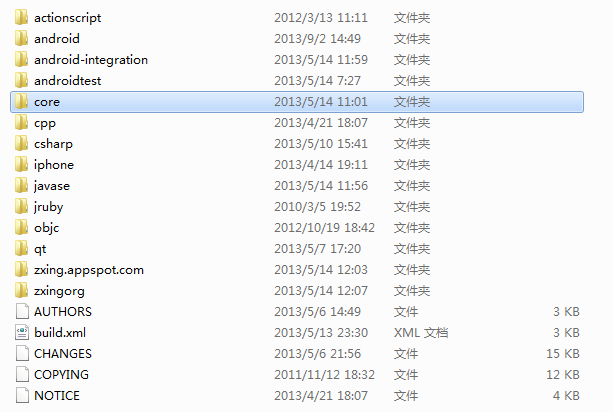
下载下来后定位两个文件夹,core和android,core是一些核心的库,android是针对android的一些代码。
我们先看核心库,在package com.google.zxing中的一些生成二维码的类关系
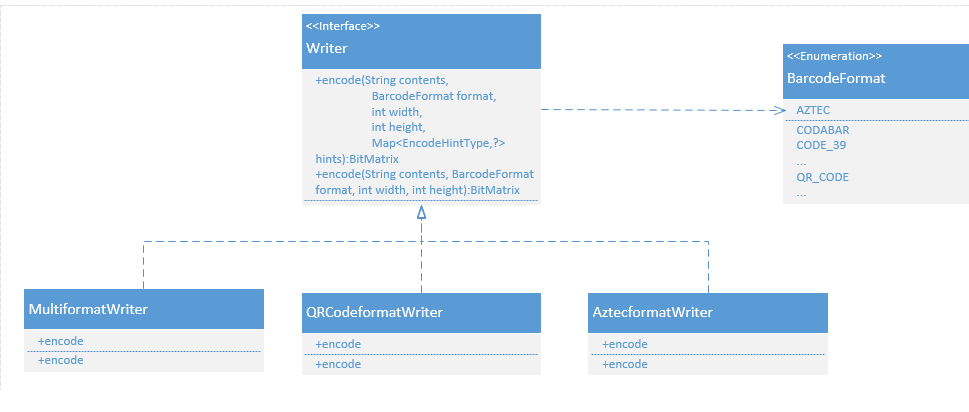
接口Writer里面有两个encode的重载函数,不同的格式的二维码有各自的类实现了Writer接口,MultiformatWriter类比较特殊,根据代码的注释可见其其实是个工厂类,根据BarcodeFormat实例化不同的Writer,然后最终调用各自的Encode.encode()方法
 public final class MultiFormatWriter implements Writer {

   @Override

   public BitMatrix encode(String contents,

                           BarcodeFormat format,

                           int width,

                           int height) throws WriterException {

     return encode(contents, format, width, height, null);

   }

   @Override

   public BitMatrix encode(String contents,

                           BarcodeFormat format,

                           int width, int height,

                           Map<EncodeHintType,?> hints) throws WriterException {

     Writer writer;

     switch (format) {

       case EAN_8:

         writer = new EAN8Writer();

         break;

       case EAN_13:

         writer = new EAN13Writer();

         break;

       case UPC_A:

         writer = new UPCAWriter();

         break;

       case QR_CODE:

         writer = new QRCodeWriter();

         break;

       case CODE_39:

         writer = new Code39Writer();

         break;

       case CODE_128:

         writer = new Code128Writer();

         break;

       case ITF:

         writer = new ITFWriter();

         break;

       case PDF_417:

         writer = new PDF417Writer();

         break;

       case CODABAR:

         writer = new CodaBarWriter();

         break;

       case DATA_MATRIX:

         writer = new DataMatrixWriter();

         break;

       case AZTEC:

         writer = new AztecWriter();

         break;

       default:

         throw new IllegalArgumentException("No encoder available for format " + format);

     }

     return writer.encode(contents, format, width, height, hints);

   }

 }
然后看解析二维码的类结构
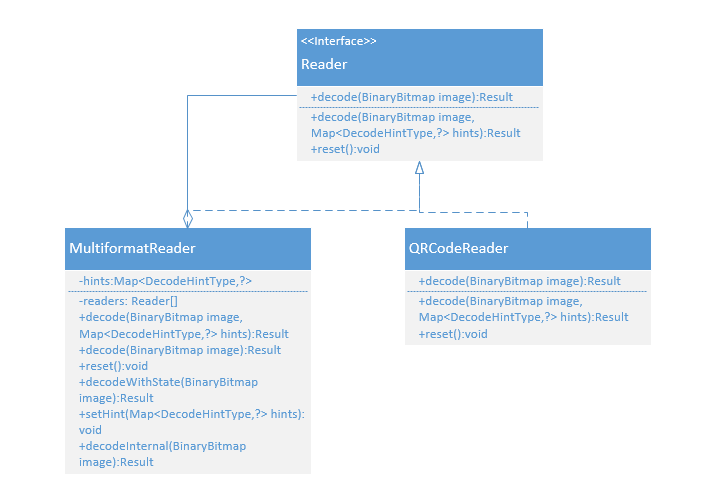
关键就是这个MultiformatReader,里面聚合了多个reader,并且根据客户端设置的DecodeHintType值,确定添加reader以及添加reader的顺序,最后调用reader.decode方法
 public final class MultiFormatReader implements Reader {

   private Map<DecodeHintType,?> hints;

   private Reader[] readers;

   @Override

   public Result decode(BinaryBitmap image) throws NotFoundException {

     setHints(null);

     return decodeInternal(image);

   }

   @Override

   public Result decode(BinaryBitmap image, Map<DecodeHintType,?> hints) throws NotFoundException {

     setHints(hints);

     return decodeInternal(image);

   }

   public Result decodeWithState(BinaryBitmap image) throws NotFoundException {

     // Make sure to set up the default state so we don't crash

     if (readers == null) {

       setHints(null);

     }

     return decodeInternal(image);

   }

   public void setHints(Map<DecodeHintType,?> hints) {//根据设置的hint来设置reader

     this.hints = hints;

     boolean tryHarder = hints != null && hints.containsKey(DecodeHintType.TRY_HARDER);

     @SuppressWarnings("unchecked")

     Collection<BarcodeFormat> formats =

         hints == null ? null : (Collection<BarcodeFormat>) hints.get(DecodeHintType.POSSIBLE_FORMATS);

     Collection<Reader> readers = new ArrayList<Reader>();

     if (formats != null) {

       boolean addOneDReader =

           formats.contains(BarcodeFormat.UPC_A) ||

           formats.contains(BarcodeFormat.UPC_E) ||

           formats.contains(BarcodeFormat.EAN_13) ||

           formats.contains(BarcodeFormat.EAN_8) ||

           formats.contains(BarcodeFormat.CODABAR) ||

           formats.contains(BarcodeFormat.CODE_39) ||

           formats.contains(BarcodeFormat.CODE_93) ||

           formats.contains(BarcodeFormat.CODE_128) ||

           formats.contains(BarcodeFormat.ITF) ||

           formats.contains(BarcodeFormat.RSS_14) ||

           formats.contains(BarcodeFormat.RSS_EXPANDED);

       // Put 1D readers upfront in "normal" mode

       if (addOneDReader && !tryHarder) {

         readers.add(new MultiFormatOneDReader(hints));

       }

       if (formats.contains(BarcodeFormat.QR_CODE)) {

         readers.add(new QRCodeReader());

       }

       if (formats.contains(BarcodeFormat.DATA_MATRIX)) {

         readers.add(new DataMatrixReader());

       }

       if (formats.contains(BarcodeFormat.AZTEC)) {

         readers.add(new AztecReader());

       }

       if (formats.contains(BarcodeFormat.PDF_417)) {

          readers.add(new PDF417Reader());

       }

       if (formats.contains(BarcodeFormat.MAXICODE)) {

          readers.add(new MaxiCodeReader());

       }

       // At end in "try harder" mode

       if (addOneDReader && tryHarder) {

         readers.add(new MultiFormatOneDReader(hints));

       }

     }

     if (readers.isEmpty()) {

       if (!tryHarder) {

         readers.add(new MultiFormatOneDReader(hints));

       }

       readers.add(new QRCodeReader());

       readers.add(new DataMatrixReader());

       readers.add(new AztecReader());

       readers.add(new PDF417Reader());

       readers.add(new MaxiCodeReader());

       if (tryHarder) {

         readers.add(new MultiFormatOneDReader(hints));

       }

     }

     this.readers = readers.toArray(new Reader[readers.size()]);

   }

   @Override

   public void reset() {

     if (readers != null) {

       for (Reader reader : readers) {

         reader.reset();

       }

     }

   }

   private Result decodeInternal(BinaryBitmap image) throws NotFoundException {//最终都调用这个方法

     if (readers != null) {

       for (Reader reader : readers) {

         try {

           return reader.decode(image, hints);

         } catch (ReaderException re) {

           // continue

         }

       }

     }

     throw NotFoundException.getNotFoundInstance();

   }

 }
DecodeHintType的语法比较有意思,还在理解中
 public enum DecodeHintType {

   /**

    * Unspecified, application-specific hint. Maps to an unspecified {@link Object}.

    */

  OTHER(Object.class),

   /**

    * Image is a pure monochrome image of a barcode. Doesn't matter what it maps to;

    * use {@link Boolean#TRUE}.

    */

   PURE_BARCODE(Void.class),

   /**

    * Image is known to be of one of a few possible formats.

    * Maps to a {@link List} of {@link BarcodeFormat}s.

    */

   POSSIBLE_FORMATS(List.class),

   /**

    * Spend more time to try to find a barcode; optimize for accuracy, not speed.

    * Doesn't matter what it maps to; use {@link Boolean#TRUE}.

    */

   TRY_HARDER(Void.class),

   /**

    * Specifies what character encoding to use when decoding, where applicable (type String)

    */

   CHARACTER_SET(String.class),

   /**

    * Allowed lengths of encoded data -- reject anything else. Maps to an {@code int[]}.

    */

   ALLOWED_LENGTHS(int[].class),

   /**

    * Assume Code 39 codes employ a check digit. Doesn't matter what it maps to;

    * use {@link Boolean#TRUE}.

    */

   ASSUME_CODE_39_CHECK_DIGIT(Void.class),

   /**

    * Assume the barcode is being processed as a GS1 barcode, and modify behavior as needed.

    * For example this affects FNC1 handling for Code 128 (aka GS1-128). Doesn't matter what it maps to;

    * use {@link Boolean#TRUE}.

    */

   ASSUME_GS1(Void.class),

   /**

    * The caller needs to be notified via callback when a possible {@link ResultPoint}

    * is found. Maps to a {@link ResultPointCallback}.

    */

   NEED_RESULT_POINT_CALLBACK(ResultPointCallback.class),

   // End of enumeration values.

   ;

   /**

    * Data type the hint is expecting.

    * Among the possible values the {@link Void} stands out as being used for

    * hints that do not expect a value to be supplied (flag hints). Such hints

    * will possibly have their value ignored, or replaced by a

    * {@link Boolean#TRUE}. Hint suppliers should probably use

    * {@link Boolean#TRUE} as directed by the actual hint documentation.

    */

   private final Class<?> valueType;

   DecodeHintType(Class<?> valueType) {

     this.valueType = valueType;

   }

   public Class<?> getValueType() {

     return valueType;

   }

 }
然后我们看下android里面是如何调用的,入口是CaptureActivity,在com.google.zxing.client.android package中,以下描述一个通用的流程

CaptureAct中的onResume中的initCamera初始化CaptureActHandler,其构造函数中新起了一个DecodeThread去异步准备一个DecodeHandler,然后调用restartPreviewAndDecode方法,让DecodeHandler去处理R.id.decode的消息,当然这里需要处理一些线程同步问题,代码里用到了CountDownLatch来控制。DecodeHanlder处理R.id.decode消息后用传递R.id.decode_succeeded消息给CaptureActHanlder,最终再调用handleDecode传递给CaptureAct.
zxing二维码扫描的流程简析(Android版)的更多相关文章
- Android—ZXing二维码扫描遇到的问题
最近工作中需要开发带有二维码扫描功能的软件(基于开源项目ZXing),遇到的问题记录一下,也希望给大家带来帮助. 1.首先因为扫描要开摄像机所以加权限是一定的,不然后面什么都不能进行 <uses ...
- Android之Zxing二维码扫描图片拉伸
还是这个接手项目,二维码扫描集成的是zxing,扫描界面的图像有明显的拉伸变形. 这种问题,根据以往的经验,一般是x,y轴错位引起的,处理好x,y轴的问题,一般可以解决问题. 由于这个问题,之前有很多 ...
- zxing 二维码扫描 配置和使用
本文转载至 http://blog.csdn.net/a6472953/article/details/8796501 二维码扫描使用最多的主要有两个库:zbarSDK 和zxing 关于zbar ...
- 自定义ZXing二维码扫描界面并解决取景框拉伸等问题
先看效果 扫描内容是下面这张,二维码是用zxing库生成的 由于改了好几个类,还是去年的事都忘得差不多了,所以只能上这个类的代码了,主要就是改了这个CaptureActivity.java packa ...
- Zxing二维码扫描
源代码地址 有问题能够加QQ:312122330 之前对于Zbar的二位码扫描.到项目上线以后才发现扫描过于灵敏.导致有时候扫描到半截就启动了. 后来翻看ZXING的源代码,没有想象的复杂,复杂的地 ...
- google zxing 二维码扫描(android client分析)
一.总体架构 二.架构分析 1. com.google.zxing.client.android AmbientLightManager 环境光线管理 Detects ambient light an ...
- Android快速实现二维码扫描--Zxing
Android中二维码扫描的最常用库是zxing和zbar,zxing项目地址为https://github.com/zxing/zxing,目前还有多个人在维护.zbar主要用C来写的,对速度有要求 ...
- Android 基于google Zxing实现二维码、条形码扫描,仿微信二维码扫描效果
Android 高手进阶(21) 版权声明:本文为博主原创文章,未经博主允许不得转载. 转载请注明出处:http://blog.csdn.net/xiaanming/article/detail ...
- Android自由行之走进zxing,轻松实现二维码扫描
现在很多App都集成了扫一扫功能,最常用的微信.QQ.手机助手等.二维码也使得生活变得更加简洁,扫一扫订餐.扫一扫下载等等.那么,说到二维码,我们不得不提Google一个开源的扫码框架:zxing. ...
随机推荐
- EXCEL Pivot table manipulate
Add filter For the Demo time,I would like to filter out the products which not in Red and Black colo ...
- thinkphp学习笔记5—模块化设计
原文:thinkphp学习笔记5-模块化设计 1.模块结构 完整的ThinkPHP用用围绕模块/控制器/操作设计,并支持多个入口文件盒多级控制.ThinkPHP默认PATHINFO模式,如下: htt ...
- 阐述linux IPC(两):基于socket进程间通信(下一个)
[版权声明:尊重原创.转载请保留源:blog.csdn.net/shallnet 要么 .../gentleliu,文章学习交流.请勿用于商业用途] 其中两个进程通信,有两个过程,以彼此的过程 ...
- 使用Eclipse+Maven+Jetty构建Java Web开发环境(几个教程综合集成2014发行)
工作需要使用Jetty由于web集装箱,得知Eclipse+Maven+Jetty该组合是非常好的,因此,要在网上找了很多教程,但不写或多或少特定的或过时的内容而导致最终的配置失败,易于配置为未来的同 ...
- NSOJ Minimum Transport Cost
These are N cities in Spring country. Between each pair of cities there may be one transportation tr ...
- SQL Prompt5 破解版+使用说明 [转]
SQL脚本越写越多,总是觉得编写效率太过于低下,这和打字速度无关.在我个人编写SQL脚本时,至少会把SQL的格式排列成易于阅读的,因为其他人会阅读到你的SQL,无论是在程序中或是脚本文件中,良好的排版 ...
- ASP.NET MVC+EF框架+EasyUI实现权限管理系列(2)-数据库访问层的设计Demo
原文:ASP.NET MVC+EF框架+EasyUI实现权限管理系列(2)-数据库访问层的设计Demo ASP.NET MVC+EF框架+EasyUI实现权限管系列 (开篇) (1)框架搭建 前言:这 ...
- linux后台server开发环境的部署配置和验证(nginx+apache+php-fpm+FASTCGI(C/C++))
linux后台server开发环境部署配置 引言 背景 随着互联网业务的不断增多.开发环境变得越来越复杂,为了便于统一server端的开发部署环境,特制定本配置文档. 使用软件 CentOS 6.3( ...
- JSON多层数据添加与访问
最近项目中有要用到,JSON的多层数据对象,相当是一个json格式数组里面嵌套一个json对象吧,至于我为什么要用到这个呢,引入业务场景: 两组数据 1: user_id user_h ...
- R.layout.main connot be resolved 和R.java消失
出现例如以下问题: 鼠标放到出代码上面: 分析问题: 1.查看R文件是否被生成.假设没有生成,则勾选build Automatically,然后Clean: 2.假设R文件已生成.则删除去掉代码中: ...