
android之intent显式,显式学习
intent,意图 当从一个Activity到另一个Activity时调用,这里重点学习显式,隐式的使用
使用语句上的区别:
隐式意图: 显式意图:
setAction 跳转到其他应用:setClassName
setData 跳转到自己应用:setClass
addCategory(当为DEFAULT时可无)
一、无参时的显式、隐式举例
显式-到自己应用(最简单情况):
/*

    * 跳转到自己的应用activity

    * 在本应用中跳转:ActivitySecond.java

    * 显式跳转:直接指定目标Activity的包名和类名

    */

   public void onClick2(View v){

       Intent intent = new Intent();

       //上下文对象:this

       //cls:直接指定目标Activity的类名:ActivitySecond

       intent.setClass(this, ActivitySecond.class);

       startActivity(intent);

   }
显式-到其他应用(记得加权限):
  /*

    * 显式跳转至拨号器

    */

   public void onClick3(View v){

       Intent intent = new Intent();

       //指定目标的Activity的包名和类名

       intent.setClassName("com.android.dialer", "com.android.dialer.DialtactsActivity");

       startActivity(intent);

   }
隐式(无参数传递,最简单情况)
  /*

    * 隐式跳转至拨号器

    */

   public void onClick4(View v){

       Intent intent = new Intent();

       //隐式设置拨号器的动作

       intent.setAction(Intent.ACTION_DIAL);

       startActivity(intent);

   }
二、有参数时隐式传递
三个参数:清单文件的:name 《=====》java文件的setAction
scheme《=====》 setData
mimeType《=====》 setType
必须保证一一匹配,必须一一对应
当然还有两个并列原则:
(1)外部: <intent-filter > </intent-filter >和<intent-filter > </intent-filter >并列
(2)内部:<intent-filter > </intent-filter >中如
<action android:name="com.wsq.dial"/>
<action android:name="com.wsq.dial1"/>
<data android:scheme="wsq" />
<data android:scheme="wsq1" />两个中任意匹配一个即可
举例说明:
1)需改变清单文件(隐式跳转至自己应用(无类型)匹配第一对intent-filter
此时清单文件第一对intent-filter:
   <!-- 并列匹配第一种情况 (没有加类型) -->

             <intent-filter >

                 <action android:name="com.wsq.dial"/>

                 <action android:name="com.wsq.dial1"/>

                 <data android:scheme="wsq" />

                 <data android:scheme="wsq1" />

                 <category android:name="android.intent.category.DEFAULT"></category>

             </intent-filter>
java中对应代码为:
/*

    * 隐式跳转至拨号器

    * 需要在清单文件添加东西

    */

   public void onClick5(View v){

       Intent intent = new Intent();

     //下面两/三条语句的形参必须和清单文件中保持一致

       //隐式设置拨号器的动作

       //name=dial/dial1 ,scheme=wsq:**/wsq1:**任意匹配即可

       intent.setAction("com.wsq.dial");

       intent.setData(Uri.parse("wsq1:only "));

     //系统会自动添加默认的category(可有可无)

       intent.addCategory(Intent.CATEGORY_DEFAULT);

       startActivity(intent);

   }
2)需改变清单文件(隐式跳转至自己应用(有 类型)匹配第二对intent-filter)
此时清单文件第二对intent-filter:
 <!-- 并列匹配第二种情况 加类型 -->

             <intent-filter >

                 <action android:name="com.wsq.dial3"/>

                 <data android:scheme="wsq3" android:mimeType="text/username"/>

                 <category android:name="android.intent.category.DEFAULT"></category>

             </intent-filter>
java中对应代码为:
/*

    * 有类型参数传递

    * 隐式跳转至SecondActivity

    * 需要在清单文件添加东西

    * name=dial3 ,scheme=wsq:**,mimeType="text/username"

    */

   public void onClick6(View v){

       Intent intent = new Intent();

       //下面两/三条语句的形参必须和清单文件中保持一致

       //隐式设置拨号器的动作

       intent.setAction("com.wsq.dial3");

     /*

      * 该两者不能共生,所以使用一个综合性的方法替代

      * intent.setData(Uri.parse("wsq:paopao"));

        intent.setType("text/username");

      */

       intent.setDataAndType(Uri.parse("wsq3:paopao"), "text/username");

       //系统会自动添加默认的category(可有可无)

       intent.addCategory(Intent.CATEGORY_DEFAULT);

       startActivity(intent);

   }
注意的是intent.setData和intent.setType不能同时存在,使用综合方法代替了
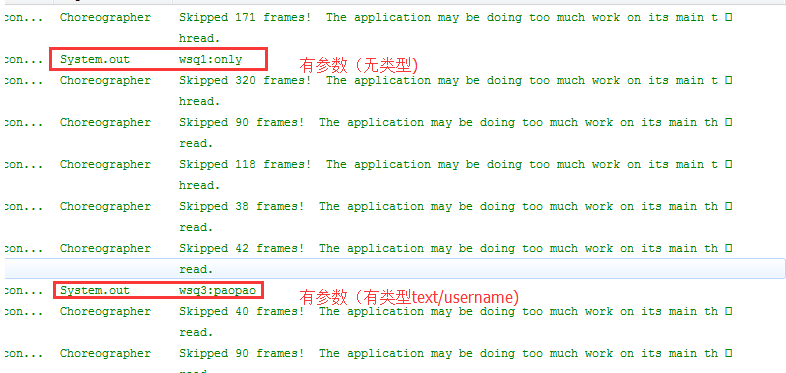
三、对上述两种传参的响应:
在SecondActivity.java中接收意图intent,获取到启动这个Activity的意图:MainActivity中的Intent
   //,只针对5,6按钮,不针对第二个按钮因为无数据传过来,如果点击发生错误

            //获取到启动这个Activity的意图:MainActivity中的Intent

            Intent intent  = getIntent();

            Uri uri =intent.getData();

            //打印显示按钮6传过来的参数

            System.out.println(uri.toString());
需要注意的是,第二个按钮(最简单情况无参传递)是无参的,所以该响应不能接收到数据,所以该响应只针对上述两种有参数传递的意图
四、效果:
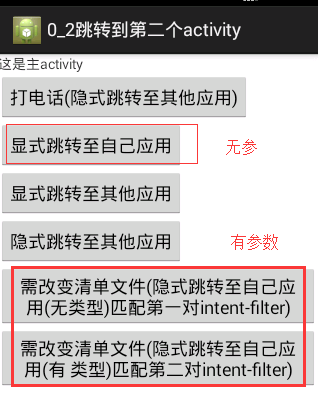
有参数的响应:
五、代码:
package com.wsq.jumpSecondactivity;

import android.app.Activity;

import android.content.Intent;

import android.net.Uri;

import android.os.Bundle;

import android.view.Menu;

import android.view.MenuItem;

import android.view.View;

public class MainActivity extends Activity {

    @Override

    protected void onCreate(Bundle savedInstanceState) {

        super.onCreate(savedInstanceState);

        setContentView(R.layout.activity_main);

    }

   /*

    * 跳转到第二个activity:打电话

    * 隐式跳转

    * 使用setAction和setData

    */

   public void onClick1(View v){

       Intent intent = new Intent();

       //

       intent.setAction(Intent.ACTION_CALL);

       intent.setData(Uri.parse("tel:110")); //英文字符

       //跳转

       startActivity(intent);

   }

   /*

    * 跳转到自己的应用activity

    * 在本应用中跳转:ActivitySecond.java

    * 显式跳转:直接指定目标Activity的包名和类名

    */

   public void onClick2(View v){

       Intent intent = new Intent();

       //上下文对象:this

       //cls:直接指定目标Activity的类名:ActivitySecond

       intent.setClass(this, ActivitySecond.class);

       startActivity(intent);

   }

   /*

    * 显式跳转至拨号器

    */

   public void onClick3(View v){

       Intent intent = new Intent();

       //指定目标的Activity的包名和类名

       intent.setClassName("com.android.dialer", "com.android.dialer.DialtactsActivity");

       startActivity(intent);

   }

   /*

    * 隐式跳转至拨号器

    */

   public void onClick4(View v){

       Intent intent = new Intent();

       //隐式设置拨号器的动作

       intent.setAction(Intent.ACTION_DIAL);

       startActivity(intent);

   }

   /*

    * 隐式跳转至拨号器

    * 需要在清单文件添加东西

    */

   public void onClick5(View v){

       Intent intent = new Intent();

     //下面两/三条语句的形参必须和清单文件中保持一致

       //隐式设置拨号器的动作

       //name=dial/dial1 ,scheme=wsq:**/wsq1:**任意匹配即可

       intent.setAction("com.wsq.dial");

       intent.setData(Uri.parse("wsq1:only "));

     //系统会自动添加默认的category(可有可无)

       intent.addCategory(Intent.CATEGORY_DEFAULT);

       startActivity(intent);

   }

   /*

    * 有类型参数传递

    * 隐式跳转至SecondActivity

    * 需要在清单文件添加东西

    * name=dial3 ,scheme=wsq:**,mimeType="text/username"

    */

   public void onClick6(View v){

       Intent intent = new Intent();

       //下面两/三条语句的形参必须和清单文件中保持一致

       //隐式设置拨号器的动作

       intent.setAction("com.wsq.dial3");

     /*

      * 该两者不能共生,所以使用一个综合性的方法替代

      * intent.setData(Uri.parse("wsq:paopao"));

        intent.setType("text/username");

      */

       intent.setDataAndType(Uri.parse("wsq3:paopao"), "text/username");

       //系统会自动添加默认的category(可有可无)

       intent.addCategory(Intent.CATEGORY_DEFAULT);

       startActivity(intent);

   }

}
MainActivity.java
package com.wsq.jumpSecondactivity;

import android.app.Activity;

import android.content.Intent;

import android.net.Uri;

import android.os.Bundle;

public class ActivitySecond extends Activity {

     @Override

        protected void onCreate(Bundle savedInstanceState) {

            super.onCreate(savedInstanceState);

            setContentView(R.layout.activity_second);

            //,只针对5,6按钮,不针对第二个按钮因为无数据传过来,如果点击发生错误

            //获取到启动这个Activity的意图:MainActivity中的Intent

            Intent intent  = getIntent();

            Uri uri =intent.getData();

            //打印显示按钮6传过来的参数

            System.out.println(uri.toString());

        }

}
ActivitySecond.java
<?xml version="1.0" encoding="utf-8"?>

<manifest xmlns:android="http://schemas.android.com/apk/res/android"

    package="com.wsq.jumpSecondactivity"

    android:versionCode="1"

    android:versionName="1.0" >

    <uses-sdk

        android:minSdkVersion="14"

        android:targetSdkVersion="19" />

    <uses-permission android:name="android.permission.CALL_PHONE"/>

    <application

        android:allowBackup="true"

        android:icon="@drawable/ic_launcher"

        android:label="@string/app_name"

        android:theme="@style/AppTheme" >

        <!-- 主入口 -->

        <activity

            android:name=".MainActivity"

            android:label="@string/app_name" >

            <intent-filter>

                <action android:name="android.intent.action.MAIN" />

                <category android:name="android.intent.category.LAUNCHER" />

            </intent-filter>

        </activity>

        <!-- 第二个入口, -->

        <!--.ActivitySecond 等价于android.intent.action.ActivitySecond  -->

        <activity android:name=".ActivitySecond">

             <intent-filter >

                 <category android:name="android.intent.category.DEFAULT"></category>

             </intent-filter>

            <!-- 并列匹配第一种情况 (没有加类型) -->

             <intent-filter >

                 <action android:name="com.wsq.dial"/>

                 <action android:name="com.wsq.dial1"/>

                 <data android:scheme="wsq" />

                 <data android:scheme="wsq1" />

                 <category android:name="android.intent.category.DEFAULT"></category>

             </intent-filter>

             <!-- 并列匹配第二种情况 加类型 -->

             <intent-filter >

                 <action android:name="com.wsq.dial3"/>

                 <data android:scheme="wsq3" android:mimeType="text/username"/>

                 <category android:name="android.intent.category.DEFAULT"></category>

             </intent-filter>

        </activity>"

    </application>

</manifest>
清单文件.xml
<?xml version="1.0" encoding="utf-8"?>

<LinearLayout xmlns:android="http://schemas.android.com/apk/res/android"

    android:layout_width="match_parent"

    android:layout_height="match_parent"

    android:orientation="vertical" >

     <TextView

        android:layout_width="wrap_content"

        android:layout_height="wrap_content"

        android:text="这是主activity" />

     <Button

        android:layout_width="wrap_content"

        android:layout_height="wrap_content"

        android:text="打电话(隐式跳转至其他应用)"

        android:onClick="onClick1" />

     <Button

        android:layout_width="wrap_content"

        android:layout_height="wrap_content"

        android:text="显式跳转至自己应用"

        android:onClick="onClick2" />

     <Button

        android:layout_width="wrap_content"

        android:layout_height="wrap_content"

        android:text="显式跳转至其他应用"

        android:onClick="onClick3" />

      <Button

        android:layout_width="wrap_content"

        android:layout_height="wrap_content"

        android:text="隐式跳转至其他应用"

        android:onClick="onClick4" />

         <Button

        android:layout_width="wrap_content"

        android:layout_height="wrap_content"

        android:text="需改变清单文件(隐式跳转至自己应用(无类型)匹配第一对intent-filter)"

        android:onClick="onClick5" />

          <Button

        android:layout_width="wrap_content"

        android:layout_height="wrap_content"

        android:text="需改变清单文件(隐式跳转至自己应用(有 类型)匹配第二对intent-filter)"

        android:onClick="onClick6" />

</LinearLayout>
Main布局文件
<?xml version="1.0" encoding="utf-8"?>

<LinearLayout xmlns:android="http://schemas.android.com/apk/res/android"

    android:layout_width="match_parent"

    android:layout_height="match_parent"

    android:orientation="vertical" >

    <TextView

        android:id="@+id/editText1"

        android:layout_width="match_parent"

        android:layout_height="wrap_content"

        android:hint="第二个activity"

        android:ems="10" >

    </TextView>

</LinearLayout>
Second布局文件
android之intent显式,显式学习的更多相关文章
- Android开发:显式/隐式Intent
显式跳转 是在已知包名和类名的情况下常用的跳转方法: Intent mIntent = new Intent(); mIntent.setClassName("com.android.set ...
- Android沉浸式(侵入式)标题栏(状态栏)Status(一)
Android沉浸式(侵入式)标题栏(状态栏)Status(一) 现在越来越多的APP设计采用这种称之为沉浸式状态栏(Status)的设计,这种沉浸式状态栏又称之"侵入式"状 ...
- Android沉浸式(侵入式)标题栏(状态栏)Status(三)
Android沉浸式(侵入式)标题栏(状态栏)Status(三) 从附录文章1,2可以看到,依靠Android系统提供的标准方案,状态栏即便在透明状态下,仍然有些半透明而不是全透明.本文是And ...
- Android沉浸式(侵入式)标题栏(状态栏)Status(二)
Android沉浸式(侵入式)标题栏(状态栏)Status(二) 附录1以xml写style实现了Android沉浸式(侵入式)状态栏(标题栏),同样以上层Java代码实现.在附录文章1的基础上 ...
- .NetCore微服务Surging新手傻瓜式 入门教程 学习日志---先让程序跑起来(一)
原文:.NetCore微服务Surging新手傻瓜式 入门教程 学习日志---先让程序跑起来(一) 写下此文章只为了记录Surging微服务学习过程,并且分享给广大想学习surging的基友,方便广大 ...
- .NetCore微服务Surging新手傻瓜式 入门教程 学习日志---结构简介(二)
原文:.NetCore微服务Surging新手傻瓜式 入门教程 学习日志---结构简介(二) 先上项目解决方案图: 以上可以看出项目结构可以划分为4大块,1是surging的核心底层,2,3,4都可以 ...
- Android 自动取色并设置沉浸式状态栏
Android 自动取色并设置沉浸式状态栏 - Stars-One的杂货小窝 最近在进行产品的优化,也是研究了下沉浸式状态栏的实现方法及自动取色,记录一下笔记 设置沉浸式状态栏 1.添加依赖 这里,是 ...
- 一起学Android之Intent
本文简述在Android开发中Intent的常见应用,仅供学习分享使用. 什么是Intent? Intent负责对应用中一次操作的动作.动作涉及数据.附加数据进行描述,Android则根据此Inten ...
- Android 之 Intent(意图)
Intent是 Android中重要的桥梁之一,它分为显式意图和隐式意图.接下来分别针对这两种意图进行讲解. 显式意图:通过指定一组数据或动作,激活应用内部的 activity:(相比隐式意图,此做法 ...
随机推荐
- spring中依赖注入与aop讲解
一.依赖注入 这个属于IOC依赖注入,也叫控制反转,IOC是说类的实例由容器产生,而不是我们用new的方式创建实例,控制端发生了改变所以叫控制反转. 1 2 3 4 5 6 7 8 9 10 11 1 ...
- Keil C 里面Lib库文件的生成与调用
源:Keil C 里面Lib库文件的生成与调用
- iOS开发实现Label中多颜色多字体
UILabel *label = [[UILabel alloc] initWithFrame:CGRectMake(8, 100, 300, 30)]; label.textColor = wor ...
- Freemarker入门案例
Freemarker入门案例 首先需要到freemarker官方下载freemarker的jar包,导入到项目中,如:freemarker-2.3.19.jar 1.先建个freemarker的工具类 ...
- python with用法
python中with可以明显改进代码友好度,比如: with open('a.txt') as f: print f.readlines() 为了我们自己的类也可以使用with, 只要给这个类增加两 ...
- iOS 调试 之 打印
参考:http://m.blog.csdn.net/blog/HookyStudent/42964317 参考:http://m.blog.csdn.net/blog/laencho/25190639 ...
- 基于jquery 封装的 select 小控件,解决 IE6 7 8里 select 边框 高度 无法遮挡等问题
一.基本原理 select控件在浏览器中是个永远的痛,不同的版本解析出来的可谓五花八门.主要有以下问题: 1,IE6中无法设置高度,Z INDEX永远在最上,无法被其它层遮挡 2,IE7中可以设置高度 ...
- Zepto.js-Ajax 请求
Ajax 请求 执行Ajax请求.它可以是本地资源,或者通过支持HTTP access control的浏览器 或者通过 JSONP来实现跨域. 引入Ajax模块 <script src=&qu ...
- Java经典案例之-判断兔子的数量(斐波那契数列)
/** * 描述:有一对兔子,从出生后第3个月起每个月都生一对兔子,小兔子长到第四个月后每个月又生一对兔子, * 假如兔子都不死,问每个兔子总数为多少? * 分析:根据题目条件可以推断 * 兔子的规律 ...
- 记一次DG搭建过程中ORA-09925: Unable to createaudit trail file 错误
今天做Oracle DG 编写initorcl的时候,修改完以后,sqlplus就不能再登陆,一直报 ERROR: ORA-09925: Unable to createaudit trail fi ...