
关于iOS9中的App Transport Security相关说明及适配(转)
原文:http://my.oschina.net/vimfung/blog/494687
iOS9中新增App Transport Security(简称ATS)特性, 主要使到原来请求的时候用到的HTTP,都转向TLS1.2协议进行传输。这也意味着所有的HTTP协议都强制使用了HTTPS协议进行传输。原文如下:
|
App Transport Security App Transport Security (ATS) enforces best practices in the secure connections between an app and its back end. ATS prevents accidental disclosure, provides secure default behavior, and is easy to adopt; it is also on by default in iOS 9 and OS X v10.11. You should adopt ATS as soon as possible, regardless of whether you’re creating a new app or updating an existing one. If you’re developing a new app, you should use HTTPS exclusively. If you have an existing app, you should use HTTPS as much as you can right now, and create a plan for migrating the rest of your app as soon as possible. In addition, your communication through higher-level APIs needs to be encrypted using TLS version 1.2 with forward secrecy. If you try to make a connection that doesn't follow this requirement, an error is thrown. If your app needs to make a request to an insecure domain, you have to specify this domain in your app's |
如果我们在iOS9下直接进行HTTP请求是会收到如下错误提示:
App Transport Security has blocked a cleartext HTTP (http://) resource load since it is insecure. Temporary exceptions can be configured via your app's Info.plist file.
系统会告诉我们不能直接使用HTTP进行请求,需要在Info.plist新增一段用于控制ATS的配置:
|
1
2
3
4
5
|
<key>NSAppTransportSecurity</key><dict> <key>NSAllowsArbitraryLoads</key> <true/></dict> |
也即:

这段配置中的NSAppTransportSecurity是ATS配置的根节点,配置了节点表示告诉系统要走自定义的ATS设置。而NSAllowsAritraryLoads节点则是控制是否禁用ATS特性,设置YES就是禁用ATS功能。
直到前面的配置可以完美的适配iOS9了,但是如果你想遵循苹果给出的标准,让自己的数据更加安全,那么需要继续往下看。
其实ATS并不单单针对HTTP进行了限制,而是对HTTPS也有一定的要求,以百度的地址为例,如果在App中请求https://baidu.com的话,是会收到如下的错误信息:
NSURLSession/NSURLConnection HTTP load failed (kCFStreamErrorDomainSSL, -9802)
查阅了一下官方资料(https://developer.apple.com/library/prerelease/ios/technotes/App-Transport-Security-Technote/),发现HTTPS的请求需要满足下面的要求:
|
These are the App Transport Security requirements:
|
根据原文描述,首先必须要基于TLS 1.2版本协议。再来就是连接的加密方式要提供Forward Secrecy(正向保密?这个不清楚是什么,好奇的筒子找资料吧~),文档中罗列出支持的加密算法(如下表)。最后就是证书至少要使用一个SHA256的指纹与任一个2048位或者更高位的RSA密钥,或者是256位或者更高位的ECC密钥。如果不符合其中一项,请求将被中断并返回nil。
|
支持Forward Secrecy的加密方式
|
我们再来看刚才的百度的地址,用浏览器打开百度的地址,然后点击链接前面的锁图标,如图:
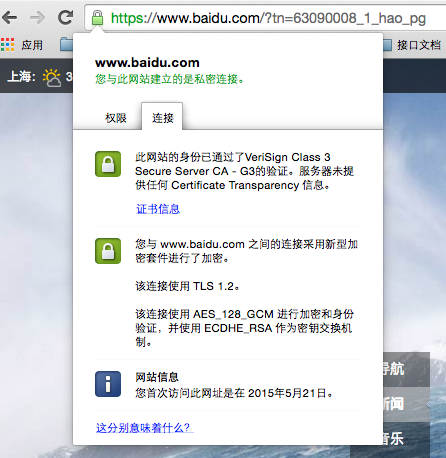
可以看到它使用了TLS 1.2版本协议,符合第一个约定。然后可以看到使用AES_128_GCM进行加密,并使用ECDHE_RSA作为密钥交换机制的,我们可以在Forward Secrecy的列表中找到对应两条记录:
TLS_ECDHE_RSA_WITH_AES_256_GCM_SHA384TLS_ECDHE_RSA_WITH_AES_128_GCM_SHA256
但是还不能确定百度是否提供Forward Secrecy,我们再点开证书信息,查看“签发者名称”和“公共密钥信息”两项,如图:
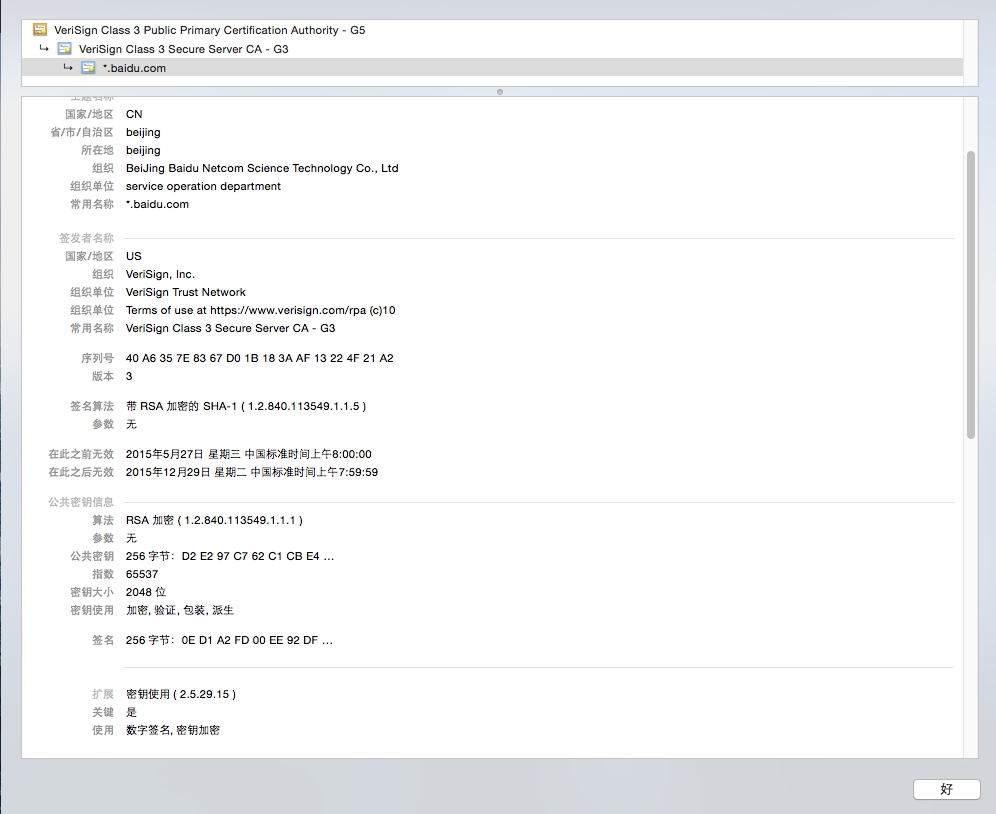
看到签名算法中写着“带RSA加密的SHA-1”。可以判定该加密算法不包含在上面两项中。因此百度是一个不符合ATS的要求,所以返回了错误。这时候,如果要解决这样的问题,同样需要对ATS进行配置。配置如下:
|
1
2
3
4
5
6
7
8
9
10
11
12
13
14
15
|
<key>NSAppTransportSecurity</key> <dict> <key>NSExceptionDomains</key> <dict> <key>baidu.com</key> <dict> <key>NSIncludesSubdomains</key> <true/> <key>NSExceptionRequiresForwardSecrecy</key> <false/> <key>NSExceptionAllowsInsecureHTTPLoads</key> <true/> </dict> </dict> </dict> |
其中NSIncludesSubdomains设置为YES表示百度的子级域名都使用相同设置。NSExceptionRequiresForwardSecrecy为NO由于百度不支持ForwardSecrecy,因此屏蔽掉改功能。最后NSExceptionAllowInsecureHTTPLoads设置为YES,则表示允许访问没有证书或者是自签名、过期、主机名不匹配的证书引发的错误的域名(这里检查过百度的证书貌似没有什么问题,但是还是需要设置此项才允许访问)。
关于iOS9中的App Transport Security相关说明及适配(转)的更多相关文章
- iOS9中的App Transport Security
问题:webView加载网页加载不出来 原因:苹果在iOS9 sdk中加入了App Transport Security限制(iOS9以前的iOS sdk默认关闭ATS),默认强制使用https,并且 ...
- 关于iOS9中配置App Transport Security(应用程序传输安全协议)
在 在info.plist中,进行上面的配置就行了,注意的是,那个网址,你需要访问什么网址,就填写什么网址就行了. NSTemporaryExceptionAllowsInsecureHTTPLoad ...
- 【iOS】App Transport Security
iOS9中新增App Transport Security(简称ATS)特性, 主要使到原来请求的时候用到的HTTP,都转向TLS1.2协议进行传输.这也意味着所有的HTTP协议都强制使用了HTTPS ...
- App Transport Security has blocked a cleartext HTTP (http://)
使用SDWebImage加载“http://”开头的图片报错,错误如下: App Transport Security has blocked a cleartext HTTP (http://) r ...
- Xcode 遇到 App Transport Security has blocked a cleartext HTTP 错误
今天用Xcode 创建新项目用到 URL 发送请求时,报下面的错: “App Transport Security has blocked a cleartext HTTP (http://) re ...
- xcode9.4 报错 error:The resource could not be loaded because the App Transport Security policy requires the use of a secure connection.
原因 http | https 协议 不能正常使用 找到的解决方案 但是在字段名上有了变化,不过复制进去 还是会自动选择对应的 解决办法 1. 在Info.plist中添加 App Transpor ...
- iOS9中请求出现App Transport Security has blocked a cleartext HTTP (http://)
错误描述: App Transport Security has blocked a cleartext HTTP (http://) resource load since it is insecu ...
- iOS9 beta 请求出现App Transport Security has blocked a cleartext HTTP (http://)
iOS9 beta 请求出现App Transport Security has blocked a cleartext HTTP (http://) http://www.bubuko.com/in ...
- 关于App Transport Security的更新,中英文对照 --Xcode 7 --iOS9
章节都为本人定义,无抄袭,其中英文部分内容为官方文档摘抄以及自己总结,翻译的不好,敬请指正 App Transport Security(暂且翻译为app传输安全) What is ATS? App ...
随机推荐
- 安全运维之:Linux系统账户和登录安全(转)
三.删减系统登录欢迎信息 系统的一些欢迎信息或版本信息,虽然能给系统管理者带来一定的方便,但是这些信息有时候可能被黑客利用,成为攻击服务器的帮凶,为了保证系统的安全,可以修改或删除某些系统文件,需要修 ...
- 跨域(cross-domain)访问 cookie (读取和设置)
Passport 一方面意味着用一个帐号可以在不同服务里登录,另一方面就是在一个服务里面登录后可以无障碍的漫游到其他服务里面去.坦白说,目前 sohu passport 在这一点实现的很烂(不过俺的工 ...
- rails跑通第一个demo
rails -h 查看帮助 Usage: rails new APP_PATH [options] Options: -r, [--ruby=PATH] # Path to the Ruby bina ...
- MVC与WebForm最大的区别
原文地址:http://www.cnblogs.com/birdshover/archive/2009/08/24/1552614.html 使用ASP.NET MVC框架,创建默认项目,第一直观感觉 ...
- ubuntu 命令
用mount命令加载iso到虚拟光驱 先在/media/目录下新建一个空目录作为加载iso的虚拟光驱名称: sudo mkdir /media/aaaa 再用mount挂载: sudo mount - ...
- Wireshark入门与进阶系列(一)
摘自http://blog.csdn.net/howeverpf/article/details/40687049 Wireshark入门与进阶系列(一) “君子生非异也,善假于物也”---荀子 本文 ...
- 解决未能启动服务“VMware Authorization Service”
计算机-管理-服务--服务列表找到VMware Authorization Service 并双击 打开服务.
- MSMQ是什么?
MSMQ(MicroSoft Message Queue,微软消息队列)是在多个不同的应用之间实现相互通信的一种异步传输模式,相互通信的应用可以分布于同一台机器上,也可以分布于相连的网络空间中的任一位 ...
- Oracle Semaphore Management in UNIX Administration
Oracle UNIX/Linux Tips by Burleson Consulting Semaphores and Oracle 11g 信号量和数据库 Semaphores are data ...
- hdu1867A + B for you again
Problem Description Generally speaking, there are a lot of problems about strings processing. Now yo ...