
RIA Service 的 SOAP EndPoint
原文 www.cyqdata.com/cnblogs/article-detail-39983-english
越来越多的朋友都在使用Silverlight开发应用程序,其中我们常用的还会有一个特殊的服务,就是RIA Service,具体来说,它是一个所谓的Domain Service. 关于这个服务的基本概念,如果有不清楚,请参考下面这个网址
http://www.silverlight.net/getstarted/riaservices/
今天这一篇是要谈谈一个问题,就是如何让RIA Service支持WPF此类客户端来访问?
你可能会疑惑,这难道是一个问题吗?是的,RIA Service默认只能在Silverlight里面访问到。我们还是通过一个例子来讲解一下吧
1. 定义一个业务实体类
namespace WebApplication1

{

    using System.ComponentModel.DataAnnotations;

    using System.Runtime.Serialization;

    using System.ServiceModel.DomainServices.Server;

    [DataContract]

    public class Employee

    {

        [Key][DataMember]

        public int ID { get { return this.GetHashCode(); } }

        [DataMember]

        public string FirstName { get; set; }

        [DataMember]

        public string LastName { get; set; }

    }

}
2. 创建一个Domain Service
namespace WebApplication1

{

    using System.Linq;

    using System.ServiceModel.DomainServices.Hosting;

    using System.ServiceModel.DomainServices.Server;

    // TODO: Create methods containing your application logic.

    [EnableClientAccess()]

    public class SampleDomainService : DomainService

    {

        [Query]

        public IQueryable<Employee> GetEmployees()

        {

            return new[]{

                new Employee{FirstName="ares",LastName="chen"},

                new Employee{FirstName="mike",LastName="fei"},

                new Employee{FirstName="tom",LastName="jerry"}

            }.AsQueryable();

        }

    }

}
【备注】需要注意的是,Domain Service是没有svc文件的,这与标准的WCF服务是完全不同的。
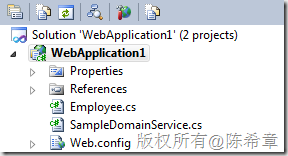
3. 在Silverlight应用程序中访问这个服务
作为演示,我们做了一个很简单的界面
<UserControl x:Class="SilverlightApplication1.MainPage"

    xmlns="http://schemas.microsoft.com/winfx/2006/xaml/presentation"

    xmlns:x="http://schemas.microsoft.com/winfx/2006/xaml"

    xmlns:d="http://schemas.microsoft.com/expression/blend/2008"

    xmlns:mc="http://schemas.openxmlformats.org/markup-compatibility/2006"

    mc:Ignorable="d"

    d:DesignHeight="300" d:DesignWidth="400" xmlns:sdk="http://schemas.microsoft.com/winfx/2006/xaml/presentation/sdk">

    <Grid x:Name="LayoutRoot" Background="White">

        <sdk:DataGrid AutoGenerateColumns="True" Margin="24,53,21,25" Name="dataGrid1" />

        <TextBlock Height="33" HorizontalAlignment="Left" Margin="25,14,0,0" Name="textBlock1" Text="Employee List" VerticalAlignment="Top" Width="219" FontSize="25"  />

    </Grid>

</UserControl>
然后通过如下的代码调用数据
using System.Windows;

using System.Windows.Controls;

namespace SilverlightApplication1

{

    using WebApplication1;

    public partial class MainPage : UserControl

    {

        public MainPage()

        {

            InitializeComponent();

            Loaded += new RoutedEventHandler(MainPage_Loaded);

        }

        void MainPage_Loaded(object sender, RoutedEventArgs e)

        {

            var ctx = new SampleDomainContext();

            var op = ctx.Load<Employee>(ctx.GetEmployeesQuery());

            dataGrid1.ItemsSource = op.Entities;

        }

    }

}
从上面的代码不难看出,在Silverlight调用RIA Service的时候,是相当容易的,这里不用指定路径,也无需有其他更多设置。
得到的页面效果如下
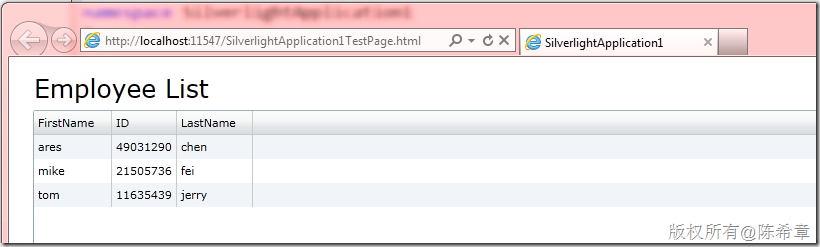
你可能会有一个疑问,那么到底是调用了什么服务呢?
我们通过IE 9自带的开发工具,可以监控一下得到一个特殊的WCF地址
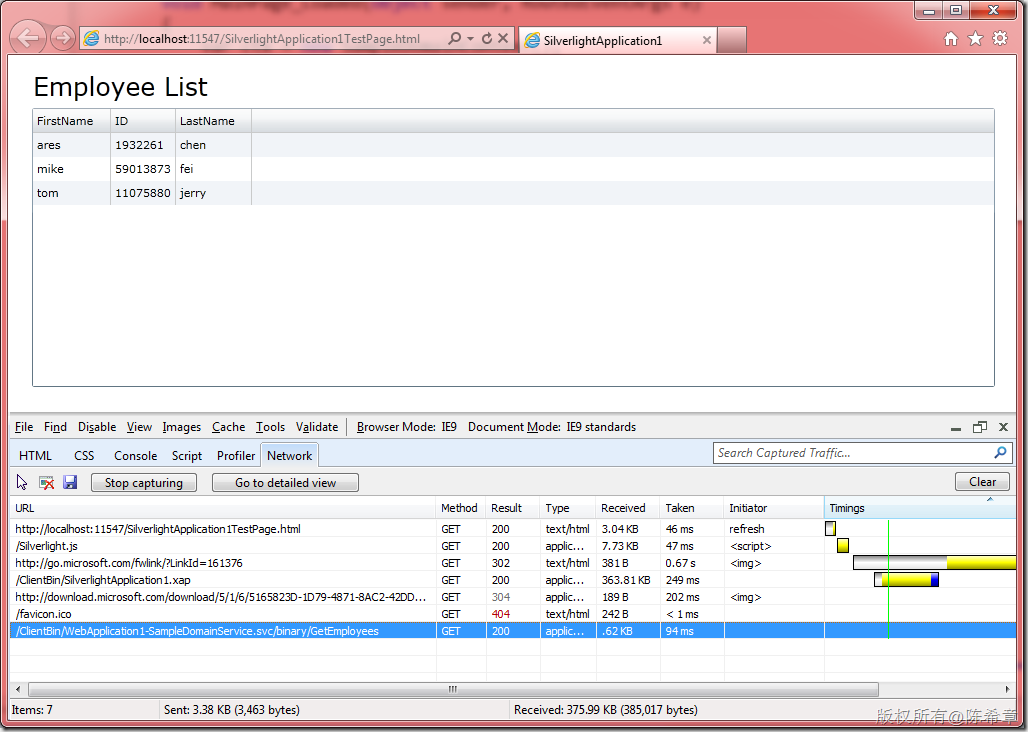
最后一行,很明显是一个WCF的调用地址,我们很好奇的是,它到底传递了什么东西过来呢?
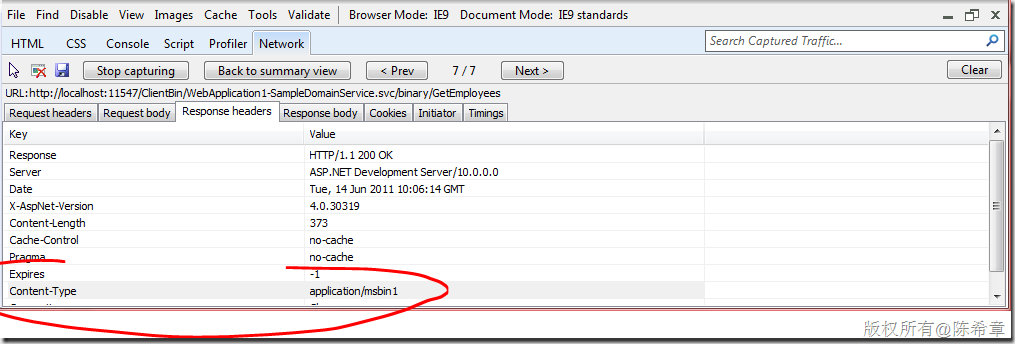
该服务返回的其实是一个二进制的包,具体内容如下
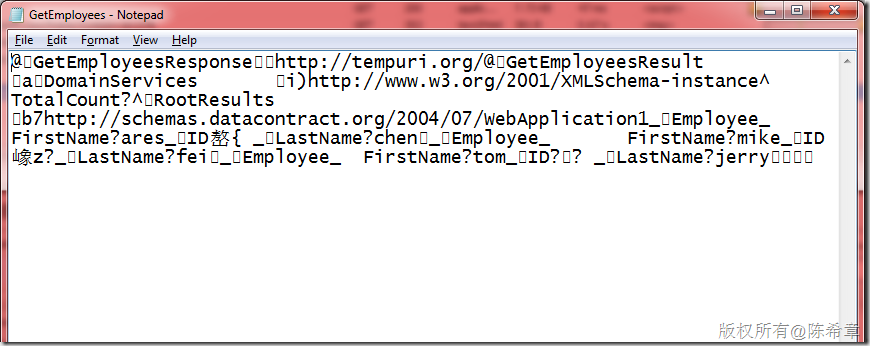
虽然不能完全看懂,但可以确定的是,这是二进制序列化的结果。
那好,我们回到刚才的话题,既然这是一个WCF服务,而且也确实有一个隐含的svc地址(注意,我说的是隐含,因为物理上并不存在该文件),那么是否可以通过该地址,发起普通的服务调用呢?
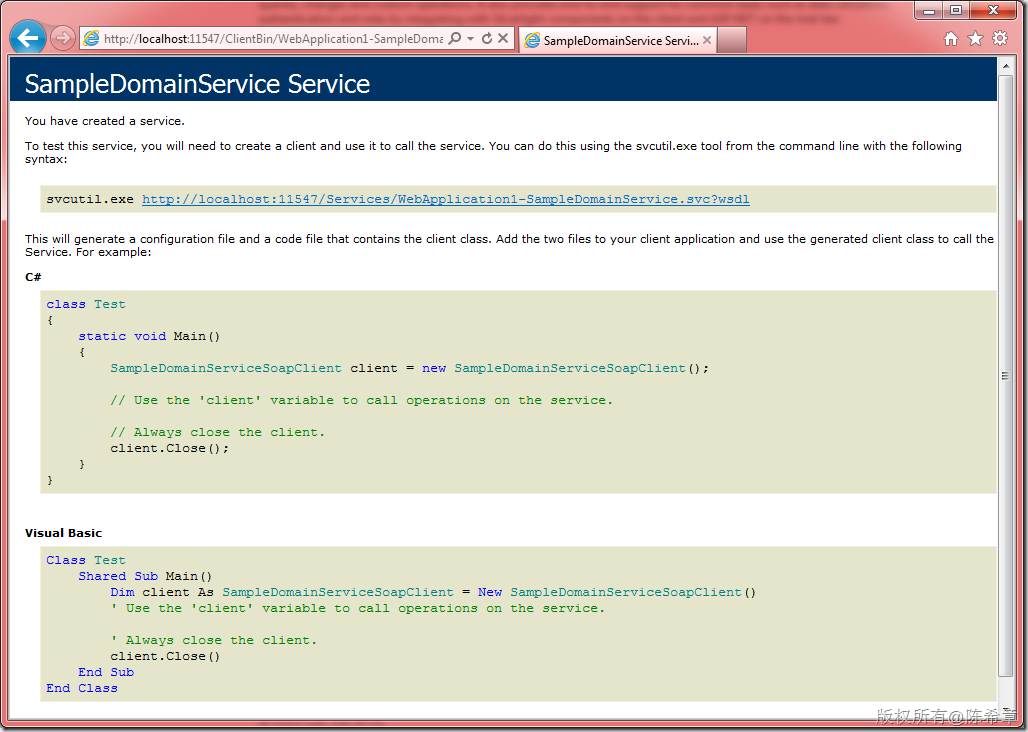
我们尝试将http://localhost:11547/ClientBin/WebApplication1-SampleDomainService.svc 这个地址输入到浏览器地址栏
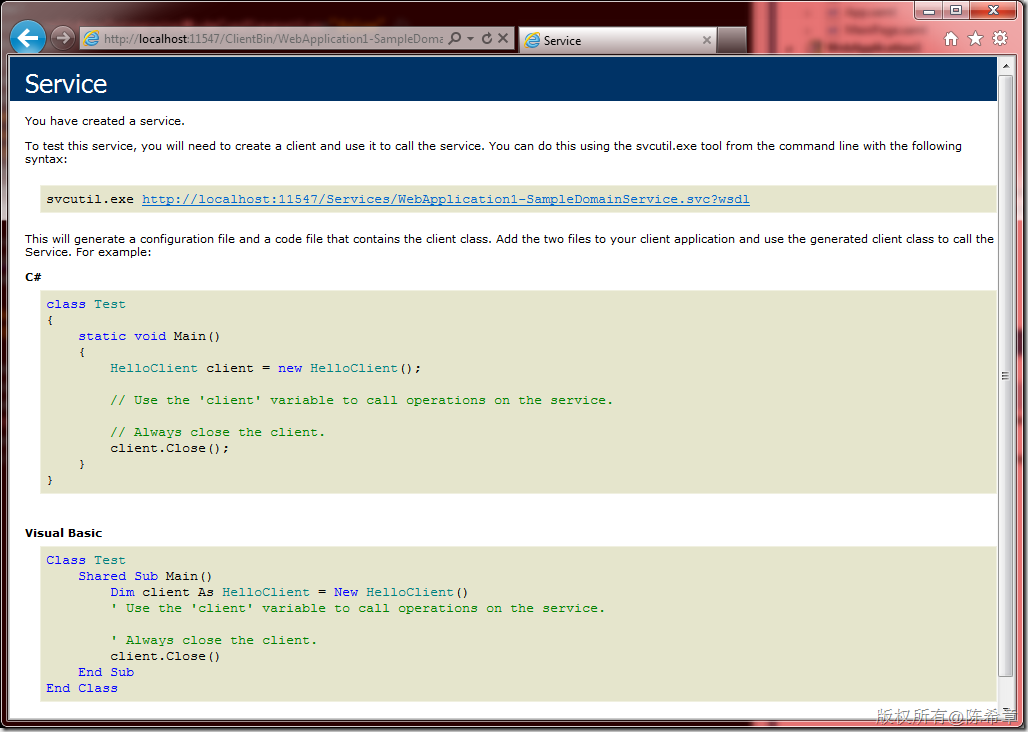
令人欣喜的是,我们看到了熟悉的WCF WSDL的界面。
那么,这是否意味着,我们可以在除了Silverlight之外的其他应用程序中调用该服务呢?
4. 创建WPF应用程序,添加服务引用
很不幸的是,我们在WPF中尝试添加服务引用时,却会遇到下面的错误
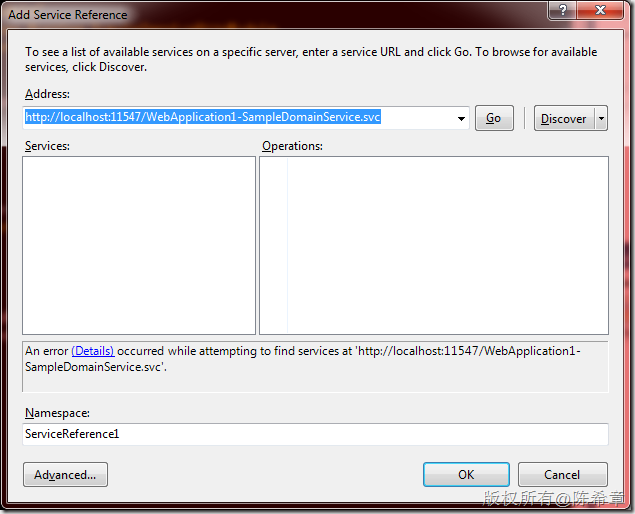
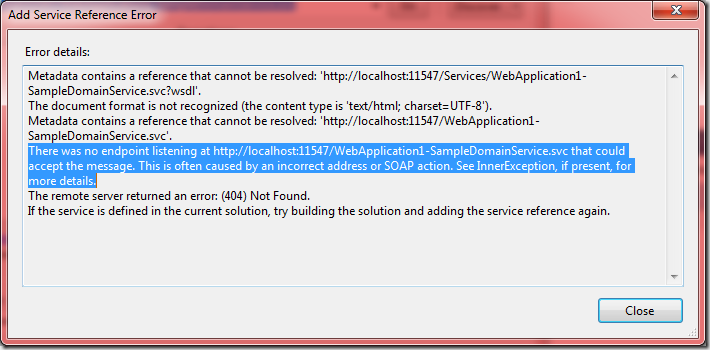
详细的错误如下,意思是说,没有找到有关的endpoint.
5. 安装RIA Service Toolkit以便添加SOAP EndPoint支持
为了解决如上的问题,微软在4月份发布了一个Toolkit,可以为RIA Service添加SOAP EndPoint支持
请先通过下面的地址下载
http://www.microsoft.com/download/en/details.aspx?id=2384
具体来说,这个工具包提供了很多增强的功能
What is available in the Toolkit?
The following functionality are available in this release of the Toolkit:-
1. LinqToSql DomainService
2. Soap endpoint - This enables you to expose a soap endpoint for your DomainService
3. JSON endpoint - This enables you to expose a JSON endpoint for your DomainService
4. ASP.NET DomainDataSource - This control will enable you to create an ASP.net application that can talk to your DomainService
5.
WCF client proxy auto generation/updating for WCF Core Service – This
enables you to get up-to-date WCF proxy and configuration each time you
build your solution, when you add Silverlight-enable WCF service in your
Silverlight application.
6. Domain Service support for Windows Azure
Table Storage. When hosting WCF RIA Services in Windows Azure, you can
now easily leverage Windows Azure Table Storage as your data backend.
(Requires Windows Azure SDK 1.3)
7. T4 template based client code
generation. The feature leverages the code generation extensibility
point added to the product and provides a well factored and granular
mechanism to customize client code generation logic using T4 templates.
8. CollectionView to enable MVVM Patterns
9. An early preview of the jQuery client for WCF RIA Services (RIA/JS)
安装好之后,我们会得到一些Assembly,在如下的目录
C:\Program Files (x86)\Microsoft SDKs\RIA Services\v1.0\Toolkit\Libraries\Server
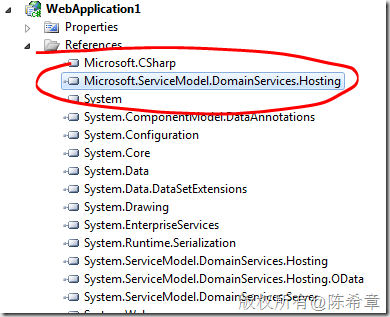
本例中,我们将使用其中一个Microsoft.ServiceModel.DomainServices.Hosting.dll 来提供SOAP EndPoint支持,所以我们要将其添加到Web项目的引用列表中来
6. 修改Web.config,添加SOAP EndPoint
熟悉WCF的朋友都知道,WCF是基于配置的,无处不在的配置使得服务很灵活并且强大。本例中,我们也只需要修改配置文件,就可以完成添加SOAP EndPoint的工作。下面的粗体部分是我们添加的
    <system.serviceModel>

        <domainServices>

            <endpoints>

                <add name="OData" type="System.ServiceModel.DomainServices.Hosting.ODataEndpointFactory, System.ServiceModel.DomainServices.Hosting.OData, Version=4.0.0.0, Culture=neutral, PublicKeyToken=31bf3856ad364e35" />

              <add name="Soap" type="Microsoft.ServiceModel.DomainServices.Hosting.SoapXmlEndpointFactory,

                       Microsoft.ServiceModel.DomainServices.Hosting, Version=4.0.0.0, Culture=neutral,

                       PublicKeyToken=31bf3856ad364e35" />

            </endpoints>

        </domainServices>

        <serviceHostingEnvironment aspNetCompatibilityEnabled="true"

            multipleSiteBindingsEnabled="true" />

    </system.serviceModel>
保存配置文件,我们再去浏览器中访问该服务。你有没有发现有什么不同呢?如果有,请告诉我吧
7. 在WPF中完成服务引用,并且使用它发起调用
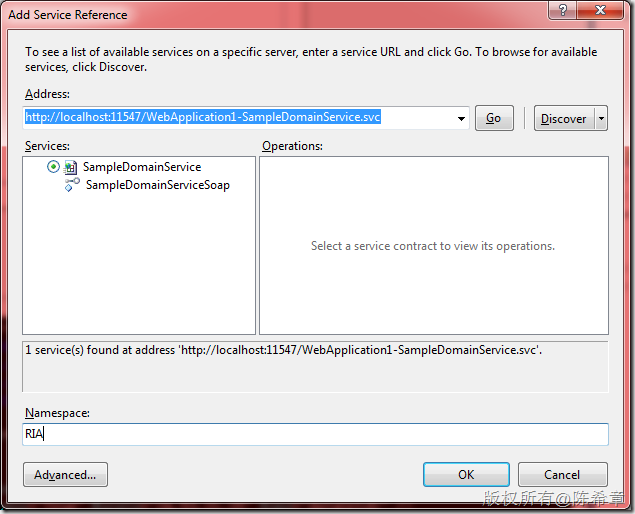
是的,你没有看错,我们找到了这个服务。
好吧,既然能够添加引用,接下来的事情你应该会做了吧?当然,不是很难,你懂的
MainWindow.xaml
<Window x:Class="WpfApplication1.MainWindow"

        xmlns="http://schemas.microsoft.com/winfx/2006/xaml/presentation"

        xmlns:x="http://schemas.microsoft.com/winfx/2006/xaml"

        Title="MainWindow" Height="350" Width="525">

    <Grid>

        <DataGrid AutoGenerateColumns="True" Margin="12,62,12,12" Name="dataGrid1" />

        <TextBlock Height="33" HorizontalAlignment="Left" Margin="12,23,0,0" Name="textBlock1" Text="Employee List" FontSize="25" VerticalAlignment="Top" Width="224" />

    </Grid>

</Window>
MainWindow.xaml.cs
using System.Windows;

namespace WpfApplication1

{

    /// <summary>

    /// Interaction logic for MainWindow.xaml

    /// </summary>

    public partial class MainWindow : Window

    {

        public MainWindow()

        {

            InitializeComponent();

            Loaded += new RoutedEventHandler(MainWindow_Loaded);

        }

        void MainWindow_Loaded(object sender, RoutedEventArgs e)

        {

            var proxy = new RIA.SampleDomainServiceSoapClient();

            dataGrid1.ItemsSource = proxy.GetEmployees().RootResults;

        }

    }

}
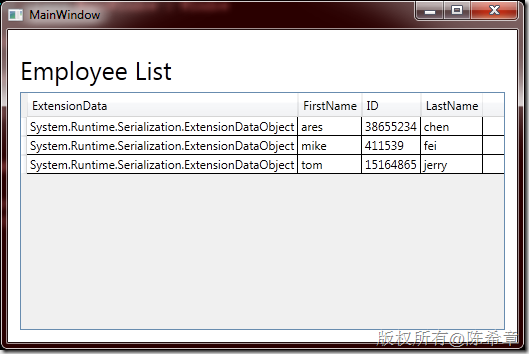
BTW:我觉得WPF的界面(例如这个DataGrid)看起来没有Silverlight那么好看,不是吗? 当然,这个话题还是等我们以后有机会再来谈谈吧
总结
RIA Service默认只能被Silverlight访问,它确实极其方便。如果希望它能被其他客户代码访问到,则可以通过安装RIA Service Toolkit,为其添加SOAP Endpoint来实现。
RIA Service 的 SOAP EndPoint的更多相关文章
- 调用Ria Service中方法的各种方式
前端界面后台: using System; using System.Collections.Generic; using System.Linq; using System.Net; using S ...
- Web service standards: SOAP, REST, OData, and more
Web service standards: SOAP, REST, OData, and more So far, we've covered the components of a web ser ...
- 使用Fiddler解析WCF RIA Service传输的数据
原文 http://www.cnblogs.com/wintersun/archive/2011/01/05/1926386.html 使用Fiddler 2 解析WCF RIA Service传输的 ...
- 使用TcpTrace小工具截获Web Service的SOAP报文
Web Service客户端对服务端进行调用时,请求和响应都使用SOAP报文进行通讯.在开发和测试时,常常查看SOAP报文的内容,以便进行分析和调试.TcpTrace是一款比较小巧的工具,可以让我们截 ...
- WCF RIA SERVICE相关技术
WCF RIA SERVICE实体属性拷贝 private void DoSubmit() { ((IEditableObject)this.RepairContract).EndEdit(); va ...
- 建立自己的Web service(SOAP篇)
1.简介 这篇文章主要介绍采用SOAP来建立以及访问Web service接口. Web service是一个平台独立的,低耦合的,自包含的.基于可编程的web的应用程序,可使用开放的XML(标准通用 ...
- ASP.NET Web Service 标准SOAP开发案例代码(自定义验证安全头SOAPHeader)
using System.Xml;using System.Xml.Serialization;using System.Web.Services.Protocols;using System.Con ...
- Web Service之Soap请求响应内容中文编码解密
java模拟Soap请求测试Web Service接口,发现Web Service响应内容中的中文竟然是编码格式.比如: 中文:退保成功 Soap中文编码:退保成功 我仔细分析后发现,退编码实际上 ...
- 几种远程调用接口协议简单比较和web service(SOAP)与HTTP接口的区别:
什么是web service? 答:soap请求是HTTP POST的一个专用版本,遵循一种特殊的xml消息格式Content-type设置为: text/xml任何数据都可以xml化. ...
随机推荐
- 为何遍历Ldr会得到空项?
转自:http://www.0xaa55.com/thread-1385-1-1.html 之前做过ldr遍历的操作,发现第一项竟然是空,也就是大部分元素都是0,下面来揭示一下原理: 经过研究,其实L ...
- php7 install memcached extension
#download source code package from git $ git clone https://github.com/php-memcached-dev/php-memcache ...
- python dict traversal
rs=dict() rs['item1'] = 'item1' rs['item2'] = 'item2' for k,d in rs.items(): print k,d for k in rs.k ...
- C#时间日期操作
一.C# 日期格式 DateTime dt = DateTime.Now; dt.ToString();//2005-11-5 13:21:25 dt.ToFileTime().ToString() ...
- JavaWeb核心编程之(三.1)ServletHello
Servlet简介Java Servlet是和平台无关的服务器端组件,它运行在Servlet容器中. Servlet容器负责Servlet和客户的通信以及调用Servlet方法, 在这里Servlet ...
- ubuntu12.04常见错误总结
1.通过终端安装程序sudo apt-get install xxx时出错: E: Could not get lock /var/lib/dpkg/lock - open (11: Resource ...
- CSS Hack代码与浏览兼容总结
关于CSS Hack的东西能少尽量少吧.发现这篇文章我写得太复杂了,所以重新精简了一下,把代码粘贴到jsfiddle上,方面修改代码和维护. 1, IE条件注释法,微软官方推荐的hack方式. 只在I ...
- Ksoap 使用简介
转:http://www.open-open.com/bbs/view/1320111271749?sort=newest WebService 是一种基于SOAP协议的远程调用标准.通过WebSer ...
- Probability theory
1.Probability mass functions (pmf) and Probability density functions (pdf) pmf 和 pdf 类似,但不同之处在于所适用的分 ...
- Scala中的apply实战详解
apply可以应用与Object和Class,单调用情景不一样. 通过Array(1,2,3,4,5) 可以调用到Array中的.appy方法.你可以看源码是如何实现apply的. 类中的appy比较 ...