
python 学习之爬虫练习
通过学习python,写两个简单的爬虫,没用线程,本地抓取速度还不错,有些瑕疵就是抓的图片有些显示不出来,代码做个笔记记录下:
# -*- coding:utf-8 -*-

import re

import urllib.request

import os

url = "http://www.58pic.com/yuanchuang/0/day-"

def getHtml(url):

    page = urllib.request.urlopen(url)

    html = page.read().decode('gbk')

    return html

def getImg(html,num):

    reg = r'src="(.*?)" '

    imgre = re.compile(reg)

    imglist = re.findall(imgre,html)

    x = 0

    os.mkdir(r"G:\collect/%d" % num)

    filePath = r"G:\collect/%d/" % num

    for imgurl in imglist:

        f=open(filePath+str(x)+".jpg",'wb')

        req=urllib.request.urlopen(imgurl)

        buf=req.read()

        f.write(buf)

        x+=1

for i in range(1,10):

    getUrl = url+"%d.html" % i

    print(getUrl)

    html = getHtml(getUrl)

    #print(html)

    print(getImg(html,i))
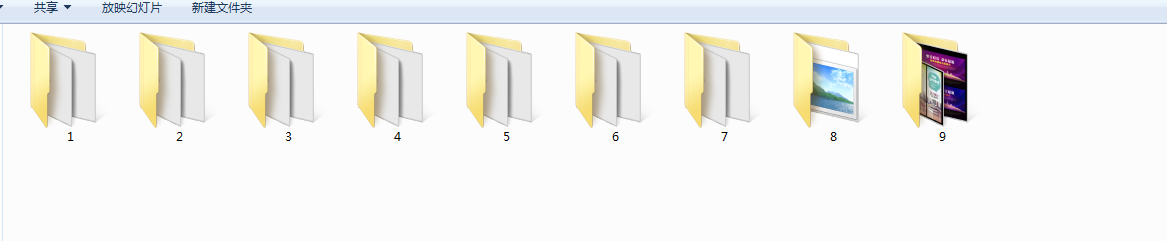
最终的结果如下图:

根据上面的初步代码,优化后加强版的爬虫代码,对于链接的状态异常的抛出异常后在继续执行程序。代码如下:
# -*- coding:utf-8 -*-

import re

import urllib.request

import os

url = "http://www.58pic.com/psd/"

def getHtml(url):

    page = urllib.request.urlopen(url)

    html = page.read().decode('gbk')

    return html

def getImg(html,num):

    reg = r'src="(.+?\.jpg)" class="show-area-pic" id="show-area-pic" alt="(.*?)"'

    imgre = re.compile(reg)

    imglist = re.findall(imgre,html)

    print(imglist)

    filePath = r"F:\Py/collect/%d/" % num

    isCreate = os.path.exists(filePath)

    if isCreate == False :

        os.mkdir(r"F:\Py/collect/%d" % num)

        for img in imglist:

            title = img[1]

            f=open(filePath+title+".jpg",'wb')

            req=urllib.request.urlopen(img[0])

            buf=req.read()

            f.write(buf)

for i in range(22797263,22797666):

    getUrl = url+"%d.html" % i

    #status = urllib.request.urlopen(getUrl).code

    try:

        html = getHtml(getUrl)

        #print(html)

        getImg(html,i)

    except urllib.request.URLError as e:

        print(e.code)

        print(e.reason)
python 学习之爬虫练习的更多相关文章
- Python学习网络爬虫--转
原文地址:https://github.com/lining0806/PythonSpiderNotes Python学习网络爬虫主要分3个大的版块:抓取,分析,存储 另外,比较常用的爬虫框架Scra ...
- python学习之爬虫(一) ——————爬取网易云歌词
接触python也有一段时间了,一提到python,可能大部分pythoner都会想到爬虫,没错,今天我们的话题就是爬虫!作为一个小学生,关于爬虫其实本人也只是略懂,怀着"Done is b ...
- 【Python学习】爬虫报错处理bs4.FeatureNotFound
[BUG回顾] 在学习Python爬虫时,运Pycharm中的文件出现了这样的报错: bs4.FeatureNotFound: Couldn’t find a tree builder with th ...
- python学习之爬虫初体验
作业来源: "https://edu.cnblogs.com/campus/gzcc/GZCC-16SE2/homework/2851" ** 1.简述爬虫原理 通用爬虫 即(搜索 ...
- python学习笔记——爬虫学习中的重要库urllib
1 urllib概述 1.1 urllib库中的模块类型 urllib是python内置的http请求库 其提供了如下功能: (1)error 异常处理模块 (2)parse url解析模块 (3)r ...
- python学习笔记——爬虫中提取网页中的信息
1 数据类型 网页中的数据类型可分为结构化数据.半结构化数据.非结构化数据三种 1.1 结构化数据 常见的是MySQL,表现为二维形式的数据 1.2 半结构化数据 是结构化数据的一种形式,并不符合关系 ...
- Python学习---网页爬虫[下载图片]
爬虫学习--下载图片 1.主要用到了urllib和re库 2.利用urllib.urlopen()函数获得页面源代码 3.利用正则匹配图片类型,当然正则越准确,下载的越多 4.利用urllib.url ...
- Python学习 之 爬虫
目标:下载贴吧或空间中所有图片 步骤:(1)获取页面代码 (2)获取图片URL,下载图片 代码如下: #!/usr/bin/python import re import urllib def get ...
- python学习笔记——爬虫的抓取策略
1 深度优先算法 2 广度/宽度优先策略 3 完全二叉树遍历结果 深度优先遍历的结果:[1, 3, 5, 7, 9, 4, 12, 11, 2, 6, 14, 13, 8, 10] 广度优先遍历的结果 ...
随机推荐
- 触控(Touch)
1 使用触控实现一个简易的画板 1.1 问题 触控(Touch)是一个UITouch类型的对象,当用户触摸了屏幕上的视图时自动被创建,通常使用触控实现绘图.涂鸦.手写等功能.本案例使用触控实现一个简易 ...
- 使用Unity在MVC上实现动态注入
一.前言 通过前一篇的文章介绍使用unity轻量级的依赖注入容器,本文就介绍在MVC上使用unity依赖注入控制器和控制器中的日志属性. 实现MVC中新提供 的两个接口:IDependencyReso ...
- Emacs下编译C++/C程序<转>
1.启动Emacs,在终端输入“emacs&”命令后回车(你也可以输入“emacs”命令,不过当你在使用Emacs的时候,当前终端 就不为你工作了:并且如果你熟练使用Emacs的话也可以输入“ ...
- python单元测试--深入理解unittest
单元测试的重要性就不多说了,可恶的是python中有太多的单元测试框架和工具,什么unittest, testtools, subunit, coverage, testrepository, nos ...
- (原)ippicvmt.lib(ippinit.obj) : error LNK2005: _ippSetCpuFeatures@8 已经在 ippcoremt.lib(ippinit.obj) 中定义
转载请注明出处: http://www.cnblogs.com/darkknightzh/p/5497234.html 参考网址: http://answers.opencv.org/question ...
- easyui的combobox将得到的数据设定为下拉框默认值和复选框设定默认值
通过easyui做了一个表,表里是从数据库拿到的数据. 现在双击某一行,通过点击行的id取到这一行的所有数据,现在需要修改这些得到的数据, 其中部分数据是<select>这个选择的, 问题 ...
- activiti笔记四 关于部署信息表act_re_deployment
一.简要描述 部署流程定义时需要被持久化保存下来的信息.二.表结构说明 字段名称 字段描述 数据类型 主键 为空 取值说明 ID_ ID_ nvarchar(64) √ 主键ID NAME_ 部署名称 ...
- python学习资料
http://woodpecker.org.cn/diveintopython/ http://www.cnblogs.com/txw1958/archive/2012/12/10/A_Byte_of ...
- Blog透视镜
Blog透视镜,提供了Blog代码示例,文章和教程,可以帮助你建置博客. 网站名称:Blog透视镜 网站地址:http://blog.openyu.org
- bzoj1664 [Usaco2006 Open]County Fair Events 参加节日庆祝
Description Farmer John has returned to the County Fair so he can attend the special events (concert ...