
itchat分析微信好友的个性签名
itchat分析微信好友的个性签名
itchat是一个开源的微信个人号python接口(公众号、企业号接口为itchatmp)。使用它可以非常优雅地操纵个人微信号。文档链接
七夕到了,博主也要自娱自乐呀,“不知其人视其友“,为了对自己有更全面的了解,博主决定分析一下微信好友的个性签名。
安装
pip install itchat
实验原理
- 使用itchat接口采集好友数据
- 对好友性别进行统计分析,使用echart可视化展示
- 对好友的个性签名文本汇总,然后使用结巴分词法分词,最后用词云显示
采集好友数据
def getFriendsData():

    itchat.login() #这里需要扫码登录

    friends = itchat.get_friends()

    return friends #返回一个JSON对象
性别分析
性别统计
#统计性别比例

def sexStatistic(friends):

    male = 0

    female = 0

    other = 0

    for friend in friends:

        sex = friend['Sex']

        if sex==1:

            male += 1

        elif sex==2:

            female += 1

        else:

            other += 1 #出现other的原因是有些用户会不填写性别

    total = len(friends)

    male,female,other = map(lambda x:x*1.0/total,[male,female,other])

    displaySex(male,female,other,friends[0]['NickName']) #friends[0]['NickName']是登录者的名字(就是博主)
显示性别比
为了使数据更加直观,这里使用百度的echart库,echart本是JavaScript的数据可视化库,这里使用它的python接口
pip install echarts-python
def displaySex(male,female,other,user):

    from echarts import Echart, Legend, Pie

    chart = Echart(u'%s的微信好友性别比例'%user, 'from WeChat')

    chart.use(Pie('WeChat',[

        {'value': male, 'name': u'男性 %.2f%%' % float(male*100)},

        {'value': female, 'name': u'女性 %.2f%%' % float(female*100)},

        {'value': other, 'name': u'其他 %.2f%%' % float(other*100)}],

        radius=["50%", "70%"]))

    chart.use(Legend(["male", "female", "other"]))

    chart.plot()
运行结果会在浏览器中显示()
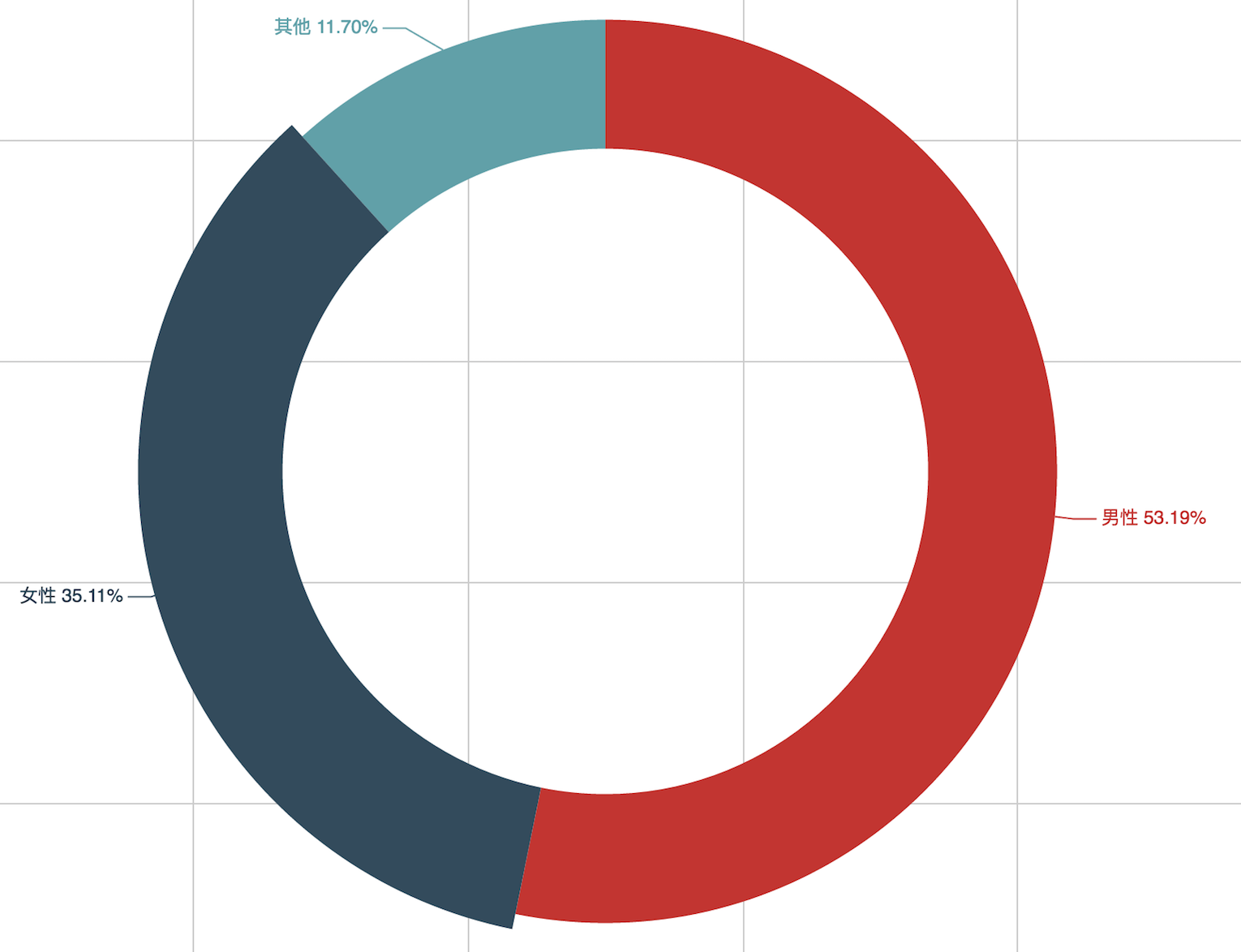
嗯,男女比还算协调。
个性签名分析
文本获取
def signatureStatistic(friends):

    import sys #设置编码

    reload(sys)

    sys.setdefaultencoding('utf-8')

    text = u''

    for friend in friends:

        signature = friend['Signature'].strip()

        if len(signature)>0 and not signature.startswith('<span'):

            text += friend['Signature']+' '

    displayWordCloud(text) #使用词云显示
词云分析
这里用到了结巴分词法。值得注意的是要过滤掉诸如”我“、”的“、“因为”、”就是“等无实际意义的stopword,网上可以找到中文的常见stopword列表
def displayWordCloud(text):

    import jieba #结巴中文分词

    import wordcloud #词云库

    from scipy.misc import imread #从scipy借用读取图片的模块

    import matplotlib.pyplot as plt #matplotlib纯粹用来辅助作图

    from collections import Counter

    #结巴分词

    jiebaText = list(jieba.cut(text,cut_all=True))

    #过滤stopword

    stopWords = open('./stopWord.txt').read().strip().split()

    jiebaText = [x for x in jiebaText if len(x)>0 and x not in stopWords]

    # 使用 counter 做词频统计,并转成字典

    wordDic = dict(Counter(jiebaText))

    bgimg = imread("./mask.jpg") # 返回numpy.ndarray类型的rgb数组

    myWordCloud = wordcloud.WordCloud(

        font_path="./font.otf", #特别注意,中文一定要有支持中文的字体,默认是没有的,要从外部引入

        background_color = "#242424", #背景色设置

        mask=bgimg, #词云的"模子",是一个数组

        width=1200,

        height=1200,

    )

    #生成词云图

    myWordCloud.generate_from_frequencies(wordDic)

    plt.imshow(myWordCloud)

    plt.axis("off")

    plt.show()
词云分析结果
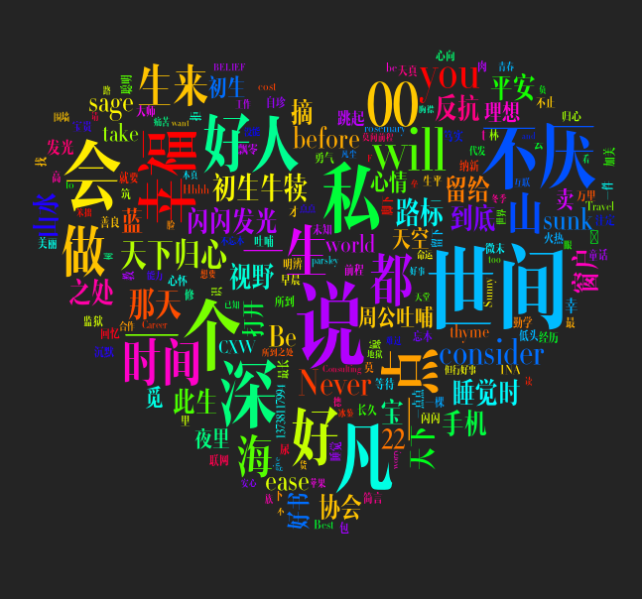
最后,祝我的好友们七夕快乐~

itchat分析微信好友的个性签名的更多相关文章
- [置顶]
Python 使用itchat 对微信好友数据进行简单分析
人生苦短,我用Python! Python 热度一直很高,我感觉这就是得益于拥有大量的包资源,极大的方便了开发人员的需求. 最近在一个微信公众号上看到一个调用微信 API 可以对微信好友进行简单数据分 ...
- 利用 Python 分析微信好友性别和位置
今天用到一个非常有意思的库——itchat,它已经完成了 wechat 的个人账号API接口,使爬取个人微信信息更加方便. 下载 爬取微信好友信息 这样就将你所有微信好友的信息都返回了,我们并不需要 ...
- 使用itchat获取微信好友的男女比例
# 使用itchat获取微信好友的男女比例 import itchat itchat.auto_login(hotReload=True) friends = itchat.get_friends(u ...
- Python使用itchat获取微信好友信息~
最近发现了一个好玩的包itchat,通过调用微信网页版的接口实现收发消息,获取好友信息等一些功能,各位可以移步itchat项目介绍查看详细信息. 目标: 获取好友列表 统计性别及城市分布 根据好友签名 ...
- Python分析微信好友性别比例和省份城市分布比例
如需转发请注明:小婷儿的博客:https://www.cnblogs.com/xxtalhr/p/10642241.html 一.安装模块 pip install itchat pip install ...
- 10分钟教你用Python玩转微信之抓取好友个性签名制作词云
01 前言+展示 各位小伙伴我又来啦.今天带大家玩点好玩的东西,用Python抓取我们的微信好友个性签名,然后制作词云.怎样,有趣吧~好了,下面开始干活.我知道你们还是想先看看效果的. 后台登录: 词 ...
- 【python】itchat登录微信获取好友签名并生成词云
在知乎上看到一篇关于如何使用itchat统计微信好友男女比例并使用plt生成柱状图以及获取微信好友签名并生成词云的文章https://zhuanlan.zhihu.com/p/36361397,感觉挺 ...
- python itchat 爬取微信好友信息
原文链接:https://mp.weixin.qq.com/s/4EXgR4GkriTnAzVxluJxmg 「itchat」一个开源的微信个人接口,今天我们就用itchat爬取微信好友信息,无图言虚 ...
- 使用 python 进行微信好友分析
使用 python 进行微信好友分析 1. 使用到的库 ① wxpy:初始化微信机器人 ② openpyxl:保存微信好友数据为Excel表格 ③ pyecharts:生成可视化的地图 ④ wordc ...
随机推荐
- IntelliJ Idea 配置Tomcat提示Port is not specified
修改Debug这里的端口就好了
- Ansible playbook 部署filebeat
- hosts: all tasks: - name: Copy Package copy: src=/usr/local/filebeat--linux-x86_64.tar.gz dest=/us ...
- Windows 7 64bit VS2015 配置CUDA
1. 更新驱动 下载系统显卡驱动,首先在设备管理器中查看自己的显卡型号,我的是GeForce GTX 960,然后在官网下载对应的驱动程序并安装. 官网网址:NVIDIA 驱动程序下载 2. 安装 ...
- C# 之 GUID格式化
Guid的带参数的ToString()方法来实现格式化,如下: //// 摘要: // 根据所提供的格式说明符,返回此 System.Guid 实例值的字符串表示形式. //// 参数: // ...
- mysql特殊使用
1.按照 job 和薪水倒序排序: select ename,job,sal from emp order by job desc,sal desc; 2.substr()截取子串 该函数接收3个参数 ...
- BZOJ3295 [Cqoi2011]动态逆序对 分治 树状数组
原文链接http://www.cnblogs.com/zhouzhendong/p/8678185.html 题目传送门 - BZOJ3295 题意 对于序列$A$,它的逆序对数定义为满足$i< ...
- C# 类的序列化和反序列化
序列化 (Serialization)将对象的状态信息转换为可以存储或传输的形式的过程.在序列化期间,对象将其当前状态写入到临时或持久性存储区.以后,可以通过从存储区中读取或反序列化对象的状态,重新创 ...
- tesorflow - create neural network+结果可视化+加速神经网络训练+Optimizer+TensorFlow
以下仅为了自己方便查看,绝大部分参考来源:莫烦Python,建议去看原博客 一.添加层 def add_layer() 定义 add_layer()函数 在 Tensorflow 里定义一个添加层的函 ...
- Noj - 在线强化训练1
1445 A 求n个整数的和 1564 B 判断一个数是否是完全数 1011 C 判素数(Prime number) 1566 D 输入一组整数,找出最小值 1200 E 判断三角 ...
- 20165319 《JAVA程序设计》第一周学习总结
教材内容学习总结 1.了解了基础的JAVA历史 2.学会了JDK的安装 3.学会了JAVA的基本应用 git的学习以及代码相关 1.学会了git在Windows系统上的安装以及linux系统的安装 2 ...